
使用SQL Database Migration Wizard把SQL Server 2008迁移到Windows Azure SQL Database
本篇体验使用SQL Database Migration Wizard(SQLAzureMW)将SQL Server 2008数据库迁移到 Azure SQL Database。当然,SQLAzureMV还可以把SQL Server 2005/2012/2014迁移到Azure SQL Database。
SQLAzureMV有几个版本:
1、SQLAzureMW v3x 适用于 .NET Framework 3.5 和 SQL Server 2008 R2 SP1
2、SQLAzureMW v4x 适用于 .NET Framework 4.5 和 SQL Server 2012
3、SQLAzureMW v5x 适用于 .NET Framework 4.5 和 SQL Server 2014
所有的版本下载在这里。
→登录到Windows Azure的"管理门户"
→点击左侧的"SQL数据库"
→点击页面左下方的"新建"
选择合适的"服务层"版本,选择默认的排序规则是"SQL_Latin1_General_CP1_CI_AS",选择服务器,点击右下角的"打勾"按钮。
如果还没有创建服务器,先创建服务器:
点击右下角的"打勾"按钮。
→点击左侧的"SQL数据库"
→点击"服务器"
→点击服务器名称
→点击"配置"
→点击"添加到允许的IP地址",把当前的ip地址添加到"白名单",点击"保存"。
→双击"SQLAzureMV.exe"
→在界面中勾选"数据库",点击"下一步"
→在"连接到数据库..."窗口中,勾选"SQL Server身份验证",填写用户名和密码,指定数据库名称,勾选"保存登录信息",点击"连接"按钮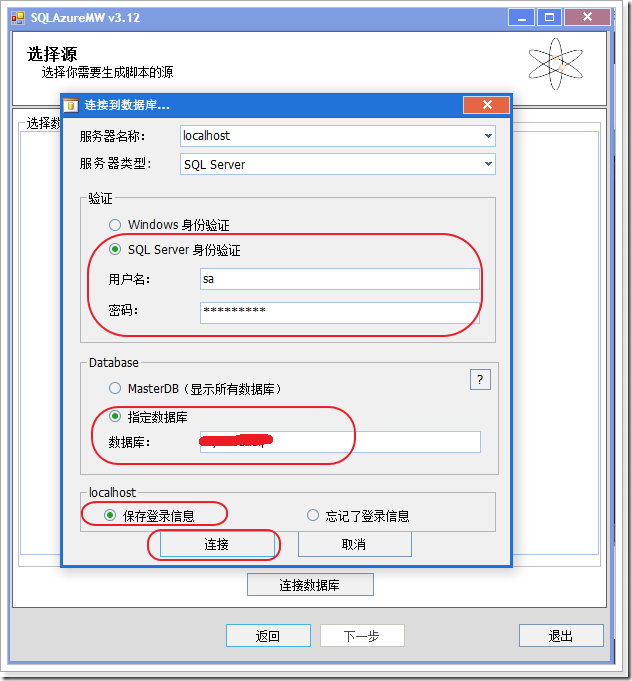
→在界面中点击"下一步"
→在界面中勾选"为所有对象生成脚本",点击"下一步"
→在"脚本向导汇总"界面中,点击"下一步"
跳出"生成脚本"提示框,点击"是"
→在"结果汇总"界面中,有"执行结果"和"SQL脚本"选项卡,点击"下一步"
注意:如果生成的SQL脚本中有错误、或者不兼容情况,会以红色字体显示,这时候可以把SQL脚本保存到硬盘,再到SQL Server Management Studio中进行修改,修改后,可以在SQLAzureMV直接打开修改好的SQL脚本文件。
→到"管理门户"中复制服务器名称,类似"xxxxxx.database.chinacloudapi.cn"的格式,填写如下:
注意:在用户名称栏,填写可是符合"服务器名称@xxxxxx",@后面的xxxxxx与"xxxxxx.database.chinacloudapi.cn"中的xxxxxx一致。上图中的用户名是不对的。
在跳出的"执行脚本"提示框中,点击"是"。
点击"连接"。
→在界面中点击"下一步"
迁移成功显示如下界面:
→点击"退出"。
→打开"SQL Server Management Studio",在界面中填写相关信息,点击"连接"
注意:
○ 服务器名类似"xxxxxx.database.chinacloudapi.cn"的格式,用户名类似"服务器名@xxxxxx"的格式。
○ 还可以通过https://xxxxxx.database.chinacloudapi.cn/, 来判断地址、用户名、密码是否正确。
○ 如果Sql Sever 2008还没有允许远程连接,参照这里。
→登录成功后,显示如下界面:

至此,使用SQL Database Migration Wizard(SQLAzureMW)将SQL Server 2008数据库迁移到 Azure SQL Database,成功!
使用SQL Database Migration Wizard把SQL Server 2008迁移到Windows Azure SQL Database的更多相关文章
- [Windows Azure] Guidelines for Connecting to Windows Azure SQL Database
Guidelines for Connecting to Windows Azure SQL Database 6 out of 12 rated this helpful - Rate this t ...
- [Windows Azure] Development Considerations in Windows Azure SQL Database
Development Considerations in Windows Azure SQL Database 3 out of 5 rated this helpful - Rate this t ...
- How to Use Lucene.NET with Windows Azure SQL Database
http://social.technet.microsoft.com/wiki/contents/articles/2367.how-to-use-lucene-net-with-windows-a ...
- [Windows Azure] Getting Started with Windows Azure SQL Database
In this tutorial you will learn the fundamentals of Windows Azure SQL Database administration using ...
- [Windows Azure] Windows Azure SQL Database library
Microsoft Windows Azure SQL Database extends SQL Server capabilities to the cloud. SQL Database offe ...
- [转]Azure 表存储和 Windows Azure SQL Database - 比较与对照
本文转自:https://msdn.microsoft.com/library/azure/jj553018 更新时间: 2014年10月 作者:Valery Mizonov 和 Seth Manhe ...
- 安装 SQL Server 2008 时提示需要删除 SQL Server 2005 Express 工具
已安装 SQL Server 2005,安装 SQL Server 2008 时提示需要删除 SQL Server 2005 Express 工具 错误提示:已安装 SQL Server 2005 E ...
- [Windows Azure] Getting Started with Windows Azure SQL Data Sync
Getting Started with Windows Azure SQL Data Sync In this tutorial, you learn the fundamentals of Win ...
- [Windows Azure] Create and use a reporting service in Windows Azure SQL Reporting
Create and use a reporting service in Windows Azure SQL Reporting In this tutorial you will learn ab ...
随机推荐
- [golang note] 环境搭建
LiteIDE(windows) • golang安装 ▶ 下载对应操作系统的版本并安装,下载地址:http://www.golangtc.com/download,譬如这里下载的是go1.6.win ...
- 转 Spring Boot之No session repository could be auto-configured, check your configuration问题解决
1. 环境介绍 JDK 1.8 Spring-Boot 1.5.1.RELEASE, STS IDE 2. 问题的提出 创建了一个非常简约的Spring Boot Web Application ...
- 再谈CentOS 7程序自启动
上次发现了/etc/init.d下已经没有启动脚本了,然后对于启动乱序自己在rc.local中重排. 其实想一想这些应用的自启动终归还是需要通过脚本来执行的. 一.脚本在哪里? /usr/lib/sy ...
- snmp信息的查询命令snmpwalk
在日常监控中,经常会用到 snmp 服务,而 snmpwalk 命令则是测试系统各种信息最有效的方法,现总结一些常用的方法如下: 获取所有信息snmpwalk -v 2c -c public 52.0 ...
- Redis持久化存储(RDB和AOF)
参考了: https://blog.csdn.net/canot/article/details/52886923 和 https://www.cnblogs.com/zhangchao-letv/ ...
- TinyHttpd代码解析
十一假期,闲来无事.看了几个C语言开源代码.http://www.cnblogs.com/TinyHttpd 这里本来想解析一下TinyHttpd的代码,但是在网上一搜,发现前辈们已经做的很好了.这里 ...
- django中的view测试和models测试样例
感觉用model_mommy比factory_boy要好些. 如果Models.py如下: from django.db import models from django.contrib.auth. ...
- Luogu 1903 数颜色 | 分块
Luogu 1903 数颜色 | 分块 莫队不会啊-- 这道题直接分块也能卡过! 这道题的做法很有趣:对于每个位置i,记录它的颜色a[i]上一次出现的位置,记为pre[i]. 这样在查询一个区间[l, ...
- Python3之turtle模块的使用
Python3之turtle模块的使用 直接扣代码就行: import turtle as t t.pensize(4) t.hideturtle() t.colormode(255) t.c ...
- Javascript中DOM详解与学习
DOM(文档对象模型)是针对html和XML文档的一个API(应用程序编程接口).DOM描绘了一个层次化的节点树,允许开发人员添加,移除和修改页面的某一部分.下面将从这几个层次来学习. 一.节点层次 ...