
PostgreSQL 之 yum安装 postgis 插件
版本说明:
CentOS7.5 + PostgreSQL 10.5
参考资源:
https://www.postgresql.org/download/linux/redhat/
http://download.osgeo.org/postgis/source/ postgis下载ftp网站
https://trac.osgeo.org/geos/ geos官方网站
https://blog.csdn.net/xzwspy/article/details/80082082?utm_source=blogxgwz3 源码安装postgis,注意各个版本的兼容性
https://www.cnblogs.com/ilifeilong/p/6979288.html 源码安装postgis,注意各个版本的兼容性
https://blog.csdn.net/learn_tech/article/details/80195566 源码安装gdal
http://2057.iteye.com/blog/1616620
安装postgresql
#Install the repository RPM

yum install https://download.postgresql.org/pub/repos/yum/10/redhat/rhel-7-x86_64/pgdg-centos10-10-2.noarch.rpm

#Install the client packages

yum install postgresql10

#Optionally install the server packages

yum install postgresql10-server

#Optionally initialize the database and enable automatic start

/usr/pgsql-10/bin/postgresql-10-setup initdb

systemctl enable postgresql-10

systemctl start postgresql-10
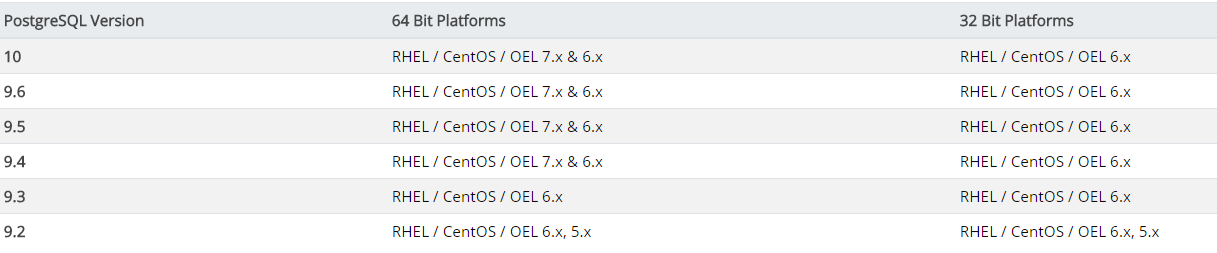
Platform support
安装PostGIS
1.先安装几个工具包
yum install wget net-tools epel-release -y
然后安装postgis
yum install postgis24_10 postgis24_10-client -y
安装拓展工具
yum install ogr_fdw10 -y

yum install pgrouting_10 -y
2.创建数据库postgis
CREATE DATABASE postgis OWNER postgres;
切换新创建的database
\c postgis
安装PostGis扩展
postgis=# CREATE EXTENSION postgis;

postgis=# CREATE EXTENSION postgis_topology;

postgis=# CREATE EXTENSION ogr_fdw;
然后可以验证是否安装成功
SELECT postgis_full_version();

另外,下面是官方网站点列的一份扩展:
-- Enable PostGIS (includes raster)

CREATE EXTENSION postgis;

-- Enable Topology

CREATE EXTENSION postgis_topology;

-- Enable PostGIS Advanced 3D

-- and other geoprocessing algorithms

-- sfcgal not available with all distributions

CREATE EXTENSION postgis_sfcgal;

-- fuzzy matching needed for Tiger

CREATE EXTENSION fuzzystrmatch;

-- rule based standardizer

CREATE EXTENSION address_standardizer;

-- example rule data set

CREATE EXTENSION address_standardizer_data_us;

-- Enable US Tiger Geocoder

CREATE EXTENSION postgis_tiger_geocoder;
PostgreSQL 之 yum安装 postgis 插件的更多相关文章
- PostgreSQL 12 YUM安装
目录 1.创建postgres用户 2.查看操作系统版本 3.配置yum源(对应CentOS 6) 4.安装客户端包 5.安装服务器端包 6.初始化数据库和设置自启动服务 7.postgres用户的b ...
- CentOS 6.9/7通过yum安装指定版本的PostgreSQL扩展PostGIS
一.安装PostGIS扩展插件(24_10) // 安装EPEL源 # rpm -ivh http://dl.fedoraproject.org/pub/epel/6/x86_64/epel-rele ...
- CentOS7使用yum安装PostgreSQL和PostGIS
更新yum源 CentOS7默认yum源的PostgreSQL版本过低,不适合在本版本上使用.在https://yum.postgresql.org/repopackages.php上找到适合Cent ...
- 与你相遇好幸运,CentOS 7 x86_64使用Yum安装PostgreSQL
访问http://yum.pgrpms.org/reporpms/repoview/letter_p.group.html,下载并安装和当前系统对应的rpm文件. wget https://downl ...
- postgresql数据库的yum安装方法
实验环境>>>>>>>>>>>>>>>>>>操作系统:CentOS release 6.3 ...
- CentOS7 yum安装、配置PostgreSQL 9.5
PostgreSQL 9.5安装 1.添加RPM yum install https://download.postgresql.org/pub/repos/yum/9.5/redhat/rhel-7 ...
- PostgreSQL数据库的安装与PostGIS的安装(转)
原文:http://lovewinner.iteye.com/blog/1490915 安装postgresql sudo apt-get install postgresql-9.1 postgre ...
- yum安装PostgreSQL 在6和7
一.安装PostgreSQL 复制代码// 安装EPEL源# wget http://dl.fedoraproject.org/pub/epel/6/x86_64/epel-release-6-8.n ...
- CentOS下yum安装PostgreSQL
关键词:centos install PostgreSQL Configure YUM repository vim /etc/yum.repos.d/CentOS-Base.repo [base] ...
随机推荐
- 比较器(TreeSet和优先队列,可以对里面的元素按照自己的意愿进行排序)
class MyComparator implements Comparator<Integer>{ public int compare(Integer o1, Integer o2) ...
- immutable-styles 新的css style 开发模式
immutable-styles 是一个开源的library,可以方便我们开发强壮以及可预测的web 界面,不用担心其他css 的影响 特性 编译时错误提示 防止css 覆盖 分离破坏点 严格继承 重 ...
- asyn proposals
Objective:
- GoJS v1.8.12 去掉水印
找到这段代码, 特征:1. 含有字符串:'7eba17a4ca3b1a8346','78a118b7':2. 也可能不为aw,根据具体情况来操作. a.aw=d[D.Wg("7eba17a4 ...
- c/c++ int数组初始化/重置为0
1.int数组其实初始化的时候默认就是全部为0 int a[1000];int a[1000] = {0}; 以上2种写法其实都可以 注意:int a[1000] = {0};这种方法如果想把整形数组 ...
- struts2+dojo实现datagrid动态刷新
实现一个普通的数据库查询功能,参考了这个帖子:http://stackoverflow.com/questions/5499453/how-to-refresh-datagrid 需要注意的是动态创建 ...
- 分页-jquery.page.js插件在使用时重复触发“上一页”和“下一页”操作
HTML代码 <!-- <div class="zxf_pagediv" id="Pagination" style="display:b ...
- Java 反射基础
1.反射概念: Java运行时,动态获得类的信息以及动态调用对象的方法的功能. 在运行时判断任意一个对象所属的类 在运行时构造任意一个类的对象 在运行时判断任意一个类所具有的成员变量和方法 在运行时调 ...
- Spring Schedule实现定时任务
applicationContext.xml 1. 增加配置 <!-- 开启定时任务 --> <task:annotation-driven /> <!-- 开启注解 - ...
- str.replace()和re.sub()/calendar.month_abbr/re.subn()/upper和lower和capitalize/贪婪匹配和费贪婪匹配/re.S和re.DOTALL 笔记
str.replace()可以进行简单的替换 >>> a = 'one.txt, index.py, index.php, index.html, index.js' >> ...