
尚硅谷springboot学习4-helloworld探究
1、POM文件
<parent>

    <groupId>org.springframework.boot</groupId>

    <artifactId>spring-boot-starter-parent</artifactId>

    <version>1.5.9.RELEASE</version>

</parent>
他的父项目是
<parent>

  <groupId>org.springframework.boot</groupId>

  <artifactId>spring-boot-dependencies</artifactId>

  <version>1.5.9.RELEASE</version>

  <relativePath>../../spring-boot-dependencies</relativePath>

</parent>
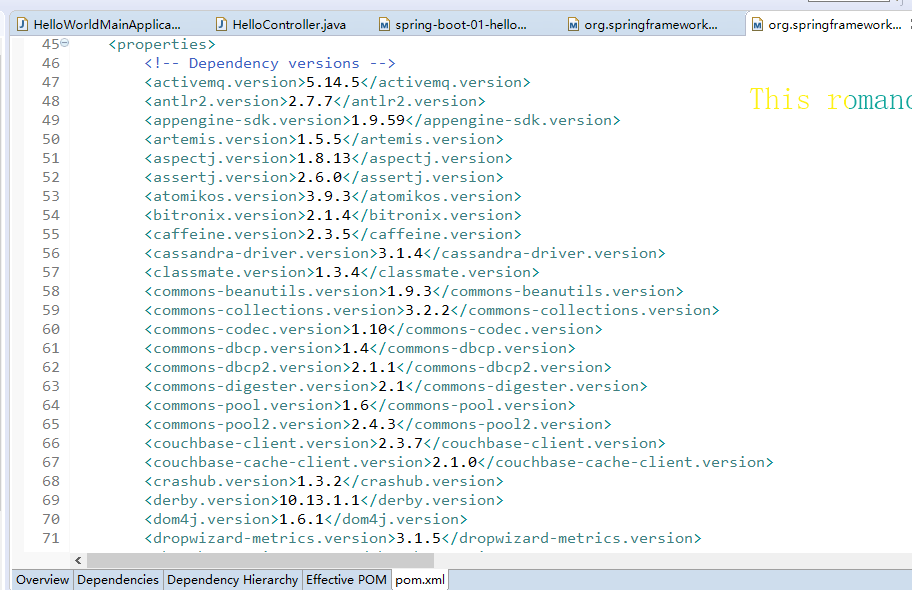
他来真正管理Spring Boot应用里面的所有依赖版本;是Spring Boot的版本仲裁中心;以后我们导入依赖默认是不需要写版本;(没有在dependencies里面管理的依赖自然需要声明版本号)
2、启动器
<dependency>

    <groupId>org.springframework.boot</groupId>

    <artifactId>spring-boot-starter-web</artifactId>

</dependency>
spring-boot-starter:spring-boot场景启动器;帮我们导入了web模块正常运行所依赖的组件;
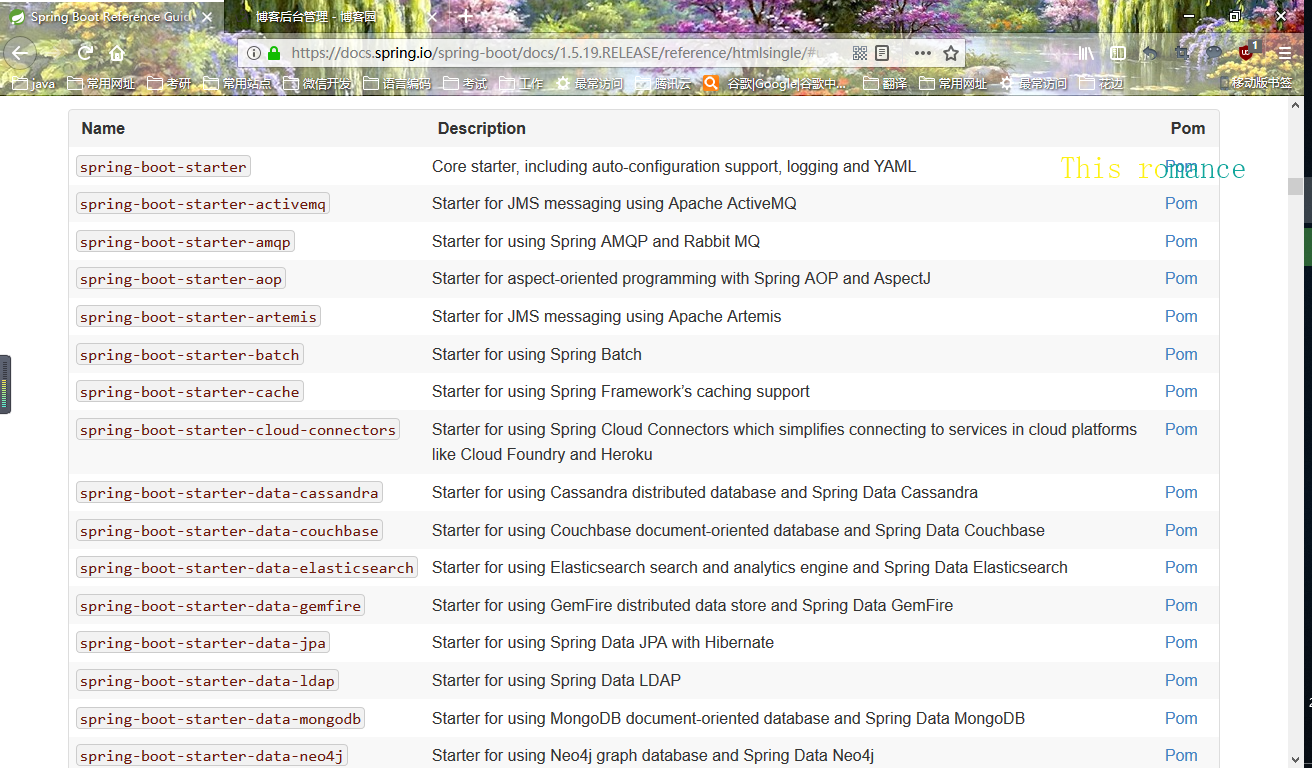
Spring Boot将所有的功能场景都抽取出来,做成一个个的starters(启动器),只需要在项目里面引入这些starter相关场景的所有依赖都会导入进来。要用什么功能就导入什么场景的启动器
<?xml version="1.0" encoding="UTF-8"?>

<project xmlns="http://maven.apache.org/POM/4.0.0" xmlns:xsi="http://www.w3.org/2001/XMLSchema-instance" xsi:schemaLocation="http://maven.apache.org/POM/4.0.0 http://maven.apache.org/xsd/maven-4.0.0.xsd">

    <modelVersion>4.0.0</modelVersion>

    <parent>

        <groupId>org.springframework.boot</groupId>

        <artifactId>spring-boot-starters</artifactId>

        <version>1.5.19.RELEASE</version>

    </parent>

    <artifactId>spring-boot-starter-web</artifactId>

    <name>Spring Boot Web Starter</name>

    <description>Starter for building web, including RESTful, applications using Spring

        MVC. Uses Tomcat as the default embedded container</description>

    <url>http://projects.spring.io/spring-boot/</url>

    <organization>

        <name>Pivotal Software, Inc.</name>

        <url>http://www.spring.io</url>

    </organization>

    <properties>

        <main.basedir>${basedir}/../..</main.basedir>

    </properties>

    <dependencies>

        <dependency>

            <groupId>org.springframework.boot</groupId>

            <artifactId>spring-boot-starter</artifactId>

        </dependency>

        <dependency>

            <groupId>org.springframework.boot</groupId>

            <artifactId>spring-boot-starter-tomcat</artifactId>

        </dependency>

        <dependency>

            <groupId>org.hibernate</groupId>

            <artifactId>hibernate-validator</artifactId>

        </dependency>

        <dependency>

            <groupId>com.fasterxml.jackson.core</groupId>

            <artifactId>jackson-databind</artifactId>

        </dependency>

        <dependency>

            <groupId>org.springframework</groupId>

            <artifactId>spring-web</artifactId>

        </dependency>

        <dependency>

            <groupId>org.springframework</groupId>

            <artifactId>spring-webmvc</artifactId>

        </dependency>

    </dependencies>

</project>
尚硅谷springboot学习4-helloworld探究的更多相关文章
- 尚硅谷springboot学习14-自动配置原理
配置文件能配置哪些属性 配置文件能配置的属性参照 自动配置的原理 1).SpringBoot启动的时候加载主配置类,开启了自动配置功能 @EnableAutoConfiguration 2).@Ena ...
- 尚硅谷springboot学习3-helloworld程序
1.环境准备 –jdk1.8:Spring Boot 推荐jdk1.7及以上:java version "1.8.0_112" –maven3.x:maven 3.3以上版本:Ap ...
- 尚硅谷springboot学习1-简介
以前看过springboot的相关知识,当时偷懒没有做笔记,现在忘得已经差不多了,现在趁着过年有时间,再学习一遍,并做下笔记以备忘. 特性 Spring Boot来简化Spring应用开发,约定大于配 ...
- 尚硅谷springboot学习35-启动原理
先列出几个重要的事件回调机制 配置在META-INF/spring.factories ApplicationContextInitializer SpringApplicationRunListen ...
- 尚硅谷springboot学习34-整合SpringData JPA
SpringData简介
- 尚硅谷springboot学习33-整合mybatis
引入mybatis依赖(还要引入mysql和jdbc依赖) <dependency> <groupId>org.mybatis.spring.boot</groupId& ...
- 尚硅谷springboot学习31-jdbc数据连接
可以使用JdbcTemplate操作数据库,可以在启动的时候自动建表,更新数据表 配置依赖 <dependency> <groupId>org.springframework. ...
- 尚硅谷springboot学习27-使用外置servlet容器
嵌入式Servlet容器:应用打成可执行的jar 优点:简单.便携: 缺点:默认不支持JSP.优化定制比较复杂(使用定制器[ServerProperties.自定义EmbeddedServle ...
- 尚硅谷springboot学习26-嵌入式servlet容器自动配置、启动原理
EmbeddedServletContainerAutoConfiguration:嵌入式的Servlet容器自动配置 @AutoConfigureOrder(Ordered.HIGHEST_PREC ...
随机推荐
- python之路——4
王二学习python的笔记以及记录,如有雷同,那也没事,欢迎交流,wx:wyb199594 复习 1.ASCII: 字母 数字 特殊字符,1个字节(8位)表示 Unicode :16位 两个字节 一个 ...
- Unable to load the plugin type
crm 2016 post update 异步执行 1 我们自定义文件是发布在GAC的,所以先注册GAC 2 更新注册插件 3 重启IIS ,异步服务
- php创建临时表
$sql= "create temporary table yc_linshi ( img varchar(100) not null, openid varchar(50) not nul ...
- CS229 6.4 Neurons Networks Autoencoders and Sparsity
BP算法是适合监督学习的,因为要计算损失函数,计算时y值又是必不可少的,现在假设有一系列的无标签train data: ,其中 ,autoencoders是一种无监督学习算法,它使用了本身作为标签以 ...
- 学习docker后的个人理解
一.什么是docker Docker 是一个开源的应用容器引擎,基于 Go 语言 并遵从Apache2.0协议开源.可以让开发者打包他们的应用以及依赖包到一个轻量级.可移植的容器中,然后发布到任何流行 ...
- linux设置服务器时间同步
yum install -y rdate 服务器请设置 */5 * * * * /usr/bin/rdate -s time-b.nist.gov ubuntu 设定时区:dpkg-reconfigu ...
- SVN上拖下来的项目,缺少build path怎么办?
在eclipse里用subeclipe从svn上拖下来的项目,看不见java build path怎么办? 原因那是因为你的两个配置文件:.project .classpath没有内容或者缺失. 重新 ...
- 在同一个Linux上配置多个git账户
1.首先在~/.ssh目录下执行 ssh-keygen -t rsa -C "miaoying.new@qq.com" 其中 -C "miaoying.new@qq.co ...
- Docker Basic
1.简介 last 1.简介 1.1目的?一次编译.到处运行: 1.2.是什么? 实现[运行环境和配置文件的]软件容器,方便[持续集成]实现[整体发布]的容器虚拟化技术: 概括:整体发布的[容器虚拟化 ...
- django之前-----web应用与框架
一web应用 web应用程序是一种可以通过Web访问的应用程序,程序的最大好处是用户很容易访问应用程序,用户只需要有浏览器即可,不需要再安装其他软件.应用程序有两种模式C/S.B/S. 下面来看一个简 ...