
css案例学习之float浮动
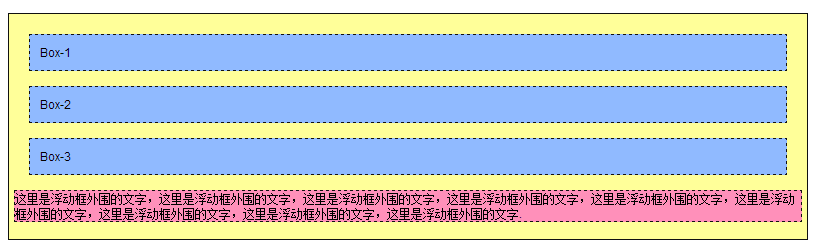
代码:
<!DOCTYPE html PUBliC "-//W3C//DTD XHTML 1.0 Transitional//EN"

 "http://www.w3.org/TR/xhtml1/DTD/xhtml1-transitional.dtd">

<html xmlns="http://www.w3.org/1999/xhtml">

<head>

    <title>float属性</title>

<style type="text/css">

body{

    margin:15px;

    font-family:Arial; font-size:12px;

    }

.father{

    background-color:#ffff99;

    border:1px solid #111111;

    padding:5px;

    }

.father div{

    padding:10px;

    margin:15px;

    border:1px dashed #111111;

    background-color:#90baff;

    }

.father p{

    border:1px dashed #111111;

    background-color:#ff90ba;

    }

.son1{

/* 这里设置son1的浮动方式*/

}

.son2{

/* 这里设置son1的浮动方式*/

}

.son3{

/* 这里设置son1的浮动方式*/

}

</style>

</head>

<body>

    <div class="father">

        <div class="son1">Box-1</div>

        <div class="son2">Box-2</div>

        <div class="son3">Box-3</div>

        <p>这里是浮动框外围的文字,这里是浮动框外围的文字,这里是浮动框外围的文字,这里是浮动框外围的文字,这里是浮动框外围的文字,这里是浮动框外围的文字,这里是浮动框外围的文字,这里是浮动框外围的文字,这里是浮动框外围的文字.</p>

    </div>

</body>

</html>

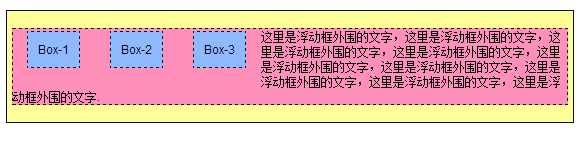

代码:
<!DOCTYPE html PUBliC "-//W3C//DTD XHTML 1.0 Transitional//EN"

 "http://www.w3.org/TR/xhtml1/DTD/xhtml1-transitional.dtd">

<html xmlns="http://www.w3.org/1999/xhtml">

<head>

    <title>float属性</title>

<style type="text/css">

body{

    margin:15px;

    font-family:Arial; font-size:12px;

    }

.father{

    background-color:#ffff99;

    border:1px solid #111111;

    padding:5px;

    }

.father div{

    padding:10px;

    margin:15px;

    border:1px dashed #111111;

    background-color:#90baff;

    }

.father p{

    border:1px dashed #111111;

    background-color:#ff90ba;

    }

.son1{

/* 这里设置son1的浮动方式*/

float:left;

}

.son2{

/* 这里设置son1的浮动方式*/

float:left;

}

.son3{

/* 这里设置son1的浮动方式*/

float:left;

}

</style>

</head>

<body>

    <div class="father">

        <div class="son1">Box-1</div>

        <div class="son2">Box-2</div>

        <div class="son3">Box-3</div> <!-- 当所有div都浮动的时候,块空间就不占据一行了,下面的内容会自动填充 ,div只占据属于自己的那一部分,后面的元素会自动补齐行剩余空间-->

        <p>这里是浮动框外围的文字,这里是浮动框外围的文字,这里是浮动框外围的文字,这里是浮动框外围的文字,这里是浮动框外围的文字,这里是浮动框外围的文字,这里是浮动框外围的文字,这里是浮动框外围的文字,这里是浮动框外围的文字.</p>

    </div>

</body>

</html>
说明:浏览器宽度改变时,样子相应的也会改变,浮动之后,默认的占据一行的宽度没有了,剩下的是css中设置的padding、margin、width、height等效果。

代码:
<!DOCTYPE html PUBliC "-//W3C//DTD XHTML 1.0 Transitional//EN"

 "http://www.w3.org/TR/xhtml1/DTD/xhtml1-transitional.dtd">

<html xmlns="http://www.w3.org/1999/xhtml">

<head>

    <title>float属性</title>

<style type="text/css">

body{

    margin:15px;

    font-family:Arial; font-size:12px;

    }

.father{

    background-color:#ffff99;

    border:1px solid #111111;

    padding:5px;

    }

.father div{

    padding:10px;

    margin:15px;

    border:1px dashed #111111;

    background-color:#90baff;

    }

.father p{

    border:1px dashed #111111;

    background-color:#ff90ba;

    }

.son1{

/* 这里设置son1的浮动方式*/

float:left;

}

.son2{

/* 这里设置son1的浮动方式*/

float:left;

}

.son3{

/* 这里设置son1的浮动方式*/

float:right;

}

</style>

</head>

<body>

    <div class="father">

        <div class="son1">Box-1</div>

        <div class="son2">Box-2</div>

        <div class="son3">Box-3</div>

        <p>这里是浮动框外围的文字,这里是浮动框外围的文字,这里是浮动框外围的文字,这里是浮动框外围的文字,这里是浮动框外围的文字,这里是浮动框外围的文字,这里是浮动框外围的文字,这里是浮动框外围的文字,这里是浮动框外围的文字.</p>

    </div>

</body>

</html>
说明:div1、div2左浮动,div3右浮动,p文字被夹中间。

div1 div3 左浮动 div2 右浮动
代码:
<!DOCTYPE html PUBliC "-//W3C//DTD XHTML 1.0 Transitional//EN"

 "http://www.w3.org/TR/xhtml1/DTD/xhtml1-transitional.dtd">

<html xmlns="http://www.w3.org/1999/xhtml">

<head>

    <title>float属性</title>

<style type="text/css">

body{

    margin:15px;

    font-family:Arial; font-size:12px;

    }

.father{

    background-color:#ffff99;

    border:1px solid #111111;

    padding:5px;

    }

.father div{

    padding:10px;

    margin:15px;

    border:1px dashed #111111;

    background-color:#90baff;

    }

.father p{

    border:1px dashed #111111;

    background-color:#ff90ba;

    clear:right;

    }

.son1{

/* 这里设置son1的浮动方式*/

float:left;

}

.son3{

/* 这里设置son3 的浮动方式*/

float:right;

}

.son2 {

/* 这里设置son2 的浮动方式*/

float:left;

}

</style>

</head>

<body>

    <div class="father">

        <div class="son1">Box-1</div>

        <div class="son2">Box-2</div>

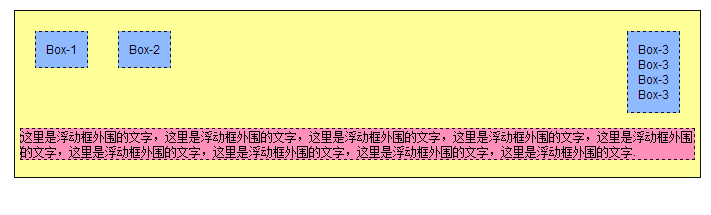
        <div class="son3">Box-3<br/>Box-3<br/>Box-3<br/>Box-3<br/></div> <!-- 换行重新占据了三行内容 -->

        <p>这里是浮动框外围的文字,这里是浮动框外围的文字,这里是浮动框外围的文字,这里是浮动框外围的文字,这里是浮动框外围的文字,这里是浮动框外围的文字,这里是浮动框外围的文字,这里是浮动框外围的文字,这里是浮动框外围的文字.</p>

    </div>

</body>

</html>
说明:有了br之后,浮动元素所在行又被重新占据了,p元素不会上来填充。
代码:
<!DOCTYPE html PUBliC "-//W3C//DTD XHTML 1.0 Transitional//EN" "http://www.w3.org/TR/xhtml1/DTD/xhtml1-transitional.dtd">

<html xmlns="http://www.w3.org/1999/xhtml">

<head>

    <title>float属性</title>

<style type="text/css">

body{

    margin:15px;

    font-family:Arial; font-size:12px;

    }

.father{

    background-color:#ffff99;

    border:1px solid #111111;

    padding:5px;

    }

.father div{

    padding:10px;

    margin:15px;

    border:1px dashed #111111;

    background-color:#90baff;

    }

.father p{

    border:1px dashed #111111;

    background-color:#ff90ba;

    clear:right;

    }

.son1{

float:left;

/* 这里设置son1的浮动方式*/

}

.son2{

/* 这里设置son1的浮动方式*/

float:left;

}

.son3{

/* 这里设置son1的浮动方式*/

float:right;

}

.father .clear{

margin:0;

padding:0;

border:0;

clear:both;    }

</style>

</head>

<body>

    <div class="father">

        <div class="son1">Box-1</div>

        <div class="son2">Box-2</div>

        <div class="son3">Box-3</div>

        <div class="clear"></div>

        <p>这里是浮动框外围的文字,这里是浮动框外围的文字,这里是浮动框外围的文字,这里是浮动框外围的文字,这里是浮动框外围的文字,这里是浮动框外围的文字,这里是浮动框外围的文字,这里是浮动框外围的文字,这里是浮动框外围的文字.</p>

    </div>

</body>

</html>
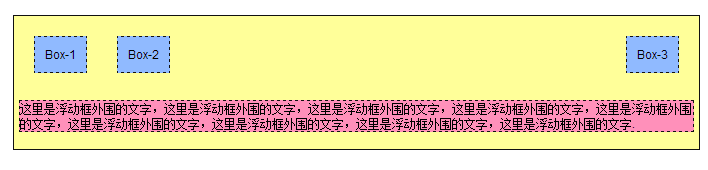
说明:添加一个clear:both;属性之后,之前的空当地方就会被清理掉,p元素就只能另起一行了。
css案例学习之float浮动的更多相关文章
- 【CSS学习】--- float浮动属性
一.前言 浮动元素以脱离标准流的方式来实现元素的向左或向右浮动,并且浮动元素还是在原来的行上进行浮动的.float浮动属性的四个参数:left:元素向左浮动:right:元素向右浮动:none:默认值 ...
- CSS| position定位和float浮动
对基础知识再度做个巩固和梳理. 一.position定位 (一):position的属性 1.absolute:生成绝对定位的元素,相对于最近一级定位不是static的父元素来进行定位: 2.rela ...
- CSS 案例学习
1.样式 display:inline-block;可改变a标签,合其可定义宽高 2.a:hover表示鼠标经过 3.background:url(110.png) bottom 表示:给链接一个图片 ...
- css案例学习之table tr th td ul li实现日历
效果 代码 <html> <head> <title>Calendar</title> <style> <!-- .month { b ...
- css案例学习之ul li dl dt dd实现二级菜单
效果 代码实现 <!DOCTYPE html PUBLIC "-//W3C//DTD XHTML 1.0 Transitional//EN" "http://www ...
- css案例学习之盒子模型
定义:每个盒子都有:边界.边框.填充.内容四个属性: 每个属性都包括四个部分:上.右.下.左:这四部分可同时设置,也可分别设置:里的抗震辅料厚度,而边框有大小和颜色之分,我们又可以理解为生活中所见盒子 ...
- css案例学习之继承关系
代码 <html> <head> <title>继承关系</title> <style> body{ color:blue; /* 颜色 * ...
- css案例学习之用thead、tbody、tfoot实现漂亮的table布局
首先说说thead.tbody.tfoot <thead> <tbody> <tfoot> 无论前后顺序如何改变, <thead> 内的元素总是在表的最 ...
- css案例学习之span边框实现的特殊效果
bottom left bottom right top left top right 配合颜色来使用,实现一些神奇的效果 #menu a span{ height:; width:; /*borde ...
随机推荐
- 【Android病毒分析报告】 - ZooTiger “集恶意推广、隐私窃取、恶意吸费于一体”
本文章由Jack_Jia编写,转载请注明出处. 文章链接:http://blog.csdn.net/jiazhijun/article/details/11772379 作者:Jack_Jia ...
- 如何为WPF添加Main()函数 程序入口点的修改
一般的.WPF的Main()函数是自动生成的,不过有时候我们需要为我们的应用程序传参.那么自动生成的Main()函数就不会满足我们的要求. 那么如何为WPF Application 设置Main()函 ...
- < IOS > IOS适配,简单的分析解决一下
版权:张英堂 欢迎转载,转载请注明出处. 做的项目很多,一到适配的时候头就大了,IOS6,7的适配,屏幕的适配,当然还有下一步要出4.7屏幕,也要做适配....悲剧的移动端的人员. 怎么做一个通用的适 ...
- MongoDB 复制
副本集:简单说,副本集就是有自动故障恢复功能的主从集群.主从集群和副本集最为明显的区别:副本集没有固定的“主节点”.整个集群会选出一个主节点.当其不能工作时,变更到其他节点.二者看起来非常相似:副本集 ...
- libcurl 多线程使用注意事项 - Balder~专栏 - 博客频道 - CSDN.NET
libcurl 多线程使用注意事项 - Balder~专栏 - 博客频道 - CSDN.NET libcurl 多线程使用注意事项 分类: C/C++学习 2012-05-24 18:48 2843人 ...
- Android中调用C++函数的一个简单Demo
这里我不想多解释什么,对于什么JNI和NDK的相关内容大家自己去百度或谷歌.我对Android的学习也只是个新手.废话少说直接进入正题. 一.在Eclipse中创建一个Android Applicat ...
- 关于memecache的使用及清楚示意
Memcache是danga.com的一个项目,最早是为 LiveJournal 服务的,目前全世界不少人使用这个缓存项目来构建自己大负载的网站,来分担数据库的压力.它可以应对任意多个连接,使用非阻塞 ...
- 本地无sqlserver服务下操作数据库 之GSQL
作为程序员无论是我们写的各种MIS系统还是游戏都离不开数据的存取操作,正如我们前几天在VS下做的一MIS系统,现在纠结. 如果是C/S或B/S模型就好了,可是需求不是,没办法,顾客是上帝...他们的需 ...
- WinForm实现窗体最小化后小图标在右边任务栏下
一 基本功能1. 首先新建一个窗体,然后拖入一个名为 NotifyIcon 的控件,名字我没有改,就那个名字 2. 我的应用程序下有些图标文件,这里我用这个图标,我选择 013.ico 3. 选择 ...
- Java编程的23种设计模式
设计模式(Design Patterns) --可复用面向对象软件的基础 设计模式(Design pattern)是一套被反复使用. ...