
Asp.net core 通过Models 生成数据库的方法
其实Getting Started当中有着详细的说明,https://docs.efproject.net/en/latest/platforms/aspnetcore/new-db.html。但是有网友问道,就说一下好了。
- 新建项目,Asp.net core,选择不适用身份验证。
- 添加项目引用。这里还是使用postgreSql。
在Nuget 控制台中输入命令:
Install-Package Npgsql.EntityFrameworkCore.PostgreSQL
Install-Package Microsoft.EntityFrameworkCore.Tools –Pre
添加这两个依赖
然后手动在Tools 节点中加上 "Microsoft.EntityFrameworkCore.Tools": "1.0.0-preview2-final",
这里发现Tools –Pre就可以正常使用nuget安装,昨天直接获取版本安装失败,看来还是nuget同步问题。
- 创建Model类 Blogs,Post和DBContext
using System;
using System.Collections.Generic;
using System.Linq;
using System.Threading.Tasks;
namespace PostgreSqlDemo2.Models
{
public
class
Blog{
public
int BlogId { get; set; }public
string Url { get; set; }public
List<Post> Posts { get; set; }}
}
using System;
using System.Collections.Generic;
using System.Linq;
using System.Threading.Tasks;
namespace PostgreSqlDemo2.Models
{
public
class
Post{
public
int PostId { get; set; }public
string Title { get; set; }public
string Content { get; set; }public
int BlogId { get; set; }public
Blog Blog { get; set; }}
}
using Microsoft.EntityFrameworkCore;
using System;
using System.Collections.Generic;
using System.Linq;
using System.Threading.Tasks;
namespace PostgreSqlDemo2.Models
{
public
class
BloggingContext : DbContext{
public BloggingContext(DbContextOptions<BloggingContext> options)
: base(options)
{ }
public
DbSet<Blog> Blogs { get; set; }public
DbSet<Post> Posts { get; set; }}
}
- 在Startup.cs类中注册DBContext
public
void ConfigureServices(IServiceCollection services)
{
// Add framework services.
services.AddApplicationInsightsTelemetry(Configuration);
services.AddDbContext<BloggingContext>(options =>
options.UseNpgsql(Configuration.GetConnectionString("DefaultConnection")));
services.AddMvc();
}
- Appsetting.json中增加连接字符串
"ConnectionStrings": {
"DefaultConnection": "User ID=test;Password=test;Host=192.168.1.6;Database=testdb;Pooling=true;"
},
- 创建Migration类
这里要说一下,Migration是ef框架设计的工具,能够用来生成一些框架类。在vs2015中,可以在Nuget控制台中使用Add-Migration,linux或者cmd中,可以使用dotnet ef migration命令,具体请自行学习。
言归正传,我们开始生成类,在Nuget控制台中输入命令:
Add-Migration MyFirstMigration
等待结束,笔者这里会报一个"无法识别的转义序列"的错误,但是不影响使用,笔者已经在apsnet上报了issue。
然后我们会看到,项目结构中增加了一个文件夹及几个文件如下:
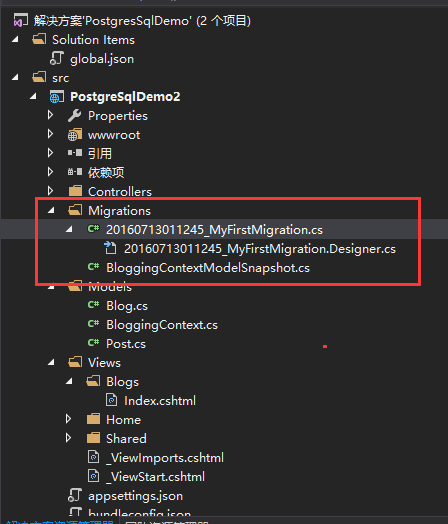
查看代码:
using System;
using System.Collections.Generic;
using Microsoft.EntityFrameworkCore.Migrations;
namespace PostgreSqlDemo2.Migrations
{
public
partial
class
MyFirstMigration : Migration{
protected
override
void Up(MigrationBuilder migrationBuilder){
migrationBuilder.CreateTable(
name: "Blogs",
columns: table => new
{
BlogId = table.Column<int>(nullable: false)
.Annotation("Npgsql:ValueGeneratedOnAdd", true),
Url = table.Column<string>(nullable: true)
},
constraints: table =>
{
table.PrimaryKey("PK_Blogs", x => x.BlogId);
});
migrationBuilder.CreateTable(
name: "Posts",
columns: table => new
{
PostId = table.Column<int>(nullable: false)
.Annotation("Npgsql:ValueGeneratedOnAdd", true),
BlogId = table.Column<int>(nullable: false),
Content = table.Column<string>(nullable: true),
Title = table.Column<string>(nullable: true)
},
constraints: table =>
{
table.PrimaryKey("PK_Posts", x => x.PostId);
table.ForeignKey(
name: "FK_Posts_Blogs_BlogId",
column: x => x.BlogId,
principalTable: "Blogs",
principalColumn: "BlogId",
onDelete: ReferentialAction.Cascade);
});
migrationBuilder.CreateIndex(
name: "IX_Posts_BlogId",
table: "Posts",
column: "BlogId");
}
protected
override
void Down(MigrationBuilder migrationBuilder){
migrationBuilder.DropTable(
name: "Posts");
migrationBuilder.DropTable(
name: "Blogs");
}
}
}
Design.cs
using System;
using Microsoft.EntityFrameworkCore;
using Microsoft.EntityFrameworkCore.Infrastructure;
using Microsoft.EntityFrameworkCore.Metadata;
using Microsoft.EntityFrameworkCore.Migrations;
using PostgreSqlDemo2.Models;
namespace PostgreSqlDemo2.Migrations
{
[DbContext(typeof(BloggingContext))]
[Migration("20160713011245_MyFirstMigration")]
partial
class
MyFirstMigration{
protected
override
void BuildTargetModel(ModelBuilder modelBuilder){
modelBuilder
.HasAnnotation("ProductVersion", "1.0.0-rtm-21431");
modelBuilder.Entity("PostgreSqlDemo2.Models.Blog", b =>
{
b.Property<int>("BlogId")
.ValueGeneratedOnAdd();
b.Property<string>("Url");
b.HasKey("BlogId");
b.ToTable("Blogs");
});
modelBuilder.Entity("PostgreSqlDemo2.Models.Post", b =>
{
b.Property<int>("PostId")
.ValueGeneratedOnAdd();
b.Property<int>("BlogId");
b.Property<string>("Content");
b.Property<string>("Title");
b.HasKey("PostId");
b.HasIndex("BlogId");
b.ToTable("Posts");
});
modelBuilder.Entity("PostgreSqlDemo2.Models.Post", b =>
{
b.HasOne("PostgreSqlDemo2.Models.Blog", "Blog")
.WithMany("Posts")
.HasForeignKey("BlogId")
.OnDelete(DeleteBehavior.Cascade);
});
}
}
}
using System;
using Microsoft.EntityFrameworkCore;
using Microsoft.EntityFrameworkCore.Infrastructure;
using Microsoft.EntityFrameworkCore.Metadata;
using Microsoft.EntityFrameworkCore.Migrations;
using PostgreSqlDemo2.Models;
namespace PostgreSqlDemo2.Migrations
{
[DbContext(typeof(BloggingContext))]
partial
class
BloggingContextModelSnapshot : ModelSnapshot{
protected
override
void BuildModel(ModelBuilder modelBuilder){
modelBuilder
.HasAnnotation("ProductVersion", "1.0.0-rtm-21431");
modelBuilder.Entity("PostgreSqlDemo2.Models.Blog", b =>
{
b.Property<int>("BlogId")
.ValueGeneratedOnAdd();
b.Property<string>("Url");
b.HasKey("BlogId");
b.ToTable("Blogs");
});
modelBuilder.Entity("PostgreSqlDemo2.Models.Post", b =>
{
b.Property<int>("PostId")
.ValueGeneratedOnAdd();
b.Property<int>("BlogId");
b.Property<string>("Content");
b.Property<string>("Title");
b.HasKey("PostId");
b.HasIndex("BlogId");
b.ToTable("Posts");
});
modelBuilder.Entity("PostgreSqlDemo2.Models.Post", b =>
{
b.HasOne("PostgreSqlDemo2.Models.Blog", "Blog")
.WithMany("Posts")
.HasForeignKey("BlogId")
.OnDelete(DeleteBehavior.Cascade);
});
}
}
}
上面代码都是自动生成的,生成依据就是你的Models中的实体类文件。
- 创建数据库
虽然上面生成了数据库架构的代码,但是还没有更新到数据库中去。需要执行:
Update-Database
如果显示Done.
则表示更新数据库成功。可以看看数据库中已经自动根据model实体创建了对应的数据表。
- 剩下的工作就和前文一样了,不在细说。
总结:
记住几个命令 "Add-Migration MyFirstMigration","Update-Database"。注意执行时要保证代码能够正常编译,并且已经完成数据库的配置。如果数据库结构改了,可以修改Models下对应的实体类,然后删除Migration文件夹下的文件,然后从新执行这两个命令。笔者这里使用PostgreSQL的时候,报错了,提示Blogs表已存在,应该是issue,只能自行更新了。
Asp.net core 通过Models 生成数据库的方法的更多相关文章
- ASP.NET Core 设置和初始化数据库 - ASP.NET Core 基础教程 - 简单教程,简单编程
原文:ASP.NET Core 设置和初始化数据库 - ASP.NET Core 基础教程 - 简单教程,简单编程 ASP.NET Core 设置和初始化数据库 上一章节中我们已经设置和配置好了 EF ...
- Python3:Django根据models生成数据库表时报 __init__() missing 1 required positional argument: 'on_delete'
Python3:Django根据models生成数据库表时报 __init__() missing 1 required positional argument: 'on_delete' 一.分析 在 ...
- asp.net core web api 生成 swagger 文档
asp.net core web api 生成 swagger 文档 Intro 在前后端分离的开发模式下,文档就显得比较重要,哪个接口要传哪些参数,如果一两个接口还好,口头上直接沟通好就可以了,如果 ...
- 【无私分享:ASP.NET CORE 项目实战(第十三章)】Asp.net Core 使用MyCat分布式数据库,实现读写分离
目录索引 [无私分享:ASP.NET CORE 项目实战]目录索引 简介 MyCat2.0版本很快就发布了,关于MyCat的动态和一些问题,大家可以加一下MyCat的官方QQ群:106088787.我 ...
- .NET跨平台:在Linux上基于ASP.NET 5用EF7生成数据库
Linux用的是Ubuntu,dnx版本是1.0.0-beta6-12120,EF版本是7.0.0-beta5. 以下是用Entity Framework 7生成SQL Server数据库的操作步骤. ...
- asp.net core 使用 swagger 生成接口文档
参考地址:http://www.cnblogs.com/daxnet/p/6181366.html http://www.jianshu.com/p/fa5a9b76f3ed 微软参考文档:https ...
- 基于ASP.NET Core Data Protection生成验证token
ASP.NET Core Data Protection 不仅提供了非对称加密能力,而且提供了灵活的秘钥存储方式以及一致的加解密接口(Protect与Unprotect).Session中用到了它,C ...
- linux 环境下部署 Asp.Net Core 项目 访问 oralce 数据库
1.ASP.NET Core 是一个跨平台的高性能开源框架,可以部署到Linux上,那项目部署在Linux上有哪些好处呢? 1.linux硬件需求小,大部分版本免费,成本低. 2.linux的用户管理 ...
- ASP.NET Core - Razor页面之Handlers处理方法
简介 在前一篇文章中,我们讨论了Razor页面.今天我们来谈谈处理方法(Handlers). 我们知道可以将代码和模型放在 .cshtml 文件里面或与 .cshtml 匹配的 .cshtml.cs ...
随机推荐
- linq之将IEnumerable<T>类型的集合转换为DataTable类型 (转载)
在考虑将表格数据导出成excel的时候,网上搜的时候找到一个特别合适的公共方法,可以将query查询出来的集合转换为datatable 需引用using System.Reflection; publ ...
- 【P1379】天才的约数和
来自GDOI2007,原题已不可考-- 又自己做出来了好开心,找特殊性是个关键的切入点 原题: 这天周航遇到了靳泽旭. 周航:"我是天才!" 靳泽旭:"你为什么是天才?& ...
- 打算从oschina的博客搬运到cnblog了
如题,感觉cnblog似乎要更加专业一点,顺便也禁水.提高下文章质量 以后就都是干货了 oschina原址 顺便庆祝一下Windows Live Writer配置成功
- ECMAScript 6的解构赋值 ( destructuring assignment)
var provinceValues=["010","020","028","0755","023" ...
- edgesForExtendedLayout,automaticallyAdjustsScrollViewInsets, extendedLayoutIncludesOpaqueBars的影响
在IOS7以后 ViewController 开始使用全屏布局的,而且是默认的行为通常涉及到布局 就离不开这个属性 edgesForExtendedLayout,它是一个类型为UIExtendedEd ...
- SDDC-SDN-SDS
SDDCSDNSDS软件定义存储是一个较大的行业发展趋势,这个行业还包括软件定义网络(SDN)和软件定义数据中心(SDDC). SDDC依赖于虚拟化和云计算技术, SDDC的目标是虚拟化数据中心的一切 ...
- rabiitmq集群完整安装
通过 Erlang 的分布式特性(通过 magic cookie 认证节点)进行 RabbitMQ 集群,各 RabbitMQ 服务为对等节点,即每个节点都提供服务给客户端连接,进行消息发送与接收. ...
- [原] wmic: Invalid XSL format (or) file name错误解决方法
之前运行wmic命令正确,今天在服务器上出现Invalid XSL format (or) file name的提示,搜索了一下,在这里找到了答案: http://www.ctkn.net/2011/ ...
- 简述Session
Session的原理 1.session技术的概述 * session是服务器端技术 * 服务器在运行时可以为每一个用户的浏览器创建一个其独享的session对象 * 由于session为用户浏览器独 ...
- C#中双问号、双冒号等几个特殊关键字
1.@ 这个东东看似和邮件有关啊,但是在C#的世界里,可跟邮件没有一毛钱关系,它是string的女朋友(当然了string有N多女友),二者结合就可以发挥作用了.你可以给它起个名字,叫做“逐字字符串” ...