
Selenium2学习-041-chromedriver:org.openqa.selenium.WebDriverException: unknown error: cannot determine loading status from unexpected alert open
今天在写WebDriver处理弹出框(alert、confirm、prompt)演示实例脚本分发给朋友时,在其执行时未能成功执行,对应的部分错误详情如下:
org.openqa.selenium.WebDriverException: unknown error: cannot determine loading status

from unexpected alert open

  (Session info: chrome=53.0.2785.116)

  (Driver info: chromedriver=2.21.371459 (36d3d07f660ff2bc1bf28a75d1cdabed0983e7c4),platform=Windows NT 10.0 x86_64) (WARNING: The server did not provide any stacktrace information)

Command duration or timeout: 50 milliseconds
经查,chromedriver V2.21 启动 chrome V5* 版本时,存在已知修复的缺陷 1362,详情截图如下所示:
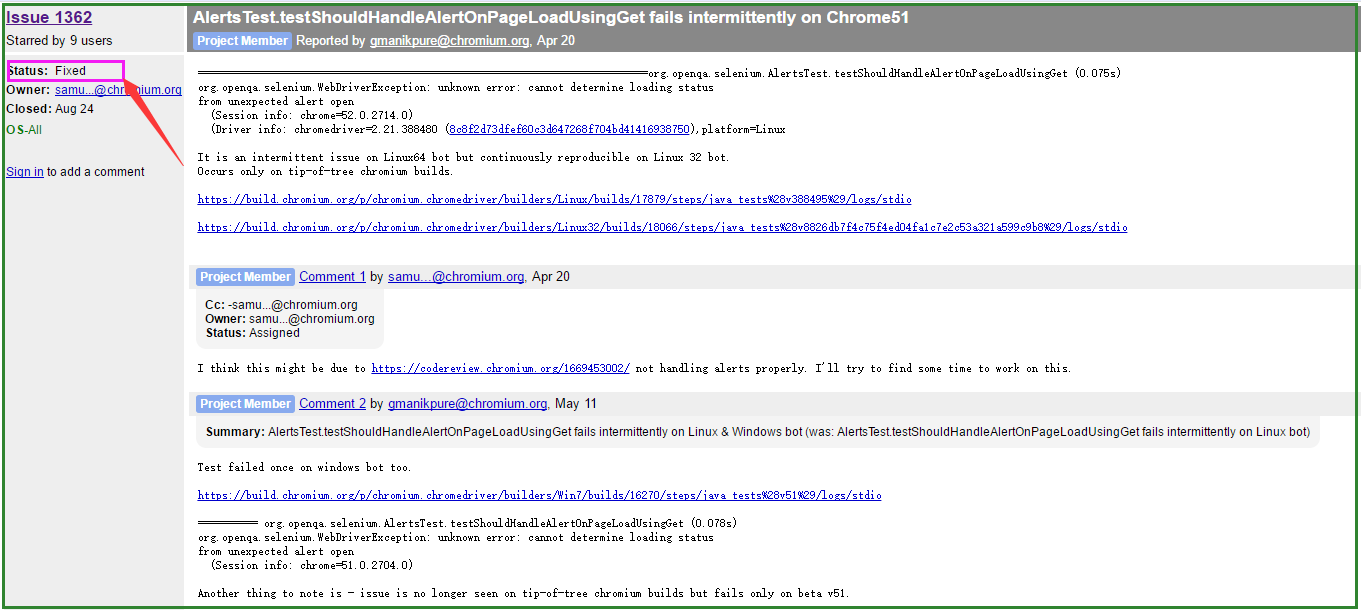
同时,由chromedriver官方更新历史可知,自 Ver 2.22 开始支持 Chrome 51+ 版本,在其更新信息中也表明了修复了缺陷。

因而,解决这个问题,只需要更新一下 chromedriver 版本即可,更新时请注意选择对应的chrome版本要求。
相应的脚本源码文件分享链接:https://yunpan.cn/ckrsegwX3p4GE 访问密码 7b6d
至此,Selenium2学习-041-chromedriver:org.openqa.selenium.WebDriverException: unknown error: cannot determine loading status from unexpected alert open 顺利完结,希望此文能够给初学 Selenium 的您一份参考。
最后,非常感谢亲的驻足,希望此文能对亲有所帮助。热烈欢迎亲一起探讨,共同进步。非常感谢! ^_^
Selenium2学习-041-chromedriver:org.openqa.selenium.WebDriverException: unknown error: cannot determine loading status from unexpected alert open的更多相关文章
- org.openqa.selenium.WebDriverException: unknown error: missing or invalid 'entry.level'
错误原因:chrome与chromedriver版本号不匹配,升级后即可解决
- org.openqa.selenium.WebDriverException: unknown error: call function result missing 'value'
原因:浏览器和驱动版本不匹配 https://npm.taobao.org/mirrors/chromedriver
- Java+selenium chrome 常见的问题WebDriverException: unknown error: call function result missing 'value'
运行chrome浏览器 报错:"main" org.openqa.selenium.WebDriverException: unknown error: call function ...
- Selenium2学习-007-WebUI自动化实战实例-005-解决 Firefox 版本不兼容:org.openqa.selenium.WebDriverException: Failed to connect to binary FirefoxBinary
此文主要讲述 Java 运行 Selenium 脚本时,因 Friefox 浏览器版本与 selenium-server-standalone-x.xx.x.jar 不兼容引起的 org.openqa ...
- selenium:org.openqa.selenium.WebDriverException: f.QueryInterface is not a function
今天用selenium2遇到问题 org.openqa.selenium.WebDriverException: f.QueryInterface is not a function 查了好久最后终于 ...
- 报错org.openqa.selenium.WebDriverException: disconnected: unable to connect to renderer解决方法
做自动化时经常会遇到不兼容的问题,比如以下简单的脚本,主要是打开浏览器,然后最大化窗口,打开百度,输入内容搜索,代码如下: package com.gs.selenium; import org.op ...
- 解决org.openqa.selenium.WebDriverException: Unable to connect to host 127.0.0.1 on port 7055 after 45000 ms org.springframework.beans.BeanInstantiation
解决方法为将selenium-server-standalone-2.37.0.jar升级至selenium-server-standalone-2.41.0.jar即可. 下载地址:http://s ...
- org.openqa.selenium.WebDriverException: f.QueryInterface is not a function Command duration or timeout:
今天偶遇一个问题,运行项目时,发现这个问题: org.openqa.selenium.WebDriverException: f.QueryInterface is not a functionCom ...
- Win10上启动UICrawler自动遍历时报 "org.openqa.selenium.WebDriverException: An unknown server-side error occur red while processing the command. Original error: Could not sign with default certifi cate."
操作步骤: 1.直接启动 Appium (我用的是 version 1.10.0) 2.打开命令窗口,切换到 UICrawler 所在路径 3.执行命令 java -jar UICrawler-2.2 ...
随机推荐
- python之常用内置函数
python内置函数,可以通过python的帮助文档 Build-in Functions,在终端交互下可以通过命令查看 >>> dir("__builtins__&quo ...
- java和c#使用hessian通信
介绍 hessian主页:http://hessian.caucho.com/ 一个简单的例子学习hessian服务:服务端为Java,客户端为C#. 先要准备好C#和Java的第三方类库:http: ...
- 图像缩放_OpenCv
图像缩放是一种比较简单的图像处理操作,这里给出opencv中的代码, opencv的版本C语言接口 int resize_c() { const char *pstrImageName = " ...
- Delphi基本类型--枚举 子界 集合 数组
[plain] view plain copy <strong>根据枚举定义集合 </strong> TMyColor = (mcBlue, mcRed); TMyColorS ...
- WPF,textBox默认是失去焦点绑定值才改变,怎么做到输入框值一改变就改变绑定值. Text="{Binding EvaluationContent,UpdateSourceTrigger=PropertyChanged}"
如果用户提出只要textBox1的文本改变slider1的滑块立刻响应,那就设置Binding的UpdateSourceTrigger属性.它是一个UpdateSourceTrigger类型枚举值,默 ...
- js实现找质因数
实现最一个整数的质因数的拆分,例如:90可以才分为2*3*3*5,具体代码如下: <script> var num = prompt('请输入一个整数:','90'); var regex ...
- Python爬虫学习(2): httplib
httplib模块实现了HTTP和HTTPS的客户端部分,但是一般不直接使用,经常通过urllib来进行HTTP,HTTPS的相关操作. 如果需要查看其源代码可以通过查找命令定位: find / -n ...
- 【Cocos2d-x游戏开发】Cocos2d-x中的弱联网技术
在上一篇博客中,我们一起学习了如何在Cocos2d-x中存储数据和读取信息,本篇博客我们将一起讨论和数据存储同样重要的联网技术. 一.弱联网技术介绍 在网络游戏中许多重要的功能都需要网络连接,而根据需 ...
- 规约模式Specification的学习
最近一直在看DDD开发 规约似乎用得很普遍. 但是还是理解不了.所以记录下学习的进度.- 规约(Specification)模式 目的:查询语句和查询条件的分离 写了一个关于规约的模拟小程序 cla ...
- scrapy爬虫笔记(一)------环境配置
前言: 本系列文章是对爬虫的简单介绍,以及教你如何用简单的方法爬取网站上的内容. 需要阅读者对html语言及python语言有基本的了解. (本系列文章也是我在学习爬虫过程中的学习笔记,随着学习的深入 ...