
Altium 分形天线设计
Altium 分形天线设计
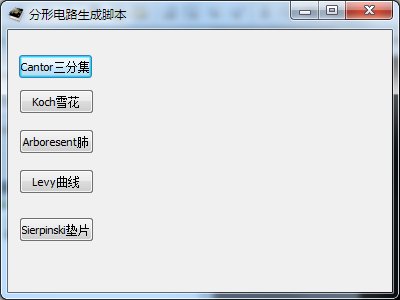
程序运行界面
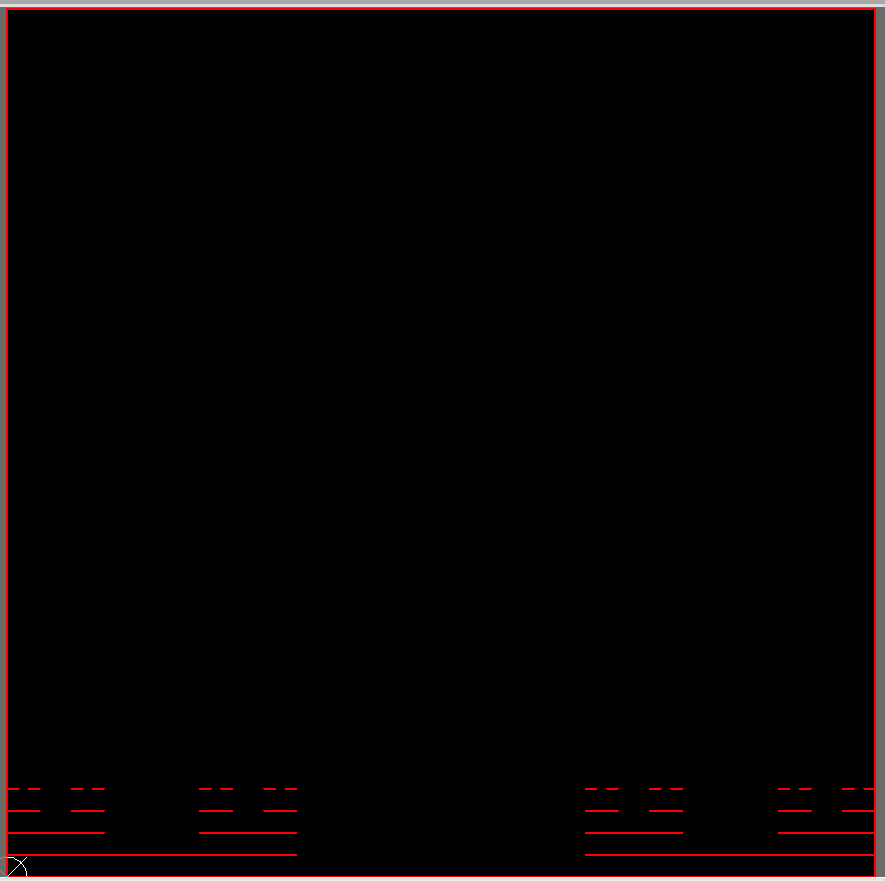
Cantor三分集
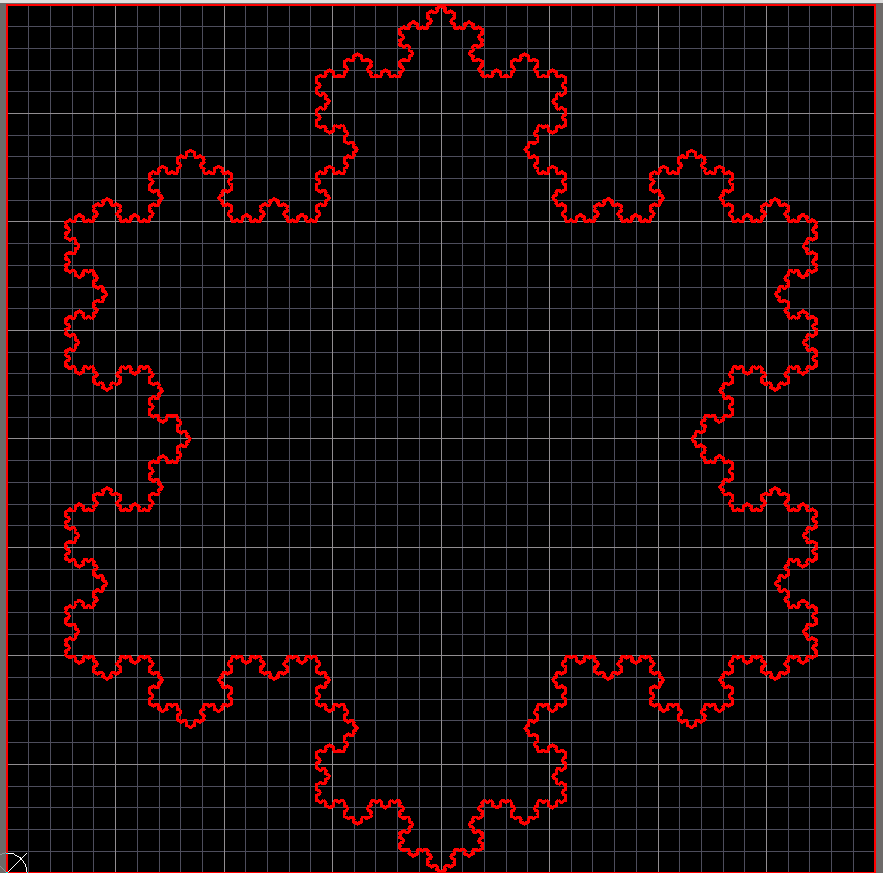
Koch雪花
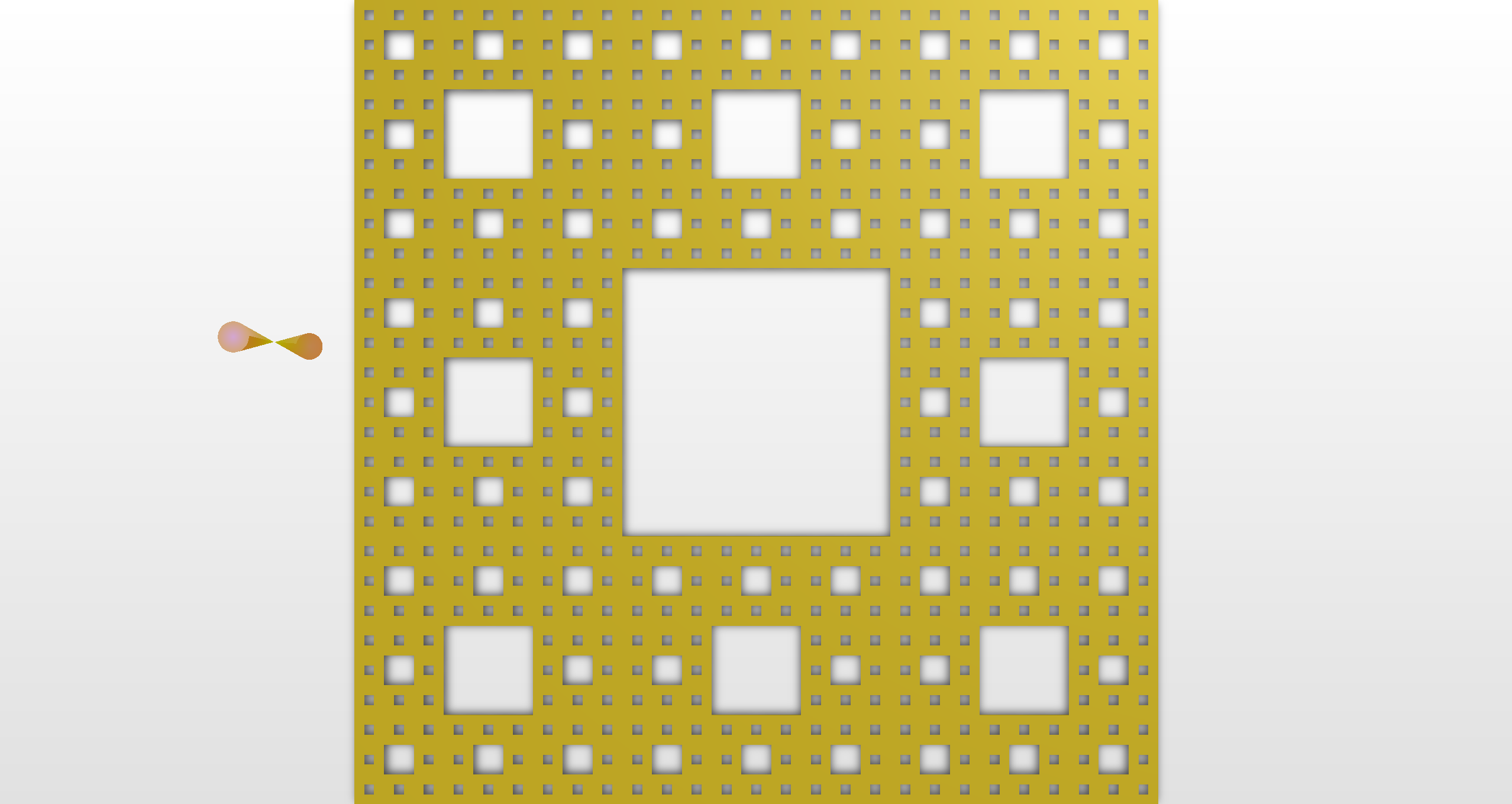
Sierpinski垫片
源代码:
Iter_Num = 4 'diedai
PI = 3.1415926
Call Client.StartServer("PCB")
PcbFileName = "PCB1.PcbDoc"
Set Document = Client.OpenDocument("PCB", PcbFileName)
If Not (Document Is Nothing) Then
'Add this schematic sheet in the newly created PCB project in DXP.
Set Workspace = GetWorkspace
If Not (Workspace Is Nothing) Then
Workspace.DM_FocusedProject.DM_AddSourceDocument(Document.FileName)
End If
Client.ShowDocument(Document)
End If
'Draw Line Function
Sub Paint_Line(x1,y1,x2,y2)
Dim Board
Dim Track
Set Board = PCBServer.GetCurrentPCBBoard
Track = PCBServer.PCBObjectFactory(eTrackObject,eNoDimension,eCreate_Default)
Track.X1 = MilsToRealCoord(CLng(x1)+Board.GetState_XOrigin/10000)
Track.Y1 = MilsToRealCoord(CLng(y1)+Board.GetState_XOrigin/10000)
Track.X2 = MilsToRealCoord(CLng(x2)+Board.GetState_XOrigin/10000)
Track.Y2 = MilsToRealCoord(CLng(y2)+Board.GetState_XOrigin/10000)
Track.Layer = eTopLayer
Track.Width = MilsToCoord (10)
Board.AddPCBObject(Track)
Board.LayerIsDisplayed(ALayer) = True
End Sub
'Draw rectangle Function
Sub Paint_Rectangle(x1,y1,x2,y2)
call Paint_Line(x1,y1,x2,y1)
call Paint_Line(x1,y1,x1,y2)
call Paint_Line(x1,y2,x2,y2)
call Paint_Line(x2,y1,x2,y2)
End Sub
Sub Action_Redraw()
Call Client.SendMessage("PCB:Zoom","Action=Redraw", 255, Client.CurrentView)
Call Client.SendMessage("PCB:Zoom","Action=All", 255, Client.CurrentView)
End Sub
'SetState_Origin
Sub Set_Origin()
Set Board = PCBServer.GetCurrentPCBBoard
Board.SetState_YOrigin(40000000)
Board.SetState_XOrigin(40000000)
End Sub
Sub Board_Shape()
Call AddStringParameter("Scope", "All")
RunProcess("PCB:Select")
Call AddStringParameter("Mode", "BOARDOUTLINE_FROM_SEL_PRIMS")
RunProcess("PCB:PlaceBoardOutline")
Call AddStringParameter("Size", "2.500MM")
RunProcess("PCB:SnapGrid")
Call AddStringParameter("MeasurementUnit", "Toggle")
RunProcess("PCB:DocumentPreferences")
End Sub
Sub CantorClick(Sender)
Board_chang = 100/0.0254
Board_kuan = 100/0.0254
Iter_Num = 5
call Set_Origin()
call Paint_Rectangle(0,0,Board_chang,Board_kuan)
Call Board_Shape()
Call Cantor_digui(0,0,Board_chang,0,Iter_Num)
Action_Redraw()
Close
End Sub
Sub Cantor_digui(ax,ay,bx,by,m)
If m=1 Then
Call Paint_Line(ax,ay,bx,by)
Else
Call Paint_Line(ax,ay,bx,by)
cx=ax+(bx-ax)/3
cy=ay+100
dx=bx-(bx-ax)/3
dy=by+100
ay=ay+100
by=by+100
Call Cantor_digui(ax,ay,cx,cy,m-1)
Call Cantor_digui(dx,dy,bx,by,m-1)
End If
m=m-1
End Sub
Sub KochClick(Sender)
Board_chang = 100/0.0254
Board_kuan = 100/0.0254
m = Board_chang
Iter_Num = 11
call Set_Origin()
call Paint_Rectangle(0,0,Board_chang,Board_kuan)
Call Board_Shape()
Action_Redraw()
Call Fractal(m/2-sqr(3)/2*m/2,m/2+m/4,m/2+sqr(3)/2*m/2,m/2+m/4,Iter_Num)
Call Fractal(m/2,m/2-m/2,m/2-sqr(3)/2*m/2,m/2+m/4,Iter_Num)
Call Fractal(m/2+sqr(3)/2*m/2,m/2+m/4,m/2,m/2-m/2,Iter_Num)
Action_Redraw()
Close
End Sub
Sub Fractal(ax,ay,bx,by,Iter_Num)
if Iter_Num = 1 Then
Call Paint_Line(ax,ay,bx,by)
else
cx=ax+(bx-ax)/3
cy=ay+(by-ay)/3
ex=bx-(bx-ax)/3
ey=by-(by-ay)/3
Call Fractal(ax,ay,cx,cy,Iter_Num-1)
Call Fractal(ex,ey,bx,by,Iter_Num-1)
l=sqr((ex-cx)*(ex-cx)+(ey-cy)*(ey-cy))
alfa=Atn((ey-cy)/(ex-cx))
if ((alfa>=0 And (ex-cx)<0) Or (alfa<0 And (ex-cx)<0)) Then
alfa=alfa+PI
End if
dx=cx+cos(alfa+PI/3)*l
dy=cy+sin(alfa+PI/3)*l
Call Fractal(cx,cy,dx,dy,Iter_Num-1)
Call Fractal(dx,dy,ex,ey,Iter_Num-1)
End If
End Sub
Sub ArboresentClick(Sender)
prate=1.5
theta=atn(sqr(4/prate/prate-1))
t=PI-4*theta
alfa=55*PI/180
leval=1
x=500
y=500
size1=3000
Call DrawArboresent(x,y,size1,prate,alfa,thata,t,lexel)
End Sub
Sub DrawArboresent(x,y,size1,prate,alfa,thata,t,lexel)
L_X=200
L_Y=300
l=size1/prate
xe=x
ye=y
xa=x+size1*cos(alfa)
ya=y+size1*sin(alfa)
xb=x+l*cos(alfa-theta)
yb=y+l*sin(alfa-theta)
xc=x+l*cos(alfa-theta-t)
yc=x+l*sin(alfa-theta-t)
xd=x+size1*cos(alfa-theta*2-t)
yd=x+size1*sin(alfa-theta*2-t)
if level<=1 Then
Call Paint_Line(L_X-xa/15,L_Y-ya/15,L_X-xe/15,L_Y-ye/15)
Call Paint_Line(L_X-xe/15,L_Y-ye/15,L_X-xd/15,L_Y-yd/15)
Call Paint_Line(L_X-xd/15,L_Y-yd/15,L_X-xc/15,L_Y-yc/15)
Call Paint_Line(L_X-xc/15,L_Y-yc/15,L_X-xe/15,L_Y-ye/15)
Call Paint_Line(L_X-xe/15,L_Y-ye/15,L_X-xb/15,L_Y-yb/15)
Call Paint_Line(L_X-xb/15,L_Y-yb/15,L_X-xa/15,L_Y-ya/15)
End if
Call DrawArboresent(xb,yb,l,prate,alfa-theta+pi,thata,t,lexel-1)
Call DrawArboresent(xc,yc,l,prate,alfa-theta+pi,thata,t,lexel-1)
End Sub
Sub LevyClick(Sender)
m = (100/0.0254)
call Set_Origin()
call Paint_Rectangle(0,0,m,m)
Call Board_Shape()
Call drawC(0,0,10000,0)
Action_Redraw()
Close()
End Sub
Sub drawC(x1,y1,x2,y2)
if (x2-x1)<5 Then
Call Paint_Line(x1,y1,x2,y2)
else
Call Paint_Line(x1,y1,x2,y2)
x3=(x1+y1+x2-y2)/2
y3=(x2+y2+y1-x1)/2
Call Paint_Line(x1,y1,x3,y3)
Call Paint_Line(x3,y3,x2,y2)
Call drawC(x1,y1,x3,y3)
Call drawC(x3,y3,x2,y2)
End if
End Sub
Sub SierpinskiClick(Sender)
m = (100/0.0254)
Iter_Num = 7
call Set_Origin
call Paint_Rectangle(0,0,m,m)
Call Board_Shape()
Action_Redraw()
Call Sier(0,0,m,m,Iter_Num)
Action_Redraw()
Close()
End Sub
kkk=1
Sub Sier(x1,y1,x2,y2,k)
L=x2-x1
W=y2-y1
Set Board = PCBServer.GetCurrentPCBBoard
Region = PCBServer.PCBObjectFactory(eRegionObject, eNoDimension,eCreate_Default)
Contour = Region.MainContour.Replicate
Region.Layer = eTopLayer
Contour.Count = 4
if k=1 Then
Contour.X(1) = MilsToCoord(x1+L/3)
Contour.Y(1) = MilsToCoord(y1+W/3)
Contour.X(2) = MilsToCoord(x2-L/3)
Contour.Y(2) = MilsToCoord(y1+W/3)
Contour.X(3) = MilsToCoord(x2-L/3)
Contour.Y(3) = MilsToCoord(y2-W/3)
Contour.X(4) = MilsToCoord(x1+L/3)
Contour.Y(4) = MilsToCoord(y2-W/3)
Call Contour.Translate(MilsToCoord(4000), MilsToCoord(4000))
Region.SetOutlineContour(Contour)
Region.Kind = 1
Board.AddPCBObject(Region)
else
Contour.X(1) = MilsToCoord(x1+L/3)
Contour.Y(1) = MilsToCoord(y1+W/3)
Contour.X(2) = MilsToCoord(x2-L/3)
Contour.Y(2) = MilsToCoord(y1+W/3)
Contour.X(3) = MilsToCoord(x2-L/3)
Contour.Y(3) = MilsToCoord(y2-W/3)
Contour.X(4) = MilsToCoord(x1+L/3)
Contour.Y(4) = MilsToCoord(y2-W/3)
Call Contour.Translate(MilsToCoord(4000), MilsToCoord(4000))
Region.SetOutlineContour(Contour)
Region.Kind = 1
Board.AddPCBObject(Region)
Call Sier(x1,y1,x1+L/3,y1+W/3,k-1)
Call Sier(x1+L/3,y1,x2-L/3,y1+W/3,k-1)
Call Sier(x2-L/3,y1,x2,y1+W/3,k-1)
Call Sier(x1,y1+W/3,x1+L/3,y2-W/3,k-1)
Call Sier(x2-L/3,y1+W/3,x2,y2-W/3,k-1)
Call Sier(x1,y2-W/3,x1+L/3,y2,k-1)
Call Sier(x1+L/3,y2-W/3,x2-L/3,y2,k-1)
Call Sier(x2-L/3,y2-W/3,x2,y2,k-1)
End if
if kkk=1000 Then
Call Client.SendMessage("PCB:Zoom","Action=Redraw" , 255, Client.CurrentView)
kkk=1
End if
kkk=kkk+1
End Sub
Altium 分形天线设计的更多相关文章
- 2.4G高频PCB天线设计
2.4G高频PCB天线设计 本文博客链接:http://blog.csdn.net/jdh99,作者:jdh,转载请注明. 参考链接: http://bbs.rfeda.cn/read-htm-t ...
- 射频识别技术漫谈(21)——RC系列射频芯片的天线设计
个人感觉使用RC系列射频芯片开发卡片读写器,主要的关键点有两个,分别涉及硬件和软件.软件上的关键是如何正确设置RC系列射频芯片内部的64个寄存器,硬件上的关键则是RC系列射频芯片的天线设计.天线提供了 ...
- Altium Designer 多通道设计
转chenzelin2009的csdn博客:http://blog.csdn.net/chenzelin2009/article/details/5751251# Altium Designer的多图 ...
- 每天进步一点点------Altium Designer PCB设计规则中英对照
Electrical(电气规则) Clearance:安全间距规则 Short Circuit:短路规则 UnRouted Net:未布线网络规则 UnConnected Pin:未连线引脚规则 Ro ...
- [转]ZigBee On Windows Mobile--ZigBee模块天线设计
原文出处:http://www.cnblogs.com/dearsj001/archive/2008/10/26/1320029.html
- Y分形的平面微带天线生成过程
Y分形的平面微带天线生成过程 本文介绍了使用Altium Designer脚本程序生成Y型天线的过程,在窗体中线宽.迭代次数,边框长度可以直接设置. Y分形天线用户界面由一个窗体.1个TImage控件 ...
- Mysql存储引擎之TokuDB以及它的数据结构Fractal tree(分形树)
在目前的Mysql数据库中,使用最广泛的是innodb存储引擎.innodb确实是个很不错的存储引擎,就连高性能Mysql里都说了,如果不是有什么很特别的要求,innodb就是最好的选择.当然,这偏文 ...
- Altium Designer PCB制作入门实例
概要:本章旨在说明如何生成电路原理图.把设计信息更新到PCB文件中以及在PCB中布线和生成器件输出文件.并且介绍了工程和集成库的概念以及提供了3D PCB开发环境的简要说明.欢迎使用Altium De ...
- Altium Designer规划电路板
所谓规划电路板就是根据电路的规模以及用户的需求,确定所要制作电路板的物理外形尺寸和电气边界.电路板规划的原则是在满足用户要求的前提下,使板面美观而且利于后面的布线工作. 1. 定义板的外 ...
随机推荐
- JavaScript的自调用函数
函数表达式可以 "自调用". 自调用表达式会自动调用. 如果表达式后面紧跟 () ,则会自动调用. 不能自调用声明的函数. 通过添加括号,来说明它是一个函数表达式: <scr ...
- php实现下载功能
<?php header("Content-type:text/html;charset=utf-8"); $file_name="1.text"; // ...
- 测试必知必会系列- Linux常用命令 - ls
21篇测试必备的Linux常用命令,每天敲一篇,每次敲三遍,每月一循环,全都可记住!! https://www.cnblogs.com/poloyy/category/1672457.html 列出当 ...
- iconfont字体图标的使用方法(转)
我之前因为项目用bootstrap比较多,所以使用font awesome字体图标比较多,后来接触到了iconfont,发现想要的什么图标都有,还可以自定义图标,非常强大!之前看了一波教程,觉得繁琐, ...
- ElasticSearch之映射常用操作
本文案例操作,建议先阅读我之前的文章<ElasticSearch之安装及基本操作API> Mapping (映射)类似关系型数据库中的表的结构定义.我们将数据以 JSON 格式存入到 El ...
- 曹工说Spring Boot源码(23)-- ASM又立功了,Spring原来是这么递归获取注解的元注解的
写在前面的话 相关背景及资源: 曹工说Spring Boot源码(1)-- Bean Definition到底是什么,附spring思维导图分享 曹工说Spring Boot源码(2)-- Bean ...
- Java-字节输入输出。(新手)
参考手册: BufferedInputStream BufferedOutputStream 实例: import java.io.*; /* * 文件的复制方式 * 1 字节流读写单个字节 * 2 ...
- Java内部类的四种分类以及作用介绍
内部类内容解析 内部类的区分 内部类分别有成员内部类.局部内部类.匿名内部类.静态内部类,接下来将分别介绍. 成员内部类 就是位于外部类成员位置的类.与外部类的属性.方法并列. 成员内部类作为外部类的 ...
- 搭建DVWA漏洞环境
DVWA是一款开源的渗透测试漏洞练习平台,其中内含XSS.SQL注入.文件上传.文件包含.CSRF和暴力破解等各个难度的测试环境. 搭建步骤: 1.在Windows系统中安装WAMP 下载地址:htt ...
- pandas 的常用方法
pandas的常用方法: 1.数据输入 2.数据查看 3.数据清洗 4.数据处理 5.数据提取 6.数据筛选 7.数据汇总 8.数据统计 9.数据输出 详情见: https://blog.csdn.n ...