
Create React App
Facebook开源了React前端框架(MIT Licence),也同时提供了React脚手架 - create-react-app。
create-react-app遵循约定优于配置(Coc)的原则,默认配置、项目结构等,让Web开发人员能够快速上手React。
1. 安装node
下载链接, 选择适当版本;
node -v # 检查node版本
npm -v # 检查npm版本
2. 全局安装create-react-app脚手架
npm install -g create-react-app
3. 创建react app
create-react-app react-app (该步会比较慢,与网络相关)

4. 查看README.md
5. 运行react app
npm start
6. 浏览http://localhost:3000/
以上是利用create-react-app来创建react app的步骤。
下面对README.md解读~
(1)当create-react-app升级后,可以只升级react-scripts。步骤可遵循这里。
(2)`public/index.html`和`src/index.js`这两个文件必须存在。Webpack会处理src文件夹里的内容,js,css,html等需要置于src中
(3)已配置好的script:
1. npm start -> 开发模式下运行于http://localhost:3000
2. npm test -> js测试
(4)支持Debugging的文本编辑器:VSCode,WebStorm
1. VSCode + Chrome Debugger Extension
在launch.json中添加如下,(端口号由配置决定)
{

  "version": "0.2.0",

  "configurations": [{

    "name": "Chrome",

    "type": "chrome",

    "request": "launch",

    "url": "http://localhost:3000",

    "webRoot": "${workspaceRoot}/src",

    "sourceMapPathOverrides": {

      "webpack:///src/*": "${webRoot}/*"

    }

  }]

}
启动调试,
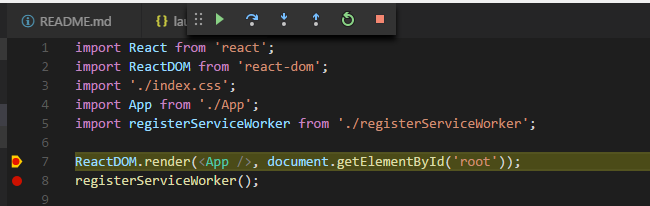
2. WebStorm + JetBrains IDE Support(略)
(5)git commit前代码格式化
1. 运行 npm install --save husky lint-staged prettier
2. package.json中scripts属性添加 "precommit": "lint-staged"
3. package.json中添加属性lint-staged
"lint-staged":{

    "src/**/*.{js,jsx,json,css}": [

      "prettier --single-quote --write",

      "git add"

    ]

  }
(6)组件,多使用export default component, import component from './component'
(7)建议各个组件有自己的一套css,尽量不复用(Generally, we recommend that you don’t reuse the same CSS classes across different components.)
(8)添加图像、字体、文件
webpack在build过程中会根据静态资源内容hash,之后重命名静态资源,避免浏览器缓存问题。可以类似import组件的方式import静态资源。
import React from 'react';

import logo from './logo.png'; // Tell Webpack this JS file uses this image

console.log(logo); // /logo.84287d09.png

function Header() {

  // Import result is the URL of your image

  return <img src={logo} alt="Logo" />;

}

export default Header;
.Logo {

  background-image: url(./logo.png);

}
(9)`public`文件夹
该文件夹中的内容不会被webpack处理,且相互之间访问需使用前缀PUBLIC_URL。
<link rel="shortcut icon" href="%PUBLIC_URL%/favicon.ico">
(10)使用全局变量
const $ = window.$;
(11)使用Bootstrap
npm install --save react-bootstrap bootstrap@3
react-bootstrap中并没有包含bootstrap的css,因此也需要install bootstrap
在src/index.js中,import bootstrap.css
import 'bootstrap/dist/css/bootstrap.css';

import 'bootstrap/dist/css/bootstrap-theme.css';

// Put any other imports below so that CSS from your

// components takes precedence over default styles.
接下来在组件中import bootstrap的组件
import { Navbar, Jumbotron, Button } from 'react-bootstrap';
(12)静态类型检查工具 - Flow
与create-react-app集成步骤:
1. Run `npm install --save flow-bin` (or `yarn add flow-bin`).

2. Add `"flow": "flow"` to the `scripts` section of your `package.json`.

3. Run `npm run flow init` (or `yarn flow init`) to create a [`.flowconfig` file] in the root directory.

4. Add `// @flow` to any files you want to type check (for example, to `src/App.js`).

then run `npm run flow` (or `yarn flow`) to check the files for type errors.
(13)环境变量
1. 在create-react-app中,除了内置的环境变量,如NODE_ENV、PUBLIC_URL外,其余环境变量需要用REACT_APP_作为前缀
2. 在定义了环境变量后,需要重新build才能生效
3. js中访问环境变量,加前缀process.env.
REACT_APP_SECRET_CODE -> process.env.REACT_APP_SECRET_CODE
4. 在.env文件中,定义环境变量
在项目根目录下创建.env文件,定义环境变量
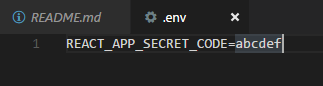
此外,还有其他env文件,比如.env.local,优先级如下:
* `npm start`: `.env.development.local` > `.env.development` > `.env.local` > `.env`

* `npm run build`: `.env.production.local` > `.env.production` > `.env.local` > `.env`
* `npm test`: `.env.test.local` > `.env.test` > `.env`
***********
(14)通过ajax获取数据
React并没有规定如何获取数据,但通常可以使用全局函数fetch()发送ajax请求,解析返回的Promise对象。
(15)开发环境中与后台API整合
目前在各种框架下的前端开发,都会使用webpack, express等作为类似server,占据端口,提供服务,但是后台api的开发与测试也同样需要占据端口。虽然端口各有所用,但是习 惯传统开发的人,不免觉得这样做完全是资源的浪费,毕竟传统开发方式只用一个端口就ok了。
从react-scripts@0.2.3版本开始,create-react-app提供了proxy字段,用于设置请求后台api时所用到的host和端口。
package.json
"proxy": "http://localhost:4000",
注意点:
1. proxy字段仅在开发过程中起作用(npm start)
2. 请求头中accept=text/html将被忽略掉
3. 可以具体配置proxy增加灵活性
同时,可以配置websocket和https的代理
配置https代理:(当api server提供https服务时)
Windows:
set HTTPS=true&&npm start
Linux & macOS
HTTPS=true npm start
(16)build后包大小分析
使用source-map-explorer ,步骤如下:
1. install source-map-explorer
npm install --save source-map-explorer
2. 在package.json中的scripts中添加:
"analyze": "source-map-explorer build/static/js/main.*",
3. 运行命令
npm run build

npm run analyze
Done!
Create React App的更多相关文章
- tap news:week5 0.0 create react app
参考https://blog.csdn.net/qtfying/article/details/78665664 先创建文件夹 安装create react app 这个脚手架(facebook官方提 ...
- 使用create react app教程
This project was bootstrapped with Create React App. Below you will find some information on how to ...
- 如何扩展 Create React App 的 Webpack 配置
如何扩展 Create React App 的 Webpack 配置 原文地址https://zhaozhiming.github.io/blog/2018/01/08/create-react-a ...
- 深入 Create React App 核心概念
本文差点难产而死.因为总结的过程中,多次怀疑本文是对官方文档的直接翻译和简单诺列:同时官方文档很全面,全范围的介绍无疑加深了写作的心智负担.但在最终的梳理中,发现走出了一条与众不同的路,于是坚持分享出 ...
- 在 .NET Core 5 中集成 Create React app
翻译自 Camilo Reyes 2021年2月22日的文章 <Integrate Create React app with .NET Core 5> [1] Camilo Reyes ...
- Create React App 安装less 报错
执行npm run eject 暴露模块 安装 npm i less less-loader -D 1.打开 react app 的 webpack.config.js const sassRege ...
- [React] Use the Fragment Short Syntax in Create React App 2.0
create-react-app version 2.0 added a lot of new features. One of the new features is upgrading to Ba ...
- [React] {svg, css module, sass} support in Create React App 2.0
create-react-app version 2.0 added a lot of new features. One of the new features is added the svgr ...
- create react app 项目部署在Spring(Tomcat)项目中
网上看了许多,大多数都是nginx做成静态项目,但是这样局限性太多,与Web项目相比许多服务端想做的验证都很麻烦,于是开始了艰难的探索之路,终于在不经意间试出来了,一把辛酸... 正常的打包就不说了. ...
随机推荐
- linux中,在在shadowsoks下怎么更新软件
在shadowsoks下怎么更新软件 先描述一下我的情况.我们学校不给大一开通校园网,我自己租用了***的vps服务器,搭建shadowsocks,(使用ipv6地址才能连接),开始了自己悲催的上网生 ...
- 【bzoj2957】【楼房重建】另类的线段树(浅尝ACM-H)
[pixiv] https://www.pixiv.net/member_illust.php?mode=medium&illust_id=62609346 向大(hei)佬(e)势力学(di ...
- SQL表操作习题6 36~45题
- django发送邮箱
要用django发送邮箱之前需要在setting中配置一下 EMAIL_HOST = 'smtp.qq.com' EMAIL_PORT = 25 EMAIL_HOST_USER = 'xxx@qq.c ...
- CentOS6.4 安装 codeblocks-12.11
FROM: http://blog.csdn.net/theegao/article/details/8750239 一.下载 1. codeblocks-12.11-1.el6.x86_64.t ...
- 2017.8.23 postgresql的外键
1.增加/删除外键的语法 ALTER TABLE t_permission ADD CONSTRAINT fkey FOREIGN KEY (fd_resid) REFERENCES t_resour ...
- 开源jabber(XMPP)架设内部即时通讯服务的解决方案
Jabber 是著名的即时通讯服务服务器,它是一个自由开源软件,能让用户自己架即时通讯服务器,可以在Internet上应用,也可以在局域网中应用. XMPP(可扩展消息处理现场协议)是基于可扩展 ...
- 资深程序员教你如何实现API自动化测试平台!附项目源码!
原文链接: 1.平时测试接口,总是现写代码,对测试用例的管理,以及测试报告的管理持久化做的不够, 2.工作中移动端开发和后端开发总是不能并行进行,需要一个mock的依赖来让他们并行开发. 3.同时让自 ...
- _.pick lodash
http://lodash.think2011.net/pick _.pick(object, [props]) 创建一个从 object 中选中的属性的对象. 参数 object (Object) ...
- Elasticsearch 2014年10月简报
1. Elasticsearch Updates 1.1 公布了Kibana 4 Beta 1 和Beta 1.1 Kibana 4不管是在界面的布局,使用配置方法,还是底层绘制图表的方式都与Kiba ...