
springmvc小结(下)
1.@ModelAttribute
2.多个对象的传递
  //自定义属性注解,用于请求参数转移到对应的对象参数中去

     //把一dog.开头的参数封装到dog中

     @InitBinder("dog")

     public void initBing(WebDataBinder binder){

           binder.setFieldDefaultPrefix("dog.");

     }

     @InitBinder("cat")

     public void initBing1(WebDataBinder binder){

           binder.setFieldDefaultPrefix("cat.");

     }

     @RequestMapping("/testmany")

     public String test(Cat cat,Dog dog){

           System.out.println(cat);

           System.out.println(dog);

           return null;

     }
   <form method="post" action="model/testmany">

      catName:<input type="text" name="cat.name"><br/>

      catAge:<input type="text" name="cat.age"><br/>

      DogName:<input type="text" name="dog.name"><br/>

      DogAge:<input type="text" name="dog.age"><br/>

      <input type="submit" value="submit">

   </form>
处理不同的数据可以传递到不同的pojo实现类中。
3.处理json
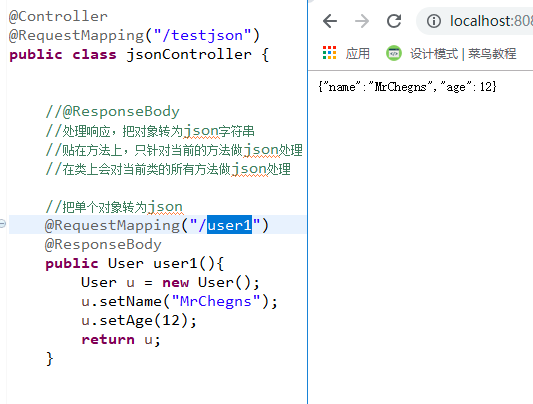
①.单个对象
     //@ResponseBody

     //处理响应,把对象转为json字符串

     //贴在方法上,只针对当前的方法做json处理

     //在类上会对当前类的所有方法做json处理

     //把单个对象转为json

     @RequestMapping("/user1")

     @ResponseBody

     public User user1(){

           User u = new User();

           u.setName("MrChegns");

           u.setAge(12);

           return u;

     }
②.多个对象
     //多个对象

     @RequestMapping("/user2")

     @ResponseBody

     public List<User> user2(){

           List<User> users = new ArrayList<>();

           User u1 = new User("MrChengs",12);

           User u2 = new User("MrChengs",13);

           users.add(u1);

           users.add(u2);

           return users;

     }

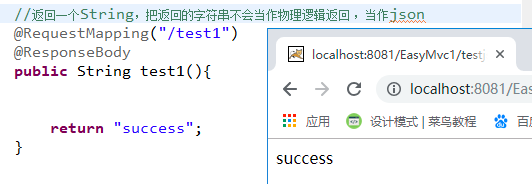
注意://返回一个String,把返回的字符串不会当作物理逻辑返回 ,当作json
     @RequestMapping(value="/test1",produces=MediaType.APPLICATION_JSON_VALUE)

     @ResponseBody

     public String test1(){

           return "success“;

     }
4.日期处理
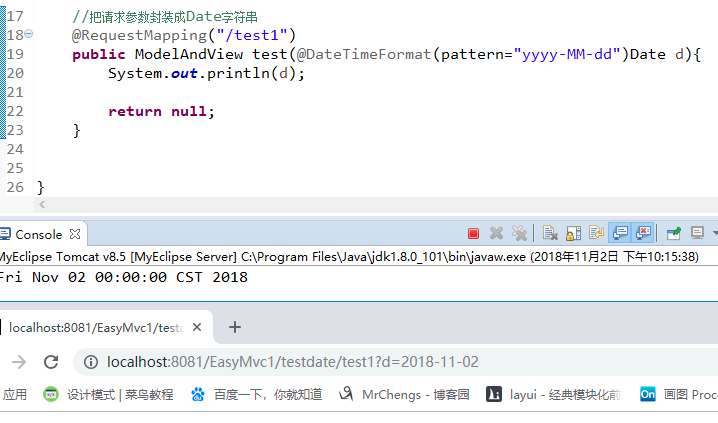
//把请求参数封装成Date字符串

     //前台向后台传数据

     @RequestMapping("/test1")

     public ModelAndView  test(@DateTimeFormat(pattern="yyyy-MM-dd")Date d){

           System.out.println(d);

           return null;

     }
time时的Date类型:
    @InitBinder

     public void initBind(WebDataBinder binder){

           SimpleDateFormat sdf = new SimpleDateFormat();

           sdf.applyPattern("yyyy-MM-dd");

           binder.registerCustomEditor(java.util.Date.class, new  CustomDateEditor(sdf, true));

     }

     @RequestMapping("/test2")

     public ModelAndView dates(User u){

           System.out.println(u);

           return null;

     }

@ControllerAdvice

public class DateformateConfig {

     @InitBinder

     public void initBind(WebDataBinder binder){

           SimpleDateFormat sdf = new SimpleDateFormat();

           sdf.applyPattern("yyyy-MM-dd");

           binder.registerCustomEditor(java.util.Date.class, new  CustomDateEditor(sdf, true));

     }

}
@RequestMapping("/test2")

     public ModelAndView dates(User u){

           System.out.println(u);

           return null;

     }
得到结果不变
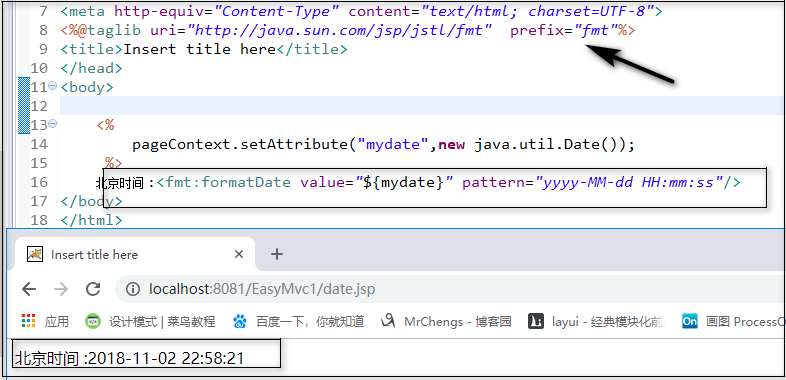
jsp页面处理:

后台向前台
public class User {

     private String name;

     private int age;

     //东八区

     @JsonFormat(pattern="yyyy-MM-dd  HH:mm:ss",timezone="GMT+8")

     private Date time;

     ....

}
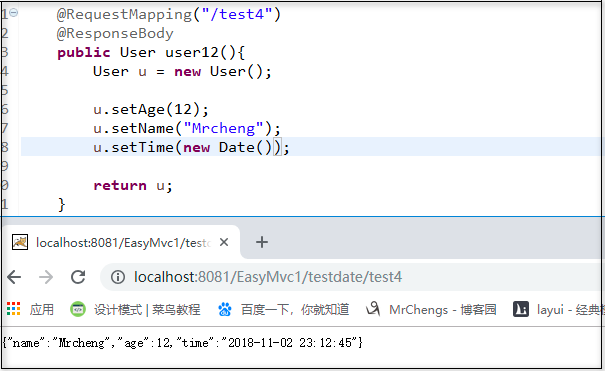
@RequestMapping("/test4")

     @ResponseBody

     public User user12(){

           User u = new User();

           u.setAge(12);

           u.setName("Mrcheng");

           u.setTime(new Date());

           return u;

     }
5.拦截器
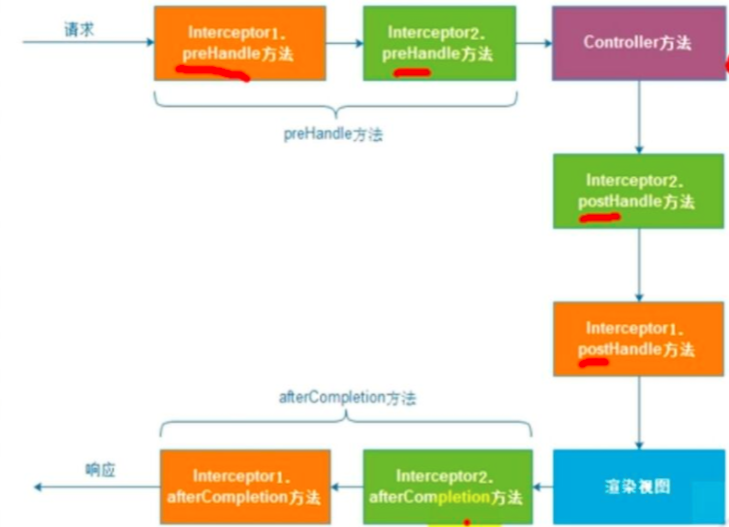
配置
<!-- 拦截器 -->

<mvc:interceptors>

     <mvc:interceptor>

           <!-- 对那些资源及进行拦截 -->

           <mvc:mapping path="/**"/>

           <!-- 派出不需要被拦截的 -->

           <mvc:exclude-mapping path="login"/>

           <bean  class="com.MrChengs.interceptor.LoginCheckInterceptor" />

     </mvc:interceptor>

</mvc:interceptors>
实现类登陆拦截
public class LoginCheckInterceptor implements  HandlerInterceptor{

     //登陆判断

     @Override

     public boolean preHandle(HttpServletRequest request,  HttpServletResponse response, Object handler)

                throws Exception {

                if(request.getSession() == null){

                     response.sendRedirect(request.getContextPath()+ "/login.jsp");

                     return false;

                }

           return true;

     }

     @Override

     public void postHandle(HttpServletRequest request,  HttpServletResponse response, Object handler,

                ModelAndView modelAndView) throws Exception {

     }

     @Override

     public void afterCompletion(HttpServletRequest request,  HttpServletResponse response, Object handler, Exception ex)

                throws Exception {

     }

}
6.异常处理:
<!-- 配置异常处理器 -->

<bean  class="org.springframework.web.servlet.handler.SimpleMappingExceptionResolver">

    //设置错误的默认视图

     <property name="defaultErrorView"  value="error/erroes"></property>

</bean>
错误的提示页面:
<%@ page language="java" contentType="text/html; charset=UTF-8"

    pageEncoding="UTF-8" isErrorPage="true"%>

<!DOCTYPE html PUBLIC "-//W3C//DTD HTML 4.01 Transitional//EN"  "http://www.w3.org/TR/html4/loose.dtd">

<html>

<head>

<meta http-equiv="Content-Type" content="text/html;  charset=UTF-8">

<title>Insert title here</title>

</head>

<body>

error:<%=exception.getMessage() %>

</body>

</html>

错误页面获取异常信息的变量名称
<property name="exceptionAttribute" value="qqq"></property>
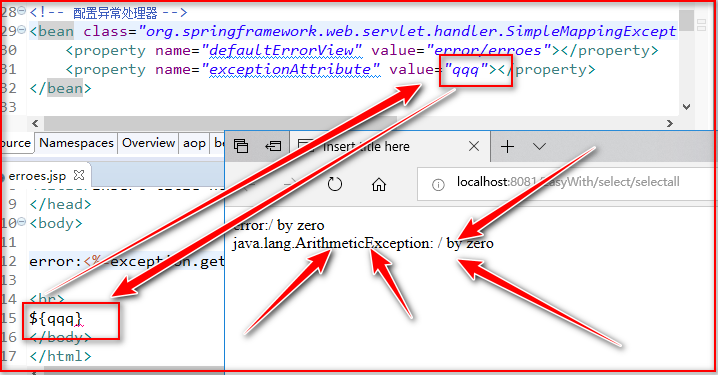
根据不同类型的异常配置不同的异常
<!-- 根据不同的异常类型,跳转到不同的页面 -->

     <property name="exceptionMappings">

     </property>
7.数据校验
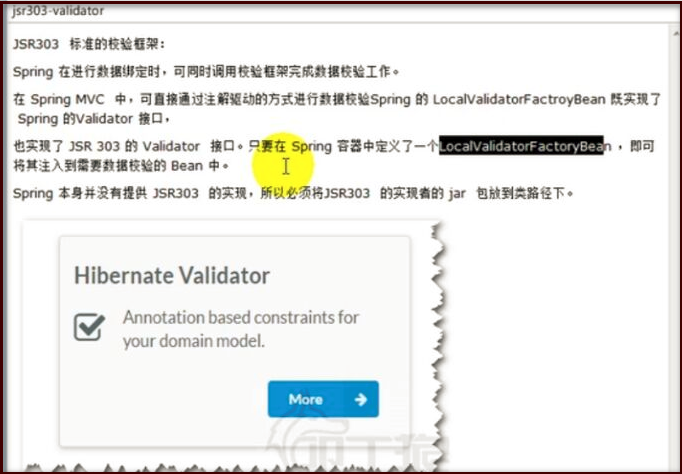
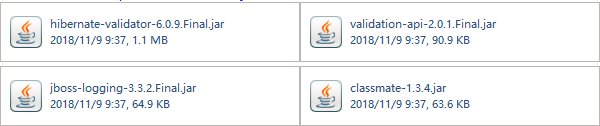
springmvc.xml中
<!-- 数据校验 -->

<bean  class="org.springframework.validation.beanvalidation.LocalValidatorFactoryBean"></bean>
pojo中
public class User {

     private int id;

     @NotNull(message="username 不可以为空")

     private String username;

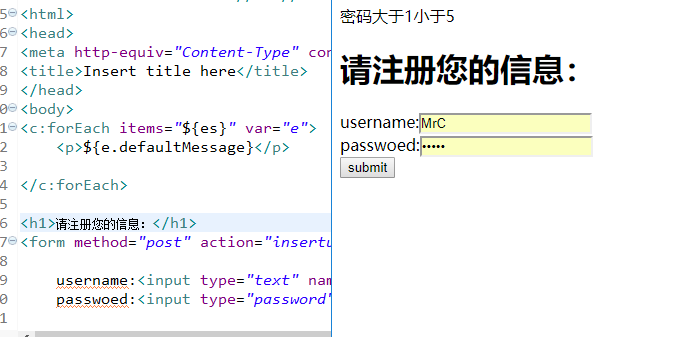
     @Size(max=5,min=1,message="密码大于1小于5")

     private String password;
...
}
BindingResult 必须在 @Valid之后
@RequestMapping("/insertuser")

     public String Users(@Valid User user,BindingResult  bindingResult,Model model) throws Exception{

           List<ObjectError> es = bindingResult.getAllErrors();

           if(es.size() > 0){

                model.addAttribute("es", es);

                return "/insert";

           }

           System.out.println("hellouser");

           System.out.println(user);

           UserMapper um = (UserMapper)  getContext().getBean("userMapper");

           um.addUser(user);

           return "redirect:/select/selectall";

     }
jsp页面上
<c:forEach items="${es}" var="e">

     <p>${e.defaultMessage}</p>

</c:forEach>
更多的可以从参考网上的更多教程.......
8.文件上传

<!-- 文件上传解析器 -->

<bean id="multipartResolver"  class="org.springframework.web.multipart.commons.CommonsMultipartResolver">

     <property name="maxUploadSize" value="1048000"></property>

</bean>
jsp页面
<form action="upload" method="post"  enctype="multipart/form-data">

     name:<input type="text" name="username">

     file:<input type="file" name="pic" >

     <input type="submit" value="submit">

</form>
controller
@Controller

public class FileUpLoad {

     @Autowired

     private ServletContext servletContext;

     @RequestMapping("/upload")

     public ModelAndView upload(User user,MultipartFile pic)  throws IOException{

           System.out.println(user);

           String fileName = pic.getOriginalFilename();

           System.out.println(fileName);

           String dir = servletContext.getRealPath("/photo");

           Files.copy(pic.getInputStream(),Paths.get(dir,  fileName));

           return null;

     }

}
两个同名pic位置
基本上总结到此结束了.....
springmvc小结(下)的更多相关文章
- springMVC框架下JQuery传递并解析Json数据
springMVC框架下JQuery传递并解析Json数据
- springmvc框架下ajax请求传参数中文乱码解决
springmvc框架下jsp界面通过ajax请求后台数据,传递中文参数到后台显示乱码 解决方法:js代码 运用encodeURI处理两次 /* *掩码处理 */ function maskWord( ...
- (转)springMVC框架下JQuery传递并解析Json数据
springMVC框架下JQuery传递并解析Json数据 json作为一种轻量级的数据交换格式,在前后台数据交换中占据着非常重要的地位.Json的语法非常简单,采用的是键值对表示形式.JSON 可以 ...
- SpringMvc架构下css、js、jpg加载失败问题
SpringMvc架构下css.js.jpg加载失败问题 springMvc搭建成功后,页面出现一些错误,jsp.js等静态资源加载失败.导致页面没有显示任何样式以及 此处原因很简单,是因为相对路径在 ...
- 使用Javamelody验证struts-spring框架与springMVC框架下action的訪问效率
在前文中我提到了关于为何要使用springMVC的问题,当中一点是使用springMVC比起原先的struts+spring框架在效率上是有优势的.为了验证这个问题,我做了两个Demo来验证究竟是不是 ...
- 微信被动回复用户消息-文本消息-springmvc环境下自动生成xml
微信被动回复用户消息-文本消息-springmvc环境下自动生成xml springmvc - 大牛! private Object subscribeMessage(Scan scan) { Sca ...
- springmvc模式下的上传和下载
接触了springmvc模式后,对上一次的上传与下载进行优化, 上次请看这里. 此处上传的功能依旧是采用表格上传.文件格式依旧是 <form action="${pageContext ...
- SpringMVC框架下的异常处理
在eclipse的javaEE环境下:导包.... 1. 在 @ExceptionHandler 方法的入参中可以加入 Exception 类型的参数, 该参数即对应发生的异常对象 2. @Excep ...
- SpringMVC框架下的拦截器
在eclipse的javaEE环境下:导包.... web.xml文件中的配置: <?xml version="1.0" encoding="UTF-8" ...
随机推荐
- [转]微信小程序登录数据解密以及状态维持
本文转自:http://www.cnblogs.com/cheesebar/p/6689326.html 学习过小程序的朋友应该知道,在小程序中是不支持cookie的,借助小程序中的缓存我们也可以存储 ...
- CSS3——transform2D的应用
前言: 关于CSS3,我想最让人感到有意思的就是2D和3D的技术,这让我们的网页立马丰富起来,可以让我们完成一些很酷很炫的效果,比如旋转木马.经过一段时间的学习,让我对CSS3有了更近一步的了解,在此 ...
- Bookstrap4 学习(一)
容器 container 是最基本的lagyout 元素, 并且当使用默认的Grid 系统时, containers 是必须的. <div class="container" ...
- python中循环删除list和dict类型注意事项
列表和字典在循环操作(增删)时,其长度会改变 # 删除 li = [11, 22, 33, 44, 'rock']中索引为单数的元素 # 方法一 del li[1::2] print(li) # [1 ...
- IO流之打印流
打印流的概述(只有输出就是只与数据目的有关,不会抛出IO异常) 打印流添加输出数据的功能,使它们能够方便地打印各种数据值表示形式. 打印流根据流的分类: l 字节打印流 PrintStream l ...
- C#打印代码运行时间
使用以下方法可以准确的记录代码运行的耗时. System.Diagnostics.Stopwatch stopwatch = new Stopwatch(); stopwatch.Start(); / ...
- WPF中使用定时器 DispatcherTimer 做TCP连接中的心跳 HeartBeat
开发过程中经常遇到定时触发的需求,如:TCP/IP连接中,使用心跳包保持连接或检测连接是否已经中断. WPF中有多种定时器: 1.using System.Windows.Threading; 代码如 ...
- 云栖神侠传—阿里云数据库专家德歌告诉你PostgreSQL的那些事
什么是云栖神侠传: 云栖社区(http://yq.aliyun.com/?utm_source=yqdg),是阿里云面向开发者群体的开放型社区.在云栖社区中,活跃着许多阿里技术大牛,他们在自己的技术领 ...
- Spring boot 使用WebAsyncTask处理异步任务
上文介绍了基于 @Async 注解的 异步调用编程,本文将继续引入 Spring Boot 的 WebAsyncTask 进行更灵活异步任务处理,包括 异步回调,超时处理 和 异常处理. 正文 1. ...
- 精准控制PWM脉冲的频率和数量
在一些项目中,我们经常要控制PWM脉冲的频率和数量,比如步进电机的控制等,下面分享一个程序是关于这方面的,程序的思想就是通过STM32的定时器来输出PWM波,并开启定时器中断,在中断里面计数脉冲的数量 ...