
pdfminer实现pdf布局分析 python (pdfminer realize layout analysis with PDF python)
使用pdfminer实现pdf文件的布局分析 python
参考资料:
https://github.com/euske/pdfminer
import cv2

from pdfminer.pdfparser import PDFParser

from pdfminer.pdfdocument import PDFDocument

from pdfminer.pdfpage import PDFPage

from pdfminer.pdfpage import PDFTextExtractionNotAllowed

from pdfminer.pdfinterp import PDFResourceManager

from pdfminer.pdfinterp import PDFPageInterpreter

from pdfminer.pdfdevice import PDFDevice

from pdfminer.layout import LAParams

from pdfminer.converter import PDFPageAggregator

import pdfminer

import numpy as np

import matplotlib.pyplot as plt

from pdf2image import convert_from_path

image_path = 'literature.pdf'

layout_type = ['LTTextBox', 'LTFigure', 'LTImage', 'LTCurve', 'LTRect']

# Text:红色, Figure:绿色, Image:蓝色, Curve:黄色, Rect:紫色

color = [(255, 0, 0), (0, 255, 0), (0, 0, 255), (255, 255, 0), (160, 32, 240)]

draw_color = dict(zip(layout_type, color))

def parse_obj(lt_objs):

    boxs = {x: [] for x in layout_type}

    # loop over the object list

    for obj in lt_objs:

        if isinstance(obj, pdfminer.layout.LTTextBoxHorizontal):

            boxs['LTTextBox'].append(obj.bbox)

        elif isinstance(obj, pdfminer.layout.LTFigure):

            boxs['LTFigure'].append(obj.bbox)

        elif isinstance(obj, pdfminer.layout.LTImage):

            boxs['LTImage'].append(obj.bbox)

        elif isinstance(obj, pdfminer.layout.LTCurve):

            boxs['LTCurve'].append(obj.bbox)

        elif isinstance(obj, pdfminer.layout.LTRect):

            boxs['LTRect'].append(obj.bbox)

        else:

            raise

    return boxs

# Open a PDF file.

fp = open(image_path, 'rb')

# Create a PDF parser object associated with the file object.

parser = PDFParser(fp)

# Create a PDF document object that stores the document structure.

# Supply the password for initialization.

password = '123'

document = PDFDocument(parser, password)

# Check if the document allows text extraction. If not, abort.

if not document.is_extractable:

    raise PDFTextExtractionNotAllowed

# Create a PDF resource manager object that stores shared resources.

rsrcmgr = PDFResourceManager()

# Set parameters for analysis.

laparams = LAParams()

# Create a PDF page aggregator object.

device = PDFPageAggregator(rsrcmgr, laparams=laparams)

interpreter = PDFPageInterpreter(rsrcmgr, device)

page_boxs = []

for page in PDFPage.create_pages(document):

    interpreter.process_page(page)

    # receive the LTPage object for the page.

    layout = device.get_result()

    # extract text from this object

    boxs = parse_obj(layout._objs)

    page_sized = tuple([round(i) for i in layout.bbox])

    page_boxs.append((page_sized, boxs))

    pass

image = convert_from_path(image_path)

assert len(image) == len(page_boxs), "The number of boxes doesn't match the number of pictures"

for i in range(len(image)):

    # 得到这一页图片

    image_pil = image[i]

    # 把这一页的图片格式转成numpy类型

    image_numpy = np.array(image_pil)

    # 得到这一页图片德国高度,为了之后得到实际的box

    page_boxs_height = page_boxs[i][0][3]

    print(page_boxs[i][1])

    # 遍历这一页的框

    for key, values in page_boxs[i][1].items():

        # 把实际的图片大小resize到页面的大小

        image_numpy = cv2.resize(image_numpy, page_boxs[i][0][2:4], interpolation=cv2.INTER_AREA)

        for value in values:

            # The y-coordinates are given as the distance from the bottom of the page.

            real_box = (value[0], page_boxs_height-value[3], value[2], page_boxs_height-value[1])

            real_box_integer = tuple([round(jj) for jj in real_box])

            # 画图

            cv2.rectangle(image_numpy, real_box_integer[:2], real_box_integer[2:], draw_color[key], 2)

    plt.figure(), plt.imshow(image_numpy)

    plt.show()
结果如下:

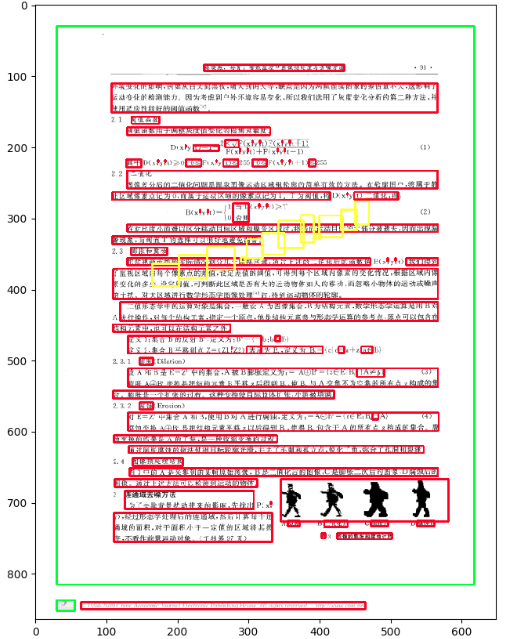

此代码只涉及到PDF文件的布局分析,没有涉及到PDF转成可编辑文档。供大家参考,有问题希望大家多多指正
pdfminer实现pdf布局分析 python (pdfminer realize layout analysis with PDF python)的更多相关文章
- PDF格式分析
系列文章是csdn作者'秋风之刀'写的,我只是把目录列出来而已,感谢作者辛苦付出. PDF格式分析(一)简介 PDF格式分析(二)语法之对象 PDF格式分析(三)语法之Filter PDF格式分析(四 ...
- Python:解析PDF文本及表格——pdfminer、tabula、pdfplumber 的用法及对比
pdf 是个异常坑爹的东西,有很多处理 pdf 的库,但是没有完美的. 一.pdfminer3k pdfminer3k 是 pdfminer 的 python3 版本,主要用于读取 pdf 中的文本. ...
- 从PDF中提取信息----PDFMiner
今天由于某种原因需要将pdf中的文本提取出来,就去搜了下资料,发现PDFMiner是针对 内容提取的,虽然最后发现pdf里面的文本全都是图片,就没整成功,不过试了个文本可复制的 那种pdf文件,发现还 ...
- Python代码教你批量将PDF转为Word
很多时候在学习时发现许多文档都是PDF格式,PDF格式却不利于学习使用,因此需要将PDF转换为Word文件,但或许你从网上下载了很多软件,但只能转换前五页(如WPS等),要不就是需要收费,那有没有免费 ...
- JFS 文件系统概述及布局分析
JFS 文件系统概述及布局分析 日志文件系统如何缩短系统重启时间 如果发生系统崩溃,JFS 提供了快速文件系统重启.通过使用数据库日志技术,JFS 能在几秒或几分钟之内把文件系统恢复到一致状态,而非日 ...
- Python核心编程第二版(中文).pdf 目录整理
python核心编程目录 Chapter1:欢迎来到python世界!-页码:7 1.1什么是python 1.2起源 :罗萨姆1989底创建python 1.3特点 1.3.1高级 1.3.2面向 ...
- 基于binlog来分析mysql的行记录修改情况(python脚本分析)
最近写完mysql flashback,突然发现还有有这种使用场景:有些情况下,可能会统计在某个时间段内,MySQL修改了多少数据量?发生了多少事务?主要是哪些表格发生变动?变动的数量是怎 ...
- Python应用——自定义函数:分割PDF文件函数
案例 将一个 pdf 文件按要求分割为几个部分.比如说一个pdf有20页,分成5个pdf文件,每个pdf文件包含4页.设计函数实现? Python代码 from PyPDF2 import PdfFi ...
- 《Python3网络爬虫开发实战》PDF+源代码+《精通Python爬虫框架Scrapy》中英文PDF源代码
下载:https://pan.baidu.com/s/1oejHek3Vmu0ZYvp4w9ZLsw <Python 3网络爬虫开发实战>中文PDF+源代码 下载:https://pan. ...
随机推荐
- sql 中 exists用法
SQL中EXISTS的用法 比如在Northwind数据库中有一个查询为SELECT c.CustomerId,CompanyName FROM Customers cWHERE EXISTS(S ...
- 0-3为变长序列建模modeling variable length sequences
在本节中,我们会讨论序列的长度是变化的,也是一个变量 we would like the length of sequence,n,to alse be a random variable 一个简单的 ...
- 写出高性能SQL语句的十三条法则
1. 首先要搞明白什么叫执行计划? 执行计划是数据库根据SQL语句和相关表的统计信息作出的一个查询方案,这个方案是由查询优化器自动分析产生的,比如一条SQL语句如果用来从一个10万条记录的表中查1条记 ...
- 【MySQL】selectKey获取insert后的自动主键
<insert id="insert" parameterType="cc.mrbird.febs.energy.domain.ChatGroup"> ...
- [CSP-S模拟测试]:联(小清新线段树)
题目描述 由于出题人懒所以没有背景.一个无限长的$01$序列,初始全为$0$,每次选择一个区间$[l,r]$进行操作,有三种操作:$\bullet 1\ l\ r$将$[l,r]$中所有元素变成$1$ ...
- Windows10下安装CentOS7双系统
参考: 参考1 参考2 问题1
- Elasticsearch后台运行步骤
Elasticsearch后台运行步骤 1.cmd 到elasticsearch 中bin目录下 2.elasticsearch-service 出现 3.安装服务 elasticsearch-se ...
- CET-6 分频周计划生词筛选(Week 1)
Week 1 2016.09.03 p17 bias = prejudice / prejudge p18 diminish p19 distinguish/extinguish + majority ...
- 【读书笔记】:MIT线性代数(1):Linear Combinations
1. Linear Combination Two linear operations of vectors: Linear combination: 2.Geometric Explaination ...
- python 装饰器 第二步:扩展函数的功能(不修改原函数)
# 第二步:扩展函数的功能(不能修改原函数) # 用于扩展基本函数的函数 # 把一个函数(eat函数)作为一个整体传给另外一个函数(kuozhan函数) # 这个函数(kuozhan函数)用形参fun ...