
Erlang/Elixir: 使用 OpenCV, Python 搭建图片缩略图服务器
这篇文章是在OSX上测试和运行的的, Ubuntu下的安装和配置请移步到这里
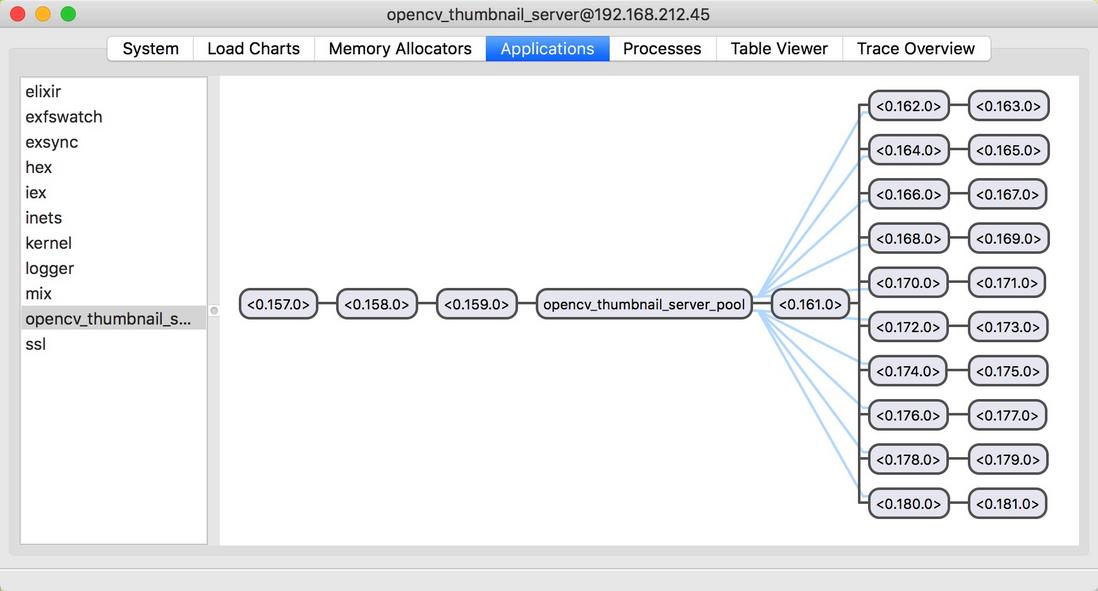
应用程序进程树, 默认 Poolboy 中初始化10个用于处理图片的 Python 工作进程(Worker)
首先安装OpenCV需要的工具包
|
1
2
3
4
5
6
|
ruby -e "$(curl -fsSL https://raw.githubusercontent.com/Homebrew/install/master/install)"
brew install python
brew tap homebrew/science
brew install opencv
sudo pip install numpy
sudo pip install matplotlib
|
使用 Homebrew 的 Python 版本, 而不是 Mac OS X 系统自带的 Python
|
1
|
alias python='/usr/local/bin/python'
|
创建 Elixir 项目
|
1
2
3
4
5
6
7
8
9
10
11
12
13
14
15
16
17
18
19
|
➜ mix new opencv_thumbnail_server --sup
* creating README.md
* creating .gitignore
* creating mix.exs
* creating config
* creating config/config.exs
* creating lib
* creating lib/opencv_thumbnail_server.ex
* creating test
* creating test/test_helper.exs
* creating test/opencv_thumbnail_server_test.exs
Your Mix project was created successfully.
You can use "mix" to compile it, test it, and more:
cd opencv_thumbnail_server
mix test
Run "mix help" for more commands.
|
Elixir 模块
|
1
2
3
4
5
6
7
8
|
require Logger
defmodule OpencvThumbnailServer do
use Application
def start(_type, _args) do
Logger.info "Start opencv thumbnail server"
OpencvThumbnailServer.Supervisor.start_link()
end
end
|
|
1
2
3
4
5
6
7
8
9
10
11
12
13
14
15
16
17
18
|
defmodule OpencvThumbnailServer.Supervisor do
use Supervisor
<a href="http://www.jobbole.com/members/chkconfig">@config</a> Application.get_env :opencv_thumbnail_server, :settings
def start_link() do
Supervisor.start_link(__MODULE__, [], name: {:global,__MODULE__})
end
def init([]) do
pool_options = @config[:poolboy]
{_, name} = pool_options[:name]
children = [
:poolboy.child_spec(name, pool_options, @config[:module_name])
]
supervise(children, strategy: :one_for_all, max_restarts: 1000, max_seconds: 3600)
end
end
|
|
1
2
3
4
5
6
7
8
9
10
11
12
13
14
15
16
17
18
19
20
21
22
23
24
25
26
27
28
29
30
31
32
33
34
35
36
37
38
39
40
41
42
|
defmodule OpencvThumbnailServer.Worker do
use GenServer
<a href="http://www.jobbole.com/members/chkconfig">@config</a> Application.get_env(:opencv_thumbnail_server, :settings)
def start_link(python_module) do
GenServer.start_link(__MODULE__, python_module, [])
end
def call_python(worker, function, args) do
GenServer.call(worker, {:call_python, function, args}, 10_000)
end
def init(python_module) do
IO.puts "Start worker"
{:ok, pid} = :python.start_link([
{:python_path, @config[:python_path]},
{:python, @config[:python]}
])
state = {python_module, pid}
{:ok, state}
end
def handle_call({:call_python, function, args}, _from, state) do
{module, pid} = state
result = :python.call(pid, module, function, args)
reply = {:ok, result}
{:reply, reply, state}
end
def handle_call(_request, _from, state) do
{:stop, :error, :bad_call, state}
end
def handle_info(_msg, {module,py_pid}) do
{:stop, :error, {module,py_pid}}
end
def terminate(_reason, {_, py_pid}) do
:python.stop(py_pid)
:ok
end
end
|
图像处理
获取宽高
|
1
2
3
4
5
6
7
8
9
10
11
12
13
14
15
16
17
18
19
20
21
22
23
24
25
26
27
28
29
30
31
32
33
34
35
36
37
38
39
40
41
42
43
44
45
46
47
48
49
50
51
52
53
54
55
56
57
58
59
60
61
62
63
64
65
66
|
# -*- coding: utf-8 -*-
import urllib2 as urllib
import numpy as np
import cv2
def load_image_url(url):
resp = urllib.urlopen(url)
buf = resp.read()
return buf
def load_image_file(filename):
image = cv2.imdecode(filename, cv2.IMREAD_COLOR)
return image
def get_photo_sizes():
return [
[160, 160],
[320, 320],
[640, 640],
[1060, 1060],
[1280, 1280]
]
def show(buf):
# print buf
# x = cv2.imdecode(image, cv2.IMREAD_COLOR)
# d = cv2.cvtColor(c, cv2.COLOR_RGB2BGR)
np_ndarray = np.fromstring(buf, dtype=np.uint8)
x = cv2.imdecode(np_ndarray, cv2.IMREAD_UNCHANGED)
return cv2.imshow('NBA Image', x)
def write(buf):
nparray = np.fromstring(buf, dtype=np.uint8)
img = cv2.imdecode(nparray, cv2.IMREAD_UNCHANGED)
return cv2.imwrite('/tmp/imwrite.png', img)
# def get_dimension():
# url = 'http://img1.gtimg.com/16/1601/160106/16010642_1200x1000_0.jpg'
# resp = urllib.urlopen(url)
# buf = resp.read()
# x = np.fromstring(buf, dtype=np.uint8)
# img = cv2.imdecode(x, cv2.IMREAD_UNCHANGED)
# # height = np.size(img, 0)
# # width = np.size(img, 1)
# height, width = image.shape[:2]
# return (width, height)
def get_dimension(buffer):
# 把原始的二进制图片数据转换为NpArray
nparray = np.fromstring(buffer, dtype=np.uint8)
# 把 nparray 转换为 opencv 的图像格式
image = cv2.imdecode(nparray, cv2.IMREAD_UNCHANGED)
height, width = image.shape[:2]
return (width, height)
def convert_color():
url = 'http://ww3.sinaimg.cn/mw690/6941baebgw1epzcuv9vmxj20me0hy0u1.jpg'
resp = urllib.urlopen(url)
buf = resp.read()
x = np.fromstring(buf, dtype=np.uint8)
img = cv2.imdecode(x, cv2.IMREAD_UNCHANGED)
if __name__ == '__main__':
get_dimension()
|
在 Erlang 和 Python 之间传输二进制数据
Erlang 的binary()数据类型和 Python 之间的映射关系, 在Python 2.x 中二进制数据类型为 str() 表示, Python 3.x 中为 bytes()
buf = resp.read(), 其中变量 buf 的类型为
在 Elixir 我们看的如下的值
Python
|
1
2
3
|
{:ok, <<255, 216, 255, 224, 0, 16, 74, 70, 73, 70, 0, 1, 1, 1, 0, 72,
0, 72, 0, 0, 255, 219, 0, 67, 0, 8, 6, 6, 7, 6, 5, 8, 7, 7, 7,
9, 9, 8, 10, 12, 20, 13, 12, 11, 11, 12, 25, 18, 19, ...>>}
|
调用 Python 函数
|
1
2
3
|
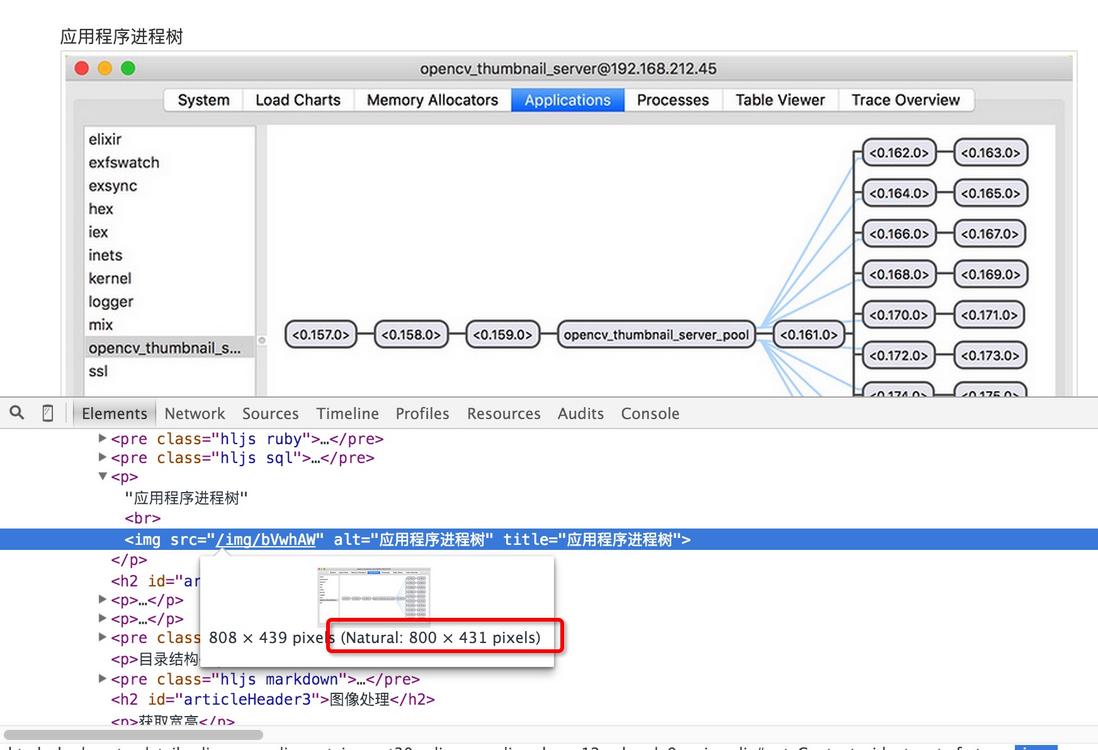
{:ok, data} = OpencvThumbnailServer.Api.load_image_url("https://segmentfault.com/img/bVwhAW")
OpencvThumbnailServer.Api.get_dimension(data)
{:ok, {800, 431}}
|
创建 Python 模块
之前的 Python 图像处理模块可以组织到一个项目中单独维护. 这里使用工具 cookiecutter创建 Python 一个基本的项目骨架, 用于实现缩略图的功能
cookiecutter 可以通过多种方式安装, 包括pip, easy_install, conda, brew 厦门电动叉车
|
1
2
3
4
|
pip install cookiecutter
easy_install cookiecutter
conda install -c https://conda.binstar.org/pydanny cookiecutter
brew install cookiecutter(Mac OS X)
|
目录结构
|
1
2
3
4
5
6
7
8
9
10
11
12
13
14
15
16
17
18
19
20
21
22
23
24
25
26
27
28
29
30
31
32
33
34
35
36
37
38
39
40
41
42
43
44
45
46
47
48
49
|
➜ opencv_thumbnail git:(master) tree
.
├── AUTHORS.rst
├── CONTRIBUTING.rst
├── HISTORY.rst
├── LICENSE
├── MANIFEST.in
├── Makefile
├── README.rst
├── build
│ ├── bdist.macosx-10.11-x86_64
│ └── lib
│ └── opencv_thumbnail
│ ├── __init__.py
│ └── opencv_thumbnail.py
├── dist
│ └── opencv_thumbnail-0.1.0-py2.7.egg
├── docs
│ ├── Makefile
│ ├── authors.rst
│ ├── conf.py
│ ├── contributing.rst
│ ├── history.rst
│ ├── index.rst
│ ├── installation.rst
│ ├── make.bat
│ ├── readme.rst
│ └── usage.rst
├── opencv_thumbnail
│ ├── __init__.py
│ ├── __init__.pyc
│ ├── opencv_thumbnail.py
│ └── opencv_thumbnail.pyc
├── opencv_thumbnail.egg-info
│ ├── PKG-INFO
│ ├── SOURCES.txt
│ ├── dependency_links.txt
│ ├── not-zip-safe
│ └── top_level.txt
├── requirements_dev.txt
├── setup.cfg
├── setup.py
├── tests
│ ├── __init__.py
│ └── test_opencv_thumbnail.py
├── tox.ini
└── travis_pypi_setup.py
9 directories, 36 files
|
API实现
调用需要从 Poolboy 池中取出一个工作进程, 并调用工作进程的call_python, 进程使用完成后返回 Poolboy 进程池, 这里封装一下以简化调用
|
1
2
3
4
5
6
7
8
9
10
11
12
13
14
15
16
17
|
defmodule OpencvThumbnailServer.Api do
alias OpencvThumbnailServer.Worker
def get_dimension(data) do
worker = :poolboy.checkout(:opencv_thumbnail_server_pool)
{w, h} = Worker.call_python(worker, :get_dimension, [data])
:poolboy.checkin(:opencv_thumbnail_server_pool, worker)
{w, h}
end
def load_image_url(url) do
worker = :poolboy.checkout(:opencv_thumbnail_server_pool)
image_bin = Worker.call_python(worker, :load_image_url, [url])
:poolboy.checkin(:opencv_thumbnail_server_pool, worker)
image_bin
end
end
|
源码
https://github.com/developerworks/opencv_thumbnail_server
参考资料
利用Python和OpenCV将URL直接转换成OpenCV格式
How to read raw png from an array in python opencv?
Install OpenCV for Python on Mac OS X
Installing scikit-image
How can i read an image from an internet url in python cv2 , scikit image and mahotas
Using Elixir, erlport with Python 2.7.9, receiving an arity error
How to read image from in memory buffer (StringIO) or from url with opencv python library
Python OpenCV convert image to byte string?
Erlang/Elixir: 使用 OpenCV, Python 搭建图片缩略图服务器的更多相关文章
- python搭建本地共享文件服务器
1.安装python 去官网下载python最新版,然后安装配置好环境 2.运行命令 在终端上输入以下命令 python3 -m http.server 当你执行完这个命令的时候,你的电脑会监听 80 ...
- Nginx 搭建图片缓存服务器-转
文章:https://waver.me/2019/04/11/Nginx-Cache-Server/ 参考: Nginx 配置详解Nginx 简易教程Nginx 配置总结
- 用C自撸apache简易模块,搭建图片处理服务器。
写C是个撸sir /* ** mod_acthumb.c -- Apache sample acthumb module ** [Autogenerated via ``apxs -n acthumb ...
- 针对于Python的OpenCV环境搭建
OpenCV 依赖 下载OpenCV 配置 总结 给Python搭建opencv的环境还真是略嫌麻烦,于是做下笔记,以备不时之需. OpenCV 依赖 opencv有些依赖,我们必须安装一下,否则接下 ...
- python接收图片变成缩略图
python图像处理库:Pillow初级教程 Image类 Pillow中最重要的类就是Image,该类存在于同名的模块中.可以通过以下几种方式实例化:从文件中读取图片,处理其他图片得到,或者直接创建 ...
- Python cv2 OpenCV 中传统图片格式与 base64 转换
Base64是网络上最常见的用于传输8Bit字节码的编码方式之一,是一种基于64个可打印字符来表示二进制数据的方法.通过http传输图片常常将图片数据转换成base64之后再进行传输. Base64简 ...
- OpenCV环境搭建
前言 我在上本科时候曾经用过opencv,那时候还是1.x版本,还必须在linux下自己编译. 时过境迁,最近突然想起来写个小程序来分析图片,就又想起了opencv.现在已然是2.4的版本. 环境搭建 ...
- OpenCV + Python 人脸检测
必备知识 Haar-like opencv api 读取图片 灰度转换 画图 显示图像 获取人脸识别训练数据 探测人脸 处理人脸探测的结果 实例 图片素材 人脸检测代码 人脸检测结果 总结 下午的时候 ...
- 使用nodejs搭建图片服务器(一)
背景 当我们开发一个Web项目的时候,为了将图片管理与web服务分离开,通常都会搭建一个图片服务器. 之所以选择nodejs是因为使用nodejs来搭建web项目相当简单而且快速,虽然这个图片服务器很 ...
随机推荐
- DataGuard相关视图
1.v$database SELECT name,open_mode,database_role,protection_mode,protection_level FROM v$database; 其 ...
- spring 包的依赖关系
转自:http://www.cnblogs.com/ywlaker/p/6136625.html 很多人都在用spring开发java项目,但是配置maven依赖的时候并不能明确要配置哪些spring ...
- FMDB数据库使用
创建数据库路径 NSString* docsdir = [NSSearchPathForDirectoriesInDomains( NSDocumentDirectory, NSUserDomainM ...
- QueryRunner cannot be resolved to a type:关于包不能正常导入的问题
在操作一个功能模块的时候,出现一个问题: 我原则是按着项目指导一步一步走的,但却出现, QueryRunner cannot be resolved to a type,这个问题应该属于Xxx can ...
- react路由传参
方法1 <刷新页面参数会消失> <Link className="item" to={{pathname:'/order',params:{index :&quo ...
- mariadb或者mysql查看某个库相关的用户授权信息
mariadb或者mysql查看某个库相关的授权信息 SELECT * FROM mysql.Db WHERE Db='DB_NAME';
- 关于iOS启动页launchImage无法显示解决办法
在没有美工的时候,往往项目开发到一半,才拿到icon和launchImage图片,这时在添加对应图片之后发现并没有正常显示,这就蛋疼了,以下列出几种解决方式. 关于设置launchImage: 工程配 ...
- hexo博客更换主题
前边我们已经学会了博客的搭建了,这次我们来看看怎么样让我们的博客更漂亮,更个性化.那就是来更换博客的主题,让我们的博客与众不同起来.我们可以去hexo的主题官网去挑选你自己喜欢的主题风格.里边收录了很 ...
- pip命令安装
sudo su #切换root用户sudo apt-get install python-pip #安装pip sudo apt-get remove python-pip #卸载pippip -- ...
- HyperLedger Fabric 1.4 区块链技术原理(2.2)
区块链从字面上理解:数据记录在区块中,通过一定的算法把区块连成一个链. 区块链通过哈希(Hash)算法,生成一串字符串,保存在区块的头部中,一个的区块通过指向上一个Hash值,加入到区块链 ...