
C# Winform WPF DeskBand 窗体嵌入任务栏,在任务栏显示文字
更新日期:2020年4月23日,更新内容:更新ComImport、DeskBand,解决电脑重启以及explorer.exe重启后,勾选状态没有保存的问题
最近写了个小程序,用于将固态硬盘的写入量等信息显示在任务栏,最开始使用Windows API也可以实现,但是当任务栏托盘增加的时候,会被遮盖,最终采用了DeskBand来实现,填了很多坑。
参考的GitHub地址:https://github.com/dsafa/CSDeskBand
DeskBand相关代码如下:
COLORREF:
// This code snippet was used by SharpShell.

//

using System.Drawing;

using System.Runtime.InteropServices;

namespace MyDiskInfo.Interop

{

    [StructLayout(LayoutKind.Sequential)]

    public struct COLORREF

    {

        public COLORREF(Color color)

        {

            Dword = (uint)color.R + (((uint)color.G) << ) + (((uint)color.B) << );

        }

        public uint Dword;

        public Color Color

        {

            get

            {

                return Color.FromArgb(

                    (int)(0x000000FFU & Dword),

                    (int)(0x0000FF00U & Dword) >> ,

                    (int)(0x00FF0000U & Dword) >> );

            }

        }

    }

}
DESKBANDINFO:
using System;

using System.Runtime.InteropServices;

namespace MyDiskInfo.Interop

{

    /// <summary>

    /// Receives information about a band object. This structure is used with the deprecated IDeskBand::GetBandInfo method.

    /// </summary>

    [StructLayout(LayoutKind.Sequential, CharSet = CharSet.Unicode)]

    public struct DESKBANDINFO

    {

        /// <summary>

        /// Set of flags that determine which members of this structure are being requested.

        /// </summary>

        /// <remarks>

        /// This will be a combination of the following values:

        ///     DBIM_MINSIZE    ptMinSize is being requested.

        ///     DBIM_MAXSIZE    ptMaxSize is being requested.

        ///     DBIM_INTEGRAL   ptIntegral is being requested.

        ///     DBIM_ACTUAL     ptActual is being requested.

        ///     DBIM_TITLE      wszTitle is being requested.

        ///     DBIM_MODEFLAGS  dwModeFlags is being requested.

        ///     DBIM_BKCOLOR    crBkgnd is being requested.

        /// </remarks>

        public DBIM dwMask;

        /// <summary>

        /// Point structure that receives the minimum size of the band object.

        /// The minimum width is placed in the x member and the minimum height

        /// is placed in the y member.

        /// </summary>

        public POINT ptMinSize;

        /// <summary>

        /// Point structure that receives the maximum size of the band object.

        /// The maximum height is placed in the y member and the x member is ignored.

        /// If there is no limit for the maximum height, (LONG)-1 should be used.

        /// </summary>

        public POINT ptMaxSize;

        /// <summary>

        /// Point structure that receives the sizing step value of the band object.

        /// The vertical step value is placed in the y member, and the x member is ignored.

        /// The step value determines in what increments the band will be resized.

        /// </summary>

        /// <remarks>

        /// This member is ignored if dwModeFlags does not contain DBIMF_VARIABLEHEIGHT.

        /// </remarks>

        public POINT ptIntegral;

        /// <summary>

        /// Point structure that receives the ideal size of the band object.

        /// The ideal width is placed in the x member and the ideal height is placed in the y member.

        /// The band container will attempt to use these values, but the band is not guaranteed to be this size.

        /// </summary>

        public POINT ptActual;

        /// <summary>

        /// The title of the band.

        /// </summary>

        [MarshalAs(UnmanagedType.ByValTStr, SizeConst = )]

        public String wszTitle;

        /// <summary>

        /// A value that receives a set of flags that define the mode of operation for the band object.

        /// </summary>

        /// <remarks>

        /// This must be one or a combination of the following values.

        ///     DBIMF_NORMAL

        ///     The band is normal in all respects. The other mode flags modify this flag.

        ///     DBIMF_VARIABLEHEIGHT

        ///     The height of the band object can be changed. The ptIntegral member defines the

        ///     step value by which the band object can be resized.

        ///     DBIMF_DEBOSSED

        ///     The band object is displayed with a sunken appearance.

        ///     DBIMF_BKCOLOR

        ///     The band will be displayed with the background color specified in crBkgnd.

        /// </remarks>

        public DBIMF dwModeFlags;

        /// <summary>

        /// The background color of the band.

        /// </summary>

        /// <remarks>

        /// This member is ignored if dwModeFlags does not contain the DBIMF_BKCOLOR flag.

        /// </remarks>

        public COLORREF crBkgnd;

        /// <summary>

        /// The view mode of the band object. This is one of the following values.

        /// </summary>

        [Flags]

        public enum DBIF

        {

            /// <summary>

            /// Band object is displayed in a horizontal band.

            /// </summary>

            DBIF_VIEWMODE_NORMAL = 0x0000,

            /// <summary>

            /// Band object is displayed in a vertical band.

            /// </summary>

            DBIF_VIEWMODE_VERTICAL = 0x0001,

            /// <summary>

            /// Band object is displayed in a floating band.

            /// </summary>

            DBIF_VIEWMODE_FLOATING = 0x0002,

            /// <summary>

            /// Band object is displayed in a transparent band.

            /// </summary>

            DBIF_VIEWMODE_TRANSPARENT = 0x0004

        }

        /// <summary>

        /// The set of flags that determine which members of this structure are being requested by the caller. One or more of the following values:

        /// </summary>

        [Flags]

        public enum DBIM

        {

            /// <summary>

            /// ptMinSize is requested.

            /// </summary>

            DBIM_MINSIZE = 0x0001,

            /// <summary>

            /// ptMaxSize is requested.

            /// </summary>

            DBIM_MAXSIZE = 0x0002,

            /// <summary>

            /// ptIntegral is requested.

            /// </summary>

            DBIM_INTEGRAL = 0x0004,

            /// <summary>

            /// ptActual is requested.

            /// </summary>

            DBIM_ACTUAL = 0x0008,

            /// <summary>

            /// wszTitle is requested.

            /// </summary>

            DBIM_TITLE = 0x0010,

            /// <summary>

            /// dwModeFlags is requested.

            /// </summary>

            DBIM_MODEFLAGS = 0x0020,

            /// <summary>

            /// crBkgnd is requested.

            /// </summary>

            DBIM_BKCOLOR = 0x0040

        }

        /// <summary>

        /// A value that receives a set of flags that specify the mode of operation for the band object. One or more of the following values:

        /// </summary>

        [Flags]

        public enum DBIMF : uint

        {

            /// <summary>

            /// The band uses default properties. The other mode flags modify this flag.

            /// </summary>

            DBIMF_NORMAL = 0x0000,

            /// <summary>

            /// Windows XP and later: The band object is of a fixed sized and position. With this flag, a sizing grip is not displayed on the band object.

            /// </summary>

            DBIMF_FIXED = 0x0001,

            /// <summary>

            /// DBIMF_FIXEDBMP

            /// Windows XP and later: The band object uses a fixed bitmap (.bmp) file as its background. Note that backgrounds are not supported in all cases, so the bitmap may not be seen even when this flag is set.

            /// </summary>

            DBIMF_FIXEDBMP = 0x0004,

            /// <summary>

            /// The height of the band object can be changed. The ptIntegral member defines the step value by which the band object can be resized.

            /// </summary>

            DBIMF_VARIABLEHEIGHT = 0x0008,

            /// <summary>

            /// Windows XP and later: The band object cannot be removed from the band container.

            /// </summary>

            DBIMF_UNDELETEABLE = 0x0010,

            /// <summary>

            /// The band object is displayed with a sunken appearance.

            /// </summary>

            DBIMF_DEBOSSED = 0x0020,

            /// <summary>

            /// The band is displayed with the background color specified in crBkgnd.

            /// </summary>

            DBIMF_BKCOLOR = 0x0040,

            /// <summary>

            /// Windows XP and later: If the full band object cannot be displayed (that is, the band object is smaller than ptActual, a chevron is shown to indicate that there are more options available. These options are displayed when the chevron is clicked.

            /// </summary>

            DBIMF_USECHEVRON = 0x0080,

            /// <summary>

            /// Windows XP and later: The band object is displayed in a new row in the band container.

            /// </summary>

            DBIMF_BREAK = 0x0100,

            /// <summary>

            /// Windows XP and later: The band object is the first object in the band container.

            /// </summary>

            DBIMF_ADDTOFRONT = 0x0200,

            /// <summary>

            /// Windows XP and later: The band object is displayed in the top row of the band container.

            /// </summary>

            DBIMF_TOPALIGN = 0x0400,

            /// <summary>

            /// Windows Vista and later: No sizing grip is ever displayed to allow the user to move or resize the band object.

            /// </summary>

            DBIMF_NOGRIPPER = 0x0800,

            /// <summary>

            /// Windows Vista and later: A sizing grip that allows the user to move or resize the band object is always shown, even if that band object is the only one in the container.

            /// </summary>

            DBIMF_ALWAYSGRIPPER = 0x1000,

            /// <summary>

            /// Windows Vista and later: The band object should not display margins.

            /// </summary>

            DBIMF_NOMARGINS = 0x2000

        }

    }

}
POINT:
// This code snippet was used by SharpShell.

//

using System.Runtime.InteropServices;

namespace MyDiskInfo.Interop

{

    /// <summary>

    /// The POINT structure defines the x- and y- coordinates of a point.

    /// </summary>

    [StructLayout(LayoutKind.Sequential, CharSet = CharSet.Unicode)]

    public struct POINT

    {

        /// <summary>

        /// The x-coordinate of the point.

        /// </summary>

        public int X;

        /// <summary>

        /// The y-coordinate of the point.

        /// </summary>

        public int Y;

    }

}
RECT:
using System.Runtime.InteropServices;

namespace MyDiskInfo.Interop

{

    [StructLayout(LayoutKind.Sequential)]

    public struct RECT

    {

        public RECT(int left, int top, int right, int bottom)

        {

            this.left = left;

            this.top = top;

            this.right = right;

            this.bottom = bottom;

        }

        public int left, top, right, bottom;

        public int Width()

        {

            return right - left;

        }

        public int Height()

        {

            return bottom - top;

        }

        public void Offset(int x, int y)

        {

            left += x;

            right += x;

            top += y;

            bottom += y;

        }

        public void Set(int left, int top, int right, int bottom)

        {

            this.left = left;

            this.top = top;

            this.right = right;

            this.bottom = bottom;

        }

        public bool IsEmpty()

        {

            return Width() ==  && Height() == ;

        }

    }

}
Attributes:
using System;

using System.Runtime.InteropServices;

namespace MyDiskInfo

{

    /// <summary>

    /// The display name of the extension and the description for the HelpText(displayed in status bar when menu command selected).

    /// </summary>

    [AttributeUsage(AttributeTargets.Class)]

    public class DeskBandInfoAttribute : System.Attribute

    {

        private string _displayName;

        private string _helpText;

        public string DisplayName

        {

            get { return _displayName; }

        }

        public string HelpText

        {

            get { return _helpText; }

        }

        public DeskBandInfoAttribute() { }

        public DeskBandInfoAttribute(string displayName, string helpText)

        {

            _displayName = displayName;

            _helpText = helpText;

        }

    }

}
WinError:
using System;

using System.Collections.Generic;

using System.Linq;

using System.Text;

using System.Threading.Tasks;

namespace MyDiskInfo.Interop

{

    public static class WinError

    {

        public const int S_OK = 0x0000;

        public const int S_FALSE = 0x0001;

        public const int E_FAIL = -;

        public const int E_INVALIDARG = -;

        public const int E_OUTOFMEMORY = -;

        public const int E_UNEXPECTED = unchecked((int)0x8000FFFF);

        public const int E_NOTIMPL = unchecked((int)0x80004001);

        public const int E_NOINTERFACE = unchecked((int)0x80004002);

        public const int STRSAFE_E_INSUFFICIENT_BUFFER = -;

        public const uint SEVERITY_SUCCESS = ;

        public const uint SEVERITY_ERROR = ;

        /// <summary>

        /// Create an HRESULT value from component pieces.

        /// </summary>

        /// <param name="sev">The severity to be used</param>

        /// <param name="fac">The facility to be used</param>

        /// <param name="code">The error number</param>

        /// <returns>A HRESULT constructed from the above 3 values</returns>

        public static int MAKE_HRESULT(uint sev, uint fac, uint code)

        {

            return (int)((sev << ) | (fac << ) | code);

        }

    }

}
ComImport:
using System;

using System.Runtime.InteropServices;

using System.Security;

using System.Windows.Interop;

namespace MyDiskInfo.Interop

{

    /// <summary>

    /// Provides a simple way to support communication between an object and its site in the container.

    /// </summary>

    [ComImport]

    [InterfaceType(ComInterfaceType.InterfaceIsIUnknown)]

    [Guid("FC4801A3-2BA9-11CF-A229-00AA003D7352")]

    public interface IObjectWithSite

    {

        /// <summary>

        /// Enables a container to pass an object a pointer to the interface for its site.

        /// </summary>

        /// <param name="pUnkSite">A pointer to the IUnknown interface pointer of the site managing this object.

        /// If NULL, the object should call Release on any existing site at which point the object no longer knows its site.</param>

        [PreserveSig]

        int SetSite([MarshalAs(UnmanagedType.IUnknown)] object pUnkSite);

        /// <summary>

        /// Retrieves the latest site passed using SetSite.

        /// </summary>

        /// <param name="riid">The IID of the interface pointer that should be returned in ppvSite.</param>

        /// <param name="ppvSite">Address of pointer variable that receives the interface pointer requested in riid.</param>

        [PreserveSig]

        int GetSite(ref Guid riid, [MarshalAs(UnmanagedType.IUnknown)] out IntPtr ppvSite);

    }

    /// <summary>

    /// Exposes a method that is used to communicate focus changes for a user input object contained in the Shell.

    /// </summary>

    [ComImport]

    [InterfaceType(ComInterfaceType.InterfaceIsIUnknown)]

    [Guid("F1DB8392-7331-11D0-8C99-00A0C92DBFE8")]

    public interface IInputObjectSite

    {

        /// <summary>

        /// Informs the browser that the focus has changed.

        /// </summary>

        /// <param name="punkObj">The address of the IUnknown interface of the object gaining or losing the focus.</param>

        /// <param name="fSetFocus">Indicates if the object has gained or lost the focus. If this value is nonzero, the object has gained the focus.

        /// If this value is zero, the object has lost the focus.</param>

        /// <returns>Returns S_OK if the method was successful, or a COM-defined error code otherwise.</returns>

        [PreserveSig]

        Int32 OnFocusChangeIS([MarshalAs(UnmanagedType.IUnknown)] Object punkObj, Int32 fSetFocus);

    }

    /// <summary>

    /// The IOleWindow interface provides methods that allow an application to obtain the handle to the various windows that participate in in-place activation, and also to enter and exit context-sensitive help mode.

    /// </summary>

    [ComImport]

    [InterfaceType(ComInterfaceType.InterfaceIsIUnknown)]

    [Guid("00000114-0000-0000-C000-000000000046")]

    public interface IOleWindow

    {

        /// <summary>

        /// Retrieves a handle to one of the windows participating in in-place activation (frame, document, parent, or in-place object window).

        /// </summary>

        /// <param name="phwnd">A pointer to a variable that receives the window handle.</param>

        /// <returns>This method returns S_OK on success.</returns>

        [PreserveSig]

        int GetWindow(out IntPtr phwnd);

        /// <summary>

        /// Determines whether context-sensitive help mode should be entered during an in-place activation session.

        /// </summary>

        /// <param name="fEnterMode">TRUE if help mode should be entered; FALSE if it should be exited.</param>

        /// <returns>This method returns S_OK if the help mode was entered or exited successfully, depending on the value passed in fEnterMode.</returns>

        [PreserveSig]

        int ContextSensitiveHelp(bool fEnterMode);

    }

    [ComImport]

    [InterfaceType(ComInterfaceType.InterfaceIsIUnknown)]

    [Guid("012DD920-7B26-11D0-8CA9-00A0C92DBFE8")]

    public interface IDockingWindow : IOleWindow

    {

        #region IOleWindow

        [PreserveSig]

        new int GetWindow(out IntPtr phwnd);

        [PreserveSig]

        new int ContextSensitiveHelp(bool fEnterMode);

        #endregion

        /// <summary>

        /// Instructs the docking window object to show or hide itself.

        /// </summary>

        /// <param name="fShow">TRUE if the docking window object should show its window.

        /// FALSE if the docking window object should hide its window and return its border space by calling SetBorderSpaceDW with zero values.</param>

        /// <returns>If this method succeeds, it returns S_OK. Otherwise, it returns an HRESULT error code.</returns>

        [PreserveSig]

        int ShowDW([In] bool fShow);

        /// <summary>

        /// Notifies the docking window object that it is about to be removed from the frame.

        /// The docking window object should save any persistent information at this time.

        /// </summary>

        /// <param name="dwReserved">Reserved. This parameter should always be zero.</param>

        /// <returns>If this method succeeds, it returns S_OK. Otherwise, it returns an HRESULT error code.</returns>

        [PreserveSig]

        int CloseDW([In] UInt32 dwReserved);

        /// <summary>

        /// Notifies the docking window object that the frame's border space has changed.

        /// </summary>

        /// <param name="prcBorder">Pointer to a RECT structure that contains the frame's available border space.</param>

        /// <param name="punkToolbarSite">Pointer to the site's IUnknown interface. The docking window object should call the QueryInterface method for this interface, requesting IID_IDockingWindowSite.

        /// The docking window object then uses that interface to negotiate its border space. It is the docking window object's responsibility to release this interface when it is no longer needed.</param>

        /// <param name="fReserved">Reserved. This parameter should always be zero.</param>

        /// <returns>If this method succeeds, it returns S_OK. Otherwise, it returns an HRESULT error code.</returns>

        [PreserveSig]

        int ResizeBorderDW(RECT prcBorder, [In, MarshalAs(UnmanagedType.IUnknown)] IntPtr punkToolbarSite, bool fReserved);

    }

    /// <summary>

    /// Gets information about a band object.

    /// </summary>

    [ComImport]

    [InterfaceType(ComInterfaceType.InterfaceIsIUnknown)]

    [Guid("EB0FE172-1A3A-11D0-89B3-00A0C90A90AC")]

    public interface IDeskBand : IDockingWindow

    {

        #region IOleWindow

        [PreserveSig]

        new int GetWindow(out IntPtr phwnd);

        [PreserveSig]

        new int ContextSensitiveHelp(bool fEnterMode);

        #endregion

        #region IDockingWindow

        [PreserveSig]

        new int ShowDW([In] bool fShow);

        [PreserveSig]

        new int CloseDW([In] UInt32 dwReserved);

        [PreserveSig]

        new int ResizeBorderDW(RECT prcBorder, [In, MarshalAs(UnmanagedType.IUnknown)] IntPtr punkToolbarSite, bool fReserved);

        #endregion

        /// <summary>

        /// Gets state information for a band object.

        /// </summary>

        /// <param name="dwBandID">The identifier of the band, assigned by the container. The band object can retain this value if it is required.</param>

        /// <param name="dwViewMode">The view mode of the band object. One of the following values: DBIF_VIEWMODE_NORMAL, DBIF_VIEWMODE_VERTICAL, DBIF_VIEWMODE_FLOATING, DBIF_VIEWMODE_TRANSPARENT.</param>

        /// <param name="pdbi">Pointer to a DESKBANDINFO structure that receives the band information for the object. The dwMask member of this structure indicates the specific information that is being requested.</param>

        /// <returns>If this method succeeds, it returns S_OK. Otherwise, it returns an HRESULT error code.</returns>

        [PreserveSig]

        int GetBandInfo(UInt32 dwBandID, DESKBANDINFO.DBIF dwViewMode, ref DESKBANDINFO pdbi);

    }

    /// <summary>

    /// Exposes methods to enable and query translucency effects in a deskband object.

    /// </summary>

    [ComImport]

    [InterfaceType(ComInterfaceType.InterfaceIsIUnknown)]

    [Guid("79D16DE4-ABEE-4021-8D9D-9169B261D657")]

    public interface IDeskBand2 : IDeskBand

    {

        #region IOleWindow

        [PreserveSig]

        new int GetWindow(out IntPtr phwnd);

        [PreserveSig]

        new int ContextSensitiveHelp(bool fEnterMode);

        #endregion

        #region IDockingWindow

        [PreserveSig]

        new int ShowDW([In] bool fShow);

        [PreserveSig]

        new int CloseDW([In] UInt32 dwReserved);

        [PreserveSig]

        new int ResizeBorderDW(RECT prcBorder, [In, MarshalAs(UnmanagedType.IUnknown)] IntPtr punkToolbarSite, bool fReserved);

        #endregion

        #region IDeskBand

        [PreserveSig]

        new int GetBandInfo(UInt32 dwBandID, DESKBANDINFO.DBIF dwViewMode, ref DESKBANDINFO pdbi);

        #endregion

        /// <summary>

        /// Indicates the deskband's ability to be displayed as translucent.

        /// </summary>

        /// <param name="pfCanRenderComposited">When this method returns, contains a BOOL indicating ability.</param>

        /// <returns>If this method succeeds, it returns S_OK. Otherwise, it returns an HRESULT error code.</returns>

        [PreserveSig]

        int CanRenderComposited(out bool pfCanRenderComposited);

        /// <summary>

        /// Sets the composition state.

        /// </summary>

        /// <param name="fCompositionEnabled">TRUE to enable the composition state; otherwise, FALSE.</param>

        /// <returns>If this method succeeds, it returns S_OK. Otherwise, it returns an HRESULT error code.</returns>

        [PreserveSig]

        int SetCompositionState(bool fCompositionEnabled);

        /// <summary>

        /// Gets the composition state.

        /// </summary>

        /// <param name="pfCompositionEnabled">When this method returns, contains a BOOL that indicates state.</param>

        /// <returns>If this method succeeds, it returns S_OK. Otherwise, it returns an HRESULT error code.</returns>

        [PreserveSig]

        int GetCompositionState(out bool pfCompositionEnabled);

    }

    /// <summary>

    /// Enables the saving and loading of objects that use a simple serial stream for their storage needs.

    /// </summary>

    [ComImport]

    [InterfaceType(ComInterfaceType.InterfaceIsIUnknown)]

    [Guid("00000109-0000-0000-C000-000000000046")]

    public interface IPersistStream : IPersist

    {

        #region IPersist Overrides

        /// <summary>

        /// Retrieves the class identifier (CLSID) of the object.

        /// </summary>

        /// <param name="pClassID">A pointer to the location that receives the CLSID on return.

        /// The CLSID is a globally unique identifier (GUID) that uniquely represents an object class that defines the code that can manipulate the object's data.</param>

        /// <returns>

        /// If the method succeeds, the return value is S_OK. Otherwise, it is E_FAIL.

        /// </returns>

        [PreserveSig]

        new int GetClassID(out Guid pClassID);

        #endregion

        /// <summary>

        /// Determines whether this instance is dirty.

        /// </summary>

        /// <returns></returns>

        [PreserveSig]

        int IsDirty();

        /// <summary>

        /// Initializes an object from the stream where it was saved previously.

        /// </summary>

        /// <param name="pStm">An IStream pointer to the stream from which the object should be loaded.</param>

        /// <returns>This method can return the following values. S_OK, E_OUTOFMEMORY, E_FAIL.</returns>

        [PreserveSig]

        int Load([In, MarshalAs(UnmanagedType.Interface)] object pStm);

        /// <summary>

        /// Saves an object to the specified stream.

        /// </summary>

        /// <param name="pStm">An IStream pointer to the stream into which the object should be saved.</param>

        /// <param name="fClearDirty">Indicates whether to clear the dirty flag after the save is complete. If TRUE, the flag should be cleared. If FALSE, the flag should be left unchanged.</param>

        /// <returns>This method can return the following values. S_OK, STG_E_CANTSAVE, STG_E_MEDIUMFULL.</returns>

        [PreserveSig]

        int Save([In, MarshalAs(UnmanagedType.Interface)] IntPtr pStm, bool fClearDirty);

        /// <summary>

        /// Retrieves the size of the stream needed to save the object.

        /// </summary>

        /// <param name="pcbSize">The size in bytes of the stream needed to save this object, in bytes.</param>

        /// <returns>This method returns S_OK to indicate that the size was retrieved successfully.</returns>

        [PreserveSig]

        int GetSizeMax(out ulong pcbSize);

    }

    /// <summary>

    /// Provides the CLSID of an object that can be stored persistently in the system.

    /// Allows the object to specify which object handler to use in the client process, as it is used in the default implementation of marshaling.

    /// </summary>

    [ComImport]

    [InterfaceType(ComInterfaceType.InterfaceIsIUnknown)]

    [Guid("0000010c-0000-0000-c000-000000000046")]

    public interface IPersist

    {

        /// <summary>

        /// Retrieves the class identifier (CLSID) of the object.

        /// </summary>

        /// <param name="pClassID">A pointer to the location that receives the CLSID on return.

        /// The CLSID is a globally unique identifier (GUID) that uniquely represents an object class that defines the code that can manipulate the object's data.</param>

        /// <returns>If the method succeeds, the return value is S_OK. Otherwise, it is E_FAIL.</returns>

        [PreserveSig]

        int GetClassID(out Guid pClassID);

    }

    /// <summary>

    /// Exposes methods that change UI activation and process accelerators for a user input object contained in the Shell.

    /// </summary>

    [ComImport]

    [InterfaceType(ComInterfaceType.InterfaceIsIUnknown)]

    [Guid("68284faa-6a48-11d0-8c78-00c04fd918b4")]

    [SuppressUnmanagedCodeSecurity]

    public interface IInputObject

    {

        /// <summary>

        /// UI-activates or deactivates the object.

        /// </summary>

        /// <param name="fActivate">Indicates if the object is being activated or deactivated. If this value is nonzero, the object is being activated. If this value is zero, the object is being deactivated.</param>

        /// <param name="msg">A pointer to an MSG structure that contains the message that caused the activation change. This value may be NULL.</param>

        /// <returns>If this method succeeds, it returns S_OK. Otherwise, it returns an HRESULT error code.</returns>

        [PreserveSig]

        int UIActivateIO(bool fActivate, ref MSG msg);

        /// <summary>

        /// Determines if one of the object's windows has the keyboard focus.

        /// </summary>

        /// <returns>Returns S_OK if one of the object's windows has the keyboard focus, or S_FALSE otherwise.</returns>

        [PreserveSig]

        int HasFocusIO();

        /// <summary>

        /// Enables the object to process keyboard accelerators.

        /// </summary>

        /// <param name="msg">The address of an MSG structure that contains the keyboard message that is being translated.</param>

        /// <returns>Returns S_OK if the accelerator was translated, or S_FALSE otherwise.</returns>

        [PreserveSig]

        int TranslateAcceleratorIO(ref MSG msg);

    }

}
DeskBand,这里和GitHub上的程序不同的是,DeskBand直接继承的ElementHost类,GitHub上的好像是多例的,我想要的是单例的,所以修改了一下。这里粘的代码是WPF的,如果你想实现Winform的,就让DeskBand继承UserControl,DeskBand代码如下:
// Copyright(c) 2017 Patrick Becker

//

// Visit the Project page for more information.

// https://github.com/patbec/TaskbarSampleExtension

using Microsoft.Win32;

using System;

using System.ComponentModel;

using System.Drawing;

using System.Runtime.InteropServices;

using System.Windows.Forms;

using MyDiskInfo.Interop;

using System.Windows.Forms.Integration;

using Utils;

using System.Threading;

using System.Windows.Interop;

namespace MyDiskInfo

{

    /// <summary>

    /// Basic class for a DeskBand object

    /// </summary>

    /// <example>

    /// [ComVisible(true)]

    /// [Guid("00000000-0000-0000-0000-000000000000")]

    /// [DeskBandInfo("Beispiel Erweiterung", "Diese ist eine Beispiel Erweiterung für die Taskleiste.")]

    /// public class SampleExtension : DeskBand

    /// { /*...*/ }

    /// </example>

    public class DeskBand : ElementHost, IObjectWithSite, IDeskBand2, IPersistStream, IInputObject

    {

        [DllImport("user32.dll", SetLastError = true)]

        public static extern int SetParent(IntPtr hWndChild, IntPtr hWndNewParent);

        private const int S_OK = ;

        private const int E_NOTIMPL = unchecked((int)0x80004001);

        protected IInputObjectSite DeskBandSite;

        public DeskBand()

        {

            InitializeComponent();

        }

        private void InitializeComponent()

        {

            this.Name = "DeskBand";

        }

        #region Properties

        /// <summary>

        /// Title of the band object, displayed by default on the left or top of the object.

        /// </summary>

        [Browsable(true)]

        [DefaultValue("")]

        public String Title { get; set; }

        /// <summary>

        /// Minimum size of the band object. Default value of -1 sets no minimum constraint.

        /// </summary>

        [Browsable(true)]

        [DefaultValue(typeof(Size), "-1,-1")]

        public Size MinSize { get; set; }

        /// <summary>

        /// Maximum size of the band object. Default value of -1 sets no maximum constraint.

        /// </summary>

        [Browsable(true)]

        [DefaultValue(typeof(Size), "-1,-1")]

        public Size MaxSize { get; set; }

        /// <summary>

        /// Minimum vertical size of the band object. Default value of -1 sets no maximum constraint. (Used when the taskbar is aligned vertically.)

        /// </summary>

        [Browsable(true)]

        [DefaultValue(typeof(Size), "-1,-1")]

        public Size MinSizeVertical { get; set; }

        /// <summary>

        /// Says that band object's size must be multiple of this size. Defauilt value of -1 does not set this constraint.

        /// </summary>

        [Browsable(true)]

        [DefaultValue(typeof(Size), "-1,-1")]

        public Size IntegralSize { get; set; }

        #endregion

        #region IObjectWithSite

        public int SetSite([In, MarshalAs(UnmanagedType.IUnknown)] Object pUnkSite)

        {

            try

            {

                if (DeskBandSite != null) Marshal.ReleaseComObject(DeskBandSite);

                if (pUnkSite != null)

                {

                    var oleWindow = (IOleWindow)pUnkSite;

                    IntPtr pHandle = IntPtr.Zero;

                    oleWindow.GetWindow(out pHandle);

                    SetParent(this.Handle, pHandle);

                    DeskBandSite = (IInputObjectSite)pUnkSite;

                    LogUtil.Log("SetSite S_OK");

                    return WinError.S_OK;

                }

                else

                {

                    LogUtil.Log("SetSite E_FAIL");

                    return WinError.E_FAIL;

                }

            }

            catch (Exception ex)

            {

                LogUtil.Error(ex, "SetSite error");

                return WinError.E_FAIL;

            }

        }

        public int GetSite(ref Guid riid, [MarshalAs(UnmanagedType.IUnknown)] out IntPtr ppvSite)

        {

            try

            {

                if (DeskBandSite != null)

                {

                    var pUnknown = Marshal.GetIUnknownForObject(DeskBandSite);

                    var result = Marshal.QueryInterface(pUnknown, ref riid, out ppvSite);

                    Marshal.Release(pUnknown);

                    LogUtil.Log("GetSite " + result);

                    return result;

                }

                else

                {

                    LogUtil.Log("GetSite E_FAIL");

                    ppvSite = IntPtr.Zero;

                    return WinError.E_FAIL;

                }

            }

            catch (Exception ex)

            {

                LogUtil.Error(ex, "GetSite error");

                Thread.Sleep();

                ppvSite = IntPtr.Zero;

                return WinError.E_FAIL;

            }

        }

        #endregion

        #region IDeskBand2

        public virtual int CanRenderComposited(out bool pfCanRenderComposited)

        {

            pfCanRenderComposited = true;

            return S_OK;

        }

        public int SetCompositionState(bool fCompositionEnabled)

        {

            fCompositionEnabled = true;

            return S_OK;

        }

        public int GetCompositionState(out bool pfCompositionEnabled)

        {

            pfCompositionEnabled = false;

            return S_OK;

        }

        public int GetBandInfo(uint dwBandID, DESKBANDINFO.DBIF dwViewMode, ref DESKBANDINFO pdbi)

        {

            if (pdbi.dwMask.HasFlag(DESKBANDINFO.DBIM.DBIM_MINSIZE))

            {

                // Support for a vertical taskbar

                // Most examples have no support for a vertical taskbar. Who in hell uses their taskbar vertically? Me! Very practical on a 21:9 monitor.

                if (dwViewMode.HasFlag(DESKBANDINFO.DBIF.DBIF_VIEWMODE_FLOATING) || dwViewMode.HasFlag(DESKBANDINFO.DBIF.DBIF_VIEWMODE_VERTICAL))

                {

                    pdbi.ptMinSize.Y = this.MinSizeVertical.Width;

                    pdbi.ptMinSize.X = this.MinSizeVertical.Height;

                }

                else

                {

                    pdbi.ptMinSize.X = this.MinSize.Width;

                    pdbi.ptMinSize.Y = this.MinSize.Height;

                }

            }

            if (pdbi.dwMask.HasFlag(DESKBANDINFO.DBIM.DBIM_MAXSIZE))

            {

                if (dwViewMode.HasFlag(DESKBANDINFO.DBIF.DBIF_VIEWMODE_FLOATING) || dwViewMode.HasFlag(DESKBANDINFO.DBIF.DBIF_VIEWMODE_VERTICAL))

                {

                    pdbi.ptMaxSize.Y = this.MaxSize.Width;

                    pdbi.ptMaxSize.X = this.MaxSize.Height;

                }

                else

                {

                    pdbi.ptMaxSize.X = this.MaxSize.Width;

                    pdbi.ptMaxSize.Y = this.MaxSize.Height;

                }

            }

            if (pdbi.dwMask.HasFlag(DESKBANDINFO.DBIM.DBIM_INTEGRAL))

            {

                if (dwViewMode.HasFlag(DESKBANDINFO.DBIF.DBIF_VIEWMODE_FLOATING) || dwViewMode.HasFlag(DESKBANDINFO.DBIF.DBIF_VIEWMODE_VERTICAL))

                {

                    pdbi.ptIntegral.Y = this.IntegralSize.Width;

                    pdbi.ptIntegral.X = this.IntegralSize.Height;

                }

                else

                {

                    pdbi.ptIntegral.X = this.IntegralSize.Width;

                    pdbi.ptIntegral.Y = this.IntegralSize.Height;

                }

            }

            if (pdbi.dwMask.HasFlag(DESKBANDINFO.DBIM.DBIM_ACTUAL))

            {

                if (dwViewMode.HasFlag(DESKBANDINFO.DBIF.DBIF_VIEWMODE_FLOATING) || dwViewMode.HasFlag(DESKBANDINFO.DBIF.DBIF_VIEWMODE_VERTICAL))

                {

                    pdbi.ptActual.Y = this.Size.Width;

                    pdbi.ptActual.X = this.Size.Height;

                }

                else

                {

                    pdbi.ptActual.X = this.Size.Width;

                    pdbi.ptActual.Y = this.Size.Height;

                }

            }

            if (pdbi.dwMask.HasFlag(DESKBANDINFO.DBIM.DBIM_TITLE))

            {

                pdbi.wszTitle = this.Title;

            }

            pdbi.dwModeFlags = DESKBANDINFO.DBIMF.DBIMF_ALWAYSGRIPPER | DESKBANDINFO.DBIMF.DBIMF_NORMAL | DESKBANDINFO.DBIMF.DBIMF_VARIABLEHEIGHT;

            pdbi.dwMask = pdbi.dwMask | DESKBANDINFO.DBIM.DBIM_BKCOLOR | DESKBANDINFO.DBIM.DBIM_TITLE; // Testen

            return S_OK;

        }

        public int GetWindow(out IntPtr phwnd)

        {

            phwnd = Handle;

            return S_OK;

        }

        public int ContextSensitiveHelp(bool fEnterMode)

        {

            return S_OK;

        }

        public int ShowDW([In] bool fShow)

        {

            if (fShow)

                Show();

            else

                Hide();

            return S_OK;

        }

        public virtual void ClearResources()

        {

        }

        public int CloseDW([In] uint dwReserved)

        {

            ClearResources();

            Dispose(true);

            return S_OK;

        }

        public int ResizeBorderDW(RECT prcBorder, [In, MarshalAs(UnmanagedType.IUnknown)] IntPtr punkToolbarSite, bool fReserved)

        {

            return E_NOTIMPL;

        }

        #endregion

        #region Implementation of IPersistStream

        int IPersistStream.GetClassID(out Guid pClassID)

        {

            //  Log key events.

            //  Return the server class id.

            pClassID = this.GetType().GUID;

            //  Return success.

            return WinError.S_OK;

        }

        int IPersistStream.IsDirty()

        {

            //  Log key events.

            //  TODO: return S_OK to indicate the object has changed

            //  since the last time is was saved to a stream.

            //  Until we need explorer bar persistence, we're not dirty.

            return WinError.S_FALSE;

        }

        int IPersistStream.Load(object pStm)

        {

            //  Log key events.

            //  Not implemented: Explorer provided Persistence.

            return WinError.S_OK;

        }

        int IPersistStream.Save(IntPtr pStm, bool fClearDirty)

        {

            //  Log key events.

            //  Not implemented: Explorer provided Persistence.

            return WinError.S_OK;

        }

        int IPersistStream.GetSizeMax(out ulong pcbSize)

        {

            //  Log key events.

            //  Not implemented: Explorer provided Persistence.

            pcbSize = ;

            return WinError.S_OK;

        }

        int IPersist.GetClassID(out Guid pClassID)

        {

            //  Log key events.

            //  The class ID is just a unique identifier for the class, meaning

            //  that we can use the class GUID as it will be provided for

            //  all SharpShell servers.

            pClassID = this.GetType().GUID;

            //  Return success.

            return WinError.S_OK;

        }

        #endregion

        #region Implementation of IInputObject

        /// <summary>

        /// UI-activates or deactivates the object.

        /// </summary>

        /// <param name="fActivate">Indicates if the object is being activated or deactivated. If this value is nonzero, the object is being activated. If this value is zero, the object is being deactivated.</param>

        /// <param name="msg">A pointer to an MSG structure that contains the message that caused the activation change. This value may be NULL.</param>

        /// <returns>

        /// If this method succeeds, it returns S_OK. Otherwise, it returns an HRESULT error code.

        /// </returns>

        int IInputObject.UIActivateIO(bool fActivate, ref MSG msg)

        {

            //  We're done.

            return WinError.S_OK;

        }

        /// <summary>

        /// Determines if one of the object's windows has the keyboard focus.

        /// </summary>

        /// <returns>

        /// Returns S_OK if one of the object's windows has the keyboard focus, or S_FALSE otherwise.

        /// </returns>

        int IInputObject.HasFocusIO()

        {

            return WinError.S_OK;

        }

        /// <summary>

        /// Enables the object to process keyboard accelerators.

        /// </summary>

        /// <param name="msg">The address of an MSG structure that contains the keyboard message that is being translated.</param>

        /// <returns>

        /// Returns S_OK if the accelerator was translated, or S_FALSE otherwise.

        /// </returns>

        int IInputObject.TranslateAcceleratorIO(ref MSG msg)

        {

            return WinError.S_OK;

        }

        #endregion

        #region Register / Unregister

        [ComRegisterFunctionAttribute]

        public static void Register(Type t)

        {

            string guid = t.GUID.ToString("B");

            DeskBandInfoAttribute[] deskBandInfo = (DeskBandInfoAttribute[])

            t.GetCustomAttributes(typeof(DeskBandInfoAttribute), false);

            // Register only the extension if the attribute DeskBandInfo is used.

            if (deskBandInfo.Length == )

            {

                RegistryKey rkClass = Registry.ClassesRoot.CreateSubKey(@"CLSID\" + guid);

                RegistryKey rkCat = rkClass.CreateSubKey("Implemented Categories");

                string _displayName = t.Name;

                string _helpText = t.Name;

                if (deskBandInfo[].DisplayName != null)

                {

                    _displayName = deskBandInfo[].DisplayName;

                }

                if (deskBandInfo[].HelpText != null)

                {

                    _helpText = deskBandInfo[].HelpText;

                }

                rkClass.SetValue(null, _displayName);

                rkClass.SetValue("MenuText", _displayName);

                rkClass.SetValue("HelpText", _helpText);

                // TaskBar

                rkCat.CreateSubKey("{00021492-0000-0000-C000-000000000046}");

                Console.WriteLine(String.Format("{0} {1} {2}", guid, _displayName, "successfully registered."));

            }

            else

            {

                Console.WriteLine(guid + " has no attributes");

            }

        }

        [ComUnregisterFunctionAttribute]

        public static void Unregister(Type t)

        {

            string guid = t.GUID.ToString("B");

            DeskBandInfoAttribute[] deskBandInfo = (DeskBandInfoAttribute[])

            t.GetCustomAttributes(typeof(DeskBandInfoAttribute), false);

            if (deskBandInfo.Length == )

            {

                string _displayName = t.Name;

                if (deskBandInfo[].DisplayName != null)

                {

                    _displayName = deskBandInfo[].DisplayName;

                }

                Registry.ClassesRoot.CreateSubKey(@"CLSID").DeleteSubKeyTree(guid);

                Console.WriteLine(String.Format("{0} {1} {2}", guid, _displayName, "successfully removed."));

            }

            else

            {

                Console.WriteLine(guid + " has no attributes");

            }

        }

        #endregion

    }

}
DiskInfo,该类继承DeskBand,用于实现业务和界面,代码如下:
using DataStruct;

using System;

using System.Collections.Generic;

using System.ComponentModel;

using System.Linq;

using System.Text;

using System.Threading;

using System.Threading.Tasks;

using System.Windows;

using System.Windows.Controls;

using System.Windows.Data;

using System.Windows.Documents;

using System.Windows.Input;

using System.Windows.Media;

using System.Windows.Media.Imaging;

using System.Windows.Navigation;

using System.Windows.Shapes;

using WCFServer;

namespace MyDiskInfo

{

    /// <summary>

    /// 固态硬盘信息显示控件

    /// </summary>

    public partial class DiskInfoCtrl : UserControl

    {

        #region 字段

        private Thread _thread = null;

        private IClientServer _client = new ClientServer();

        private double _width = ;

        private double _height = ;

        private int _interval =  * ; //刷新间隔

        private DiskModel _diskInfo = null;

        private DiskInfoViewModel _model = new DiskInfoViewModel();

        #endregion

        #region 构造函数

        public DiskInfoCtrl()

        {

            InitializeComponent();

            //尺寸

            this.Width = _width;

            this.Height = _height;

            this.DataContext = _model;

            ShowDiskInfo();

            _thread = new Thread(new ThreadStart(() =>

            {

                while (true)

                {

                    Thread.Sleep(_interval);

                    ShowDiskInfo();

                }

            }));

            _thread.Start();

        }

        #endregion

        #region 显示硬盘信息

        /// <summary>

        /// 显示硬盘信息

        /// </summary>

        private void ShowDiskInfo()

        {

            BackWork.Run(() =>

            {

                _diskInfo = _client.GetDiskInfo();

            }, () =>

            {

                _model.Info = string.Format("{0}G {1}G {2}PE", _diskInfo.LBA_TodayWrite, _diskInfo.LBA_Write, _diskInfo.PE);

            }, (ex) => { });

        }

        #endregion

        #region 释放资源

        public void ClearResources()

        {

            if (_thread != null)

            {

                _thread.Abort();

                _thread = null;

            }

        }

        #endregion

    }

    #region DiskInfoViewModel

    public class DiskInfoViewModel : INotifyPropertyChanged

    {

        public event PropertyChangedEventHandler PropertyChanged;

        private string _Info;

        public string Info

        {

            get { return _Info; }

            set

            {

                _Info = value;

                OnPropertyChanged("Info");

            }

        }

        public void OnPropertyChanged(string name)

        {

            if (PropertyChanged != null)

            {

                PropertyChanged(this, new PropertyChangedEventArgs(name));

            }

        }

    }

    #endregion

}
实现业务界面的WPF用户控件:
XAML:
<UserControl x:Class="MyDiskInfo.DiskInfoCtrl"

             xmlns="http://schemas.microsoft.com/winfx/2006/xaml/presentation"

             xmlns:x="http://schemas.microsoft.com/winfx/2006/xaml"

             xmlns:mc="http://schemas.openxmlformats.org/markup-compatibility/2006"

             xmlns:d="http://schemas.microsoft.com/expression/blend/2008"

             mc:Ignorable="d"

             d:DesignHeight="30" d:DesignWidth="120" >

    <Grid>

        <TextBlock Text="{Binding Info}" FontFamily="微软雅黑" FontSize="12" Foreground="White" TextAlignment="Center" HorizontalAlignment="Center" VerticalAlignment="Center"></TextBlock>

    </Grid>

</UserControl>
后台代码:
using DataStruct;

using System;

using System.Collections.Generic;

using System.ComponentModel;

using System.Linq;

using System.Text;

using System.Threading;

using System.Threading.Tasks;

using System.Windows;

using System.Windows.Controls;

using System.Windows.Data;

using System.Windows.Documents;

using System.Windows.Input;

using System.Windows.Media;

using System.Windows.Media.Imaging;

using System.Windows.Navigation;

using System.Windows.Shapes;

using WCFServer;

namespace MyDiskInfo

{

    /// <summary>

    /// 固态硬盘信息显示控件

    /// </summary>

    public partial class DiskInfoCtrl : UserControl

    {

        #region 字段

        private Thread _thread = null;

        private IClientServer _client = new ClientServer();

        private double _width = ;

        private double _height = ;

        private int _interval =  * ; //刷新间隔

        private DiskModel _diskInfo = null;

        private DiskInfoViewModel _model = new DiskInfoViewModel();

        #endregion

        #region 构造函数

        public DiskInfoCtrl()

        {

            InitializeComponent();

            //尺寸

            this.Width = _width;

            this.Height = _height;

            _diskInfo = _client.GetDiskInfo();

            _model.Info = string.Format("{0}G {1}G {2}PE", _diskInfo.LBA_TodayWrite, _diskInfo.LBA_Write, _diskInfo.PE);

            this.DataContext = _model;

            _thread = new Thread(new ThreadStart(() =>

            {

                while (true)

                {

                    Thread.Sleep(_interval);

                    BackWork.Run(() =>

                    {

                        _diskInfo = _client.GetDiskInfo();

                    }, () =>

                    {

                        _model.Info = string.Format("{0}G {1}G {2}PE", _diskInfo.LBA_TodayWrite, _diskInfo.LBA_Write, _diskInfo.PE);

                    }, (ex) => { });

                }

            }));

            _thread.Start();

        }

        #endregion

        #region 释放资源

        public void ClearResources()

        {

            if (_thread != null)

            {

                _thread.Abort();

                _thread = null;

            }

        }

        #endregion

    }

    #region DiskInfoViewModel

    public class DiskInfoViewModel : INotifyPropertyChanged

    {

        public event PropertyChangedEventHandler PropertyChanged;

        private string _Info;

        public string Info

        {

            get { return _Info; }

            set

            {

                _Info = value;

                OnPropertyChanged("Info");

            }

        }

        public void OnPropertyChanged(string name)

        {

            if (PropertyChanged != null)

            {

                PropertyChanged(this, new PropertyChangedEventArgs(name));

            }

        }

    }

    #endregion

}
类库是需要签名的:
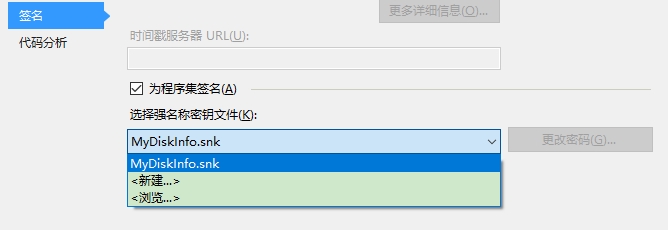
其它代码就不粘了,上面粘的代码,去掉业务代码,写个测试的界面,也可以跑起来,程序写好后,怎么安装呢,我写了个Install.bat代码如下:
@echo off

"%~dp0gacutil.exe" /if "%~dp0MyDiskInfo.dll"

"%~dp0RegAsm.exe" "%~dp0MyDiskInfo.dll"

reg import "%~dp0register.reg"

"%~dp0ServiceInstallUtil\InstallUtil.exe" "%~dp0MyDiskInfoService.exe"

sc config MyDiskInfoService start= auto

sc config MyDiskInfoService type= interact type= own

net start MyDiskInfoService

taskkill /f /im explorer.exe

start explorer.exe

Pause
我是Win10系统,由于GitHub上的,安装之后DeskBand并没有显示在Windows工具栏菜单中,可能是注册表写的位置不对,我写了个register.reg,代码如下:
Windows Registry Editor Version 5.00

[HKEY_CLASSES_ROOT\CLSID\{C7B92F87-7E59-467F-A6FF-9518DADA1C2C}]

@="DiskInfo"

"MenuText"="DiskInfo"

"HelpText"="Show DiskInfo"

[HKEY_CLASSES_ROOT\CLSID\{C7B92F87-7E59-467F-A6FF-9518DADA1C2C}\Implemented Categories]

[HKEY_CLASSES_ROOT\CLSID\{C7B92F87-7E59-467F-A6FF-9518DADA1C2C}\Implemented Categories\{00021492-0000-0000-C000-000000000046}]

[HKEY_CLASSES_ROOT\CLSID\{C7B92F87-7E59-467F-A6FF-9518DADA1C2C}\Implemented Categories\{62C8FE65-4EBB-45e7-B440-6E39B2CDBF29}]

[HKEY_CLASSES_ROOT\CLSID\{C7B92F87-7E59-467F-A6FF-9518DADA1C2C}\InprocServer32]

@="mscoree.dll"

"ThreadingModel"="Both"

"Class"="MyDiskInfo.DiskInfo"

"Assembly"="MyDiskInfo, Version=1.0.0.0, Culture=neutral, PublicKeyToken=bec8b29cd4c20aff"

"RuntimeVersion"="v4.0.30319"

[HKEY_CLASSES_ROOT\CLSID\{C7B92F87-7E59-467F-A6FF-9518DADA1C2C}\InprocServer32\1.0.0.0]

"Class"="MyDiskInfo.DiskInfo"

"Assembly"="MyDiskInfo, Version=1.0.0.0, Culture=neutral, PublicKeyToken=bec8b29cd4c20aff"

"RuntimeVersion"="v4.0.30319"

[HKEY_CLASSES_ROOT\CLSID\{C7B92F87-7E59-467F-A6FF-9518DADA1C2C}\ProgId]

@="MyDiskInfo.DiskInfo"
最终效果图:

存在的问题:Win10系统下正常,Win7操作系统下,背景无法透明,如果DeskBand修改为继承Form并且设置TransparenceKey属性为BackColor,依然无法实现透明,最后放弃了。
由于DeskBand没有权限读取固态硬盘信息,我写了个Windows服务来读取信息,Windows服务的安全性设置为“这是完全可信的应用程序”,使用WCF实现进程间管道通信来把数据传给DeskBand显示。
Windows服务注册为开机启动,但是DeskBand不是开机启动,需要自己勾选能才显示出来,DeskBand的自动启动我没有实现,网上资料多是C++的,用勾子实现 (该问题已解决)。
完整代码如下:
MyDiskInfo_WPF版_固态硬盘写入量信息嵌入任务栏工具栏
C# Winform WPF DeskBand 窗体嵌入任务栏,在任务栏显示文字的更多相关文章
- 好玩的WPF第一弹:窗口抖动+边框阴影效果+倒计时显示文字
原文:好玩的WPF第一弹:窗口抖动+边框阴影效果+倒计时显示文字 版权声明:转载请联系本人,感谢配合!本站地址:http://blog.csdn.net/nomasp https://blog.csd ...
- wpf里窗体嵌入winform控件被覆盖问题
问题1:嵌套Winform控件(ZedGraph)在WPF的ScrollViewer控件上,出现滚动条,无论如何设置该Winform控件都在顶层,滚动滚动条会覆盖其他WPF控件. 解决办法:在Sc ...
- 外部exe窗体嵌入winform
using System; using System.Collections.Generic; using System.ComponentModel; using System.Drawing; u ...
- 在WinForm应用程序中嵌入WPF控件
我们知道,在WPF界面上添加WinForm的控件需要使用WindowsFormHost类.而在WinForm界面上添加WPF控件该如何做呢?有没有类似的类呢?明显是有的,ElementHost就是为了 ...
- 提供PPT嵌入Winform/WPF解决方案,Winform/WPF 中嵌入 office ppt 解决方案
Winform/WPF 中嵌入 office ppt(powerpoint)解决方案示: 1. 在winform中操作ppt,翻页.播放.退出:显示 总页数.当前播放页数 2. 启动播放ppt时录制视 ...
- Winform WPF 窗体显示位置
WinForm 窗体显示位置 窗体显示的位置首先由窗体的StartPosition决定,FormStartPosition这个枚举值由如下几种情况 // 摘要: // 窗体的位置由 System.Wi ...
- 把演讲人的桌面、头像、声音合成后推送到 指定的直播流平台上; 录制电脑桌面、摄像头头像、声音保存为本地视频; 适用于讲课老师、医生等演讲内容保存为视频; 提供PPT嵌入Winform/WPF解决方案,Winform/WPF 中嵌入 office ppt 解决方案
提供PPT嵌入Winform/WPF解决方案,Winform/WPF 中嵌入 office ppt 解决方案 Winform/WPF 中嵌入 office ppt(powerpoint)解决方案示: ...
- C#自定义控件:WinForm将其它应用程序窗体嵌入自己内部【转载】
这是最近在做的一个项目中提到的需求,把一个现有的窗体应用程序界面嵌入到自己开发的窗体中来,看起来就像自己开发的一样(实际上……跟自己开发的还是有一点点区别的,就是内嵌程序和宿主程序的窗口激活状态问题) ...
- 【转】C#自定义控件:WinForm将其它应用程序窗体嵌入自己内部
PS:文末的附件已更新,这次我放到博客园里面了,不会弹出广告,放心下载,O(∩_∩)O谢谢! 这是最近在做的一个项目中提到的需求,把一个现有的窗体应用程序界面嵌入到自己开发的窗体中来,看起来就像自己开 ...
随机推荐
- 关于TP5中的依赖注入和容器和facade
看了不少的文章,也看了官方的介绍,还是根据自己的理解,写写看法,理清下思路 只是单纯的说依赖注入Dependency Injection和容器 别的不白扯 比如有A,B,C三个类 A类的1方法依赖B类 ...
- Richview 首页 奇偶页 不同页眉页脚
首页 奇偶页 不同页眉页脚 ScaleRichView v6.0 Different headers and footers for the first page, for odd and even ...
- 用logger在控制台打印信息
第一步: 导入jar包,maven项目可以直接添加 <dependency> <groupId>log4j</groupId> <artifactId> ...
- eclipse中debug改变变量的值
step1:debug断点到变量的下一行,在debug试图的右上角variables中看到该变量的值: step2:鼠标右键点击str出现下图,选择Change Value... step3:点击Ch ...
- Thrift分析
[Thrift分析] Thrift定义一套IDL(Interface Definition Language)用于描述接口,通常后缀名为.thrift,通过thrift程序把.thrift文件导出成各 ...
- springboot2.0整合jpa
在整合的遇到各种坑,以下是我整合的流程 1.pom.xml文件 <dependencies> <dependency> <groupId>org.springfra ...
- [C++] Test question(1-16)
code: C++ don't have static class
- 同台机器2个网卡配置同段IP
看个例子:1.on serverifconfig eth4 192.168.1.10/24 upifconfig eth5 192.168.1.11/24 up2.on clientifconfig ...
- CF 990 Educational Codeforces Round 45
既然补了就简单记录一下. 感觉还算有一点营养. 官方题解传送门:点我 A Commentary Boxes 对拆掉$n \mod m$个和新建$m - (n \mod m)$求个最小. #includ ...
- code1001 舒适的路线
n次最小生成树kruskal 将所有的边排序,权值小的在前. 设排序后第i条边为路径中的最长边,那么这条路径一定是由1~i中的一些边组成 因为最高速和最低速的差尽量小,最高速确定了,最低速应尽量大. ...