
上传文件到 Sharepoint 的文档库中和下载 Sharepoint 的文档库的文件到客户端
文件操作应用场景:
如果你的.NET项目是运行在SharePoint服务器上的,你可以直接使用SharePoint服务器端对象模型,用SPFileCollection.Add方法
http://msdn.microsoft.com/zh-cn/library/ms454491%28office.12%29.aspx
如果不在同一台机器上,并且你的SharePoint是2010,你可以使用.NET客户端对象模型,用FileCollection.Add方法
http://msdn.microsoft.com/zh-cn/library/microsoft.sharepoint.client.filecollection.add(en-us).aspx
如果是SharePoint 2007,你可以用SharePoint Web Service里面的copy.asmx
http://msdn.microsoft.com/zh-cn/library/copy.copy_members%28en-us,office.12%29.aspx
============帮助文档说明===========
Create Author: Kenmu
Create Date: 2014-05-22
Function: 支持上传文件到Sharepoint的文档库中;下载Sharepoint的文档库的文件到客户端
Support three ways as following:
1)通过调用SharePoint的Copy.asmx服务实现;只适用于SharePoint站点
IFileOperation fileOperation = new SPServiceOperation();
bool isSuccess = fileOperation.UploadFileToSPSite(domain, userAccount, pwd, documentLibraryUrl, localFilePath, ref statusInfo);
bool isSuccess = fileOperation.DownloadFileFromSPSite(domain, userAccount, pwd, documentUrl, downloadToLocalFilePath, ref statusInfo);
2)通过WebClient实现;适用于普通站点
IFileOperation fileOperation = new WebClientOperation();
3)通过WebRequest实现;适用于普通站点
IFileOperation fileOperation = new WebRequestOperation();
 using System;

 using System.Collections.Generic;

 using System.Linq;

 using System.Text;

 namespace FileOperationAboutSharePoint.FileOperation

 {

     interface IFileOperation

     {

         bool UploadFileToSPSite(string domain, string userAccount, string pwd, string documentLibraryUrl, string localFilePath,ref string statusInfo);

         bool DownloadFileFromSPSite(string domain, string userAccount, string pwd, string documentUrl, string localFilePath, ref string statusInfo);

     }

 }
 using System;

 using System.Collections.Generic;

 using System.Linq;

 using System.Web;

 using System.IO;

 using System.Net;

 using FileOperationAboutSharePoint.SPCopyService;

 namespace FileOperationAboutSharePoint.FileOperation

 {

     public class SPServiceOperation : IFileOperation

     {

         public bool UploadFileToSPSite(string domain, string userAccount, string pwd, string documentLibraryUrl, string localFilePath, ref string statusInfo)

         {

             bool isSuccess = false;

             try

             {

                 string fileName = Path.GetFileName(localFilePath);

                 string tempFilePath = string.Format("{0}{1}", Path.GetTempPath(), fileName);

                 File.Copy(localFilePath, tempFilePath, true);

                 FileStream fs = new FileStream(tempFilePath, FileMode.Open, FileAccess.Read);

                 BinaryReader br = new BinaryReader(fs);

                 byte[] fileContent = br.ReadBytes((int)fs.Length);

                 br.Close();

                 fs.Close();

                 Copy service = CreateCopy(domain, userAccount, pwd);

                 service.Timeout = System.Threading.Timeout.Infinite;

                 FieldInformation fieldInfo = new FieldInformation();

                 FieldInformation[] fieldInfoArr = { fieldInfo };

                 CopyResult[] resultArr;

                 service.CopyIntoItems(

                     tempFilePath,

                     new string[] { string.Format("{0}{1}", documentLibraryUrl, fileName) },

                     fieldInfoArr,

                     fileContent,

                     out resultArr);

                 isSuccess = resultArr[].ErrorCode == CopyErrorCode.Success;

                 if (!isSuccess)

                 {

                     statusInfo = string.Format("Failed Info: {0}", resultArr[].ErrorMessage);

                 }

             }

             catch (Exception ex)

             {

                 statusInfo = string.Format("Failed Info: {0}", ex.Message);

                 isSuccess = false;

             }

             return isSuccess;

         }

         public bool DownloadFileFromSPSite(string domain, string userAccount, string pwd, string documentUrl, string localFilePath, ref string statusInfo)

         {

             bool isSuccess = false;

             try

             {

                 Copy service = CreateCopy(domain, userAccount, pwd);

                 service.Timeout = System.Threading.Timeout.Infinite;

                 FieldInformation[] fieldInfoArr;

                 byte[] fileContent;

                 service.GetItem(documentUrl,out fieldInfoArr,out fileContent);

                 if (fileContent != null)

                 {

                     FileStream fs = new FileStream(localFilePath, FileMode.Create, FileAccess.Write);

                     fs.Write(fileContent, , fileContent.Length);

                     fs.Close();

                     isSuccess = true;

                 }

                 else

                 {

                     statusInfo = string.Format("Failed Info: {0}不存在", documentUrl);

                     isSuccess = false;

                 }

             }

             catch (Exception ex)

             {

                 statusInfo = string.Format("Failed Info: {0}", ex.Message);

                 isSuccess = false;

             }

             return isSuccess;

         }

         private Copy CreateCopy(string domain, string userAccount, string pwd)

         {

             Copy service = new Copy();

             if (String.IsNullOrEmpty(userAccount))

             {

                 service.UseDefaultCredentials = true;

             }

             else

             {

                 service.Credentials = new NetworkCredential(userAccount, pwd, domain);

             }

             return service;

         }

     }

 }
WebClientOperation.cs
 using System;

 using System.Collections.Generic;

 using System.Linq;

 using System.Web;

 using System.IO;

 using System.Net;

 namespace FileOperationAboutSharePoint.FileOperation

 {

     public class WebClientOperation : IFileOperation

     {

         public bool UploadFileToSPSite(string domain, string userAccount, string pwd, string documentLibraryUrl, string localFilePath, ref string statusInfo)

         {

             bool isSuccess = false;

             try

             {

                 string fileName = Path.GetFileName(localFilePath);

                 string tempFilePath = string.Format("{0}{1}", Path.GetTempPath(), fileName);

                 File.Copy(localFilePath, tempFilePath, true);

                 FileStream fs = new FileStream(tempFilePath, FileMode.Open, FileAccess.Read);

                 BinaryReader br = new BinaryReader(fs);

                 byte[] fileContent = br.ReadBytes((int)fs.Length);

                 br.Close();

                 fs.Close();

                 WebClient webClient = CreateWebClient(domain, userAccount, pwd);

                 webClient.UploadData(string.Format("{0}{1}", documentLibraryUrl, fileName), "PUT", fileContent);

                 isSuccess = true;

             }

             catch (Exception ex)

             {

                 statusInfo = string.Format("Failed Info: {0}", ex.Message);

                 isSuccess = false;

             }

             return isSuccess;

         }

         public bool DownloadFileFromSPSite(string domain, string userAccount, string pwd, string documentUrl, string localFilePath, ref string statusInfo)

         {

             bool isSuccess = false;

             try

             {

                 WebClient webClient = CreateWebClient(domain, userAccount, pwd);

                 byte[] fileContent = webClient.DownloadData(documentUrl);

                 FileStream fs = new FileStream(localFilePath, FileMode.Create, FileAccess.Write);

                 fs.Write(fileContent, , fileContent.Length);

                 fs.Close();

             }

             catch (Exception ex)

             {

                 statusInfo = string.Format("Failed Info: {0}", ex.Message);

                 isSuccess = false;

             }

             return isSuccess;

         }

         private WebClient CreateWebClient(string domain, string userAccount, string pwd)

         {

             WebClient webClient = new WebClient();

             if (String.IsNullOrEmpty(userAccount))

             {

                 webClient.UseDefaultCredentials = true;

             }

             else

             {

                 webClient.Credentials = new NetworkCredential(userAccount, pwd, domain);

             }

             return webClient;

         }

     }

 }
WebRequestOperation.cs
 using System;

 using System.Collections.Generic;

 using System.Linq;

 using System.Web;

 using System.IO;

 using System.Net;

 namespace FileOperationAboutSharePoint.FileOperation

 {

     public class WebRequestOperation : IFileOperation

     {

         public bool UploadFileToSPSite(string domain, string userAccount, string pwd, string documentLibraryUrl, string localFilePath, ref string statusInfo)

         {

             bool isSuccess = false;

             try

             {

                 string fileName = Path.GetFileName(localFilePath);

                 string tempFilePath = string.Format("{0}{1}", Path.GetTempPath(), fileName);

                 File.Copy(localFilePath, tempFilePath, true);

                 FileStream fs = new FileStream(tempFilePath, FileMode.Open, FileAccess.Read);

                 BinaryReader br = new BinaryReader(fs);

                 byte[] fileContent = br.ReadBytes((int)fs.Length);

                 br.Close();

                 fs.Close();

                 MemoryStream ms = new MemoryStream(fileContent);

                 WebRequest webRequest = CreateWebRequest(domain,userAccount,pwd,string.Format("{0}{1}", documentLibraryUrl, fileName));

                 webRequest.Method = "PUT";

                 webRequest.Headers.Add("Overwrite", "T");

                 webRequest.Timeout = System.Threading.Timeout.Infinite;

                 Stream outStream = webRequest.GetRequestStream();

                 byte[] buffer = new byte[];

                 while (true)

                 {

                     int i = ms.Read(buffer, , buffer.Length);

                     if (i <= )

                         break;

                     outStream.Write(buffer, , i);

                 }

                 ms.Close();

                 outStream.Close();

                 webRequest.GetResponse();

                 isSuccess = true;

             }

             catch (Exception ex)

             {

                 statusInfo = string.Format("Failed Info: {0}", ex.Message);

                 isSuccess = false;

             }

             return isSuccess;

         }

         public bool DownloadFileFromSPSite(string domain, string userAccount, string pwd, string documentUrl, string localFilePath, ref string statusInfo)

         {

             bool isSuccess = false;

             try

             {

                 WebRequest webRequest = CreateWebRequest(domain, userAccount, pwd, documentUrl);

                 webRequest.Method = "GET";

                 webRequest.Timeout = System.Threading.Timeout.Infinite;

                 using (Stream stream = webRequest.GetResponse().GetResponseStream())

                 {

                     using (FileStream fs = new FileStream(localFilePath, FileMode.Create, FileAccess.Write))

                     {

                         byte[] buffer = new byte[];

                         int i = ;

                         while (i > )

                         {

                             i = stream.Read(buffer, , buffer.Length);

                             fs.Write(buffer, , i);

                         }

                     }

                 }

                 isSuccess = true;

             }

             catch (Exception ex)

             {

                 statusInfo = string.Format("Failed Info: {0}", ex.Message);

                 isSuccess = false;

             }

             return isSuccess;

         }

         private WebRequest CreateWebRequest(string domain, string userAccount, string pwd, string requestUriString)

         {

             WebRequest webRequest = WebRequest.Create(requestUriString);

             if (String.IsNullOrEmpty(userAccount))

             {

                 webRequest.UseDefaultCredentials = true;

             }

             else

             {

                 webRequest.Credentials = new NetworkCredential(userAccount, pwd, domain);

             }

             return webRequest;

         }

     }

 }
Web.config
 <?xml version="1.0"?>

 <configuration>

   <configSections>

     <sectionGroup name="applicationSettings" type="System.Configuration.ApplicationSettingsGroup, System, Version=4.0.0.0, Culture=neutral, PublicKeyToken=b77a5c561934e089" >

       <section name="FileOperationAboutSharePoint.Properties.Settings" type="System.Configuration.ClientSettingsSection, System, Version=4.0.0.0, Culture=neutral, PublicKeyToken=b77a5c561934e089" requirePermission="false" />

     </sectionGroup>

   </configSections>

   <system.web>

     <compilation debug="true" targetFramework="4.0" />

     <authentication mode="Windows">

     </authentication>

   </system.web>

   <system.webServer>

      <modules runAllManagedModulesForAllRequests="true"/>

   </system.webServer>

   <system.serviceModel>

     <bindings />

     <client />

   </system.serviceModel>

   <applicationSettings>

     <FileOperationAboutSharePoint.Properties.Settings>

       <setting name="FileOperationAboutSharePoint_SPCopyService_Copy"

         serializeAs="String">

         <value>http://ifca-psserver/_vti_bin/copy.asmx</value>

       </setting>

     </FileOperationAboutSharePoint.Properties.Settings>

   </applicationSettings>

   <appSettings>

     <add key="domain" value="IFCA"/>

     <add key="userAccount" value="huangjianwu"/>

     <add key="pwd" value="ifca.123456"/>

     <add key="documentLibraryUrl" value="http://ifca-psserver/KDIT/"/>

     <add key="downloadFileName" value="提示信息Message说明文档.docx"/>

     <add key="downloadToLocalFilePath" value="C:\\Users\Administrator\Desktop\download_提示信息Message说明文档.docx"/>

   </appSettings>

 </configuration>
Default.aspx
上传操作:<asp:FileUpload ID="fuSelectFile" runat="server" />

<asp:Button ID="btnUpload" Text="上传" runat="server" Style="margin: 0 10px;" OnClick="btnUpload_Click" /><br />

下载操作:“<%= string.Format("{0}{1}",documentLibraryUrl, downloadFileName)%>”文件

<asp:Button ID="btnDownload" Text="下载" runat="server" Style="margin: 5px 10px;" OnClick="btnDownload_Click" />

<p /><strong>执行结果:</strong><br />

<asp:Literal ID="ltrInfo" runat="server"></asp:Literal>
Default.aspx.cs
 using System;

 using System.Collections.Generic;

 using System.Linq;

 using System.Web;

 using System.Web.UI;

 using System.Web.UI.WebControls;

 using FileOperationAboutSharePoint.FileOperation;

 using System.Web.Configuration;

 namespace FileOperationAboutSharePoint

 {

     public partial class _Default : System.Web.UI.Page

     {

         private string domain = WebConfigurationManager.AppSettings["domain"];

         private string userAccount = WebConfigurationManager.AppSettings["userAccount"];

         private string pwd = WebConfigurationManager.AppSettings["pwd"];

         protected string documentLibraryUrl = WebConfigurationManager.AppSettings["documentLibraryUrl"];

         protected string downloadFileName = WebConfigurationManager.AppSettings["downloadFileName"];

         private string downloadToLocalFilePath = WebConfigurationManager.AppSettings["downloadToLocalFilePath"];

         protected void Page_Load(object sender, EventArgs e)

         {

         }

         protected void btnUpload_Click(object sender, EventArgs e)

         {

             if (fuSelectFile.HasFile)

             {

                 string localFilePath = string.Format("{0}\\{1}", Server.MapPath("Upload"), fuSelectFile.PostedFile.FileName);

                 fuSelectFile.PostedFile.SaveAs(localFilePath);

                 string statusInfo = "";

                 //IFileOperation fileOperation = new WebClientOperation();

                 //IFileOperation fileOperation = new WebRequestOperation();

                 IFileOperation fileOperation = new SPServiceOperation();

                 bool isSuccess = fileOperation.UploadFileToSPSite(domain, userAccount, pwd, documentLibraryUrl, localFilePath, ref statusInfo);

                 ltrInfo.Text = isSuccess ? "上传成功" : statusInfo;

             }

             else

             {

                 ltrInfo.Text = "请选择需要上传的文件";

             }

         }

         protected void btnDownload_Click(object sender, EventArgs e)

         {

             string statusInfo = "";

             //IFileOperation fileOperation = new WebClientOperation();

             //IFileOperation fileOperation = new WebRequestOperation();

             IFileOperation fileOperation = new SPServiceOperation();

             bool isSuccess = fileOperation.DownloadFileFromSPSite(domain, userAccount, pwd, string.Format("{0}{1}", documentLibraryUrl, downloadFileName), downloadToLocalFilePath, ref statusInfo);

             ltrInfo.Text = isSuccess ? string.Format("下载成功<br/>下载文件位置为:{0}", downloadToLocalFilePath) : statusInfo;

         }

     }

 }

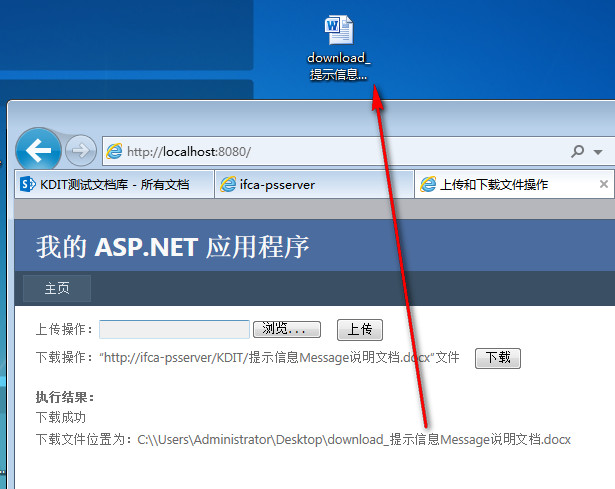
PS:如用第一种方式,就得在Visual Studio中添加Web Service,服务来源,例如:
http://ifca-psserver/_vti_bin/copy.asmx

上传文件到 Sharepoint 的文档库中和下载 Sharepoint 的文档库的文件到客户端的更多相关文章
- npm包的上传npm包的步骤,与更新和下载步骤
官网: ======================================================= 没有账号可以先注册一个,右上角点击“Sign Up",有账号直接点击“ ...
- SharePoint Server 2013 让上传文件更精彩
新版的SharePoint 2013 提供了多种上传与新建文件的方式,对于与系统集成紧密的IE来上传文档更加方便 使用IE开启SharePoint地址 Figure 1打开文档库,在"新颖快 ...
- SWFUpload多文件上传 文件数限制 setStats()
使用swfupload仿公平图片上传 SWFUpload它是基于flash与javascript的client文件上传组件. handlers.js文件 完毕文件入列队(fileQueued) → 完 ...
- Swagger文档添加file上传参数写法
想在swagger ui的yaml文档里面写一个文件上传的接口,找了半天不知道怎么写,终于搜到了,如下: /tools/upload: post: tags: - "tool" s ...
- 30分钟玩转Net MVC 基于WebUploader的大文件分片上传、断网续传、秒传(文末附带demo下载)
现在的项目开发基本上都用到了上传文件功能,或图片,或文档,或视频.我们常用的常规上传已经能够满足当前要求了, 然而有时会出现如下问题: 文件过大(比如1G以上),超出服务端的请求大小限制: 请求时间过 ...
- 本文档教授大家在yii2.0里实现文件上传 首先我们来实现单文件上传
第一步 首先建立一个关于上传的model层 如果你有已经建好的可以使用表单小部件的model层 也可以直接用这个.在这里我们新建一个新的model层 在model层新建文件 Upload.php ...
- WordPress上传含有中文文件出现乱码
最近打算学习安装配置WordPress,当然同时也在学习PHP+MySQL,希望以后能做一些关于WordPress定制和二次开发,包括主题和插件.在成功安装WordPress3.5中文版之后,就测试了 ...
- .Net多文件同时上传(Jquery Uploadify)
前提:领导给了我一个文件夹,里面有4000千多张产品图片,每张图片已产品编号+产品名称命名,要求是让我把4000多张产品图片上传到服务器端,而且要以产品编码创建n个文件夹,每张图片放到对应的文件夹下. ...
- php实现文件上传下载功能小结
文件的上传与下载是项目中必不可少的模块,也是php最基础的模块之一,大多数php框架中都封装了关于上传和下载的功能,不过对于原生的上传下载还是需要了解一下的.基本思路是通过form表单post方式实现 ...
随机推荐
- [na][win]AD域组策略wifi自动配置
http://wenku.baidu.com/link?url=MC950wliAZNeVUJ2M6Y1VTi5faqo7kG374fyBjW57r0qyLJkBZLg5ypiql4RFywQ8q7y ...
- Spring-两种配置容器
Spring提供了两种容器类型 SpringIOC容器是一个IOC Service Provider.提供了两种容器类型:BeanFactory和ApplicationContext.Sp ...
- nginx检查报错 error while loading shared libraries: libprofiler.so.0: cannot open shared object file: No such file or directory
在centos7.3上编译安装nginx-1.12.2 启动测试出错 [root@web02 local]# /usr/local/nginx/sbin/nginx -t /usr/local/ngi ...
- F1 P R的理解
F1 P R的理解 precision:查准率 recall:查全率,召回率 查准率,基于预测的结果,预测为正的样本中 由多少真正的正样本.即,真正为正的越多越好. 查全率,针对原来的正样本,有多少正 ...
- Exception时信息的记录
系统总有出现异常的时候,那么出现异常时应该如何处理? 一直以来,我都以为这么处理就足够的: 在日志中打印Exception的堆栈信息,以便排查原因 反馈给用户系统xxx出现问题 package com ...
- javascript基础学习--HTML DOM
写在前面的话:由于学校没有开过javascript这门课,所以平时用javascript时都是用到什么就去搜什么样的代码,但是在工作中有时候搜来的代码总是有那么点小问题,而当自己想去修改时,却又无从下 ...
- jquery 替换原来的html内容
1.replaceWith() 使用括号内的内容替换所选择的内容. $("#div").replaceWith("<div id="div2"& ...
- 手风琴式焦点图jQuery特效
手风琴式焦点图jQuery特效是一款鼠标点击人物图像滑动切换案例说明信息代码.效果图如下: 在线预览 源码下载 实现的代码. html代码: <div class="ag-cont ...
- 一款jquery实现的整屏切换特效
今天要为大家带来一款由jquery实现的整屏切换特效,在右侧有圆型小标,每点一个切换一屏.当然,你也可以滚动鼠标来切换页面.效果非常好.我们看下效果吧 在线预览 源码下载 html代码: < ...
- css让footer永远保持在页面底部
案例1:仅仅保存在页面底部.不固定. 思路: html: <div class="body"> <header>我是头部</header> &l ...