
脚手架搭建的vue项目里引入jquery和bootstrap
引入jquery:
1.在cmd输入:npm install jquery,回车,等待..
2.在webpack.base.conf.js里进行如下操作:
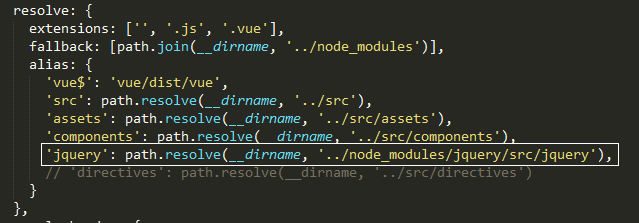
3.在webpack.prod.conf.js里进行如下操作:
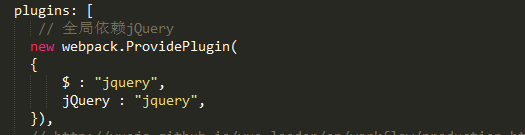
4.在入口文件里引入:

不知道是不是jquery版本的问题,在重构以前写的页面时,通过在.vue文件里引入js的方式将写好的js引入(该js文件里用了jquery插件),部分功能有问题
引入bootstrap
参照网上的方式进行了实践,生效了。
主要在配置文件里添加了两个配置文件,这个两个文件一定要放在一起
1.bootstrap.config.js文件:
module.exports = {
// Default for the style loading
styleLoader: require('extract-text-webpack-plugin').extract('style-loader', 'css-loader!postcss-loader!less-loader'),
scripts: {
'transition': true,
'alert': true,
'button': true,
'carousel': true,
'collapse': true,
'dropdown': true,
'modal': true,
'tooltip': true,
'popover': true,
'scrollspy': true,
'tab': true,
'affix': true
},
styles: {
"mixins": true,
"normalize": true,
"print": true,
"scaffolding": true,
"type": true,
"code": true,
"grid": true,
"tables": true,
"forms": true,
"buttons": true,
"component-animations": true,
"glyphicons": true,
"dropdowns": true,
"button-groups": true,
"input-groups": true,
"navs": true,
"navbar": true,
"breadcrumbs": true,
"pagination": true,
"pager": true,
"labels": true,
"badges": true,
"jumbotron": true,
"thumbnails": true,
"alerts": true,
"progress-bars": true,
"media": true,
"list-group": true,
"panels": true,
"wells": true,
"close": true,
"modals": true,
"tooltip": true,
"popovers": true,
"carousel": true,
"utilities": true,
"responsive-utilities": true
}
};
2.bootstrap.strap.config.less文件(据说空的也行,没试过):
@font-size-base: 24px;
@btn-default-color: #444;
@btn-default-bg: #eee;
3.在入口文件通过import '/path/bootstrap.min.js'的方式引入;
4.bootstrap样式可以采取上述方式引入或者在index.html里引入;
5.其他插件也可通过import方式引入,但部分插件可能会出现问题,解决方案自行google
脚手架搭建的vue项目里引入jquery和bootstrap的更多相关文章
- 在vue项目中引入jquery
在vue项目中引入jquerycnpm install jquery --save在main.js中引入,加入下面这行代码:import 'jquery'注:有些项目是按需加载的,在main.js里面 ...
- 在vue项目里使用jquery
1.NPM 安装 jQuery,项目根目录下运行以下代码 npm install jquery --save 2.webpack配置在项目根目录下的build目录下找到webpack.base.con ...
- 如何在Vue项目中引入jQuery?
假设你的项目由vue-cli初始化 (e.g. vue init webpack my-project). 在你的vue项目目录下执行: npm install jquery --save-dev 打 ...
- vue-cli3搭建的vue项目中使用jquery
装包:npm install jquery --save 方式一 全局使用 1)main.js中引入 // jquery import $ from 'jquery' Vue.prototype.$ ...
- 用脚手架搭建一个 vue 项目
一.需要安装 node 环境 下载地址: https://nodejs.org/en/ 中文网: http://nodejs.cn/ 安装后为方便国内使用,可以把 npm 换成 taobao 的 cn ...
- 如何在 vue 项目里正确地引用 jquery 和 jquery-ui的插件
copy内容的网址: https://segmentfault.com/a/1190000007020623 使用vue-cli构建的vue项目,webpack的配置文件是分散在很多地方的,而我们需要 ...
- 如何在 vue 项目里正确地引用 jquery
转载 2016年11月13日 使用vue-cli构建的vue项目,webpack的配置文件是分散在很多地方的,而我们需要修改的是build/webpack.base.conf.js,修改两处的代码 / ...
- vue项目中引入Sass
Sass作为目前成熟,稳定,强大的css扩展语言,让越来越多的前端工程师喜欢上它.下面介绍了如何在vue项目 中引入Sass. 首先在项目文件夹执行命令 npm install vue-cli -g, ...
- MintUI引入vue项目以及引入iconfont图标
官网地址:http://mint-ui.github.io/#!/zh-cn 中文文档:http://mint-ui.github.io/docs/#/zh-cn2 示例展示:http://eleme ...
随机推荐
- SQL Server 2008 R2——当前日期下,一年前数据的统计值
=================================版权声明================================= 版权声明:原创文章 谢绝转载 请通过右侧公告中的“联系邮 ...
- (转)Java:类与继承
原文地址: http://www.cnblogs.com/dolphin0520/p/3803432.html 对于面向对象的程序设计语言来说,类毫无疑问是其最重要的基础.抽象.封装.继承.多态这四大 ...
- 第10章 Shell编程(2)_字符截取命令
2. 字符截取命令 2.1 cut字段提取命令(grep提取行,cut提取列) (1)cut命令:#cut [选项] 文件名 选项: -f 列号:提取第几列: -d 分隔符:按照指定分隔符分割列,默认 ...
- 初识WebService
一.什么是Web服务 Web服务是一种可以用来解决跨网络应用集成问题的开发模式,目的是保证不同平台的应用服务可以互操作 二.Web服务的三个核心 Soap: SOAP(Simple Object Ac ...
- AC日记——砍树 codevs 1388
1388 砍树 时间限制: 1 s 空间限制: 256000 KB 题目等级 : 黄金 Gold 题解 查看运行结果 题目描述 Description 伐木工人米尔科需要砍倒M米长的木 ...
- JAVA中使用FTPClient实现文件上传下载实例代码
一.上传文件 原理就不介绍了,大家直接看代码吧 ? 1 2 3 4 5 6 7 8 9 10 11 12 13 14 15 16 17 18 19 20 21 22 23 24 25 26 27 28 ...
- IE10 IE11 中 网站无法登录问题cookie
方法一: 在程序文件中添加此文件 在项目中创建一个文件夹将下载的文件直接拖入文件夹中 来源于:http://www.hanselman.com/blog/BugAndFixASPNETFailsToD ...
- mysql max_allowed_packet 设置过小导致记录写入失败
mysql根据配置文件会限制server接受的数据包大小. 有时候大的插入和更新会受max_allowed_packet 参数限制,导致写入或者更新失败. 查看目前配置 show VARIABLES ...
- [LeetCode] Nth Digit 第N位
Find the nth digit of the infinite integer sequence 1, 2, 3, 4, 5, 6, 7, 8, 9, 10, 11, ... Note: n i ...
- [LeetCode] Remove Linked List Elements 移除链表元素
Remove all elements from a linked list of integers that have value val. Example Given: 1 --> 2 -- ...