
通过python操作GeoLite2-City.mmdb库将nginx日志访问IP转换为城市写入数据库
通过python操作GeoLite2-City.mmdb库将nginx日志写入数据库
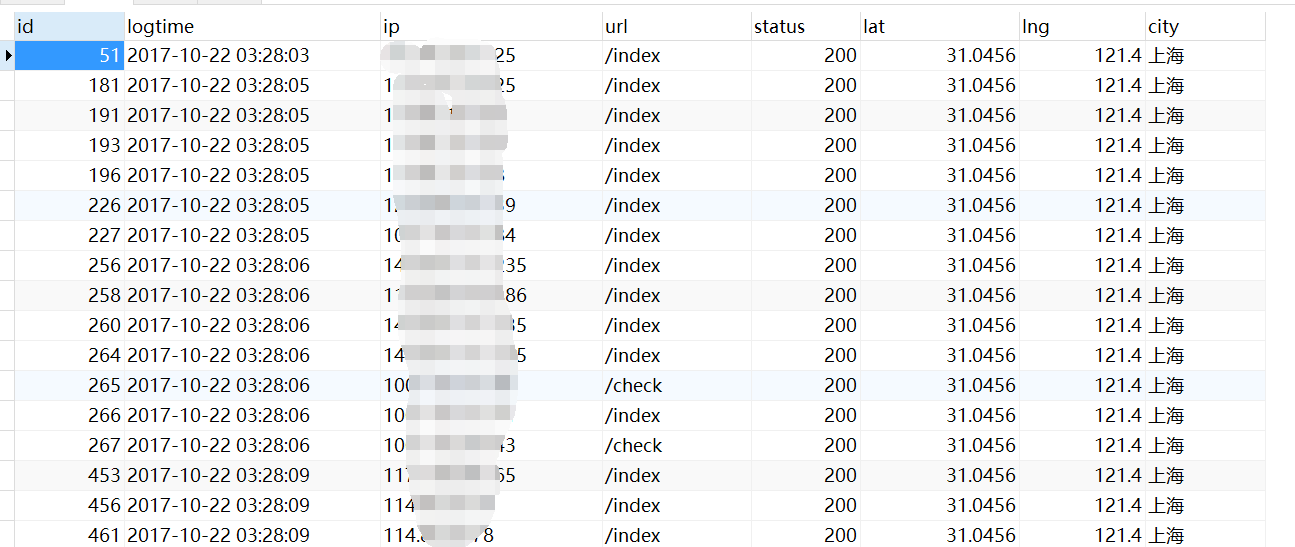
# 创建存放nginx日志的表accesslog2
CREATE TABLE `accesslog2` (

  `id` bigint(20) NOT NULL AUTO_INCREMENT,

  `logtime` datetime DEFAULT NULL,

  `ip` varchar(128) DEFAULT NULL,

  `url` text,

  `status` int(11) DEFAULT NULL,

  `lat` float DEFAULT NULL,

  `lng` float DEFAULT NULL,

  `city` varchar(50) DEFAULT NULL,

  PRIMARY KEY (`id`)

) ENGINE=InnoDB AUTO_INCREMENT=896 DEFAULT CHARSET=utf8;
# 安装geoip2模块
# sudo pip2 install geoip2
#encoding=utf-8

import time

import geoip2.database

from dbutils import MysqlConnection

# 找出ip所在城市的日志处理

def log_2db_4map(log_file):

    # 清空数据库信息

    MysqlConnection.execute_sql('truncate table accesslog2')

    path=log_file

    shandle = open(path, 'r')

    log_dict = {}

    # 读取ip数据库

    reader = geoip2.database.Reader('GeoLite2-City.mmdb')

    while True:

        line = shandle.readline()

        if line == '':

            break

        _nodes = line.split()

    # 访问url,来访ip,http状态码,访问时间

        _url,_ip,_status,_lgtime = _nodes[6], _nodes[0], _nodes[8],_nodes[3][1:]

        # 将日志访问的时间"22/Oct/2017:03:28:01"转成 2017-11-23 10:08:18 类似的格式

        _ltime = time.strftime('%Y-%m-%d %H:%M:%S',time.strptime(_lgtime,'%d/%b/%Y:%H:%M:%S'))

        # 获取城市信息

        try:

            response = reader.city(_ip)

            # 如果国家不是中国跳出本次循环

            if 'China' != response.country.name:

                continue

            # 获取城市

            _city = response.city.names.get('zh-CN','')

            if _city == '':

                print 'ip: %s city is empty' % _ip

                continue

            # 获取经度和纬度

            _lat = response.location.latitude

            _lng = response.location.longitude

            # print response

        except Exception as e:

            print 'goe has not %s info' % _ip

        _args = (_ltime,_ip,_url,_status, _lat,_lng,_city)

    # 插入数据库语句

        sql = 'insert into accesslog2(logtime, ip, url,status,lat,lng,city) values(%s, %s, %s,%s,%s,%s,%s)'

        MysqlConnection.execute_sql(sql, _args)

    # 关闭文件句柄

    shandle.close()

# 文件入口

if __name__ == '__main__':

    # nginx日志文件

    log_file = 'www_access.log'

    rt_list = log_2db_4map(log_file = log_file)
连接数据库和操作数据库的底层模块参考:
python操作mysql数据库增删改查的dbutils实例
http://www.cnblogs.com/reblue520/p/7884365.html
通过python操作GeoLite2-City.mmdb库将nginx日志访问IP转换为城市写入数据库的更多相关文章
- python 操作excle 之第三方库 openpyxl学习
目录 python 操作excle 之第三方库 openpyxl学习 安装 pip install openpyxl 英文文档链接 : 点击这里~ 1,定位excel 2,读取excle中的内容 3, ...
- 操作文件-取出一个60s内log日志中ip访问次数超过100次的ip
import timea=0while True: d={} f = open(r"/Users/**juan/Downloads/access.log",encoding=&qu ...
- 数据库之redis篇(3)—— Python操作redis
虽然前面两篇已经说了redis的一些配置安装什么的,篇幅有点长,可能看完了也不知道怎么操作,这里再浓缩一下: 什么是redis redis完全开源免费的,遵守BSD协议,是一个高性能的非关系型key- ...
- 【踩坑记录】记录一次使用Python logging库多进程打印日志的填坑过程
背景: 项目使用Python自带的logging库来打印日志 项目部署在一台Centos7的机器上 项目采用gunicorn多进程部署 过程: 1.LOG日志代码封装: 采用logging库,并设置w ...
- 学会用Python操作Mongodb
在linux下,用pip导包. pip install pymongo python操作基本步骤: 导包 建立连接,建立客户端. 获取数据库 获取集合 对数据操作 import pymongo #建立 ...
- 利用python分析nginx日志
最近在学习python,写了个脚本分析nginx日志,练练手.写得比较粗糙,但基本功能可以实现. 脚本功能:查找出当天访问次数前十位的IP,并获取该IP来源,并将分析结果发送邮件到指定邮箱. 实现前两 ...
- python操作Excel,你觉得哪个库更好呢?
对比学习python,更高效~ Excel数据的类型及组织方式 很多人学习python,不知道从何学起.很多人学习python,掌握了基本语法过后,不知道在哪里寻找案例上手.很多已经做案例的人,却不知 ...
- Python 操作 MS Excel 文件
利用 Python 对 Excel 文件进行操作需要使用第三方库: openpyxl,可执行 pip install openpyxl 进行安装 1. 导入 openpyxl 模块 导入 openpy ...
- python学习笔记-(十六)python操作mysql
一. mysql安装 1. windows下安装mysql 1.1. 下载源: http://dev.mysql.com/downloads/installer/,请认准对应版本 Windows (x ...
随机推荐
- ubuntu安装matlab
https://blog.csdn.net/qq_36982160/article/details/78397514 https://blog.csdn.net/weixin_40294256/art ...
- 隐马尔可夫模型HMM(二)概率计算问题
摘自 1.李航的<统计学习方法> 2.http://www.cnblogs.com/pinard/p/6955871.html 一.概率计算问题 上一篇介绍了概率计算问题是给定了λ(A,B ...
- 导入numpy时,出错怎么解决?
在linux中导入numpy时出错,出现如下图所示的问题,采用更新版本的问题并未解决, 解决方法如下:进入文件夹中,删除其中的numpy文件夹,其他的文件夹不动,然后重新安装numpy即可
- Windows代替touch命令
Windows 代替Linux中的touch命令: echo >
- Linux之增加系统调用[内核编译]
声明:如需引用或者摘抄本博文源码或者其文章的,请在显著处注明,来源于本博文/作者,以示尊重劳动成果,助力开源精神.也欢迎大家一起探讨,交流,以共同进步- 0.0 由于操作系统实验的缘故,有一个实验需要 ...
- LinkedStack的底层实现
package zy813ture; import java.util.EmptyStackException; public class MyLinkedStack1 { private Node ...
- django模板语法
Django 模板语法 Django 模板语法 一.模板 只要是在html里面有模板语法就不是html文件了,这样的文件就叫做模板. 二.模板语法 模板语法变量:{{ }}在Django模板中遍历复杂 ...
- Visual Studio 2013 在使用 razor无智能提示的解决办法
网上看到的方法都差不多,但是我感觉没怎么说详细,因此,截图备注下: 1.开始->Microsoft Visual Studio 2013->Visual Studio Tools-> ...
- Jmeter Md5加密操作之-------BeanShell PreProcessor
背景: 有一些登录会做一些md5校验,通过jmeter的BeanShell可以解决MD5加密情况. 1.首先需要一个解码的jar包,commons-codec-1.10.jar(网上很多),下载后,放 ...
- redis-deskmanager 连不上 虚拟机 - centos redis
1.没设置redis密码 : https://blog.csdn.net/HUXU981598436/article/details/54668779 2.关闭防火墙