
AndroidStudio使用properties资源文件
在Android项目开发中,为了一些公用资源使用方便,可以在assets资源文件夹中将需要用到的资源写成.properties或者.json的文件形式,并进行读取使用。在做html5+javascript+android的混合开发中,一般html5和javascript以及相关资源可以存放在Assets文件夹内,因此assets的使用十分必要。
由于AndroidStudio与Eclipse不同,项目中默认没有assets文件夹,因此首先需要在工程目录下添加assets文件夹,具体位置在:src/main/assets。这个位置可以通过XXX.iml 设置assets的目录( XXX代表项目名),设置如下:<option name="ASSETS_FOLDER_RELATIVE_PATH" value="/src/main/assets" />
也可以通过AndroidStudio自动添加,步骤如下:
1. 在app项目栏上用鼠标右键打开选择菜单,点选New,在下级菜单中选择Folder,再下级菜单中选择Assets Folder
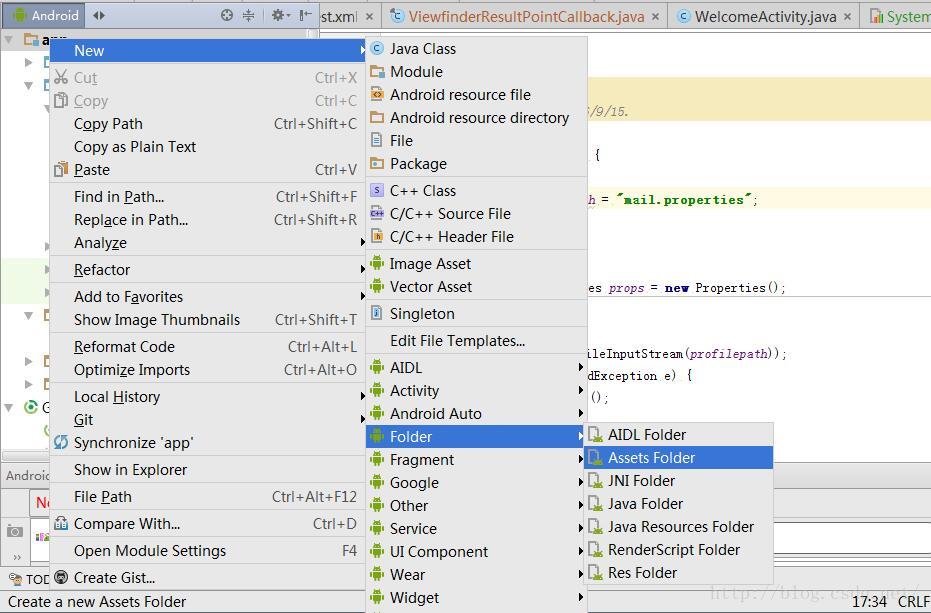
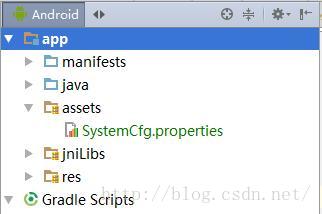
这样,assets文件夹就创建好了。
接下来为大家介绍一下properties文件的读取。
AndroidStudio读取.properties配置文件在实际的开发中使用的很多,总结了一下,常用的有以下两种方法:
一、通过jdk提供的java.util.Properties类。
此类继承自java.util.HashTable,即实现了Map接口,所以,可使用相应的方法来操作属性文件,但不建议使用像put、putAll这两个方法,因为put方法不仅允许存入String类型的value,还可以存入Object类型的。因此java.util.Properties类提供了getProperty()和setProperty()方法来操作属性文件,同时使用store或save(已过时)来保存属性值(把属性值写入.properties配置文件)。在使用之前,还需要加载属性文件,它提供了两个方法:load和loadFromXML。
load有两个方法的重载:load(InputStream inStream)、load(Reader reader),所以,可根据不同的方式来加载属性文件。
可根据不同的方式来获取InputStream,如:
1、通过当前类加载器的getResourceAsStream方法获取
InputStream inStream = TestProperties.class.getClassLoader().getResourceAsStream("test.properties");
2、从文件方式获取
InputStream inStream = new FileInputStream(new File("filePath"));
3、通过类加载器获取
InputStream in = ClassLoader.getSystemResourceAsStream("filePath");
4、在servlet中,可以通过context获取
InputStream in = context.getResourceAsStream("filePath");
5、通过url获取
URL url = new URL("path");
InputStream inStream = url.openStream();
接下来就是具体内容的读取了:
Properties prop = new Properties();
prop.load(inStream);
String key = prop.getProperty("username");
//String key = (String) prop.get("username");
二、通过java.util.ResourceBundle类来读取,这种方式比使用Properties要方便一些。
1、通过ResourceBundle.getBundle()静态方法来获取(ResourceBundle是一个抽象类),这种方式来获取properties属性文件不需要加.properties后缀名,只需要文件名即可。
ResourceBundle resource = ResourceBundle.getBundle("com/mmq/test");//test为属性文件名,放在包com.mmq下,如果是放在src下,直接用test即可
String key = resource.getString("username");
2、从inputstream中获取内容,根据第一种方法中的获取到instream后
ResourceBundle resource = new PropertyResourceBundle(inStream);
然后就可以获取具体内容了。
注意:在使用中遇到的最大的问题可能是配置文件的路径问题,如果配置文件入在当前类所在的包下,那么需要使用包名限定,如:test.properties入在com.mmq包下,则要使用com/mmq/test.properties(通过Properties来获取)或com/mmq/test(通过ResourceBundle来获取);属性文件在src根目录下,则直接使用test.properties或test即可。
在本介绍中,我们把.properties文件放在src/main/assets路径下,获取方法:
-
public static Properties loadProperties(Context context) {
-
Properties properties = new Properties();
-
try {
-
InputStream in = context.getAssets().open("test.properties");
-
properties.load(in);
-
in.close();
-
}
-
catch (IOException e) {
-
e.printStackTrace();
-
return null;
-
}
-
return properties;
-
}
AndroidStudio使用properties资源文件的更多相关文章
- java中根据key获取resource下properties资源文件中对应的参数
properties资源文件是放在resource目录下的: 新建工具类: package com.demo.utils; import java.io.InputStream; import jav ...
- Spring3.x 获取properties资源文件的值
Spring3.x 获取properties资源文件的值有两种方式: 第一种:使用<context:property-placeholder />标签 <context:prop ...
- 读取web工程中.properties资源文件的模板代码
读取web工程中.properties资源文件的模板代码 // 读取web工程中.properties资源文件的模板代码 private void test2() throws IOException ...
- 在服务端中,读取properties资源文件中的数据
1.获取到资源的路径 2.读取数据 //properties文件对象 Properties properties = new Properties(); //通过HttpServletRequest ...
- 不停服务,动态加载properties资源文件
系统运行过程中,我们用注解@Value("${****}")可以获取资源文件中的内 容,获取的内容会被存储在spring缓存中,因此如果我们修改了资源文件,要 想读取到修改后的内容 ...
- 装载Properties资源文件的项目中使用
ssm项目中打算将发短信的每小时每天的限定变成可配置的.于是将配置信息写在资源文件中,现在有两种方式加载资源文件,一个是使用spring注入方式,@Value注解注入,当然,前面需要在项目中装载.第二 ...
- maven 打包时动态替换properties资源文件中的配置值
pom build节点下面添加resource配置: <resources> <resource> <directory>src/main/resources/&l ...
- Spring读取properties资源文件
我们知道可以通过读取资源文件流后加载到Properties对象,再使用该对象方法来获取资源文件.现在介绍下利用Spring内置对象来读取资源文件. 系统启动时加载资源文件链路:web.xml --&g ...
- properties 资源文件读取
1. 在source中添加资源文件 resource.properties #FTP 相关配置 #FTP 的ip地址 FTP_ADDRESS=192.168.88.142 FTP_PORT=21 ...
随机推荐
- POJ2029:Get Many Persimmon Trees(二维树状数组)
Description Seiji Hayashi had been a professor of the Nisshinkan Samurai School in the domain of Aiz ...
- ajax中打开新页面使用window.open方法被拦截的解决方法
$('.testA').unbind('click').bind('click',function(){ var result=""; $.ajax({ url:'http://l ...
- Altium Designer布局移动原件的问题
- 驱动学习3-make
在向内核中添加驱动的时候要完成3项工作 (1)在Kconfig中添加新代码对应项目的编译条件(下面Makefile文件中需要用到它定义的的宏变量) (2)将驱动源码添加到对应的目录中 (3)在目录Ma ...
- Android ---------- Android Bar Bug 总结
1 怎样设置 ActionBar的Tab 的颜色? // 设置actionBar的颜色 Drawable draw = new ColorDrawable(Color.GREEN); actionBa ...
- 【57.97%】【codeforces Round #380A】Interview with Oleg
time limit per test1 second memory limit per test256 megabytes inputstandard input outputstandard ou ...
- Android利用AlarmManager执行定时任务
Android中的AlarmManager功能很强大,它是一个全局定时器,可以在指定时间或者指定周期启动其他组件(包括Activity.Service.BroadcastReceiver). 使用Al ...
- 通过双重for循环来找到JSON中不反复的数据
//通过双重for循环来找到JSON中不反复的数据 var count = 0; for ( i=0; i<json.length; i++) { for ( j=0; j<i; j++) ...
- 【LeetCode-面试算法经典-Java实现】【096-Unique Binary Search Trees(唯一二叉搜索树)】
[096-Unique Binary Search Trees(唯一二叉搜索树)] [LeetCode-面试算法经典-Java实现][全部题目文件夹索引] 原题 Given n, how many s ...
- LOG4J中日志级别的使用
<logger name="demo-log" additivity="false"> <level value="${log.le ...