
转载:gulp文件
这是我的文件目录结构图
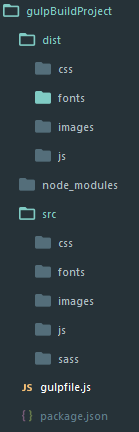 下面是我gulpfile.js的配置

'use strict'

var gulp=require('gulp');

var gutil=require('gulp-util');

var uglify=require('gulp-uglify');

var watchPath=require('gulp-watch-path');

var combiner=require('stream-combiner2');

var sourcemaps=require('gulp-sourcemaps');

var minifycss=require('gulp-minify-css');

var autoprefixer=require('gulp-autoprefixer');

var sass=require('gulp-sass');

var imagemin=require('gulp-imagemin');

var handleError=function(err){

    var colors=gutil.colors;

    console.log('\n')

    gutil.log(colors.red('Error!'))

    gutil.log('fileName: ' + colors.red(err.fileName))

    gutil.log('lineNumber: ' + colors.red(err.lineNumber))

    gutil.log('message: ' + err.message)

    gutil.log('plugin: ' + colors.yellow(err.plugin))

}

var combiner=require('stream-combiner2')

gulp.task('gutil',function(){

    gutil.log('message');

    gutil.log(gutil.colors.red('error'))

    gutil.log(gutil.colors.green('message:')+"some")

})

//压缩js

gulp.task('uglifyjs',function(){

    var combined=combiner.obj([

        gulp.src('src/js/**/*.js'),

        sourcemaps.init(),

        uglify(),

        sourcemaps.write('./'),

        gulp.dest('dist/js/')

    ])

    combined.on('error',handleError)

})

//压缩css

gulp.task('minifycss',function(){

    gulp.src('src/css/**/*.css')

        .pipe(sourcemaps.init())

        .pipe(autoprefixer({

                browsers: 'last 2 versions'

        }))

        .pipe(minifycss())

        .pipe(sourcemaps.write('./'))

        .pipe(gulp.dest('dist/css'));

})

//编译scss

gulp.task('sass',function(){

            gulp.src('src/sass/**/*.scss')

            .on('error',function(err){

                console.error('Error!',err.message)

            })

            .pipe(sourcemaps.init())

            .pipe(autoprefixer({

                browsers: 'last 2 versions'

            }))

            .pipe(sass({outputStyle: 'compact'}))

            .pipe(minifycss())

            .pipe(sourcemaps.write('./'))

            .pipe(gulp.dest('dist/css'))

})

//压缩图片

gulp.task('image', function () {

    gulp.src('src/images/**/*')

        .pipe(imagemin({

            progressive: true

        }))

        .pipe(gulp.dest('dist/images'))

})

// gulp.watch('src/js/**/*.js',function(event){

//     console.log(event);

//     当修改 src/js/log.js 文件时

//     event {

//         // 发生改变的类型,不管是添加,改变或是删除

//         type: 'changed',

//         // 触发事件的文件路径

//         path: 'D:/wamp/www/gulpBuildProject/src/js/log.js'

//     }

// })

//捕获错误信息

var handleError=function(err){

    var colors=gutil.colors;

    console.log('\n');

    gutil.log(colors.red('Error!'))

    gutil.log('filename: '+colors.red(err.filename))

    gutil.log('lineNumber: '+ colors.red(err.lineNumber))

    gutil.log('message: ' + err.message)

    gutil.log('plugin: ' + colors.yellow(err.plugin))

}

//监听js修改

gulp.task('watchjs',function(){

    gulp.watch('src/js/**/*.js',function(event){

        var paths=watchPath(event,'src/','dist/')

        paths={

            srcPath: 'src/js/log.js',

            srcdir:'src/js/',

            distPath:'dist/js/log.js',

            distDir:'dist/js',

            srcFilename:'log.js',

            distFilename:'log.js'

        }

        gutil.log(gutil.colors.green(event.type)+ ' ' + paths.srcPath)

        gutil.log('Dist '+ paths.distPath)

        var combined=combiner.obj([

            gulp.src(paths.srcPath),

            uglify(),

            gulp.dest(paths.distDir)

        ])

        // gulp.src(paths.srcPath)

        //     .pipe(uglify())

        //     .pipe(gulp.dest(paths.distDir))

        combined.on('error',handleError);

    })

})

//监听css修改

gulp.task('watchcss',function(){

    gulp.watch('src/css/**/*.css',function(event){

        var paths=watchPath(event,'src/','dist/');

        gutil.log(gutil.colors.green(event.type) + ' ' + paths.srcPath)

        gutil.log('Dist ' +paths.distPath)

        gulp.src(paths.srcPath)

            .pipe(sourcemaps.init())

            .pipe(autoprefixer({

                browsers: 'last 2 versions'

            }))

            .pipe(minifycss())

            .pipe(sourcemaps.write('./'))

            .pipe(gulp.dest(paths.distDir));

    })

})

//监听编译sass

gulp.task('watchsass',function(){

    gulp.watch('src/sass/**/*',function(event){

        var paths=watchPath(event,'src/sass/','dist/css/')

        gulp.log(gutil.colors.green(event.type)+ ' ' + paths.srcPath)

        gulp.log('Dist ' + paths.distPath)

        sass(paths.srcPath)

            .on('error',function(err){

                console.error('Error!', err.message);

            })

            .pipe(sourcemaps.init())

            .pipe(sass())

            .pipe(minifycss())

            .pipe(autoprefixer({

                browsers:'last 2 versions'

            }))

            .pipe(sourcemaps.write('./'))

            pipe(gulp.dest(paths.distDir))

    })

})

//监听压缩图片

gulp.task('watchimage', function () {

    gulp.watch('src/images/**/*', function (event) {

        var paths = watchPath(event,'src/','dist/')

        gutil.log(gutil.colors.green(event.type) + ' ' + paths.srcPath)

        gutil.log('Dist ' + paths.distPath)

        gulp.src(paths.srcPath)

            .pipe(imagemin({

                progressive: true

            }))

            .pipe(gulp.dest(paths.distDir))

    })

})

//配置文件复制任务

gulp.task('watchcopy',function(){

    gulp.watch('src/fonts/**/*',function(event){

        var paths=watchPath(event)

        gulp.log(gutil.colors.green(event.type)+ ' ' + paths.srcPath)

        gulp.log('Dist ' + paths.distPath)

        gulp.src(paths.srcPath)

            .pipe(gulp.dest(paths.distDir))

    })

})

gulp.task('copy',function(){

    gulp.src('src/fonts/**/*')

        .pipe(gulp.dest('dist/fonts/'))

})

gulp.task('default',['watchjs','watchcss','watchsass','watchimage','watchcopy'])
另外以下插件有需要也可以用得上
【gulp-plumber】例外處理
【gulp-livereload】自動重新載入頁面
【gulp-notify】gulp 處理通知
【browser-sync】瀏覽器同步檢視
转载:gulp文件的更多相关文章
- [转载]DriverStore文件夹特别大,能删除吗?
[转载]DriverStore文件夹特别大,能删除吗? 转自博客园https://www.cnblogs.com/lovebing/p/6951833.html 这篇文章,清理完C盘多了20G!不要太 ...
- [转载]config文件的一个很好的实现
以下是转载于网上的一个很好的config文件的实现,留存以备案 //Config.h #pragma once #include <string> #include <map> ...
- 【转载】文件上传那些事儿,文件ajax无刷上传
导语 正好新人导师让我看看能否把产品目前使用的FileUploader从老的组件库分离出来的,自己也查阅了相关的各种资料,对文件上传的这些事有了更进一步的了解.把这些知识点总结一下,供自己日后回顾,也 ...
- 转载--gulp入门
关于gulp的入门文章,先转载了 http://markpop.github.io/2014/09/17/Gulp%E5%85%A5%E9%97%A8%E6%95%99%E7%A8%8B/
- (转载)C++文件读写函数之——fopen、fread和fwrite、fgetc和fputc、fgets和fputs、ftellf和fseek、rewind
http://blog.sina.com.cn/s/blog_61437b3b0102v0bt.html http://blog.csdn.net/chenwk891/article/details/ ...
- [转载]CAD文件版本
http://blog.sina.com.cn/s/blog_4c9fa4dd0101il1v.html 在工作中会遇到打开一张图纸时出现“图形文件无效”的提示,大部都是因为用低版本软件打开了高版本的 ...
- [转载] Linux 文件系统结构介绍
原文: https://linux.cn/article-6132-weibo.html Linux中的文件是什么?它的文件系统又是什么?那些配置文件又在哪里?我下载好的程序保存在哪里了?在 Linu ...
- 转载:python文件打开方式详解——a、a+、r+、w+区别
第一步 排除文件打开方式错误: r只读,r+读写,不创建 ###f.readline()是读取第一行,f.readlines()是读取全部并返回一个列表 w新建只写,w+新建读写,会将文件内 ...
- 转载 .htaccess文件RewriteRule语法规则
详见: http://blog.csdn.net/scchary/article/details/40045807 # -- 位于行首时表示注释. [F] -- Forbidden( ...
随机推荐
- 【转】40条常见的移动端Web页面问题解决方案
1.安卓浏览器看背景图片,有些设备会模糊 2.图片加载 3.假如手机网站不用兼容IE浏览器,一般我们会使用zep ...
- struts-tags通用标签基本用法
2017-01-07 16:02:46 <s:debug></s:debug><!-- 标签库中实现的debug --> ${name }<!-- 是从对象栈 ...
- [LeetCode] Remove Duplicates from Sorted Array II 有序数组中去除重复项之二
Follow up for "Remove Duplicates":What if duplicates are allowed at most twice? For exampl ...
- [LeetCode] Divide Two Integers 两数相除
Divide two integers without using multiplication, division and mod operator. If it is overflow, retu ...
- #define与typedef在重定义类型中的区别
#define 为完全的替换 typedef 重新定一个数据类型 eg #define charp1 char* typedef char* charp2charp1 a,b; //a char* b ...
- pip安装使用详解(转)
pip类似RedHat里面的yum,安装Python包非常方便.本节详细介绍pip的安装.以及使用方法. 1.pip下载安装 1.1 pip下载 1 # wget "https://py ...
- 微软 消息队列 MessageQueue 简单使用
1.在服务电脑上打开 消息队列 ①进入控制面板>程序>启用或关闭windows功能 ②将需要的勾选(我自己全选了哈哈哈) ③我的电脑 右键 打开管理 见到消息队列 在专用队列上新建专用队列 ...
- 生成GUID唯一值的方法汇总(dotnet/javascript/sqlserver)
一.在 .NET 中生成1.直接用.NET Framework 提供的 Guid() 函数,此种方法使用非常广泛.GUID(全局统一标识符)是指在一台机器上生成的数字,它保证对在同一时空中的任何两台计 ...
- Android 天猫apk聊天数据库解密
1.使用Android 天猫apk 进行聊天会产生tmallWangXinDB的数据库.2.用sqlite3 工具打开提示加密或者错误.3.需要对该数据库进行解密. 解密流程:1.反编译apk,dex ...
- 浅谈:javascript的面向对象编程之基础知识的介绍
在进入javascript的面对对象之前,我们先来介绍一下javascript的几个概念. 1.javascript的面向对象的基本概念 function aa(){ } /* * 这里的aa,在我们 ...