
【代码笔记】iOS-钢琴小游戏
一,效果图。
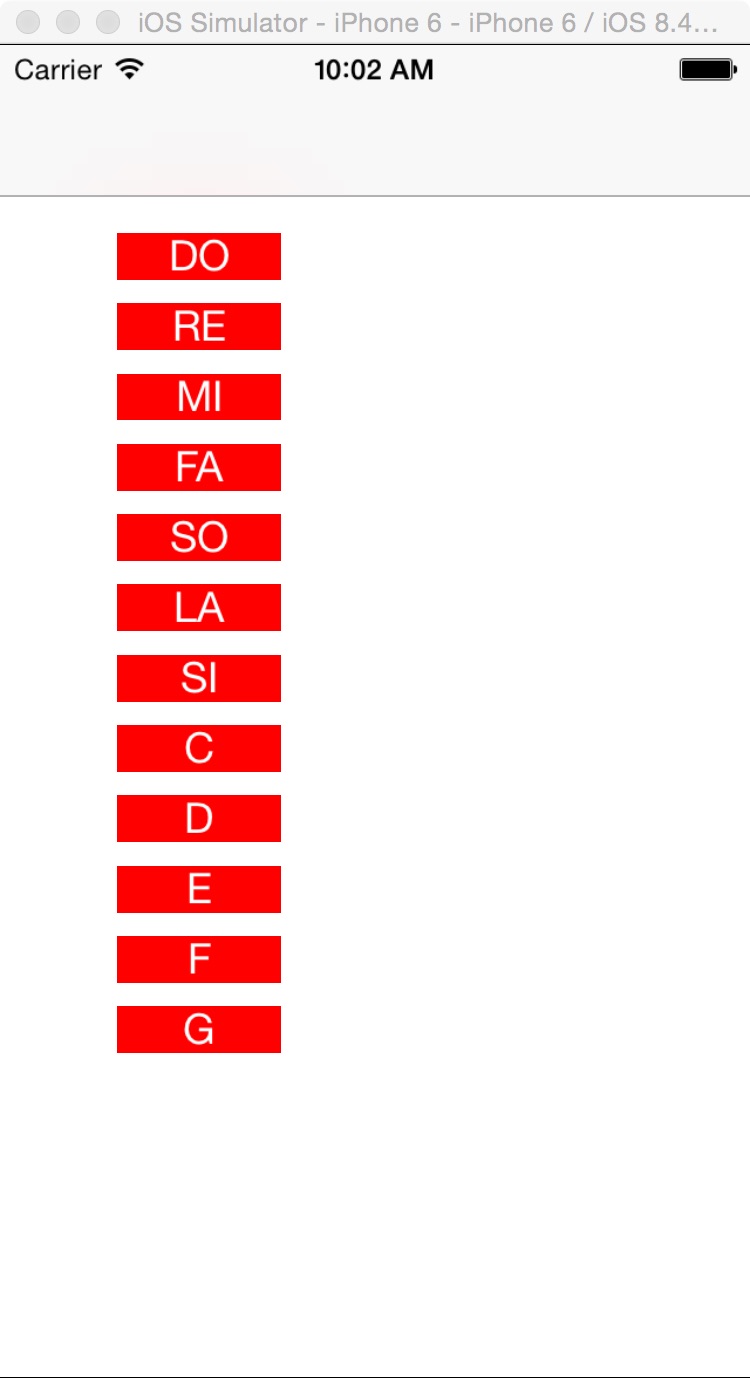
二,工程图。
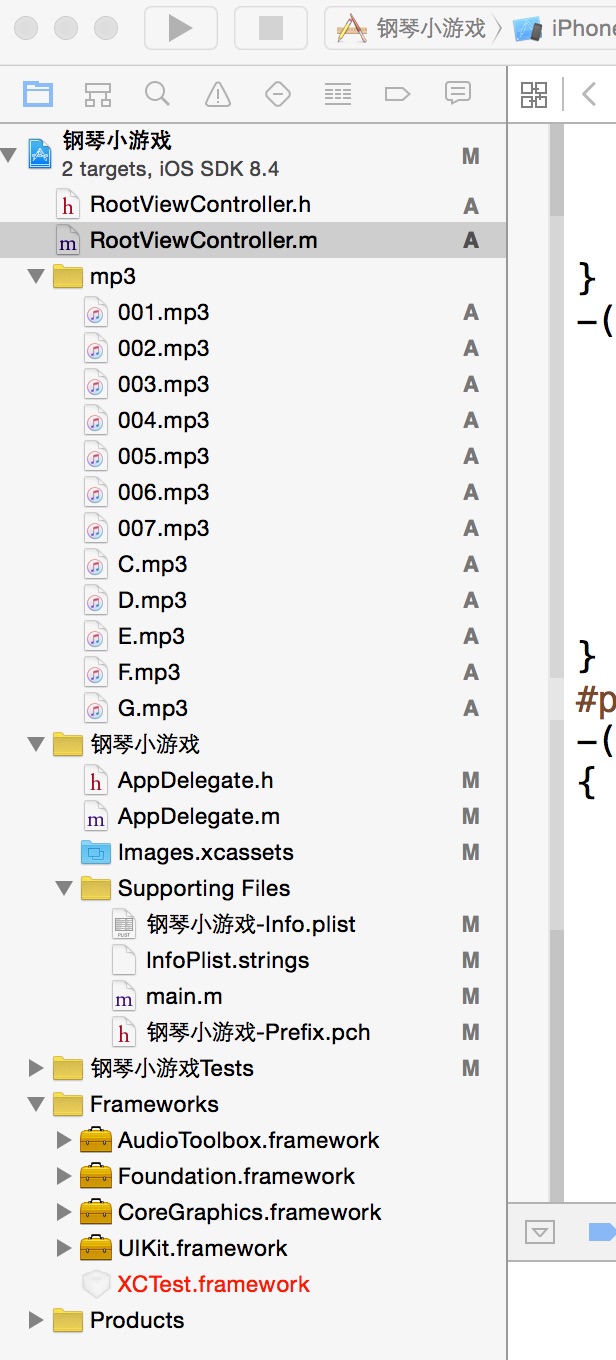
三,代码。
RootViewController.h

#import <UIKit/UIKit.h>

//加入头文件

#import <AudioToolbox/AudioToolbox.h>

@interface RootViewController : UIViewController

{

    NSString *soundFile;

}

@end
RootViewController.m
#import "RootViewController.h"

@interface RootViewController ()

@end

@implementation RootViewController

- (id)initWithNibName:(NSString *)nibNameOrNil bundle:(NSBundle *)nibBundleOrNil

{

    self = [super initWithNibName:nibNameOrNil bundle:nibBundleOrNil];

    if (self) {

        // Custom initialization

    }

    return self;

}

- (void)viewDidLoad

{

    [super viewDidLoad];

    // Do any additional setup after loading the view.

    //初始化界面

    [self addView];

}

#pragma -mark -fucntions

-(void)addView

{

    NSArray *titleArray=[[NSArray alloc]initWithObjects:@"DO",@"RE",@"MI",@"FA",@"SO",@"LA",@"SI",@"C",@"D",@"E",@"F",@"G", nil];

    for (int i=0; i<12; i++) {

        UIButton *button=[[UIButton alloc]initWithFrame:CGRectMake(50, 80+30*i, 70, 20)];

        [button setTitle:[titleArray objectAtIndex:i] forState:UIControlStateNormal];

        [button addTarget:self action:@selector(doClickAction:) forControlEvents:UIControlEventTouchUpInside];

        button.tag=i;

        button.backgroundColor=[UIColor redColor];

        [self.view addSubview:button];

    }

}

-(void)playSound:(NSString*)soundKey{

    NSString *path = [NSString stringWithFormat:@"%@%@",[[NSBundle mainBundle] resourcePath],soundKey];

    SystemSoundID soundID;

    NSURL *filePath = [NSURL fileURLWithPath:path isDirectory:NO];

    AudioServicesCreateSystemSoundID((__bridge CFURLRef)filePath, &soundID);

    AudioServicesPlaySystemSound(soundID);

}

#pragma -makr -doClickActions

-(void)doClickAction:(UIButton *)btn

{

    NSLog(@"---doClickActions--");

    NSLog(@"--btn.tag---%ld",btn.tag);

    if (btn.tag==0) {

        soundFile = [NSString stringWithFormat:@"/001.mp3"];

        [self playSound: soundFile];

    }else if (btn.tag==1){

        soundFile = [NSString stringWithFormat:@"/002.mp3"];

        [self playSound: soundFile];

    }else if (btn.tag==2){

        soundFile = [NSString stringWithFormat:@"/003.mp3"];

        [self playSound: soundFile];

    }else if (btn.tag==3){

        soundFile = [NSString stringWithFormat:@"/004.mp3"];

        [self playSound: soundFile];

    }else if (btn.tag==4){

        soundFile = [NSString stringWithFormat:@"/005.mp3"];

        [self playSound: soundFile];

    }else if (btn.tag==5){

        soundFile = [NSString stringWithFormat:@"/006.mp3"];

        [self playSound: soundFile];

    }else if (btn.tag==6){

        soundFile = [NSString stringWithFormat:@"/007.mp3"];

        [self playSound: soundFile];

    }else if (btn.tag==7){

        soundFile = [NSString stringWithFormat:@"/C.mp3"];

        [self playSound: soundFile];

    }else if (btn.tag==8){

        soundFile = [NSString stringWithFormat:@"/D.mp3"];

        [self playSound: soundFile];

    }else if (btn.tag==9){

        soundFile = [NSString stringWithFormat:@"/E.mp3"];

        [self playSound: soundFile];

    }else if (btn.tag==10){

        soundFile = [NSString stringWithFormat:@"/F.mp3"];

        [self playSound: soundFile];

    }else if (btn.tag==11){

        soundFile = [NSString stringWithFormat:@"/G.mp3"];

        [self playSound: soundFile];

    }

}

- (void)didReceiveMemoryWarning

{

    [super didReceiveMemoryWarning];

    // Dispose of any resources that can be recreated.

}
【代码笔记】iOS-钢琴小游戏的更多相关文章
- 常用Java API之Ramdom--用代码模拟猜数小游戏
常用Java API之Ramdom Ramdom类用来生成随机数字.使用起来也是三个步骤: 1.导包 import java.util.Random; 2.创建 Random r = new Rand ...
- Html5游戏开发-145行代码完成一个RPG小Demo
lufy前辈写过<[代码艺术]17行代码的贪吃蛇小游戏>一文,忽悠了不少求知的兄弟进去阅读,阅读量当然是相当的大.今天我不仿也搞一个这样的教程,目地不在于忽悠人,而在于帮助他人. 先看de ...
- 微信小游戏 demo 飞机大战 代码分析(四)(enemy.js, bullet.js, index.js)
微信小游戏 demo 飞机大战 代码分析(四)(enemy.js, bullet.js, index.js) 微信小游戏 demo 飞机大战 代码分析(一)(main.js) 微信小游戏 demo 飞 ...
- 微信小游戏 demo 飞机大战 代码分析 (三)(spirit.js, animation.js)
微信小游戏 demo 飞机大战 代码分析(三)(spirit.js, animation.js) 微信小游戏 demo 飞机大战 代码分析(一)(main.js) 微信小游戏 demo 飞机大战 代码 ...
- 微信小游戏 demo 飞机大战 代码分析 (二)(databus.js)
微信小游戏 demo 飞机大战 代码分析(二)(databus.js) 微信小游戏 demo 飞机大战 代码分析(一)(main.js) 微信小游戏 demo 飞机大战 代码分析(三)(spirit. ...
- 微信小游戏 demo 飞机大战 代码分析 (一)(game.js, main.js)
微信小游戏 demo 飞机大战 代码分析(一)(main.js) 微信小游戏 demo 飞机大战 代码分析(二)(databus.js) 微信小游戏 demo 飞机大战 代码分析(三)(spirit. ...
- 小游戏——js+h5[canvas]+cs3制作【五子棋】小游戏
五子棋小游戏学习—— 有一个问题是,棋盘线的颜色,在canvas中,明明设置了灰色,但在我的预览中还是黑色的,很重的颜色. 以下是复刻的源码: <!DOCTYPE html> <ht ...
- 3行代码,为QQ轻游戏加上语音互动能力
欢迎大家前往腾讯云+社区,获取更多腾讯海量技术实践干货哦~ 本文由腾讯游戏云 发表于云+社区专栏 游戏和社交往往有着密不可分的关系,QQ轻游戏就是一款集成在手Q里面的游戏平台,直接通过手Q入口就能随开 ...
- iOS开发实战-基于SpriteKit的FlappyBird小游戏
写在前面 最近一直在忙自己的维P恩的事情 公司项目也是一团乱 于是...随手找了个游戏项目改了改就上线了,就当充数了. SpriteKit简介 SpriteKit是iOS 7之后苹果推出的2D游戏框架 ...
- iOS 基础入门--Bull' Eye 小游戏
说明 Bull's Eye小游戏是http://www.raywenderlich.com/store/ios-apprentice里非常酷的入门demo 跟着该教程一步步做下来便有了 ...
随机推荐
- 在浏览器输入网址到页面加载完毕中间到底发生了什么?(Browser-->Server)
最近在学习韩老师的php视频,中间有讲到发送请求到服务器返回内容,以前对这个理解并不深刻,虽然以前也知道一部分,这次听了之后收获良多:所以我就画了个流程图,从浏览器输入网址到服务器返回信息,浏览器渲染 ...
- javascript日期验证:填写的日期大于等于当前日期
<script> $(function () { var d = new Date(); var strDate = getDateStr(d); $("#beginTime&q ...
- 一些C#实用的方法汇总
代码如下: /// <summary> /// 过滤字符串方法,用于将单引号等特殊符号转化成中文符号 /// </summary> /// <param name=&qu ...
- 取得 APP 自己的版本号 (狠跨 4 个平台)
XE7 源码下载:[原创]取得APP自己的版本号(狠跨4个平台)XE7.zip XE6 源码下载:[原创]取得APP自己的版本号(狠跨4个平台)XE6.zip XE5 源码下载:[原创]取得APP自己 ...
- Git合并特定commits 到另一个分支
https://ariejan.net/2010/06/10/cherry-picking-specific-commits-from-another-branch/ http://blog.csdn ...
- 使用maven创建Archetype
Archetype原型 也就是说为项目生成一个原型,可以把这个项目发布,其他人就可以直接通过命令构建一个原型项目了. 其实我一开始也是不知道maven还有这个功能的,但是在使用的springside的 ...
- form表单及其中元素
<form method=get/post action="提交路径"> 单行文本域:<input type="text" name=&quo ...
- VS使用WinRAR软件以命令行方式打包软件至一个exe
由于项目需要,需要将一个绿色版软件(即无需在C盘写入文件)发给客户使用,要求是只有一个exe文件,双击即可执行. 网上说WinRAR软件创建自解压文件可以实现,链接http://blog.csdn. ...
- Java中查找文件并且打印输出指定文件下面的子目录
package com.immoc; import java.io.File; import java.io.IOException; public class FileUtile { //列出fil ...
- 高性能 Windows Socket 组件 HP-Socket v3.0.2 正式发布
HP-Socket 是一套通用的高性能 Windows Socket 组件包,包含服务端组件(IOCP 模型)和客户端组件(Event Select 模型),广泛适用于 Windows 平台的 TCP ...