
【机器学习】Octave 实现逻辑回归 Logistic Regression
34.62365962451697,78.0246928153624,0

30.28671076822607,43.89499752400101,0

35.84740876993872,72.90219802708364,0

60.18259938620976,86.30855209546826,1

79.0327360507101,75.3443764369103,1

45.08327747668339,56.3163717815305,0

61.10666453684766,96.51142588489624,1

75.02474556738889,46.55401354116538,1

76.09878670226257,87.42056971926803,1

84.43281996120035,43.53339331072109,1

95.86155507093572,38.22527805795094,0

75.01365838958247,30.60326323428011,0

82.30705337399482,76.48196330235604,1

69.36458875970939,97.71869196188608,1

39.53833914367223,76.03681085115882,0

53.9710521485623,89.20735013750205,1

69.07014406283025,52.74046973016765,1

67.94685547711617,46.67857410673128,0

70.66150955499435,92.92713789364831,1

76.97878372747498,47.57596364975532,1

67.37202754570876,42.83843832029179,0

89.67677575072079,65.79936592745237,1

50.534788289883,48.85581152764205,0

34.21206097786789,44.20952859866288,0

77.9240914545704,68.9723599933059,1

62.27101367004632,69.95445795447587,1

80.1901807509566,44.82162893218353,1

93.114388797442,38.80067033713209,0

61.83020602312595,50.25610789244621,0

38.78580379679423,64.99568095539578,0

61.379289447425,72.80788731317097,1

85.40451939411645,57.05198397627122,1

52.10797973193984,63.12762376881715,0

52.04540476831827,69.43286012045222,1

40.23689373545111,71.16774802184875,0

54.63510555424817,52.21388588061123,0

33.91550010906887,98.86943574220611,0

64.17698887494485,80.90806058670817,1

74.78925295941542,41.57341522824434,0

34.1836400264419,75.2377203360134,0

83.90239366249155,56.30804621605327,1

51.54772026906181,46.85629026349976,0

94.44336776917852,65.56892160559052,1

82.36875375713919,40.61825515970618,0

51.04775177128865,45.82270145776001,0

62.22267576120188,52.06099194836679,0

77.19303492601364,70.45820000180959,1

97.77159928000232,86.7278223300282,1

62.07306379667647,96.76882412413983,1

91.56497449807442,88.69629254546599,1

79.94481794066932,74.16311935043758,1

99.2725269292572,60.99903099844988,1

90.54671411399852,43.39060180650027,1

34.52451385320009,60.39634245837173,0

50.2864961189907,49.80453881323059,0

49.58667721632031,59.80895099453265,0

97.64563396007767,68.86157272420604,1

32.57720016809309,95.59854761387875,0

74.24869136721598,69.82457122657193,1

71.79646205863379,78.45356224515052,1

75.3956114656803,85.75993667331619,1

35.28611281526193,47.02051394723416,0

56.25381749711624,39.26147251058019,0

30.05882244669796,49.59297386723685,0

44.66826172480893,66.45008614558913,0

66.56089447242954,41.09209807936973,0

40.45755098375164,97.53518548909936,1

49.07256321908844,51.88321182073966,0

80.27957401466998,92.11606081344084,1

66.74671856944039,60.99139402740988,1

32.72283304060323,43.30717306430063,0

64.0393204150601,78.03168802018232,1

72.34649422579923,96.22759296761404,1

60.45788573918959,73.09499809758037,1

58.84095621726802,75.85844831279042,1

99.82785779692128,72.36925193383885,1

47.26426910848174,88.47586499559782,1

50.45815980285988,75.80985952982456,1

60.45555629271532,42.50840943572217,0

82.22666157785568,42.71987853716458,0

88.9138964166533,69.80378889835472,1

94.83450672430196,45.69430680250754,1

67.31925746917527,66.58935317747915,1

57.23870631569862,59.51428198012956,1

80.36675600171273,90.96014789746954,1

68.46852178591112,85.59430710452014,1

42.0754545384731,78.84478600148043,0

75.47770200533905,90.42453899753964,1

78.63542434898018,96.64742716885644,1

52.34800398794107,60.76950525602592,0

94.09433112516793,77.15910509073893,1

90.44855097096364,87.50879176484702,1

55.48216114069585,35.57070347228866,0

74.49269241843041,84.84513684930135,1

89.84580670720979,45.35828361091658,1

83.48916274498238,48.38028579728175,1

42.2617008099817,87.10385094025457,1

99.31500880510394,68.77540947206617,1

55.34001756003703,64.9319380069486,1

74.77589300092767,89.52981289513276,1
ex2data1.txt
0.051267,0.69956,1

-0.092742,0.68494,1

-0.21371,0.69225,1

-0.375,0.50219,1

-0.51325,0.46564,1

-0.52477,0.2098,1

-0.39804,0.034357,1

-0.30588,-0.19225,1

0.016705,-0.40424,1

0.13191,-0.51389,1

0.38537,-0.56506,1

0.52938,-0.5212,1

0.63882,-0.24342,1

0.73675,-0.18494,1

0.54666,0.48757,1

0.322,0.5826,1

0.16647,0.53874,1

-0.046659,0.81652,1

-0.17339,0.69956,1

-0.47869,0.63377,1

-0.60541,0.59722,1

-0.62846,0.33406,1

-0.59389,0.005117,1

-0.42108,-0.27266,1

-0.11578,-0.39693,1

0.20104,-0.60161,1

0.46601,-0.53582,1

0.67339,-0.53582,1

-0.13882,0.54605,1

-0.29435,0.77997,1

-0.26555,0.96272,1

-0.16187,0.8019,1

-0.17339,0.64839,1

-0.28283,0.47295,1

-0.36348,0.31213,1

-0.30012,0.027047,1

-0.23675,-0.21418,1

-0.06394,-0.18494,1

0.062788,-0.16301,1

0.22984,-0.41155,1

0.2932,-0.2288,1

0.48329,-0.18494,1

0.64459,-0.14108,1

0.46025,0.012427,1

0.6273,0.15863,1

0.57546,0.26827,1

0.72523,0.44371,1

0.22408,0.52412,1

0.44297,0.67032,1

0.322,0.69225,1

0.13767,0.57529,1

-0.0063364,0.39985,1

-0.092742,0.55336,1

-0.20795,0.35599,1

-0.20795,0.17325,1

-0.43836,0.21711,1

-0.21947,-0.016813,1

-0.13882,-0.27266,1

0.18376,0.93348,0

0.22408,0.77997,0

0.29896,0.61915,0

0.50634,0.75804,0

0.61578,0.7288,0

0.60426,0.59722,0

0.76555,0.50219,0

0.92684,0.3633,0

0.82316,0.27558,0

0.96141,0.085526,0

0.93836,0.012427,0

0.86348,-0.082602,0

0.89804,-0.20687,0

0.85196,-0.36769,0

0.82892,-0.5212,0

0.79435,-0.55775,0

0.59274,-0.7405,0

0.51786,-0.5943,0

0.46601,-0.41886,0

0.35081,-0.57968,0

0.28744,-0.76974,0

0.085829,-0.75512,0

0.14919,-0.57968,0

-0.13306,-0.4481,0

-0.40956,-0.41155,0

-0.39228,-0.25804,0

-0.74366,-0.25804,0

-0.69758,0.041667,0

-0.75518,0.2902,0

-0.69758,0.68494,0

-0.4038,0.70687,0

-0.38076,0.91886,0

-0.50749,0.90424,0

-0.54781,0.70687,0

0.10311,0.77997,0

0.057028,0.91886,0

-0.10426,0.99196,0

-0.081221,1.1089,0

0.28744,1.087,0

0.39689,0.82383,0

0.63882,0.88962,0

0.82316,0.66301,0

0.67339,0.64108,0

1.0709,0.10015,0

-0.046659,-0.57968,0

-0.23675,-0.63816,0

-0.15035,-0.36769,0

-0.49021,-0.3019,0

-0.46717,-0.13377,0

-0.28859,-0.060673,0

-0.61118,-0.067982,0

-0.66302,-0.21418,0

-0.59965,-0.41886,0

-0.72638,-0.082602,0

-0.83007,0.31213,0

-0.72062,0.53874,0

-0.59389,0.49488,0

-0.48445,0.99927,0

-0.0063364,0.99927,0

0.63265,-0.030612,0
ex2data2.txt
本次算法的背景是,假如你是一个大学的管理者,你需要根据学生之前的成绩(两门科目)来预测该学生是否能进入该大学。
根据题意,我们不难分辨出这是一种二分类的逻辑回归,输入x有两种(科目1与科目2),输出有两种(能进入本大学与不能进入本大学)。输入测试样例以已经本文最前面贴出分别有两组数据。
我们在进行逻辑回归之前,通常想把数据数据更为直观的显示出来,那么我们根据输入样例绘制图像。
function plotData(X, y)

%PLOTDATA Plots the data points X and y into a new figure

%   PLOTDATA(x,y) plots the data points with + for the positive examples

%   and o for the negative examples. X is assumed to be a Mx2 matrix.

% Create New Figure

figure; hold on;

% ====================== YOUR CODE HERE ======================

% Instructions: Plot the positive and negative examples on a

%               2D plot, using the option 'k+' for the positive

%               examples and 'ko' for the negative examples.

% Find Indices of Positive and Negative Examples

pos = find(y == 1); neg = find(y == 0);

% Plot Examples

plot(X(pos, 1), X(pos, 2), 'k+','LineWidth', 2, 'MarkerSize', 7);

plot(X(neg, 1), X(neg, 2), 'ko', 'MarkerFaceColor', 'y','MarkerSize', 7);

% =========================================================================

hold off;

end
如上代码所展示的是绘图函数,我们可以通过它把数据绘制出来
执行如下代码,绘制图像
clear ; close all; clc

%% Load Data

%  The first two columns contains the exam scores and the third column

%  contains the label.

data = load('ex2data1.txt');

X = data(:, [1, 2]); y = data(:, 3);

%% ==================== Part 1: Plotting ====================

%  We start the exercise by first plotting the data to understand the

%  the problem we are working with.

fprintf(['Plotting data with + indicating (y = 1) examples and o ' ...

         'indicating (y = 0) examples.\n']);

plotData(X, y);

% Put some labels

hold on;

% Labels and Legend

xlabel('Exam 1 score')

ylabel('Exam 2 score')

% Specified in plot order

legend('Admitted', 'Not admitted')

hold off;

fprintf('\nProgram paused. Press enter to continue.\n');

pause;
绘制结果入下图所示:
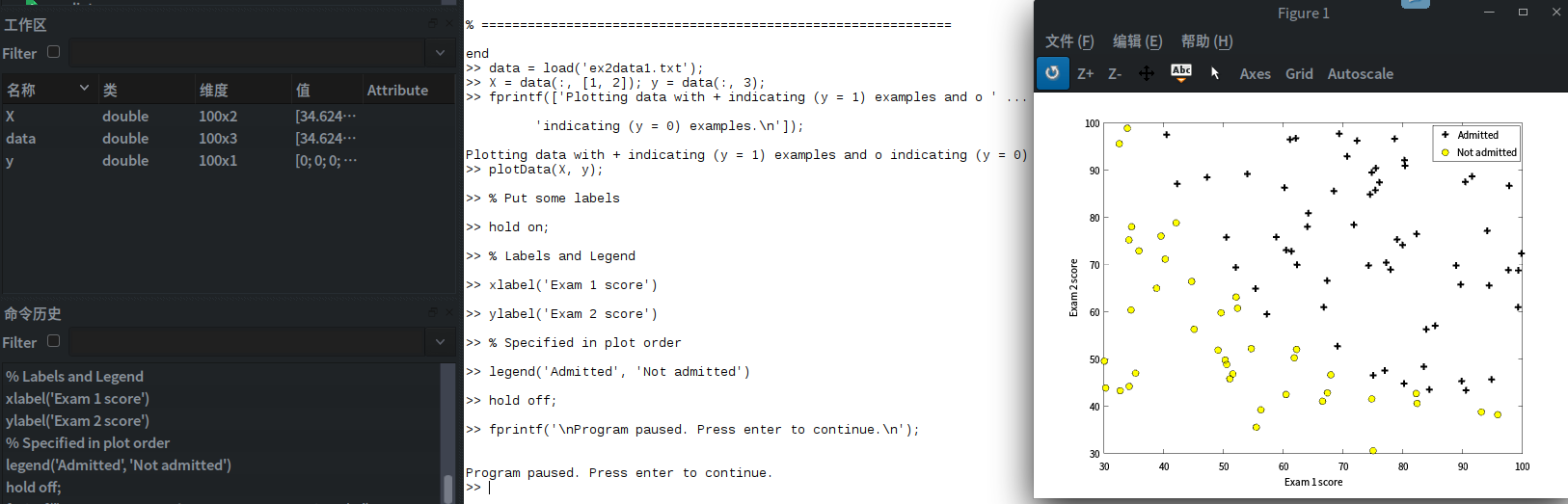
图中用+与O分别表示y = 1 与y = 0的两种结果。
在接触到真正的代价函数之前,我们通常假设函数是hΘ(x)= g(ΘTx)
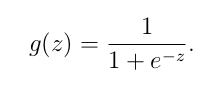
是一S形函数,他可以很好的将0与1区分开。
S形函数的实现:
function g = sigmoid(z)

%SIGMOID Compute sigmoid functoon

%   J = SIGMOID(z) computes the sigmoid of z.

% You need to return the following variables correctly

g = zeros(size(z));

% ====================== YOUR CODE HERE ======================

% Instructions: Compute the sigmoid of each value of z (z can be a matrix,

%               vector or scalar).

g = 1 ./ ( 1 + exp(-z) ) ;

% =============================================================

end
现在我们可以对逻辑函数进行梯度下降,回归函数中的代价函数J(Θ)

代价函数代码实现为
function [J, grad] = costFunction(theta, X, y)

%COSTFUNCTION Compute cost and gradient for logistic regression

%   J = COSTFUNCTION(theta, X, y) computes the cost of using theta as the

%   parameter for logistic regression and the gradient of the cost

%   w.r.t. to the parameters.

% Initialize some useful values

m = length(y); % number of training examples

% You need to return the following variables correctly

J = 0;

grad = zeros(size(theta));

% ====================== YOUR CODE HERE ======================

% Instructions: Compute the cost of a particular choice of theta.

%               You should set J to the cost.

%               Compute the partial derivatives and set grad to the partial

%               derivatives of the cost w.r.t. each parameter in theta

%

% Note: grad should have the same dimensions as theta

%

J= -1 * sum( y .* log( sigmoid(X*theta) ) + (1 - y ) .* log( (1 - sigmoid(X*theta)) ) ) / m ;

grad = ( X' * (sigmoid(X*theta) - y ) )/ m ;

% =============================================================

end
function [J, grad] = costFunctionReg(theta, X, y, lambda)

%COSTFUNCTIONREG Compute cost and gradient for logistic regression with regularization

%   J = COSTFUNCTIONREG(theta, X, y, lambda) computes the cost of using

%   theta as the parameter for regularized logistic regression and the

%   gradient of the cost w.r.t. to the parameters.

% Initialize some useful values

m = length(y); % number of training examples

% You need to return the following variables correctly

J = 0;

grad = zeros(size(theta));

% ====================== YOUR CODE HERE ======================

% Instructions: Compute the cost of a particular choice of theta.

%               You should set J to the cost.

%               Compute the partial derivatives and set grad to the partial

%               derivatives of the cost w.r.t. each parameter in theta

theta_1=[0;theta(2:end)];

J= -1 * sum( y .* log( sigmoid(X*theta) ) + (1 - y ) .* log( (1 - sigmoid(X*theta)) ) ) / m  + lambda/(2*m) * theta_1' * theta_1 ;

grad = ( X' * (sigmoid(X*theta) - y ) )/ m + lambda/m * theta_1 ;

% =============================================================

end
预测函数:
function p = predict(theta, X)

%PREDICT Predict whether the label is 0 or 1 using learned logistic

%regression parameters theta

%   p = PREDICT(theta, X) computes the predictions for X using a

%   threshold at 0.5 (i.e., if sigmoid(theta'*x) >= 0.5, predict 1)

m = size(X, 1); % Number of training examples

% You need to return the following variables correctly

p = zeros(m, 1);

% ====================== YOUR CODE HERE ======================

% Instructions: Complete the following code to make predictions using

%               your learned logistic regression parameters.

%               You should set p to a vector of 0's and 1's

%

k = find(sigmoid( X * theta) >= 0.5 );

p(k)= 1;

% p(sigmoid( X * theta) >= 0.5) = 1;   % it's a more compat way.

% =========================================================================

end
现在我们实现代价函数和他的梯度下降,并拟合出直线
%% ============ Part 2: Compute Cost and Gradient ============

%  In this part of the exercise, you will implement the cost and gradient

%  for logistic regression. You neeed to complete the code in

%  costFunction.m

%  Setup the data matrix appropriately, and add ones for the intercept term

[m, n] = size(X);

% Add intercept term to x and X_test

X = [ones(m, 1) X];

% Initialize fitting parameters

initial_theta = zeros(n + 1, 1);

% Compute and display initial cost and gradient

[cost, grad] = costFunction(initial_theta, X, y);

fprintf('Cost at initial theta (zeros): %f\n', cost);

fprintf('Gradient at initial theta (zeros): \n');

fprintf(' %f \n', grad);

fprintf('\nProgram paused. Press enter to continue.\n');

pause;
%% ============= Part 3: Optimizing using fminunc  =============

%  In this exercise, you will use a built-in function (fminunc) to find the

%  optimal parameters theta.

%  Set options for fminunc

options = optimset('GradObj', 'on', 'MaxIter', 400);

%  Run fminunc to obtain the optimal theta

%  This function will return theta and the cost

[theta, cost] = ...

	fminunc(@(t)(costFunction(t, X, y)), initial_theta, options);

% Print theta to screen

fprintf('Cost at theta found by fminunc: %f\n', cost);

fprintf('theta: \n');

fprintf(' %f \n', theta);

% Plot Boundary

plotDecisionBoundary(theta, X, y);

% Put some labels

hold on;

% Labels and Legend

xlabel('Exam 1 score')

ylabel('Exam 2 score')

% Specified in plot order

legend('Admitted', 'Not admitted')

hold off;

fprintf('\nProgram paused. Press enter to continue.\n');

pause;

%% ============== Part 4: Predict and Accuracies ==============

%  After learning the parameters, you'll like to use it to predict the outcomes

%  on unseen data. In this part, you will use the logistic regression model

%  to predict the probability that a student with score 45 on exam 1 and

%  score 85 on exam 2 will be admitted.

%

%  Furthermore, you will compute the training and test set accuracies of

%  our model.

%

%  Your task is to complete the code in predict.m

%  Predict probability for a student with score 45 on exam 1

%  and score 85 on exam 2

prob = sigmoid([1 45 85] * theta);

fprintf(['For a student with scores 45 and 85, we predict an admission ' ...

         'probability of %f\n\n'], prob);

% Compute accuracy on our training set

p = predict(theta, X);

fprintf('Train Accuracy: %f\n', mean(double(p == y)) * 100);

fprintf('\nProgram paused. Press enter to continue.\n');

pause;
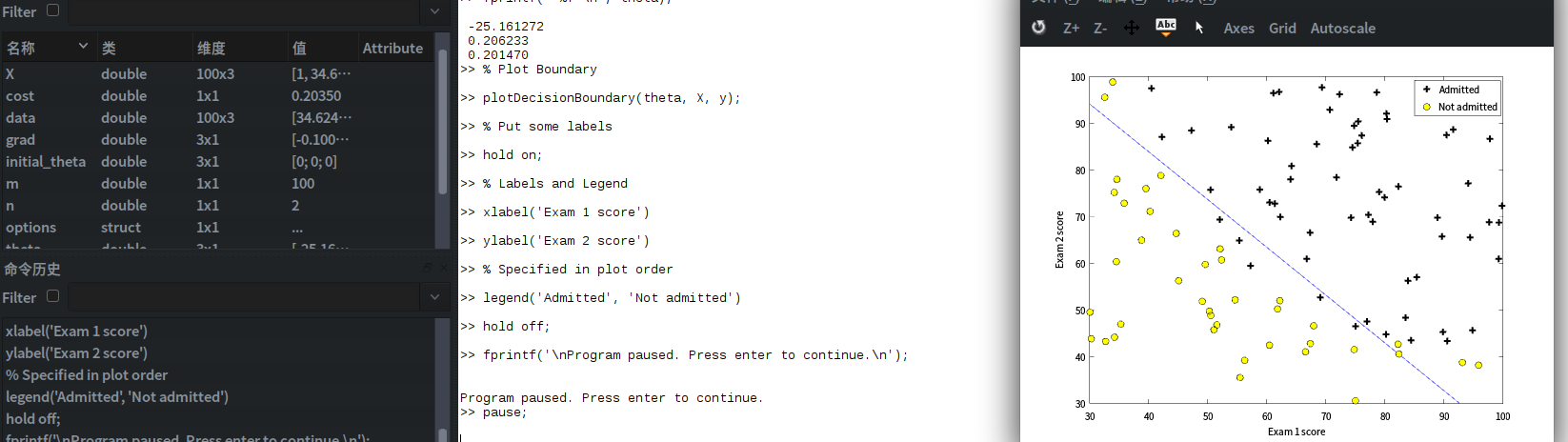
实例2,对非线性函数进行逻辑回归,
实现步骤如下:
%% Machine Learning Online Class - Exercise 2: Logistic Regression

%

%  Instructions

%  ------------

%

%  This file contains code that helps you get started on the second part

%  of the exercise which covers regularization with logistic regression.

%

%  You will need to complete the following functions in this exericse:

%

%     sigmoid.m

%     costFunction.m

%     predict.m

%     costFunctionReg.m

%

%  For this exercise, you will not need to change any code in this file,

%  or any other files other than those mentioned above.

%

%% Initialization

clear ; close all; clc

%% Load Data

%  The first two columns contains the X values and the third column

%  contains the label (y).

data = load('ex2data2.txt');

X = data(:, [1, 2]); y = data(:, 3);

plotData(X, y);

% Put some labels

hold on;

% Labels and Legend

xlabel('Microchip Test 1')

ylabel('Microchip Test 2')

% Specified in plot order

legend('y = 1', 'y = 0')

hold off;

%% =========== Part 1: Regularized Logistic Regression ============

%  In this part, you are given a dataset with data points that are not

%  linearly separable. However, you would still like to use logistic

%  regression to classify the data points.

%

%  To do so, you introduce more features to use -- in particular, you add

%  polynomial features to our data matrix (similar to polynomial

%  regression).

%

% Add Polynomial Features

% Note that mapFeature also adds a column of ones for us, so the intercept

% term is handled

X = mapFeature(X(:,1), X(:,2));

% Initialize fitting parameters

initial_theta = zeros(size(X, 2), 1);

% Set regularization parameter lambda to 1

lambda = 1;

% Compute and display initial cost and gradient for regularized logistic

% regression

[cost, grad] = costFunctionReg(initial_theta, X, y, lambda);

fprintf('Cost at initial theta (zeros): %f\n', cost);

fprintf('\nProgram paused. Press enter to continue.\n');

pause;

%% ============= Part 2: Regularization and Accuracies =============

%  Optional Exercise:

%  In this part, you will get to try different values of lambda and

%  see how regularization affects the decision coundart

%

%  Try the following values of lambda (0, 1, 10, 100).

%

%  How does the decision boundary change when you vary lambda? How does

%  the training set accuracy vary?

%

% Initialize fitting parameters

initial_theta = zeros(size(X, 2), 1);

% Set regularization parameter lambda to 1 (you should vary this)

lambda = 1;

% Set Options

options = optimset('GradObj', 'on', 'MaxIter', 400);

% Optimize

[theta, J, exit_flag] = ...

	fminunc(@(t)(costFunctionReg(t, X, y, lambda)), initial_theta, options);

% Plot Boundary

plotDecisionBoundary(theta, X, y);

hold on;

title(sprintf('lambda = %g', lambda))

% Labels and Legend

xlabel('Microchip Test 1')

ylabel('Microchip Test 2')

legend('y = 1', 'y = 0', 'Decision boundary')

hold off;

% Compute accuracy on our training set

p = predict(theta, X);

fprintf('Train Accuracy: %f\n', mean(double(p == y)) * 100);
样本:

逻辑回归:
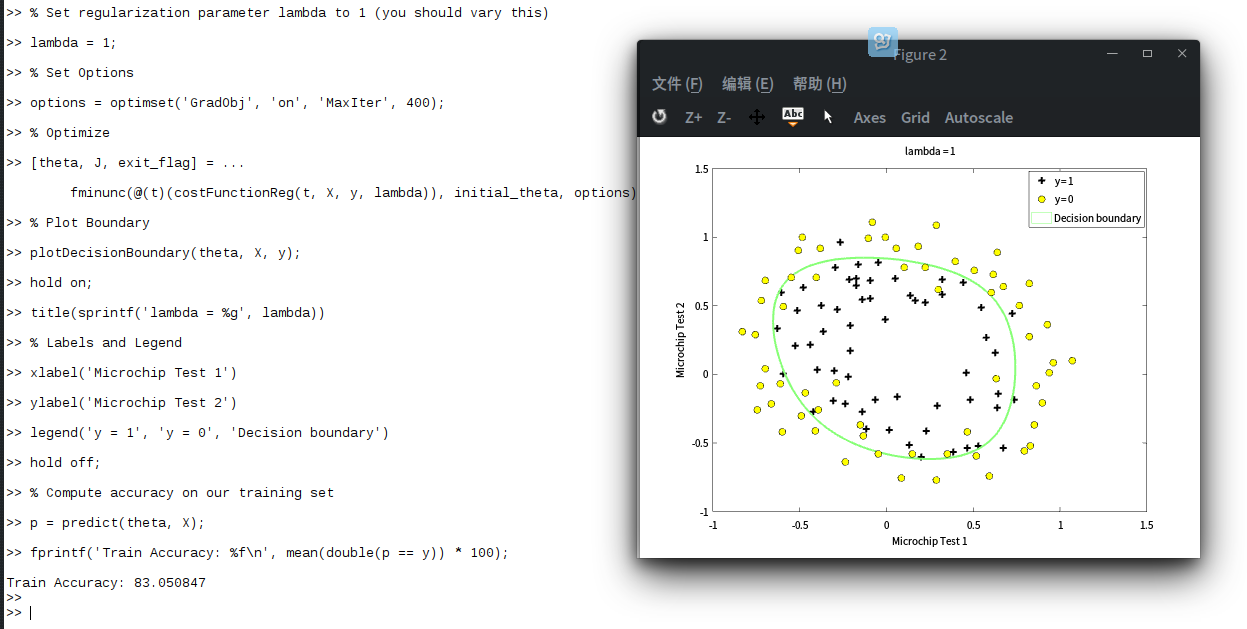
预测结果:为83.050847
【机器学习】Octave 实现逻辑回归 Logistic Regression的更多相关文章
- 机器学习总结之逻辑回归Logistic Regression
机器学习总结之逻辑回归Logistic Regression 逻辑回归logistic regression,虽然名字是回归,但是实际上它是处理分类问题的算法.简单的说回归问题和分类问题如下: 回归问 ...
- 机器学习入门11 - 逻辑回归 (Logistic Regression)
原文链接:https://developers.google.com/machine-learning/crash-course/logistic-regression/ 逻辑回归会生成一个介于 0 ...
- 机器学习 (三) 逻辑回归 Logistic Regression
文章内容均来自斯坦福大学的Andrew Ng教授讲解的Machine Learning课程,本文是针对该课程的个人学习笔记,如有疏漏,请以原课程所讲述内容为准.感谢博主Rachel Zhang 的个人 ...
- Coursera公开课笔记: 斯坦福大学机器学习第六课“逻辑回归(Logistic Regression)” 清晰讲解logistic-good!!!!!!
原文:http://52opencourse.com/125/coursera%E5%85%AC%E5%BC%80%E8%AF%BE%E7%AC%94%E8%AE%B0-%E6%96%AF%E5%9D ...
- 机器学习(四)--------逻辑回归(Logistic Regression)
逻辑回归(Logistic Regression) 线性回归用来预测,逻辑回归用来分类. 线性回归是拟合函数,逻辑回归是预测函数 逻辑回归就是分类. 分类问题用线性方程是不行的 线性方程拟合的是连 ...
- 机器学习方法(五):逻辑回归Logistic Regression,Softmax Regression
欢迎转载,转载请注明:本文出自Bin的专栏blog.csdn.net/xbinworld. 技术交流QQ群:433250724,欢迎对算法.技术.应用感兴趣的同学加入. 前面介绍过线性回归的基本知识, ...
- 逻辑回归(Logistic Regression)详解,公式推导及代码实现
逻辑回归(Logistic Regression) 什么是逻辑回归: 逻辑回归(Logistic Regression)是一种基于概率的模式识别算法,虽然名字中带"回归",但实际上 ...
- ML 逻辑回归 Logistic Regression
逻辑回归 Logistic Regression 1 分类 Classification 首先我们来看看使用线性回归来解决分类会出现的问题.下图中,我们加入了一个训练集,产生的新的假设函数使得我们进行 ...
- [笔记]机器学习(Machine Learning) - 02.逻辑回归(Logistic Regression)
逻辑回归算法是分类算法,虽然这个算法的名字中出现了"回归",但逻辑回归算法实际上是一种分类算法,我们将它作为分类算法使用.. 分类问题:对于每个样本,判断它属于N个类中的那个类或哪 ...
随机推荐
- Kong管理UI -kong-dashboard
本文仍然是在ubuntu18的环境下进行 https://github.com/PGBI/kong-dashboard kong dashboart如果要正常使用管理UI,前提为kong已经正常run ...
- android 开发 我的高德地图代码例子
下载高德地图依赖库和相关注册方式,请查看高德开发者网站:http://lbs.amap.com/api/android-sdk/summary 点击打开链接 高德地图坐标拾取器:http://lbs ...
- python3 json.dump乱码问题
json.dumps(obj, ensure_ascii=False) ensure_ascii = True,会忽略掉non-ascii字符
- leetcode64
class Solution { public: int minPathSum(vector<vector<int>>& grid) { int row=grid.si ...
- TP5 自定义验证器
TP内置验证功能提供两种验证方法 验证器(推荐) $validate = Validate::make([ 'id' => 'require|integer', ]); if ($validat ...
- 如何切换pip的源
参考别人的帖子https://blog.csdn.net/chenghuikai/article/details/55258957
- JVM系列2:垃圾收集器与内存分配策略
垃圾收集是一个很大话题,本文也只是看了深入理解Java虚拟机总结了下垃圾收集的知识. 首先按照惯例,先上思维导图: 垃圾收集简而言之就是JVM帮我们清理掉内存区域不需要的数据.它主要负责清理堆中实例对 ...
- 爬虫 1 requests 、beautifulsoup
1.requests 1.method 提交方式:post.get.put.delete.options.head.patch 2.url 访问地址 3.params 在url中传递的参数,GET p ...
- Linux命令行报错 bash: cannot create temp file for here-document: No space left on device
今天Linux服务器出问题了,使用"tab"补全命令时,提示 bash: cannot create temp file for here-document: No space l ...
- mysql win10x64 免安装版 安装配置
安装包下载或者 gaobo百度云/工具/开发工具/mysql-5.7.23-winx64.zip 第一步, 解压MySQL压缩包 将以下载的MySQL压缩包解压到自定义目录下,我的解压目录是: ...