
Python学习系列(七)( 数据库编程)
 import MySQLdb

 #connect to a database 'test'

 conn=MySQLdb.connect(host='localhost',user='root',passwd='zbc123',db='test')

 cursor=conn.cursor()

 #create a table

 cursor.execute('create table \

 test(ID int primary key auto_increment,Name char(25))')

 #Closing database

 cursor.close()

 conn.close()
 import MySQLdb

 #connect to a database 'test'

 conn=MySQLdb.connect(host='localhost',user='root',passwd='zbc123',db='test')

 cursor=conn.cursor()

 #fetch datas

 n=cursor.execute('select * from test;')

 r=cursor.fetchall()

 print n,r

 #Closing database

 cursor.close()

 conn.close()

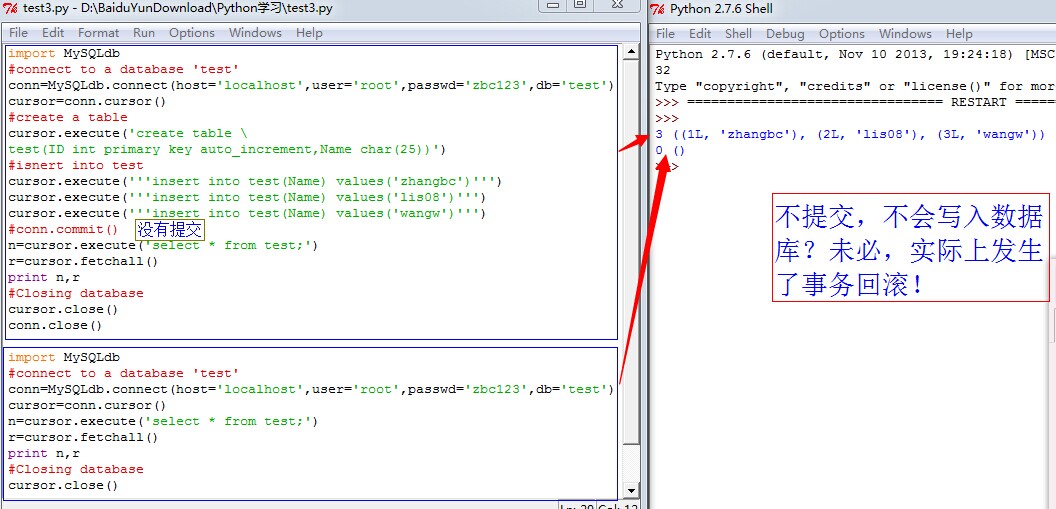
 >>> ================================ RESTART ================================

 >>>

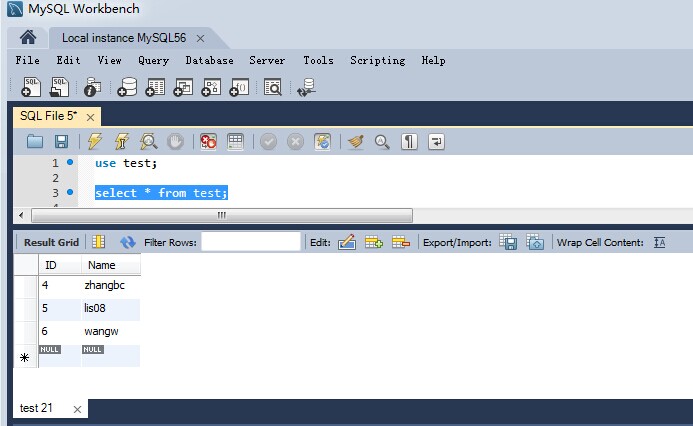
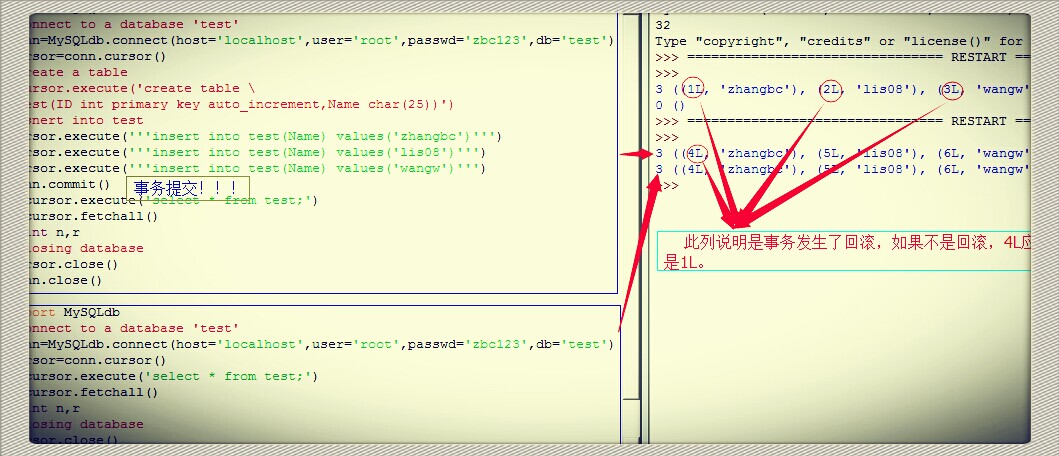
 3 ((4L, 'zhangbc'), (5L, 'lis08'), (6L, 'wangw'))

 >>>
 import MySQLdb

 #connect to a database 'test'

 conn=MySQLdb.connect(host='localhost',user='root',passwd='zbc123',db='test')

 cursor=conn.cursor()

 #insert data into table 'test'

 mysql='''insert into test(id,sname) values(4,'zhanghua')'''

 cursor.execute(mysql)

 conn.commit()#below mysql5.0 needed

 #fetch datas

 n=cursor.execute('select * from test;')

 r=cursor.fetchall()

 print n,r

 #Closing database

 cursor.close()

 conn.close()

 >>> ================================ RESTART ================================

 >>>

 4 ((1L, 'zhangbc'), (2L, 'lis'), (3L, 'wangw'), (4L, 'zhanghua'))
 import MySQLdb

 #connect to a database 'test'

 conn=MySQLdb.connect(host='localhost',user='root',passwd='zbc123',db='test')

 cursor=conn.cursor()

 #update data of the table 'test'

 mysql='''update test set sname='Lisi08' where id=2'''

 cursor.execute(mysql)

 conn.commit()#below mysql5.0 needed

 #fetch datas

 n=cursor.execute('select * from test;')

 r=cursor.fetchall()

 print n,r

 #Closing database

 cursor.close()

 conn.close()

 >>> ================================ RESTART ================================

 >>>

 4 ((1L, 'zhangbc'), (2L, 'Lisi08'), (3L, 'wangw'), (4L, 'zhanghua'))
 import MySQLdb

 #connect to a database 'test'

 conn=MySQLdb.connect(host='localhost',user='root',passwd='zbc123',db='test')

 cursor=conn.cursor()

 #delete data of the table 'test'

 mysql='''delete from test where id=4'''

 cursor.execute(mysql)

 conn.commit()#below mysql5.0 needed

 #fetch datas

 n=cursor.execute('select * from test;')

 r=cursor.fetchall()

 print n,r

 #Closing database

 cursor.close()

 conn.close()

 >>> ================================ RESTART ================================

 >>>

 3 ((1L, 'zhangbc'), (2L, 'Lisi08'), (3L, 'wangw'))
 import MySQLdb

 #connect to a database 'test'

 conn=MySQLdb.connect(host='localhost',user='root',passwd='zbc123',db='test')

 cursor=conn.cursor()

 #fetch datas

 cursor.execute('select * from test;')

 #获得结果集的记录

 numrows=int(cursor.rowcount)

 #循环,取行数据

 for i in range(numrows):

     row=cursor.fetchone()

     print row[0],row[1]

 #Closing database

 cursor.close()

 conn.close()

 >>> ================================ RESTART ================================

 >>>

 4 zhangbc

 5 lis08

 6 wangw
ii)使用字典cursor
 #-*- coding:UTF-8 -*-

 import MySQLdb as mdb

 #connect to a database 'test'

 conn=mdb.connect(host='localhost',user='root',passwd='zbc123',db='test')

 with conn:

     #获取连接上的字典cursor,每一个cursor其实都是cursor的子类

     cur=conn.cursor(mdb.cursors.DictCursor)

 #fetch datas

 cur.execute('select * from test;')

 #获得结果集

 rows=cur.fetchall()

 #循环,取行数据

 for row in rows:

     print '%s %s'%(row['ID'],row['Name'])

 #Closing database

 cur.close()

 conn.close()

 >>> ================================ RESTART ================================

 >>>

 4 zhangbc

 5 lis08

 6 wangw
iii)获取单个表的字段名及其信息
 #-*- coding:UTF-8 -*-

 import MySQLdb as mdb

 #connect to a database 'test'

 conn=mdb.connect(host='localhost',user='root',passwd='zbc123',db='test')

 with conn:

     #获取连接上的字典cursor,每一个cursor其实都是cursor的子类

     cur=conn.cursor()

 #fetch datas

 cur.execute('select * from test;')

 #获得结果集

 rows=cur.fetchall()

 #获得链接对象的描述信息

 desc=cur.description

 print 'cur.description:',desc

 #打印表头

 print '%2s %3s'%(desc[0][0],desc[1][0])

 #循环,取行数据

 for row in rows:

     print '%2s %3s'%row

 #Closing database

 cur.close()

 conn.close()

 >>> ================================ RESTART ================================

 >>>

 cur.description: (('ID', 3, 1, 11, 11, 0, 0), ('Name', 254, 7, 25, 25, 0, 1))

 ID Name

  4 zhangbc

  5 lis08

  6 wangw
Python学习系列(七)( 数据库编程)的更多相关文章
- python学习笔记(七):面向对象编程、类
一.面向对象编程 面向对象--Object Oriented Programming,简称oop,是一种程序设计思想.在说面向对象之前,先说一下什么是编程范式,编程范式你按照什么方式来去编程,去实现一 ...
- Python学习系列(八)( 面向对象基础)
Python学习系列(八)( 面向对象基础) Python学习系列(七)( 数据库编程) 一,面向对象 1,域:属于一个对象或类的变量.有两种类型,即实例变量—属于每个实例/类的对象:类变量—属于类 ...
- Python学习系列(六)(模块)
Python学习系列(六)(模块) Python学习系列(五)(文件操作及其字典) 一,模块的基本介绍 1,import引入其他标准模块 标准库:Python标准安装包里的模块. 引入模块的几种方式: ...
- Python学习系列(三)(字符串)
Python学习系列(三)(字符串) Python学习系列(一)(基础入门) Python学习系列(二)(基础知识) 一个月没有更新博客了,最近工作上有点小忙,实在是没有坚持住,丢久又有感觉写的必要了 ...
- Python学习系列(二)(基础知识)
Python基础语法 Python学习系列(一)(基础入门) 对于任何一门语言的学习,学语法是最枯燥无味的,但又不得不学,基础概念较繁琐,本文将不多涉及概念解释,用例子进行相关解析,适当与C语言对比, ...
- python学习之路网络编程篇(第四篇)
python学习之路网络编程篇(第四篇) 内容待补充
- python学习第七讲,python中的数据类型,列表,元祖,字典,之元祖使用与介绍
目录 python学习第七讲,python中的数据类型,列表,元祖,字典,之元祖使用与介绍 一丶元祖 1.元祖简介 2.元祖变量的定义 3.元祖变量的常用操作. 4.元祖的遍历 5.元祖的应用场景 p ...
- Python学习第七课
Python学习第七课 'Alex' "Alex"print('hello'*5) #重复输出字符串 print('hellowold'[2:]) #类似于切片操作:会取出 llo ...
- Python学习系列(九)(IO与异常处理)
Python学习系列(九)(IO与异常处理) Python学习系列(八)( 面向对象基础) 一,存储器 1,Python提供一个标准的模块,称为pickle,使用它既可以在一个文件中存储任何Pytho ...
随机推荐
- Easy-RSA 3快速入门自述文件
Easy-RSA 3快速入门自述文件 这是使用Easy-RSA版本3的快速入门指南.运行./easyrsa -h可以找到有关使用和特定命令的详细帮助.可以在doc /目录中找到其他文档. 如果您从Ea ...
- [国家集训队2011]happiness
Description 高一一班的座位表是个n*m的矩阵,经过一个学期的相处,每个同学和前后左右相邻的同学互相成为了好朋友.这学期要分文理科了,每个同学对于选择文科与理科有着自己的喜悦值,而一对好朋友 ...
- CocoaPods学习系列1——安装和常规使用
CocoaPods是一个Github上的开源项目,目前已经成为iOS开发过程中标准的依赖库管理器,提供了一种对第三方类库简单优雅的集成和管理方案. 其工作原理,是将第三方类库统一管理到一个名为Pods ...
- C语言排序算法之简单交换法排序,直接选择排序,冒泡排序
C语言排序算法之简单交换法排序,直接选择排序,冒泡排序,最近考试要用到,网上也有很多例子,我觉得还是自己写的看得懂一些. 简单交换法排序 /*简单交换法排序 根据序列中两个记录键值的比较结果来对换这两 ...
- Python中有趣的数据结构
链表 链表的基本操作 >>> a = [66.25,333,333,1,1234.5] >>> print a.count(333),a.count(66.25), ...
- Pandas分类数据
通常实时的数据包括重复的文本列.例如:性别,国家和代码等特征总是重复的.这些是分类数据的例子. 分类变量只能采用有限的数量,而且通常是固定的数量.除了固定长度,分类数据可能有顺序,但不能执行数字操作. ...
- NumPy数学算数函数
NumPy - 算数函数 很容易理解的是,NumPy 包含大量的各种数学运算功能. NumPy 提供标准的三角函数,算术运算的函数,复数处理函数等. 三角函数 NumPy 拥有标准的三角函数,它为弧度 ...
- tensorflow笔记:使用tf来实现word2vec
(一) tensorflow笔记:流程,概念和简单代码注释 (二) tensorflow笔记:多层CNN代码分析 (三) tensorflow笔记:多层LSTM代码分析 (四) tensorflow笔 ...
- tensorflow笔记:模型的保存与训练过程可视化
tensorflow笔记系列: (一) tensorflow笔记:流程,概念和简单代码注释 (二) tensorflow笔记:多层CNN代码分析 (三) tensorflow笔记:多层LSTM代码分析 ...
- codeforces 814B.An express train to reveries 解题报告
题目链接:http://codeforces.com/problemset/problem/814/B 题目意思:分别给定一个长度为 n 的不相同序列 a 和 b.这两个序列至少有 i 个位置(1 ≤ ...