
Flume示例
建议参考官方文档:http://flume.apache.org/FlumeUserGuide.html
示例一:用tail命令获取数据,下沉到hdfs
类似场景:

创建目录:
mkdir /home/hadoop/log
不断往文件中追加内容:
while true

do

echo  >> /home/hadoop/log/test.log

sleep 0.5

done
查看文件内容:
tail -F test.log
启动Hadoop集群。
检查下hdfs式否是salf模式:
hdfs dfsadmin -report
tail-hdfs.conf的内容如下:
# Name the components on this agent
a1.sources = r1
a1.sinks = k1
a1.channels = c1
#exec 指的是命令
# Describe/configure the source
a1.sources.r1.type = exec
#F根据文件名追中, f根据文件的nodeid追中
a1.sources.r1.command = tail -F /home/hadoop/log/test.log
a1.sources.r1.channels = c1
# Describe the sink
#下沉目标
a1.sinks.k1.type = hdfs
a1.sinks.k1.channel = c1
#指定目录, flum帮做目的替换
a1.sinks.k1.hdfs.path = /flume/events/%y-%m-%d/%H%M/
#文件的命名, 前缀
a1.sinks.k1.hdfs.filePrefix = events-
#10 分钟就改目录
a1.sinks.k1.hdfs.round = true
a1.sinks.k1.hdfs.roundValue = 10
a1.sinks.k1.hdfs.roundUnit = minute
#文件滚动之前的等待时间(秒)
a1.sinks.k1.hdfs.rollInterval = 3
#文件滚动的大小限制(bytes)
a1.sinks.k1.hdfs.rollSize = 500
#写入多少个event数据后滚动文件(事件个数)
a1.sinks.k1.hdfs.rollCount = 20
#5个事件就往里面写入
a1.sinks.k1.hdfs.batchSize = 5
#用本地时间格式化目录
a1.sinks.k1.hdfs.useLocalTimeStamp = true
#下沉后, 生成的文件类型,默认是Sequencefile,可用DataStream,则为普通文本
a1.sinks.k1.hdfs.fileType = DataStream
# Use a channel which buffers events in memory
a1.channels.c1.type = memory
a1.channels.c1.capacity = 1000
a1.channels.c1.transactionCapacity = 100
# Bind the source and sink to the channel
a1.sources.r1.channels = c1
a1.sinks.k1.channel = c1
执行命令:
bin/flume-ng agent -c conf -f conf/tail-hdfs.conf -n a1

前端页面查看下, master:50070


示例二:多个Agent串联
类似场景:

从tail命令获取数据发送到avro端口,另一个节点从avro端口接收数据,下沉到logger。
在weekend10机器上配置tail-avro.conf,在weekend01机器上配置avro-logger.conf。
tail-avro.conf配置文件:
# Name the components on this agent
a1.sources = r1
a1.sinks = k1
a1.channels = c1
# Describe/configure the source
a1.sources.r1.type = exec
a1.sources.r1.command = tail -F /home/hadoop/log/test.log
a1.sources.r1.channels = c1
# Describe the sink
#绑定的不是本机, 是另外一台机器的服务地址, sink端的avro是一个发送端, avro的客户端, 往weekend01这个机器上发
a1.sinks = k1
a1.sinks.k1.type = avro
a1.sinks.k1.channel = c1
a1.sinks.k1.hostname = weekend01
a1.sinks.k1.port = 4141
a1.sinks.k1.batch-size = 2
# Use a channel which buffers events in memory
a1.channels.c1.type = memory
a1.channels.c1.capacity = 1000
a1.channels.c1.transactionCapacity = 100
# Bind the source and sink to the channel
a1.sources.r1.channels = c1
a1.sinks.k1.channel = c1
avro-logger.conf配置文件:
# Name the components on this agent
a1.sources = r1
a1.sinks = k1
a1.channels = c1
# Describe/configure the source
#source中的avro组件是接收者服务, 绑定本机
a1.sources.r1.type = avro
a1.sources.r1.channels = c1
a1.sources.r1.bind = 0.0.0.0
a1.sources.r1.port = 4141
# Describe the sink
a1.sinks.k1.type = logger
# Use a channel which buffers events in memory
a1.channels.c1.type = memory
a1.channels.c1.capacity = 1000
a1.channels.c1.transactionCapacity = 100
# Bind the source and sink to the channel
a1.sources.r1.channels = c1
a1.sinks.k1.channel = c1
先在weekend01上启动:bin/flume-ng agent -c conf -f conf/avro-logger.conf -n a1 -Dflume.root.logger=INFO,console
再在weekend110上启动:bin/flume-ng agent -c conf -f conf/tail-avro.conf -n a1
并在weekend110执行:while true ; do echo 11111111 >> /home/hadoop/log/test.log; sleep 1; done
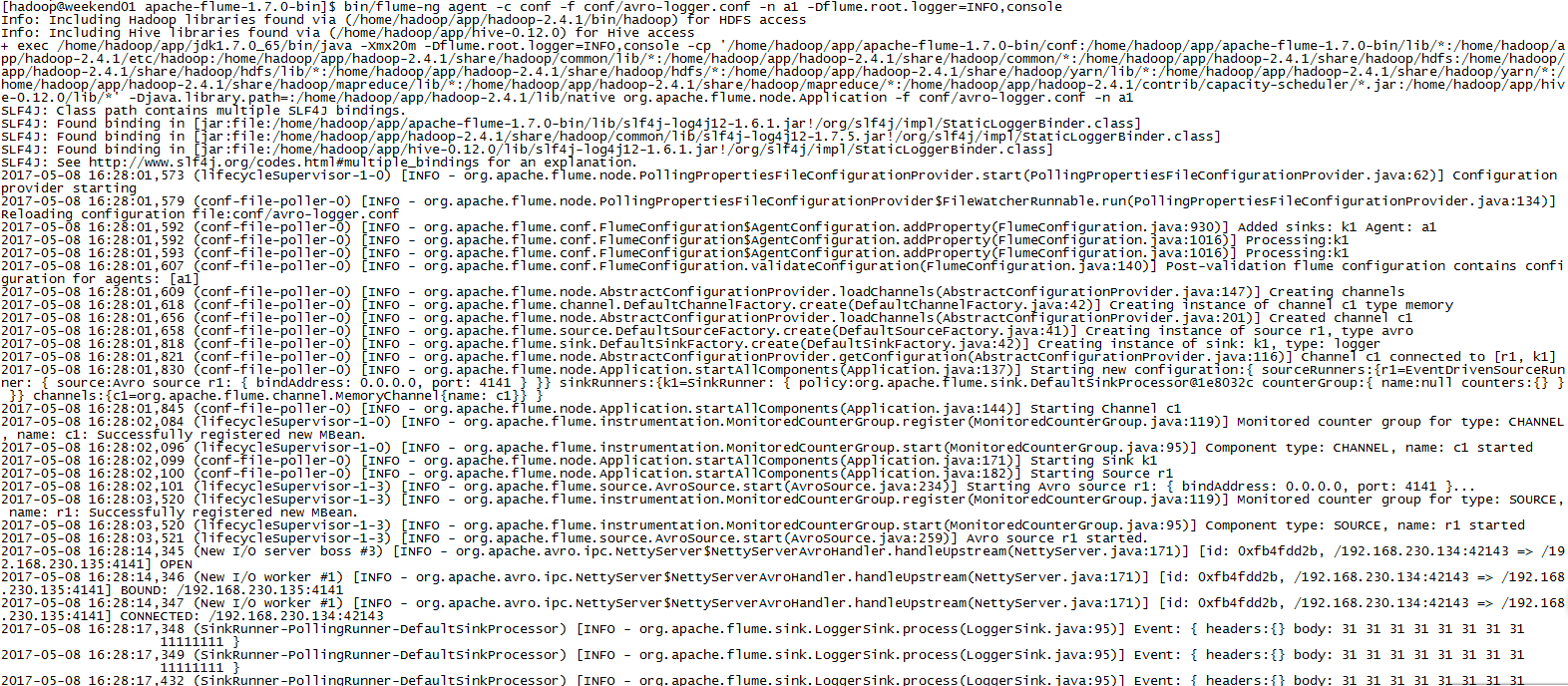
显示效果如下:

或者直接在weekend110上执行:bin/flume-ng avro-client -H weekend01 -p 4141 -F /home/hadoop/log/test.log
同样的效果。
Flume示例的更多相关文章
- Flume 示例
1.Syslog Tcp Source sysylog通过配置一个端口,flume能够监控这个端口的数据.如果通往这个端口发送数据可以被flume接收到.可以通过socket发送. #配置文件:sys ...
- Flume NG 简介及配置实战
Flume 作为 cloudera 开发的实时日志收集系统,受到了业界的认可与广泛应用.Flume 初始的发行版本目前被统称为 Flume OG(original generation),属于 clo ...
- 分布式日志收集收集系统:Flume(转)
Flume是一个分布式.可靠.和高可用的海量日志采集.聚合和传输的系统.支持在系统中定制各类数据发送方,用于收集数据:同时,Flume提供对数据进行简单处理,并写到各种数据接受方(可定制)的能力.Fl ...
- 04.flume+kafka环境搭建
1.flume下载 安装 测试 1.1 官网下载,通过xshell从winser2012传到cent0s的/opt/flume目录中,使用rz命令 1.2 解压安装 tar -zxvf apache- ...
- flume 1.4的介绍及使用示例
flume 1.4的介绍及使用示例 本文将介绍关于flume 1.4的使用示例,如果还没有安装flume的话可以参考:http://blog.csdn.net/zhu_xun/article/deta ...
- Spark Streaming + Flume整合官网文档阅读及运行示例
1,基于Flume的Push模式(Flume-style Push-based Approach) Flume被用于在Flume agents之间推送数据.在这种方式下,Spark Stre ...
- flume使用示例
flume的特点: flume是一个分布式.可靠.和高可用的海量日志采集.聚合和传输的系统.支持在日志系统中定制各类数据发送方,用于收集数据;同时,Flume提供对数据进行简单处理,并写到各种数据接受 ...
- Flume笔记--示例(使用配置文件)
例子参考资料:http://www.aboutyun.com/thread-8917-1-1.html 自定义sink实现和属性注入:http://www.coderli.com/flume-ng-s ...
- flume http source示例讲解
一.介绍 flume自带的Http Source可以通过Http Post接收事件. 场景:对于有些应用程序环境,它可能不能部署Flume SDK及其依赖项,或客户端代码倾向于通过HTTP而不是Flu ...
随机推荐
- 【Linux】shell判断mysql端口是否启用?
#!/bin/bash set -eux mysqld >& & CONNECTED=$(netstat -alnt | grep -c ":3306 ") ...
- 给ubuntu设置静态ip —— How to set static IP Address in Ubuntu Server 16.04
原文: http://www.configserverfirewall.com/ubuntu-linux/ubuntu-set-static-ip-address/ ----------------- ...
- php.in
[PHP] ;;;;;;;;;;; ; WARNING ; ;;;;;;;;;;; ; This is the default settings file for new PHP installati ...
- 倍福TwinCAT(贝福Beckhoff)常见问题(FAQ)-如何添加Scope监控
添加一个Scope YT NC项目 默认添加的就是对Axis_1的监控,位置,速度和加速度都有,可以删除模长的监控(Position modulo) 点击Record就可以记录曲线了(要停止记 ...
- 【VBA编程】08.数组
[数组简介]数组其实就是一组相同类型的数据的有序集合,其形象表示就像线性表.在存储数据的时候,首先在内存中分配一个连续的存储空间,将各个元素按顺序存放在连续的存储单元格中.[定义静态数组]Dim 数据 ...
- JavaScript | window浏览器对象模型
Js Window - 获取浏览器窗口 全局变量是window对象的属性 全局函数是window对象的方法 HTML DOM的document是window对象属性之一 window.document ...
- 使用Python爬虫爬取网络美女图片
代码地址如下:http://www.demodashi.com/demo/13500.html 准备工作 安装python3.6 略 安装requests库(用于请求静态页面) pip install ...
- spring 代理 演变过程
动态代理演变 拿JDBC开事务举例子 最初 写代码 每个CUD 都需要开启事务 所以出现很多累赘代码 因此提出静态代理的构想,把事务交给后台做,程序员只需要 调用update(sql)就行了,upda ...
- mongodb - 集合重命名
#创建新的集合yb > for(i=0;i<10;i++){db.yb.insert({'i':i})} WriteResult({ "nInserted" : 1 } ...
- Linux文件压缩和打包
gzip压缩工具 1.将etc下的所有conf文件查看后循环追加到1.txt文件中 [root@bogon gzip]# find /etc/ -type f -name '*.conf' -exec ...