
ubuntu安装dockers过程:
1. 先对系统进行更新
1.1 apt-get upgrade
1.2 去中国关于dockers的网站
1.3 安装docker
curl -sSL https://get.daocloud.io/docker | sh
1.4 如果你的电脑没有安装curl,执行:sudo apt install curl
1.5 若报错说

2 安装docker(ubuntu 16.04)
Prerequisites
To follow this tutorial, you will need the following:
- 64-bit Ubuntu 16.04 server
- Non-root user with sudo privileges Initial Setup Guide for Ubuntu 16.04 explains how to set this up.)
Note: Docker requires a 64-bit version of Ubuntu as well as a kernel version equal to or greater than 3.10. The default 64-bit Ubuntu 16.04 server meets these requirements.
All the commands in this tutorial should be run as a non-root user. If root access is required for the command, it will be preceded by sudo. Initial Setup Guide for Ubuntu 16.04 explains how to add users and give them sudo access.
Step 1 — Installing Docker
The Docker installation package available in the official Ubuntu 16.04 repository may not be the latest version. To get the latest and greatest version, install Docker from the official Docker repository. This section shows you how to do just that.
First, add the GPG key for the official Docker repository to the system:
- curl -fsSL https://download.docker.com/linux/ubuntu/gpg | sudo apt-key add -
Add the Docker repository to APT sources:
- sudo add-apt-repository "deb [arch=amd64] https://download.docker.com/linux/ubuntu $(lsb_release -cs) stable"
Next, update the package database with the Docker packages from the newly added repo:
- sudo apt-get update
Make sure you are about to install from the Docker repo instead of the default Ubuntu 16.04 repo:
- apt-cache policy docker-ce
You should see output similar to the follow:
docker-ce:

  Installed: (none)

  Candidate: 17.03.1~ce-0~ubuntu-xenial

  Version table:

     17.03.1~ce-0~ubuntu-xenial 500

        500 https://download.docker.com/linux/ubuntu xenial/stable amd64 Packages

     17.03.0~ce-0~ubuntu-xenial 500

        500 https://download.docker.com/linux/ubuntu xenial/stable amd64 Packages
Notice that docker-ce is not installed, but the candidate for installation is from the Docker repository for Ubuntu 16.04. The docker-ce version number might be different.
Finally, install Docker:
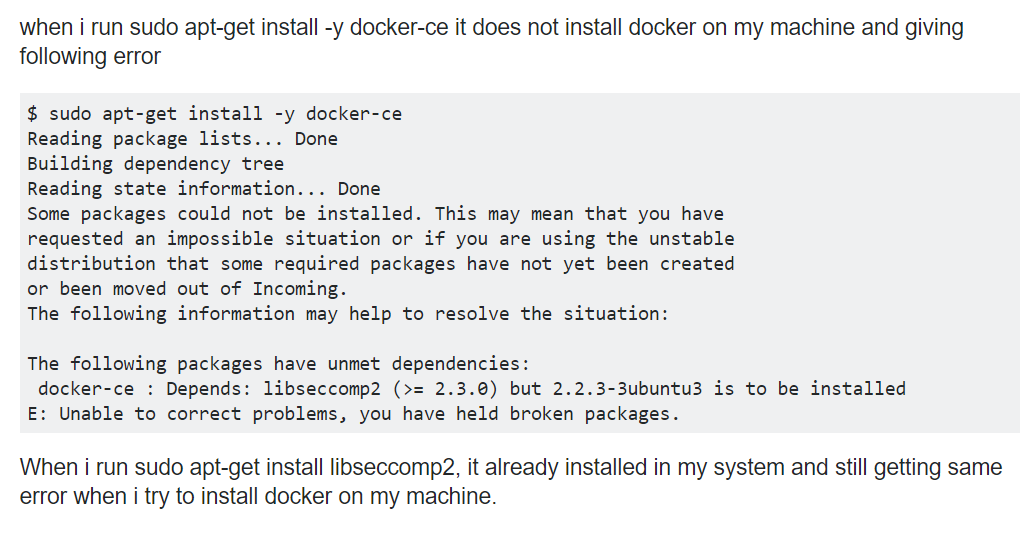
- sudo apt-get install -y docker-ce
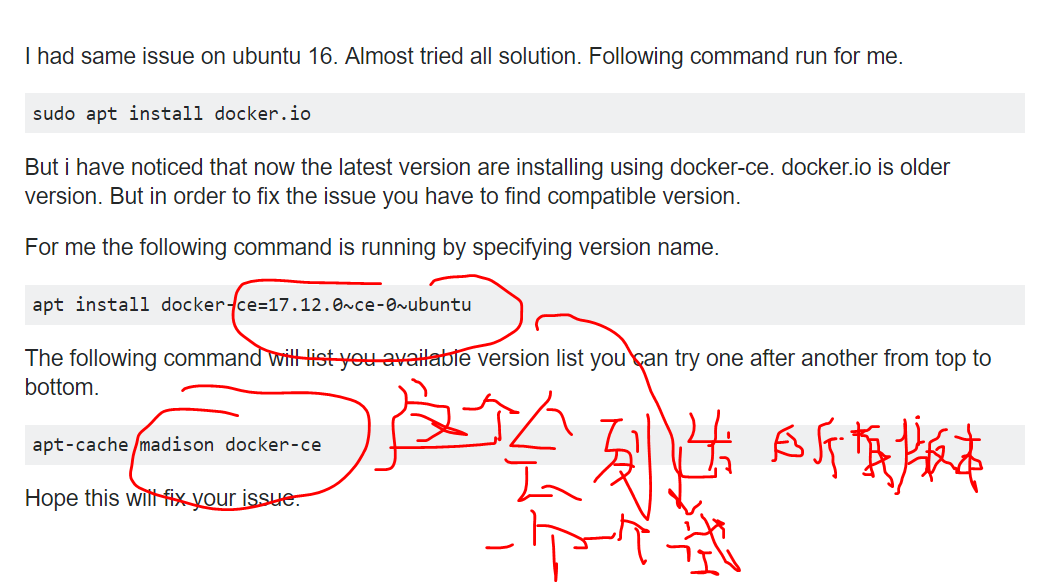
- 注意:有可能运行因为docker是高版本出错
- 因为使用docker-er比install docker.io下载的版本高,后者属于老版本安装
Docker should now be installed, the daemon started, and the process enabled to start on boot. Check that it's running:
- sudo systemctl status docker
The output should be similar to the following, showing that the service is active and running:
● docker.service - Docker Application Container Engine

   Loaded: loaded (/lib/systemd/system/docker.service; enabled; vendor preset: enabled)

   Active: active (running) since Sun 2016-05-01 06:53:52 CDT; 1 weeks 3 days ago

     Docs: https://docs.docker.com

 Main PID: 749 (docker)
Installing Docker now gives you not just the Docker service (daemon) but also the docker command line utility, or the Docker client. We'll explore how to use the docker command later in this tutorial.
3. 加速:
http://guide.daocloud.io/dcs/docker-9153151.html
https://www.daocloud.io/mirror#accelerator-doc
教程主要来源:https://www.digitalocean.com/community/tutorials/how-to-install-and-use-docker-on-ubuntu-16-04
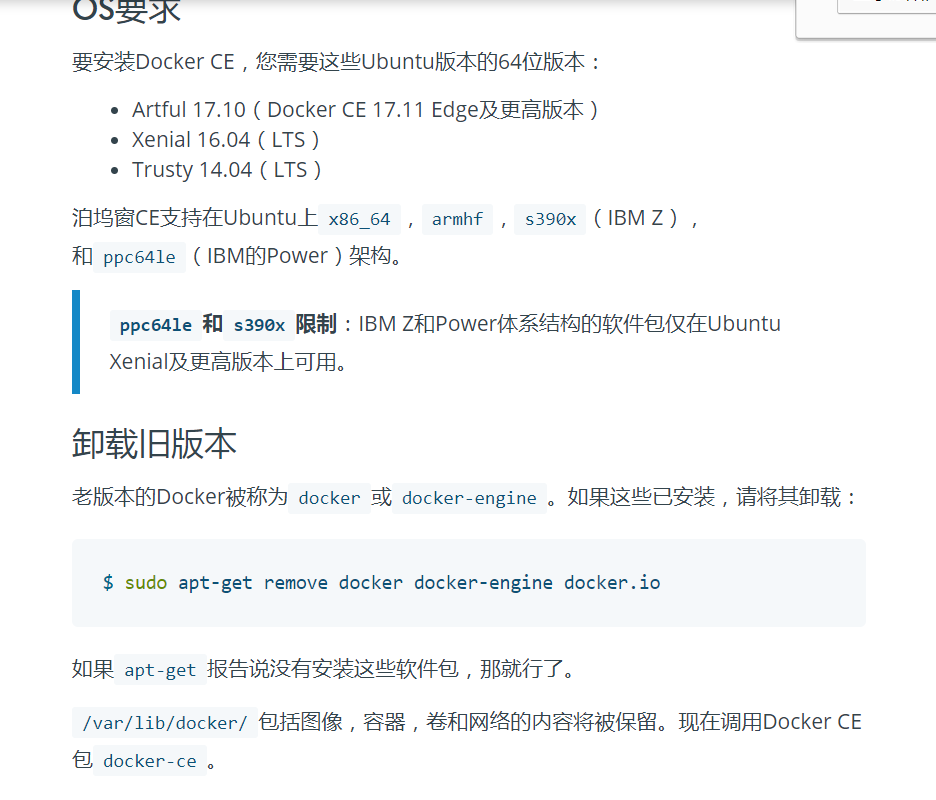
https://docs.docker.com/install/linux/docker-ce/ubuntu/#os-requirements
ubuntu安装dockers过程:的更多相关文章
- Linux(二):VMware虚拟机中Ubuntu安装详细过程
Linux(二):VMware虚拟机中Ubuntu安装详细过程 目录 1 准备 2 安装 2.1 虚拟机的建立 2.2 虚拟机安装Ubuntu系统 2.3 虚拟机设置 3 完成 1 准备 1.操作系统 ...
- Ubuntu安装MyEclise16 过程差不多
选择好安装路径,和workpace路径,可能会因为工作空间放的位置不太对,导致myeclipse出现问题. 1.Ubuntu安装MyEclise10 不知道为什么网上会有那么多安装过程,还有配置目录和 ...
- VMware Ubuntu安装详细过程(详细图解)
说明:该篇博客是博主一字一码编写的,实属不易,请尊重原创,谢谢大家! 一.下载Ubuntu镜像文件 下载地址:http://mirrors.aliyun.com/ubuntu-releases/16. ...
- ubuntu 安装vagrant过程
Ubuntu安装vagrant时需要首先安装virtualBox. Step1: 在https://www.virtualbox.org/wiki/Linux_Downloads 下载ubuntu对应 ...
- Ubuntu安装Mysql过程及远程问题解决
ubuntu下执行 sudo apt-get instlll mysql-server sudo apt-get install mysql-client 安装过程中会有文字界面设置密码 牢记密码 M ...
- Ubuntu安装Chrome过程中的细节
Ubuntu中的默认浏览器是Firefox,但是一直以来都认为Chrome更加优秀.下面记录一下在Ubuntu下安装Chrome的过程,也回顾一下Ubuntu系统中的一些细节. 大多数Linux安装软 ...
- VMware Ubuntu安装具体过程
不是每个程序猿都必须玩过linux,仅仅是博主认为如今的非常多server都是linux系统的,而自己属于那种前端也搞.后台也搞,对框架搭建也感兴趣,可是非常多生产上的框架和工具都是安装在server ...
- ubuntu安装 laravel 过程中出现: mcrypt php extension required 的问题 | 以及composer相关问题 | Nginx安装
这篇文章对于Nginx的配置至关重要 如果碰到访问index.php不返回html而出现下载文件的问题,加上那段default就可以修正: https://www.digitalocean.com/c ...
- ubuntu 安装Pangolin 过程
Pangolin 是一款开源的OPENGL显示库,可以用来视频显示.而且开发容易. 代码我们可以从Github 进行下载:https://github.com/zzx2GH/Pangolin.git ...
随机推荐
- css3正方体
使用animation和调整页面角度做出来 <html lang="zh"> <head> <meta charset="UTF-8&quo ...
- C++ vector 实例二
// constructing vectors #include <iostream> #include <vector> int main () { // construct ...
- centos 6.5 解压 zip
只查看 zip 文件内容而不解压 unzip -l filename.zip 解压到指定目录(不指定则为当前目录) unzip filename.zip -d /usr/file 压缩文件或目录为 z ...
- BZOJ 1419: Red is good 期望dp
数学期望可以理解成一个 DAG 模型. Code: #include <bits/stdc++.h> #define N 5003 #define ll long long #define ...
- html2canvas 使用指南
html2canvas(document.body).then(function(canvas) { document.body.appendChild(canvas); }); 属性参数: http ...
- POI2012 BEZ-Minimalist Security | noi.ac #537 Graph
题目链接:戳我 首先注意这张图有可能不连通!! 然后我们考虑对于每一个联通块,首先任意确定一个点,给它设最终值为x,然后进行搜索.(因为对于一个联通块而言,我们知道一个点的最终值,那么整个联通块上面点 ...
- 使用matplotlib绘制常用图表(1)
#导入相关包from matplotlib import pyplot as plt import matplotlib from matplotlib import font_manager #初始 ...
- js输入密文弹出数字键盘
我们经常被产品要求,在移动端的web页面上的输入框输入密码时要弹出数字键盘,而不是全键盘,这个该怎么实现呢? 1.首先要弹出数字键盘,我们只能把input框的type从password改为tel 2. ...
- Teamviewer解决许可证授权的问题
提交商业用途表 https://www.teamviewer.com/zhCN/pricing/commercial-use/
- linux中~和/,$和#的区别
/是目录层的分隔.表示符.只有一个/表明是root,/etc/表明是根目录下面的etc目录(当然目录最后不需要/,但有/直接表明他是目录,没有末尾的/,那么/etc需要检测一下确定是目录还是文件,虽然 ...