
Part 39 AngularJS route change events
In this video we will discuss
1. Different events that are triggered when a route change occurs in an angular application
2. Logging the events and event handler parameters to inspect their respective properties
When route navigation occurs in an Angular application, the following events are triggered
1. $locationChangeStart
2. $routeChangeStart
3. $locationChangeSuccess
4. $routeChangeSuccess
The following code proves the above point
Please note that we are injecting $log service into the controller function to log the events.
In our previous video, we used $$route.originalPath property to get the route that the user is navigating to. How do we know next parameter has $$route.originalPath property. Well the easiest way is to log and inspect their properties. The following code does exactly the same thing.
In this example we have logged just $routeChangeStart & $locationChangeStart events parameters. In a similar way, you can also log $routeChangeSuccess & $locationChangeSuccess events parameters.
Now, launch the browser developer tools and you can see the properties available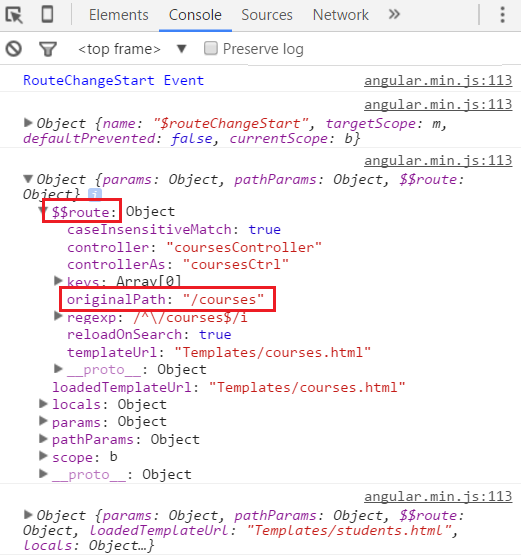
Part 39 AngularJS route change events的更多相关文章
- Part 38 AngularJS cancel route change
n this video we will discuss, how to cancel route change in Angular with an example. This is extreme ...
- [AngularJS] Accessible Button Events
Often buttons need to be handled by JavaScript, and if done improperly it can lead to accessibility ...
- [Redux] Fetching Data on Route Change
We will learn how to fire up an async request when the route changes. A mock server data: /** /api/i ...
- part 36 AngularJS route reload
In this video we will discuss angular route service reload() method. This method is useful when you ...
- Cisco IOS debug command reference Command A through D
debug aaa accounting through debug auto-config debug aaa accounting : to display information on acco ...
- AngularCSS--关于angularjs动态加载css文件的方法(仅供参考)
AngularCSS CSS on-demand for AngularJS Optimize the presentation layer of your single-page apps by d ...
- AngularJs ng-route路由详解
本篇基于ng-route来讲下路由的使用...其实主要是 $routeProvider 搭配 ng-view 实现. ng-view的实现原理,基本就是根据路由的切换,动态编译html模板. 更多内容 ...
- [AngularJS] ngModelController render function
ModelValue and ViewValue: $viewValue: Actual string value in the view. $modelValue: The value in the ...
- [RxJS + AngularJS] Sync Requests with RxJS and Angular
When you implement a search bar, the user can make several different queries in a row. With a Promis ...
随机推荐
- Jetpack Compose学习(7)——MD样式架构组件Scaffold及导航底部菜单
Jetpack Compose学习(7)--MD样式架构组件Scaffold及导航底部菜单 | Stars-One的杂货小窝 Compose给我们提供了一个Material Design样式的首页组件 ...
- 5.深入TiDB:Insert 语句
本文基于 TiDB release-5.1进行分析,需要用到 Go 1.16以后的版本 我的博客地址:https://www.luozhiyun.com/archives/605 这篇文章我们看一下 ...
- npm install失败或者进度卡住解决办法 以及 nrm的使用
今天在使用npm install安装url-loader时,遇到下载进度条停止问题 因为已经提前更换了 淘宝的镜像,应该不是网络问题,通过 npm config set loglevel info 显 ...
- Linux从头学15:【页目录和页表】-理论 + 实例 + 图文的最完全、最接地气详解
作 者:道哥,10+年嵌入式开发老兵,专注于:C/C++.嵌入式.Linux. 关注下方公众号,回复[书籍],获取 Linux.嵌入式领域经典书籍:回复[PDF],获取所有原创文章( PDF 格式). ...
- 微服务Cloud整体聚合工程创建过程
1.父工程创建及使用 使用idea开发工具,选择File-new- project ,在选项中选择Maven工程,选择jdk版本1.8,勾选maven-archetype-site,点击next,输入 ...
- Java标识符和关键字的区别!java基础 java必学
任何计算机语言都离不开标识符和关键字,那我们就来简单讲一下他们两者的区别,希望有助于大家的的理解!本篇文章干货满满,如果你觉得难懂的话可以看下高淇老师讲的Java300集的教学视频,分选集,深度剖析了 ...
- bzoj2038 小z的袜子 (莫队)
题目大意 作为一个生活散漫的人,小Z每天早上都要耗费很久从一堆五颜六色的袜子中找出一双来穿.终于有一天,小Z再也无法忍受这恼人的找袜子过程,于是他决定听天由命-- 具体来说,小Z把这N只袜子从1到N编 ...
- CVE-2017-11882 漏洞分析总结 新手漏洞分析详细教程
CVE-2017-11882分析总结 注: 这篇随笔记录了CVE-2017-11882漏洞分析的整个过程,并介绍了相关调试软件的使用 漏洞信息 CVE-2017-11882属于缓冲区溢出类型漏洞,产生 ...
- c语言中for循环 和嵌套for循环
for循环:for( ; ; )里面是bai3个语句,两个分号.第一个语句是开始前执行,第二个语句是判断真假,如果真,就执行后面(大括号内)的代码.第三个语句是每次执行完毕后执行的东西,通常第三个语句 ...
- 整数划分为k份
题目 将整数n分成k份,且每份不能为空,任意两个方案不能相同(不考虑顺序). 例如:n=7,k=3,下面三种分法被认为是相同的. 1,1,5; 1,5,1; 5,1,1; 问有多少种不同的分法. 输入 ...