
Angular5 父组件获取子组件实例( ViewChildren、ViewChild用法)
原文链接
Understanding ViewChildren, ContentChildren, and QueryList in Angular
使用场景
有时候,我们想要在父组件中访问它的子组件。在Angular中可以使用ViewChildren ViewChild ContentChildren 来实现对子组件的访问。
假设,我们封装了一个Alert子组件
// alert.component.html

<h1 (click)="alert()">{{type}}</h1>
import { Component, OnInit, Input } from '@angular/core';

@Component({

  selector: 'app-alert',

  templateUrl: './alert.component.html',

  styleUrls: ['./alert.component.scss']

})

export class AlertComponent implements OnInit {

  @Input() type = 'success';

  constructor() { }

  ngOnInit() {

  }

  alert() {

    console.log('alert');

  }

}
然后,在HomeComponent 使用它多次
// home.component.html

    <app-alert></app-alert>

    <app-alert type="info"></app-alert>

    <app-alert type="danger"></app-alert>
ViewChildren
使用 @ViewChildren decorator 来获取所有的子组件。@ViewChildren 支持的参数包括 directive 、component type 和 模板变量。
// home.component.js

export class HomeComponent implements OnInit, AfterViewInit {

  @ViewChildren(AlertComponent) alerts: QueryList<AlertComponent>;

  ngAfterViewInit() {

    console.log(this.alerts);

    this.alerts.forEach(alertInstance => console.log(alertInstance));

  }

}
控制台打印出了3个AlertComponent的instance 对象
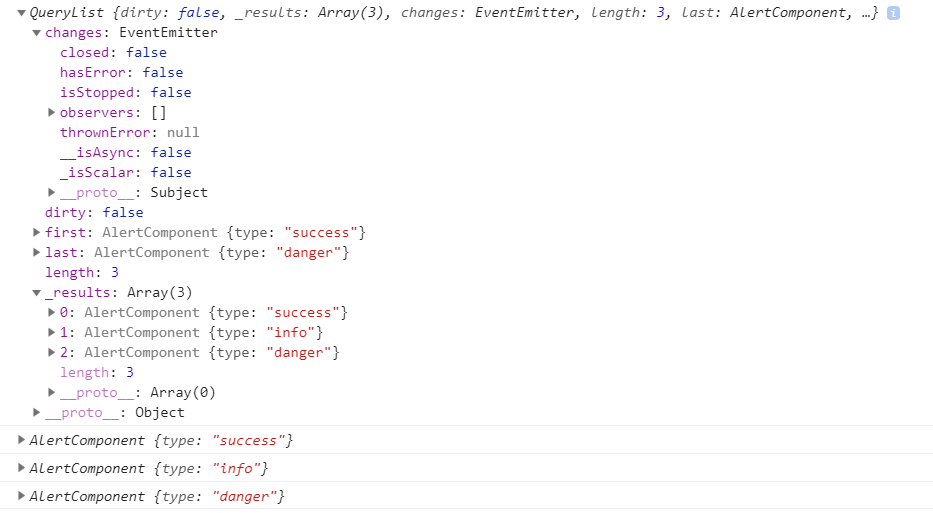
当@ViewChildren的参数是 component 或者 directive时,会返回component 或者 directive的实例对象。
当@ViewChildren的参数是模板变量时,会分两种情况。如果模板变量对应的是一个component,则返回实例对象;如果模板变量对应的是一个普通html标签,则返回本地元素的引用 ElementRef。
// home.component.html

<div class="col" #div>

    <app-alert #alert1></app-alert>

    <app-alert type="info"></app-alert>

    <app-alert type="danger"></app-alert>

  </div>
// home.component.ts

export class HomeComponent implements OnInit, AfterViewInit {

  @ViewChildren('alert1') alerts: QueryList<any>;

  @ViewChildren('div') div: QueryList<any>;

  ngAfterViewInit() {

    console.log(this.div);

    this.div.forEach(inst => console.log(inst));

    console.log(this.alerts);

    this.alerts.forEach(alertInstance => console.log(alertInstance));

  }

}
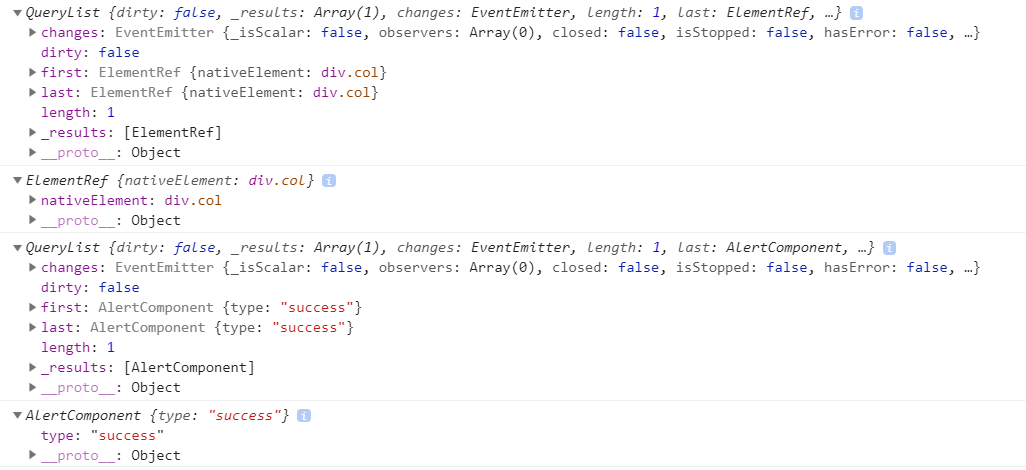
需要注意的是:如果使用了
*ngIf来控制子组件是否显示,只有在子组件显示的时候,才能够获取到子组件。
ViewChild
如果在父组件中只有一个子组件,使用@ViewChild比较合适。
// home.component.ts

export class HomeComponent implements OnInit, AfterViewInit {

  @ViewChild('alert1') alerts: any;

  @ViewChild('div') div: any;

  ngAfterViewInit() {

    console.log(this.div);

    console.log(this.alerts);

  }

}
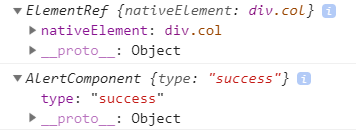
read 参数
ElementRef
如果不想获取子组件的实例,只想访问Dom元素,可以添加read参数
// home.component.ts

@ViewChild('alert1', {read: ElementRef}) alerts: any;
@ViewChildren也支持read 参数。
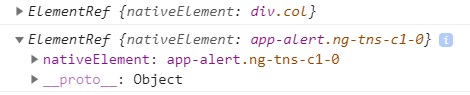
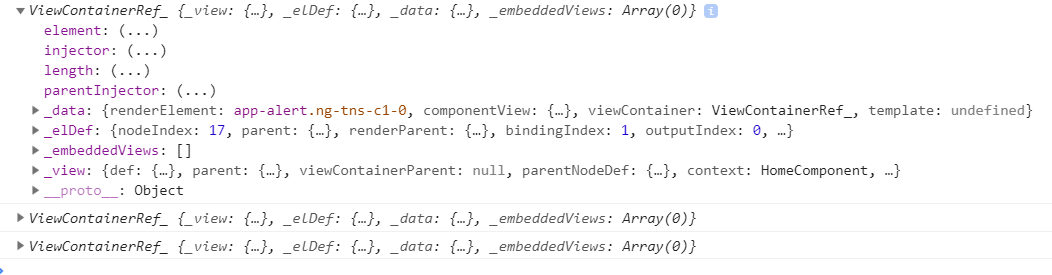
ViewContainerRef
You need this token when you need to create templates or components dynamically。当需要动态创建组件时,需要这个参数。
@ViewChildren(AlertComponent, {read: ViewContainerRef}) alerts: QueryList<AlertComponent>;
Angular5 父组件获取子组件实例( ViewChildren、ViewChild用法)的更多相关文章
- Vee-validate 父组件获取子组件表单校验结果
vee-validate 是为 Vue.js 量身打造的表单校验框架,允许您校验输入的内容并显示对应的错误提示信息.它内置了很多常见的校验规则,可以组合使用多种校验规则,大部分场景只需要配置就能实现开 ...
- 子组件获取父组件数据 propsDown, 父组件获取子组件数据 eventUp
(一) popsDowm 三种方法获取父组件数据:被动获得(1):主动获取(2). 1.被动获得: 父组件:v-bind: 绑定变量参数和方法参数:子组件:props 接收参数.可以在模板中直接使用也 ...
- vue父组件获取子组件页面的数组 以城市三级联动为例
父组件调用子组件 <Cselect ref="registerAddress"></Cselect> import Cselect from '../../ ...
- 关于Vue中,父组件获取子组件的数据(子组件调用父组件函数)的方法
1. 父组件调用子组件时,在调用处传给子组件一个方法 :on-update="updateData" 2. 子组件在props中,接收这个方法并声明 props: { onUp ...
- React Hook父组件获取子组件的数据/函数
我们知道在react中,常用props实现子组件数据到父组件的传递,但是父组件调用子组件的功能却不常用.文档上说ref其实不是最佳的选择,但是想着偷懒不学redux,在网上找了很多教程,要不就是hoo ...
- antd 父组件获取子组件中form表单的值
还是拿代码来讲吧,详情见注释 子组件 import React, { Component } from 'react'; import { Form, Input } from 'antd'; con ...
- vue 的父组件和子组件互相获取数据和方法
父组件主动获取子组件的数据和方法 一.ref(但不能实时更新获取) 1.调用子组件的时候 定义一个ref <child ref="headerChild"></c ...
- vue3 template refs dom的引用、组件的引用、获取子组件的值
介绍 通过 ref() 还可以引用页面上的元素或组件. DOM 的引用 <template> <div> <h3 ref="h3Ref">Tem ...
- vue:父子组件间通信,父组件调用子组件方法进行校验子组件的表单
参考: ElementUI多个子组件表单的校验管理:https://www.jianshu.com/p/541d8b18cf95 Vue 子组件调用父组件方法总结:https://juejin.im/ ...
随机推荐
- LOJ-6282-数列分块入门6
链接: https://loj.ac/problem/6282 题意: 给出一个长为 的数列,以及 个操作,操作涉及单点插入,单点询问,数据随机生成. 思路: vector 维护每个区间, 当某个区间 ...
- C# 常用方法——生成验证码
其他常用方法详见:https://www.cnblogs.com/zhuanjiao/p/12060937.html 原文链接:https://www.cnblogs.com/morang/p/405 ...
- 自定义 Swiper 的上一页,下一页按钮
1. Swiper 的上一页,下一页按钮,不是必需包含在container 中的 2. 定义上一页,下一页按钮的样式,CSS略.... 3. 在初始化Swiper中,定义上一页,下一页按钮
- [人物存档]【AI少女】【捏脸数据】气质学生
点击下载(城通网盘): AISChaF_20191119010459547.png
- Visual Studio下__cplusplus宏为199711L的问题
Visual Studio下__cplusplus宏为199711L的问题 / Zc:__ cplusplus(启用更新的__cplusplus宏) 该/ ZC:__ CPLUSPLUS编译器选项使_ ...
- spring boot 项目打包后无法通过命令行传入参数
java -jar .\tk-provider.jar --spring.profiles.active=test 本想用测试环境的配置文件运行项目可项目启动时一直是使用dev配置文件运行. java ...
- #4 div1E Parentheses 括号匹配
E - Parentheses Time Limit:2000MS Memory Limit:131072KB 64bit IO Format:%lld & %llu Subm ...
- CentOS版本禁用Ctrl+Alt+Del重启功能
1 禁用Ctrl+Alt+Del重启功能(不重启系统的前提条件) 1.1 CentOS 6 ##查看/etc/inittab确认Ctrl+Alt+Del相关配置文件 cat /etc/initta ...
- Unity3D_(游戏)卡牌04_游戏界面
启动屏界面.主菜单界面.选关界面.游戏界面 卡牌01_启动屏界面 传送门 卡牌02_主菜单界面 传送门 卡牌03_选关界面 传送门 卡牌04_游戏界面 传送门 选关界面效果 (源代码在文 ...
- 上一个树形菜单的改进,增添了数据绑定功能而非仅仅的jq特效
<!DOCTYPE html><html> <head> <meta charset="UTF-8"> <title>& ...