
SQL: enable sa Account in SQL Server
Link:
http://sudeeptaganguly.wordpress.com/2010/04/20/how-to-enable-sa-account-in-sql-server/
引用:
When you install the SQL Server using Windows Authentication mode, by default, the “sa” account is disabled. Sometimes, due to users/customers request, you may need to enable the sa account. You need to change the authentication mode for SQL server from Windows Authentication Mode to SQL Server and Windows Authentication Mode to use the sa account.
To Change the Authentication Mode:
Follow the steps mentioned below to change the authentication mode from Windows Authentication to SQL Server and Windows Authentication. You need to remember that, the SQL Server service needs to restart to make this change effective.
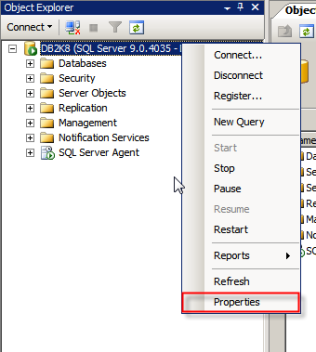
1. Login to the SQL server instance using SQL Server Management Studio. Right-click on the database instance, and go to Properties.
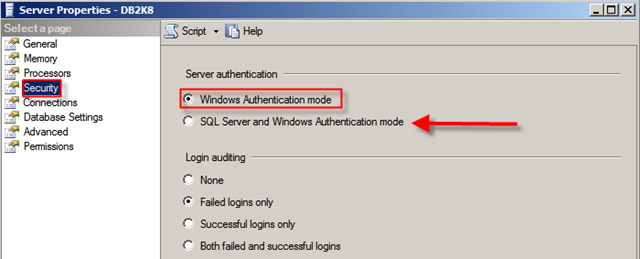
2. On the Server Properties page, Click on Security. Click on the radio button next to SQL Server and Windows Authentication mode, and click on OK to close the Server Properties page.
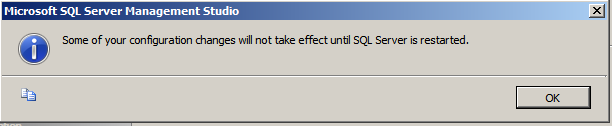
3. Once you clicked on the Ok button, we will get the following screen:
As discussed earlier, we need to restart the SQL Server service to make this change effective. After restarting the SQL Server, the authentication mode will be changed to SQL Server and Windows Authentication mode.
Enable the sa Login:
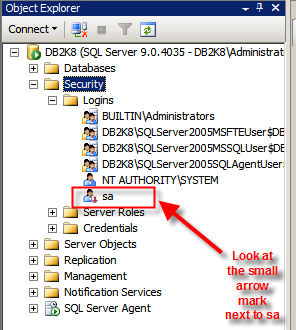
1. Connect to the SQL Server instance using SSMS and go to Security. Expand Security, go to Logins.
2. You can see the sa account is disabled when you install SQL Server using Windows Authentication mode.
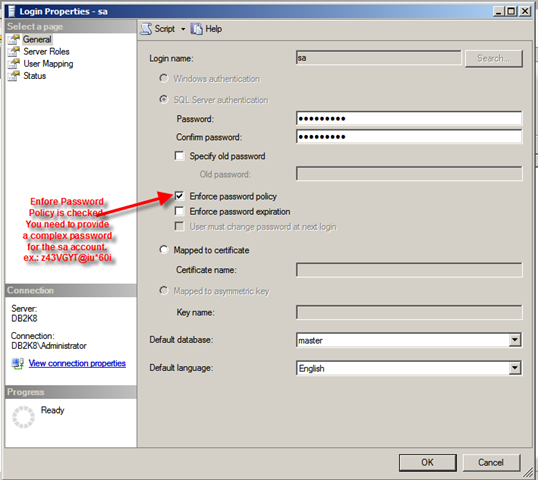
3. Right-click on the sa account and go to Login Properties. Specify a complex password for the sa account. By default, the Enforce password policy is checked. (if you don’t want to provide a complex password for the sa account, you can uncheck this option. However, this is not recommended.)
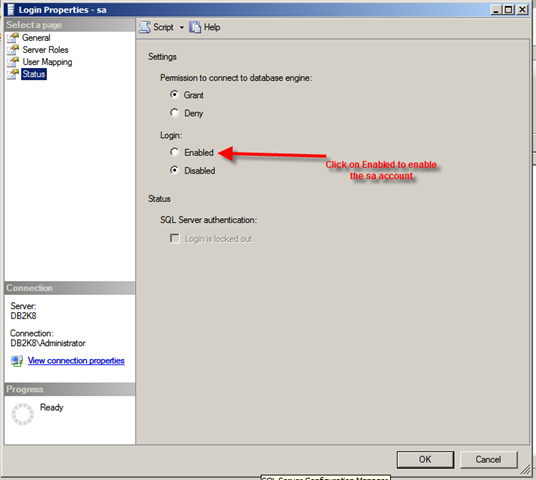
4. Click on the Status page. By default, the sa account will be disabled. Click on the Enabled button to enable the sa account. Click on Ok to close the sa Login Properties.
Thus, sa account is enabled and you will be able to login to the SQL instance using the sa account.
If you want to use a script to enable the sa account, you can use the script mentioned below:
 1: USE [master]

 2: GO

 3: ALTER LOGIN [sa] WITH PASSWORD=N'z43VGYT@Iu*60i'

 4: GO

 5: ALTER LOGIN [sa] ENABLE

 6: GO
SQL: enable sa Account in SQL Server的更多相关文章
- 浅谈SQL注入风险 - 一个Login拿下Server
前两天,带着学生们学习了简单的ASP.NET MVC,通过ADO.NET方式连接数据库,实现增删改查. 可能有一部分学生提前预习过,在我写登录SQL的时候,他们鄙视我说:“老师你这SQL有注入,随便都 ...
- 浅谈SQL注入风险 - 一个Login拿下Server(转)
前两天,带着学生们学习了简单的ASP.NET MVC,通过ADO.NET方式连接数据库,实现增删改查. 可能有一部分学生提前预习过,在我写登录SQL的时候,他们鄙视我说:“老师你这SQL有注入,随便都 ...
- 使用设置sa用户登录sql server2008
今天在net项目中添加数据库过程中出现了小问题,就是使用sql server身份验证没登录成功,经过一番调试,终于解决问题. 使用sa账户登录sql server 2008 的方法步骤如下: 1.首先 ...
- SQL Azure (14) 将云端SQL Azure中的数据库备份到本地SQL Server
<Windows Azure Platform 系列文章目录> 注意: 1.只有SQL Server 2012 CU4及以上版本才支持本章内容 2.当你的数据库文件很大时,建议优化以下内容 ...
- 智能SQL优化工具--SQL Optimizer for SQL Server(帮助提升数据库应用程序性能,最大程度地自动优化你的SQL语句 )
SQL Optimizer for SQL Server 帮助提升数据库应用程序性能,最大程度地自动优化你的SQL语句 SQL Optimizer for SQL Server 让 SQL Serve ...
- Sql性能检测工具:Sql server profiler和优化工具:Database Engine Tuning Advisor
原文:Sql性能检测工具:Sql server profiler和优化工具:Database Engine Tuning Advisor 一.工具概要 数据库应用系统性能低下,需要对其进行优化 ...
- 简单实用SQL脚本Part:查找SQL Server 自增ID值不连续记录
原文:简单实用SQL脚本Part:查找SQL Server 自增ID值不连续记录 在很多的时候,我们会在数据库的表中设置一个字段:ID,这个ID是一个IDENTITY,也就是说这是一个自增ID.当并发 ...
- SQL手工注入漏洞测试(Sql Server数据库)
还是先找到注入点,然后order by找出字段数:4 通过SQL语句中and 1=2 union select 1,2,3……,n联合查询,判断显示的是哪些字段,就是原本显示标题和内容时候的查询字段. ...
- 【转】使用SQL Tuning Advisor STA优化SQL
SQL优化器(SQL Tuning Advisor STA)是Oracle10g中推出的帮助DBA优化工具,它的特点是简单.智能,DBA值需要调用函数就可以给出一个性能很差的语句的优化结果.下面介绍一 ...
随机推荐
- ASP.NET SignalR 与 LayIM2.0 配合轻松实现Web聊天室(九) 之 用 Redis 实现用户在线离线状态消息处理(一)
前言 上一篇中简单讲解了用Redis缓存在线用户逻辑.篇幅也比较小,本篇将详细实现用户的上线下线通知.图片效果转换功能.而且,代码和开发思路都会详细介绍. 效果展示 目前有三个用户,user1,use ...
- 5.1 stack,queue以及priority_queue
*:stack 使用要包含头文件stack,栈是一种先进后出的元素序列,删除和访问只能对栈顶的元素(最后一个添加的元素)进行,并且添加元素只能添加到栈顶.栈内的元素不能访问,要想访问先要删除其上方的所 ...
- hdu 1249 三角形
题目链接:http://acm.hdu.edu.cn/showproblem.php?pid=1249 part=3*s*(s-1)+2 #include<stdio.h> #includ ...
- JavaScript基础——添加错误处理
JavaScript编程的一个重要组成部分,是添加错误处理来应对可能会出现的问题.默认情况下,如果因为你的JavaScript中的问题二产生了一个代码异常,那么脚本就会失败并且无法完成加载.这通常不是 ...
- 实现QQ在线咨询(需先添加好友)
实现效果如图: 点击客服专员一.二.三之后提示添加qq好友,进行聊天. 代码如下: <div class="attachLeft"> <img src=" ...
- Spring学习笔记—装配Bean
在Spring中,对象无需自己负责查找或创建与其关联的其他对象.相反,容器负责把需要相互协作的对象引用赋予各个对象.创建应用对象之间协作关系的行为通常称为装配(wiring),这也是依赖注入的本质. ...
- jQuery – 6.选择器
1. 属性过滤选择器: 1. $("div[id]")选取有id属性的<div> 2. $("div[title=test]")选取title属性为 ...
- Redis笔记(七)Java实现Redis消息队列
这里我使用Redis的发布.订阅功能实现简单的消息队列,基本的命令有publish.subscribe等. 在Jedis中,有对应的java方法,但是只能发布字符串消息.为了传输对象,需要将对象进行序 ...
- Delphi面向对象的可见性表示符
Delphi能通过在声明域和方法的时候用protected.private.public.published和automated指示符来对对象提供进一步的控制.使用这些关键字的语法如下 TSomeOb ...
- poj 1008:Maya Calendar(模拟题,玛雅日历转换)
Maya Calendar Time Limit: 1000MS Memory Limit: 10000K Total Submissions: 64795 Accepted: 19978 D ...