
Duilib实现类似电脑管家扫描目录效果
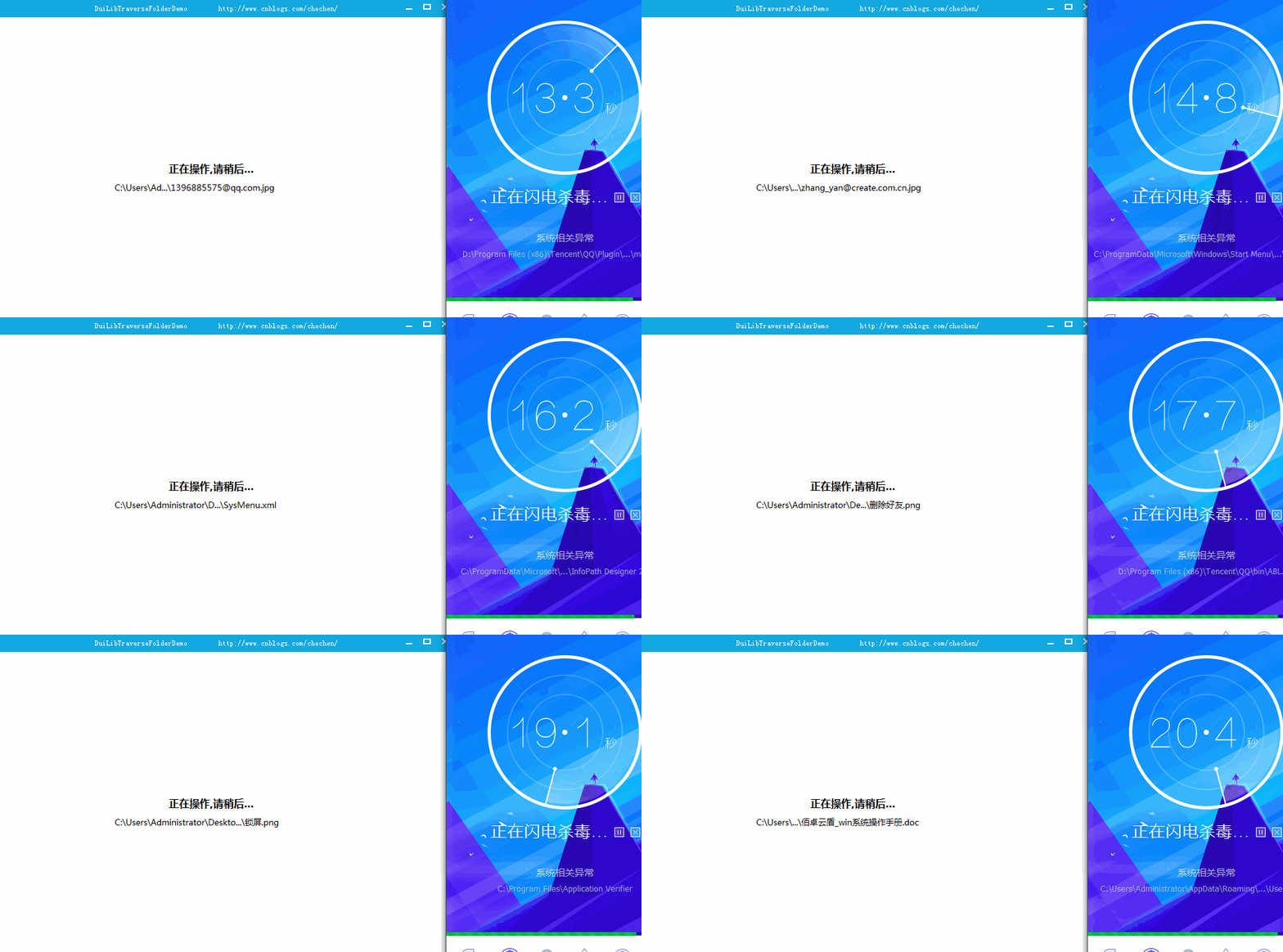
实现原理:
1.后台开线程遍历目录,遍历出一个文件路径在界面上更新显示(通过发消息通知主界面)
2.需要扩展一下Duilib控件,在此我扩展了CLabelUI,重写了PaintText函数
扩展控件的.h文件
 /*************************************************************************************************

 *

 * File Name    : UILabelEx.h

 *

 * Created      : 2016/11/11

 *

 * Author       : http://www.cnblogs.com/chechen/

 *

 * Model        :

 *

 * Description  : [[CN]] 扩展Label控件 [[CN]]

 *

 **************************************************************************************************/

 #ifndef _UILABELEX_H_

 #define _UILABELEX_H_

 class CLabelExUI : public CLabelUI

 {

 public:

     CLabelExUI(void);

     ~CLabelExUI(void);

     LPCTSTR GetClass() const;

     LPVOID GetInterface(LPCTSTR pstrName);

     void PaintText(HDC hDC);

     void SetPos(RECT rc);

 private:

     Color _MakeRGB(int a, Color cl);

     Color _MakeRGB(int r, int g, int b);

 };

 #endif//_UILABELEX_H_
.cpp
 #include "StdAfx.h"

 #include "UILabelEx.h"

 CLabelExUI::CLabelExUI(void)

 {

 }

 CLabelExUI::~CLabelExUI(void)

 {

 }

 LPCTSTR CLabelExUI::GetClass() const

 {

     return TEXT("LabelExUI");

 }

 LPVOID CLabelExUI::GetInterface(LPCTSTR pstrName)

 {

     if( _tcscmp(pstrName, TEXT("LabelEx")) ==  ) return static_cast<CLabelExUI*>(this);

     return CLabelUI::GetInterface(pstrName);

 }

 Color CLabelExUI::_MakeRGB(int a, Color cl)

 {

     return Color(a, cl.GetR(), cl.GetG(), cl.GetB());

 }

 Color CLabelExUI::_MakeRGB(int r, int g, int b)

 {

     return Color(, r, g, b);

 }

 void CLabelExUI::SetPos(RECT rc)

 {

     __super::SetPos(rc);

 }

 void CLabelExUI::PaintText(HDC hDC)

 {

     if( m_dwTextColor ==  ) m_dwTextColor = m_pManager->GetDefaultFontColor();

     if( m_dwDisabledTextColor ==  ) m_dwDisabledTextColor = m_pManager->GetDefaultDisabledColor();

     RECT rc = m_rcItem;

     rc.left += m_rcTextPadding.left;

     rc.right -= m_rcTextPadding.right;

     rc.top += m_rcTextPadding.top;

     rc.bottom -= m_rcTextPadding.bottom;

     if(!GetEnabledEffect())

     {

         if( m_sText.IsEmpty() ) return;

         int nLinks = ;

         if( IsEnabled() ) {

             if( m_bShowHtml )

                 CRenderEngine::DrawHtmlText(hDC, m_pManager, rc, m_sText, m_dwTextColor,

                 NULL, NULL, nLinks, DT_SINGLELINE | m_uTextStyle);

             else

             {

                  ASSERT(::GetObjectType(hDC)==OBJ_DC || ::GetObjectType(hDC)==OBJ_MEMDC);

                 ::SetBkMode(hDC, TRANSPARENT);

                 ::SetTextColor(hDC, RGB(GetBValue(m_dwTextColor), GetGValue(m_dwTextColor), GetRValue(m_dwTextColor)));

                 HFONT hOldFont = (HFONT)::SelectObject(hDC, m_pManager->GetFont(m_iFont));

                 SIZE size;

                 ::GetTextExtentPoint32(hDC,m_sText.GetData(),m_sText.GetLength(),&size);

                 UINT uStyle = ;

                 if(size.cx > rc.right - rc.left)

                 {

                     uStyle = DT_PATH_ELLIPSIS|DT_WORD_ELLIPSIS|DT_END_ELLIPSIS;

                 }

                 else

                 {

                     uStyle = DT_CENTER | DT_VCENTER | DT_SINGLELINE;

                 }

                 ::DrawText(hDC, m_sText, -, &rc, uStyle | DT_NOPREFIX);

                 ::SelectObject(hDC, hOldFont);

             }

         }

         else {

             if( m_bShowHtml )

                 CRenderEngine::DrawHtmlText(hDC, m_pManager, rc, m_sText, m_dwDisabledTextColor,

                 NULL, NULL, nLinks, DT_SINGLELINE | m_uTextStyle);

             else  {

                  ASSERT(::GetObjectType(hDC)==OBJ_DC || ::GetObjectType(hDC)==OBJ_MEMDC);

                 ::SetBkMode(hDC, TRANSPARENT);

                 ::SetTextColor(hDC, RGB(GetBValue(m_dwTextColor), GetGValue(m_dwTextColor), GetRValue(m_dwTextColor)));

                 HFONT hOldFont = (HFONT)::SelectObject(hDC, m_pManager->GetFont(m_iFont));

                 SIZE size;

                 ::GetTextExtentPoint32(hDC,m_sText.GetData(),m_sText.GetLength(),&size);

                 UINT uStyle = ;

                 if(size.cx > rc.right - rc.left)

                 {

                     uStyle = DT_PATH_ELLIPSIS|DT_WORD_ELLIPSIS|DT_END_ELLIPSIS;

                 }

                 else

                 {

                     uStyle = DT_CENTER | DT_VCENTER | DT_SINGLELINE;

                 }

                 ::DrawText(hDC, m_sText, -, &rc, uStyle | DT_NOPREFIX);

                 ::SelectObject(hDC, hOldFont);

                 //CRenderEngine::DrawText(hDC, m_pManager, rc, m_sText, m_dwDisabledTextColor,

                 //m_iFont, /* DT_SINGLELINE | */m_uTextStyle); ///< @todo

             }

         }

     }

     else

     {

         Font    nFont(hDC,m_pManager->GetFont(GetFont()));

         Graphics nGraphics(hDC);

         nGraphics.SetTextRenderingHint(m_TextRenderingHintAntiAlias);

         StringFormat format;

         format.SetAlignment((StringAlignment)m_hAlign);

         format.SetLineAlignment((StringAlignment)m_vAlign);

         RectF nRc((float)rc.left,(float)rc.top,(float)rc.right-rc.left,(float)rc.bottom-rc.top);

         RectF nShadowRc = nRc;

         nShadowRc.X += m_ShadowOffset.X;

         nShadowRc.Y += m_ShadowOffset.Y;

         int nGradientLength = GetGradientLength();

         if(nGradientLength == )

             nGradientLength = (rc.bottom-rc.top);

         LinearGradientBrush nLineGrBrushA(Point(GetGradientAngle(), ),Point(,nGradientLength),_MakeRGB(GetTransShadow(),GetTextShadowColorA()),_MakeRGB(GetTransShadow1(),GetTextShadowColorB() == -?GetTextShadowColorA():GetTextShadowColorB()));

         LinearGradientBrush nLineGrBrushB(Point(GetGradientAngle(), ),Point(,nGradientLength),_MakeRGB(GetTransText(),GetTextColor()),_MakeRGB(GetTransText1(),GetTextColor1() == -?GetTextColor():GetTextColor1()));

         if(GetEnabledStroke() && GetStrokeColor() > )

         {

             LinearGradientBrush nLineGrBrushStroke(Point(GetGradientAngle(),),Point(,rc.bottom-rc.top+),_MakeRGB(GetTransStroke(),GetStrokeColor()),_MakeRGB(GetTransStroke(),GetStrokeColor()));

 #ifdef _UNICODE

             nRc.Offset(-,);

             nGraphics.DrawString(m_TextValue,m_TextValue.GetLength(),&nFont,nRc,&format,&nLineGrBrushStroke);

             nRc.Offset(,);

             nGraphics.DrawString(m_TextValue,m_TextValue.GetLength(),&nFont,nRc,&format,&nLineGrBrushStroke);

             nRc.Offset(-,-);

             nGraphics.DrawString(m_TextValue,m_TextValue.GetLength(),&nFont,nRc,&format,&nLineGrBrushStroke);

             nRc.Offset(,);

             nGraphics.DrawString(m_TextValue,m_TextValue.GetLength(),&nFont,nRc,&format,&nLineGrBrushStroke);

             nRc.Offset(,-);

 #else

             USES_CONVERSION;

             wstring mTextValue = A2W(m_TextValue.GetData());

             nRc.Offset(-,);

             nGraphics.DrawString(mTextValue.c_str(),mTextValue.length(),&nFont,nRc,&format,&nLineGrBrushStroke);

             nRc.Offset(,);

             nGraphics.DrawString(mTextValue.c_str(),mTextValue.length(),&nFont,nRc,&format,&nLineGrBrushStroke);

             nRc.Offset(-,-);

             nGraphics.DrawString(mTextValue.c_str(),mTextValue.length(),&nFont,nRc,&format,&nLineGrBrushStroke);

             nRc.Offset(,);

             nGraphics.DrawString(mTextValue.c_str(),mTextValue.length(),&nFont,nRc,&format,&nLineGrBrushStroke);

             nRc.Offset(,-);

 #endif

         }

 #ifdef _UNICODE

         if(GetEnabledShadow() && (GetTextShadowColorA() >  || GetTextShadowColorB() > ))

             nGraphics.DrawString(m_TextValue,m_TextValue.GetLength(),&nFont,nShadowRc,&format,&nLineGrBrushA);

         nGraphics.DrawString(m_TextValue,m_TextValue.GetLength(),&nFont,nRc,&format,&nLineGrBrushB);

 #else

         USES_CONVERSION;

         wstring mTextValue = A2W(m_TextValue.GetData());

         if(GetEnabledShadow() && (GetTextShadowColorA() >  || GetTextShadowColorB() > ))

             nGraphics.DrawString(mTextValue.c_str(),mTextValue.length(),&nFont,nShadowRc,&format,&nLineGrBrushA);

         nGraphics.DrawString(mTextValue.c_str(),mTextValue.length(),&nFont,nRc,&format,&nLineGrBrushB);

 #endif

     }

 }
转载:http://blog.csdn.net/chenlycly/article/details/24294639
参考QQ的效果,如下所示:

DT_END_ELLIPSIS:对于显示的字符串,如果结束的字符串的范围不在矩形内,它会被截断并以省略号标识。
DT_WORDBREAK:当一行中的字符将会延伸到由lpRect指定的矩形的边框时,此行自动地在字之间换行。
DT_WORD_ELLIPSIS:截短不符合矩形的正文,并增加省略号。
DT_PATH_ELLIPSIS:对于显示的字符串,会用省略号替换字符串中间的字符,以确保结果能在矩形范围内。 如果该字符串包含反斜杠(\)字符,它会尽可能的保留最后一个反斜杠之后的正文。
xml文件:
 <?xml version="1.0" encoding="UTF-8"?>

 <Window size="750,500"  caption="0,0,0,60" sizebox="0,0,0,0" roundcorner="4,4">

   <!-- 窗口的初始尺寸(宽500,高350) 标题栏拖拽区域(高32)、可拖拽边框大小(这里添加sizebox后就可以拖拽边框调整大小了) -->

   <Font name="微软雅黑" size="13"/>

   <Font name="微软雅黑" size="16" />

   <Font name="微软雅黑" size="16" bold="true"/>

   <Font name="微软雅黑" size="13" underline="true"/>

   <Font name="宋体" size="13" />

   <Font name="微软雅黑" size="13" />

   <VerticalLayout bkcolor="#FFCCCCCC" bordersize="2" bordercolor="#FFE5DED8" >

     <!-- 整个窗口的背景色 -->

     <!-- 标题栏区 -->

     <HorizontalLayout name="appbar" height="28"  bkcolor="#FF13A8E0">

       <Control width="100"/>

       <HorizontalLayout name="apptitle" >

         <Label text="DuiLibTraverseFolderDemo        http://www.cnblogs.com/chechen/" align="center" textcolor="#FFF5F6F7"/>

       </HorizontalLayout>

       <Button name="minbtn" padding="4,0,0,0" width="24" height="24" tooltip="最小化" normalimage="file='sysbtn/Min.png'" hotimage="file='sysbtn/Min_hot.png'"/>

       <Button name="maxbtn" padding="4,0,0,0" width="24" height="24" tooltip="最大化" normalimage="file='sysbtn/Max.png'" hotimage="file='sysbtn/Max_hot.png'"/>

       <Button name="restorebtn" padding="4,0,0,0" width="24" height="24" tooltip="还原" visible="false" normalimage="file='sysbtn/Restore.png'" hotimage="file='sysbtn/Restore_hot.png'"/>

       <Button name="closebtn" padding="4,0,0,0" width="24" height="24" tooltip="关闭" normalimage="file='sysbtn/Close.png'" hotimage="file='sysbtn/Close_hot.png'"/>

     </HorizontalLayout>

     <HorizontalLayout bkcolor="#FFFFFFFF">

       <Label  text="正在操作,请稍后..."  align="center" font="2"/>

       <LabelEx name="filepath" text="" float="true" pos="225,255,0,0" width="256"  height="20" font="0" />

     </HorizontalLayout>

   </VerticalLayout>

 </Window>
Demo:Duilib实现类似电脑管家扫描目录效果
Duilib实现类似电脑管家扫描目录效果的更多相关文章
- 为什么会有可恶的腾讯电脑管家&怎么干掉它-电脑开机出现腾讯电脑管家-无法卸载腾讯电脑管家
为什么会有可恶的腾讯电脑管家 怎么干掉它 电脑开机出现腾讯电脑管家 无法卸载腾讯电脑管家 某天,趁空闲,升级了一些常用软件,其中就升了新版电脑qq,晚上玩完电脑后关机睡觉,第二天早上开机.出现了图一: ...
- Java之扫描目录,修改文件内容
扫描目录下文件,修改文件中指定内容 package org.utils.tools.fileoper; import java.io.*; import java.util.ArrayList; im ...
- QQMacMgr for Mac(腾讯电脑管家)安装
1.软件简介 腾讯电脑管家是 macOS 系统上一款由腾讯公司带来到的安全管理软件.功能有垃圾清理.软件仓库.小火箭加速和防钓鱼等.而在视觉 UI 上,导入星空概念,操作过场动画全部以星空为题材 ...
- 自制window下core animation引擎 - demo第二弹 - 仿QQ电脑管家加速小火箭
一年前想写一个像cocoa那样,可以方便层动画开发的引擎,写着写着又逆向它的QuartzCore.framework,也就是CoreAnimation的底层,已经大半年没有搞windows这个引擎.大 ...
- jquery实现章节目录效果
<html><head><title>jquery实现章节目录效果</title> <script type="text/javascr ...
- PHP-递归扫描目录和删除目录
(1) 通过递归扫描目录并打印 // php递归扫描目录 function scanMyDir($path){ // 打开目录 $dh = opendir($path); echo '<ul&g ...
- WPF如何实现类似iPhone界面切换的效果(转载)
WPF如何实现类似iPhone界面切换的效果 (version .1) 转自:http://blog.csdn.net/fallincloud/article/details/6968764 在论坛上 ...
- Adobe Edge Animate –地球自转动画的实现,类似flash遮罩层的效果
Adobe Edge Animate –地球自转动画的实现,类似flash遮罩层的效果 版权声明: 本文版权属于 北京联友天下科技发展有限公司. 转载的时候请注明版权和原文地址. 目前Edge的功能尚 ...
- TsFltMgr.sys系统蓝屏的原因就在于QQ电脑管家!
同事一WindowsXP系统,正常执行,关闭后,第二天无法启动,详细症状为: (1)安全模式以及带网络功能的安全模式都能够进入: (2)正常模式,还没出现WindowXP滚动栏就開始重新启动: (3) ...
随机推荐
- C++8002011752鸡兔同笼
难度级别: A: 编程语言:不限:运行时间限制:1000ms: 运行空间限制:51200KB: 代码长度限制:2000000B 试题描述 一个笼子里面关了鸡和兔子(鸡有2只脚,兔子有4只脚,没有例外) ...
- Postgre cannot insert multiple commands into a prepared statement
悲剧... FireDAC连接Postgre数据库, 使用默认的属性, 一次执行多条SQL的时候, 会报"cannot insert multiple commands into a pre ...
- 问题 “No mapping found for HTTP request with URI [/rbiz4/uploadFile.html]” 的解决
从以前的SpringMVC项目简化一下做个例子,结果出现了下面的错误: No mapping found for HTTP request with URI [/rbiz4/uploadFile.ht ...
- [转]第四章 使用OpenCV探测来至运动的结构——Chapter 4:Exploring Structure from Motion Using OpenCV
仅供参考,还未运行程序,理解部分有误,请参考英文原版. 绿色部分非文章内容,是个人理解. 转载请注明:http://blog.csdn.net/raby_gyl/article/details/174 ...
- LeetCode Reverse Words in a String II
原题链接在这里:https://leetcode.com/problems/reverse-words-in-a-string-ii/ 题目: Given an input string, rever ...
- java netty之ServerBootstrap的启动
通过前面的几篇文章,对整个netty部分的架构已经运行原理都有了一定的了解,那么这篇文章来分析一个经常用到的类:ServerBootstrap,一般对于服务器端的编程它用到的都还算是比较的多..看一看 ...
- echarts入门基础,画柱型图
注意:一定要自己引入echarts库 <!DOCTYPE html> <html> <head> <meta charset="UTF-8" ...
- react js 按条数 展开/折叠
//2条const MAX_SHOW_NUM = 2; class HotDiscuss extends Component { static propTypes = { //验证 repliedCo ...
- Web3D编程入门总结——WebGL与Three.js基础介绍
/*在这里对这段时间学习的3D编程知识做个总结,以备再次出发.计划分成“webgl与three.js基础介绍”.“面向对象的基础3D场景框架编写”.“模型导入与简单3D游戏编写”三个部分,其他零散知识 ...
- VS2010--2013使用技巧及使用过程中遇到的问题
Microsoft Visual Studio 2010 --2013默认情况下是不显示代码的行号的,但是在编译出错时,可点击下面输出窗口中的错误提示进行定位.但是这样操作起来你有没有感觉到不方便呢. ...