
position 小结
position:
- static
- fixed
- relative
- absolute
- sticky
1.static
static定位是HTML元素的默认值,即没有定位,元素出现在正常的流中。因此,这种定位不会受到top,bottom,left,right的影响
正常:
<!DOCTYPE html>

<html lang="en">

<head>

    <meta charset="UTF-8">

    <title>Document</title>

    <style type="text/css">

        div{

            width: 100px;

            height: 100px;

            background-color: red;

        }

    </style>

</head>

<body>

    <div></div>

</body>

</html>
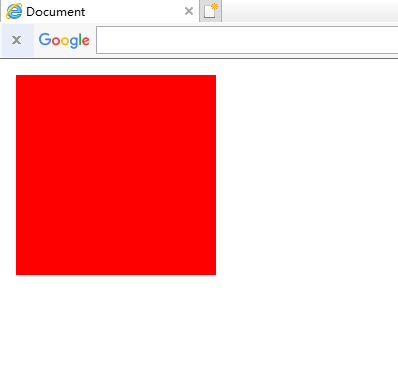
插入后:

<!DOCTYPE html>

<html lang="en">

<head>

    <meta charset="UTF-8">

    <title>Document</title>

    <style type="text/css">

        div{

            width: 100px;

            height: 100px;

            background-color: red;

            /*这里*/

            position: static;

            top: -100px;

            left: -100px;

        }

    </style>

</head>

<body>

    <div></div>

</body>

</html>
2.fixed
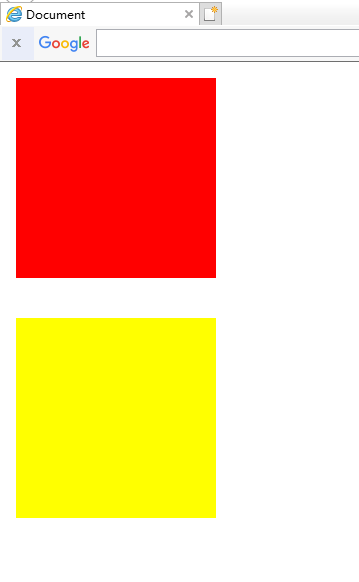
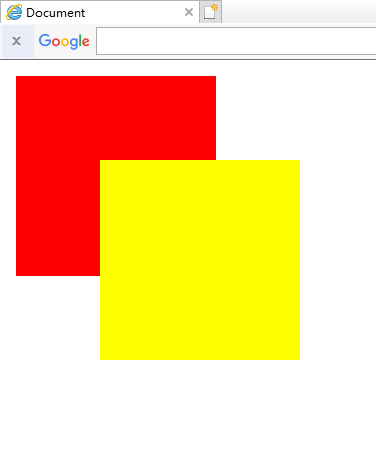
fixed定位是指元素的位置相对于浏览器窗口是固定的位置,即使窗口滚动它也不会滚动,且fixed定位会使元素脱离文档流,即,元素不占据空间,比如,网页经常跳出来的小广告。
正常:
<!DOCTYPE html>

<html lang="en">

<head>

    <meta charset="UTF-8">

    <title>Document</title>

    <style type="text/css">

        .top{

            width: 100px;

            height: 100px;

            background-color: red;

            margin-bottom: 20px;

        }

        .bottom{

            width: 100px;

            height: 100px;

            background-color: yellow;

            margin-bottom: 20px;

        }

    </style>

</head>

<body>

    <div class="top"></div>

    <div class="bottom"></div>

</body>

</html>
插入后:
<!DOCTYPE html>

<html lang="en">

<head>

    <meta charset="UTF-8">

    <title>Document</title>

    <style type="text/css">

        .top{

            width: 100px;

            height: 100px;

            background-color: red;

            margin-bottom: 20px;

        }

        .bottom{

            width: 100px;

            height: 100px;

            background-color: yellow;

            margin-bottom: 20px;

            /*这里*/

            position: fixed;

            top: 50px;

            left: 50px;

        }

    </style>

</head>

<body>

    <div class="top"></div>

    <div class="bottom"></div>

</body>

</html>
注意:fixed定位在IE7和IE8下需要描述!DOCTYPE才能支持
3.relative
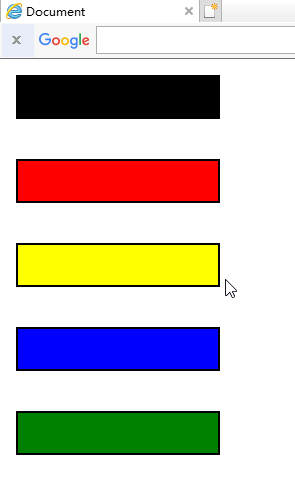
相对定位元素的定位是相对它自己的正常位置的定位
正常:
<!DOCTYPE html>

<html lang="en">

<head>

    <meta charset="UTF-8">

    <title>Document</title>

    <style type="text/css">

        .normal{

            width: 100px;

            height: 20px;

            background-color: black;

            border: 1px solid black;

            margin-bottom: 20px;

        }

        .top{

            width: 100px;

            height: 20px;

            background-color: red;

            border: 1px solid black;

            margin-bottom: 20px;

        }

        .bottom{

            width: 100px;

            height: 20px;

            background-color: yellow;

            border: 1px solid black;

            margin-bottom: 20px;

        }

        .left{

            width: 100px;

            height: 20px;

            background-color: blue;

            border: 1px solid black;

            margin-bottom: 20px;

        }

        .right{

            width: 100px;

            height: 20px;

            background-color: green;

            border: 1px solid black;

            margin-bottom: 20px;

        }

    </style>

</head>

<body>

    <div class="normal"></div>

    <div class="top"></div>

    <div class="bottom"></div>

    <div class="left"></div>

    <div class="right"></div>

</body>

</html>
插入后:
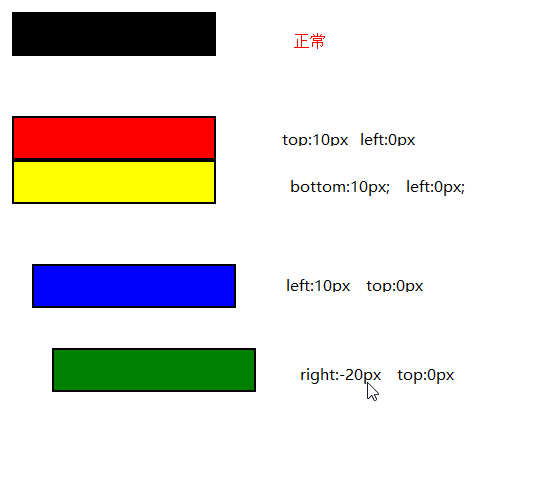
<!DOCTYPE html>

<html lang="en">

<head>

    <meta charset="UTF-8">

    <title>Document</title>

    <style type="text/css">

        .normal{

            width: 100px;

            height: 20px;

            background-color: black;

            border: 1px solid black;

            margin-bottom: 20px;

        }

        .top{

            width: 100px;

            height: 20px;

            background-color: red;

            border: 1px solid black;

            margin-bottom: 20px;

            /*这里*/

            position: relative;

            top: 10px;

            left: 0px;

        }

        .bottom{

            width: 100px;

            height: 20px;

            background-color: yellow;

            border: 1px solid black;

            margin-bottom: 20px;

            /*这里*/

            position: relative;

            left: 0px;

            bottom: 10px;

        }

        .left{

            width: 100px;

            height: 20px;

            background-color: blue;

            border: 1px solid black;

            margin-bottom: 20px;

            /*这里*/

            position: relative;

            left: 10px;

            top: 0px;

        }

        .right{

            width: 100px;

            height: 20px;

            background-color: green;

            border: 1px solid black;

            margin-bottom: 20px;

            /*这里*/

            position: relative;

            right: -20px;

            top: 0px;

        }

    </style>

</head>

<body>

    <div class="normal"></div>

    <div class="top"></div>

    <div class="bottom"></div>

    <div class="left"></div>

    <div class="right"></div>

</body>

</html>
注意:这里移动后是移动前的负的位置
移动后对于移动前:如果值为负数,则直接换成正数
如果值为正数,则直接改变为相反方向
即使相对元素的内容移动了,但是预留的空间的元素,仍然保持正常流动,也就是说相对移动后不会对下面的元素造成影响

可以对比一下,蓝色的框并没有因为黄色的框移上去而跟着移上去,黄色的框仍然保持原来的占位
4.absolute
绝对定位的元素相对于最近的已经定位的父元素,如果元素没有已经定位的父元素,那么它的位置相对于<html>
正常:

<!DOCTYPE html>

<html lang="en">

<head>

    <meta charset="UTF-8">

    <title>Document</title>

    <style type="text/css">

        .father{

            width: 100px;

            height: 100px;

            background-color: red;

            margin: 0 auto;

        }

        .son{

            width: 30px;

            height: 30px;

            background-color: yellow;

        }

    </style>

</head>

<body>

    <div class="father">

        <div class="son"></div>

    </div>

</body>

</html>
没有已经定位的父元素:

<!DOCTYPE html>

<html lang="en">

<head>

    <meta charset="UTF-8">

    <title>Document</title>

    <style type="text/css">

        .father{

            width: 100px;

            height: 100px;

            background-color: red;

            margin: 0 auto;

        }

        .son{

            width: 30px;

            height: 30px;

            background-color: yellow;

            /*这里*/

            position: absolute;

            top: 20px;

            left: 50px;

        }

    </style>

</head>

<body>

    <div class="father">

        <div class="son"></div>

    </div>

</body>

</html>
有已经定位的父元素:

<!DOCTYPE html>

<html lang="en">

<head>

    <meta charset="UTF-8">

    <title>Document</title>

    <style type="text/css">

        .father{

            width: 100px;

            height: 100px;

            background-color: red;

            margin: 0 auto;

            /*这里*/

            position: relative;

        }

        .son{

            width: 30px;

            height: 30px;

            background-color: yellow;

            /*这里*/

            position: absolute;

            top: 20px;

            left: 50px;

        }

    </style>

</head>

<body>

    <div class="father">

        <div class="son"></div>

    </div>

</body>

</html>
position 小结的更多相关文章
- css position小结
relative:可使top,right,bottom,left等相对于自身位置来进行偏移:若无则这些偏移都不会起作用 absolute:寻找离自己最近position为relative或absolu ...
- 定位属性position
定位属性position小结 1.元素为fixed(固定的),则是固定定位,即使是子元素,也不参考父元素的位置,即以浏览器作为参考定位.相当于电脑屏幕的一只蚂蚁,你无论怎么滑动屏幕,还是在原来的位置. ...
- position:absolute/relative/fixed小结
1.绝对定位:position:absolute; 当一个div块的位置被定义为绝对定位absolute时,也就意味着它失去了文档流的位置,后面的文档流会紧跟着补上来接替它的位置.如果上下左右的绝对偏 ...
- position和float小结
position属性值 Position的属性值共有四个static.relative.absolute.fixed. static 所有元素在默认的情况下position属性均为static,而我们 ...
- CSS - position属性小结
Relative: 属于文档流,针对自身进行偏移: Absolute: 脱离文档流,针对最近的定位元素进行偏移,如果没有,则针对根元素,即body标签尽心偏移: Fixed: 和absolute基本一 ...
- CSS属性小结之--半透明处理
项目中经常有遇到需求半透明的情况,如图片.文字.容器.背景等等,每次都要去翻以前的项目,不甚其烦.现在一次性做个小结,方便自己查阅,也同时分享给大家: 一. 元素容器透明 .div{ opacity: ...
- 关于用display:table让元素居中的小结
我们都知道让元素垂直居中有一种简单的方法:给需要居中的元素用一个父级包起来,并给它设置样式:display:table:同时给这个父级设置好高度:再给需要居中的元素一个display:table-ce ...
- position:absolute绝对定位解读
position:absolute绝对定位解读 摘要 用四段代码解释absolute的定位问题,进而从概念的角度切实解决html布局问题. 一.背景 常常遇到这样一些问题,很容易混淆.“浏览器屏 ...
- Spring boot中使用springfox来生成Swagger Specification小结
Rest接口对应Swagger Specification路径获取办法: 根据location的值获取api json描述文件 也许有同学会问,为什么搞的这么麻烦,api json描述文件不就是h ...
随机推荐
- AVL树实现记录
https://github.com/xieqing/avl-tree An AVL Tree Implementation In C There are several choices when i ...
- material palette
https://www.materialpalette.com/
- linux下mycat自启动方法
每次开机都要启动mycat,网上看了好多都是用shell脚本来实现mycat开机自启动,后来看到一种方法,直接修改系统文件来实现,已经实践过,方法有效. 1.修改脚本文件rc.local:vim /e ...
- 获取select下拉框选中的的值
有一id=test的下拉框,怎么获取选中的那个值呢? 分别使用javascript方法和jquery方法 <select id="test" name="&quo ...
- [Spring实战笔记]4面向切面编程的Spring-代理
代理 代理(Proxy)是一种设计模式,可以在目标对象实现的基础上,扩展目标对象的功能. 代理对象是对目标对象的扩展,并会调用目标对象. 三种代理模式 静态代理 100% 代理对象与目标对象要实现相同 ...
- eleTree树形插件引入
先放一个效果 @eleTree插件官网 刚开始用的xtree,不知为何总是达不到效果,不得已从layui官网插件中寻得这个eleTree插件,看着还不错,用法也简单.不过还是有点坑需要大家注意 开始使 ...
- python课程安排
作为最流行的脚本语言之一,python具有内置的高级数据结构和简单面向对象编程思想实现.同时,其语法简洁而清晰,类库丰富而强大,非常适合进行快速原型开发.另外,python可以运行在多种系统平台下,从 ...
- 使用Druid作为SpringBoot项目数据源(添加监控)
Druid是一个关系型数据库连接池,它是阿里巴巴的一个开源项目.Druid支持所有JDBC兼容数据库,包括了Oracle.MySQL.PostgreSQL.SQL Server.H2等.Druid在监 ...
- 浏览器中的 JS 和 Node.js 中的 JS
一个是前端技术,一个是后端技术 浏览器中的 JavaScript ECMAScript 语言基础,如语法.数据类型结构.一些内置对象 BOM(Browser Object Model) 一些操作页 ...
- Python unittest使用小结
unittest是Python自带的单元测试框架,其中最核心的四个概念是:test case, test suite, test runner, test fixture. 流程:TestLoader ...