
使用liner、feather、multiband对已经拼接的数据进行融合(下)
#include "stdafx.h"
#include <iostream>
#include <vector>
#include <opencv2/core/core.hpp>
#include <opencv2/imgproc/imgproc.hpp>
#include <opencv2/highgui/highgui.hpp>
#include <opencv2/features2d/features2d.hpp>
#include <opencv2/calib3d/calib3d.hpp>
using namespace cv;
#ifdef _DEBUG
#define new DEBUG_NEW
#endif
#define DllExport _declspec (dllexport)


/*
1.设计一个mask(一半全1,一半全0),并计算level层的gaussion_mask[i];
2.计算两幅图像每一层的Laplacian[i],并与gaussion_mask[i]相乘,合成一幅result_lapacian[i];
3.对两幅图像不断求prydown,并把最高层保存在gaussion[i],与gaussion_mask[i]相乘,合成一幅result_gaussion;
4,对result_gaussion不断求pryup,每一层都与result_lapacian[i]合成,最后得到原-图像大小的融合图像。
*/


class LaplacianBlending {
private:
                Mat_<Vec3f> top;
                Mat_<Vec3f> down;
                Mat_<);


                                maskGaussianPyramid.clear();
                                Mat currentImg;
                                 //blendMask就是掩码
                                cvtColor(blendMask, currentImg, CV_GRAY2BGR); //store color img of blend mask into maskGaussianPyramid
                                maskGaussianPyramid.push_back(currentImg); //0-level


                                currentImg = blendMask;
                                 for (int l=1; l<levels+1; l++) {
                                                Mat _down;
                                                 if (topLapPyr.size() > l)
                                                                pyrDown(currentImg, _down, topLapPyr[l].size());
                                                 else
                                                                pyrDown(currentImg, _down, topHighestLevel.size()); //lowest level


                                                Mat down;
                                                cvtColor(_down, down, CV_GRAY2BGR);
                                                maskGaussianPyramid.push_back(down); //add color blend mask into mask Pyramid
                                                currentImg = _down;
                                }
                }


                 //创建laplacian金字塔
                 void buildLaplacianPyramid(const Mat& img, vector<Mat_<Vec3f>; l<levels; l++) {
                                                Mat down,up;
                                                pyrDown(currentImg, down);
                                                pyrUp(down, up,currentImg.size());
                                                Mat lap = currentImg - up;  //存储的就是残D差
                                                lapPyr.push_back(lap);
                                                currentImg = down;
                                }
                                currentImg.copyTo(HighestLevel);
                }


                Mat_<Vec3f> reconstructImgFromLapPyramid() {
                                 //将左右laplacian图像拼成的resultLapPyr金字塔中每一层
                                 //从上到下插值放大并相加,即得blend图像结果
                                Mat currentImg = resultHighestLevel;
                                 for (int l=levels-1; l>=0; l--) {
                                                Mat up;
                                                pyrUp(currentImg, up, resultLapPyr[l].size());
                                                currentImg = up + resultLapPyr[l];
                                }
                                 return currentImg;
                }


                 void blendLapPyrs() {
                                 //获得每层金字塔中直接用左右两图Laplacian变换拼成的图像
                                 //一半的一半就是在这个地方计算的。 是基于掩模的方式进行的.
                                resultHighestLevel = topHighestLevel.mul(maskGaussianPyramid.back()) +
                                                downHighestLevel.mul(Scalar(1.0,1.0,1.0) - maskGaussianPyramid.back());
                                 for (int l=0; l<levels; l++) {
                                                Mat A = topLapPyr[l].mul(maskGaussianPyramid[l]);
                                                Mat antiMask = Scalar(1.0,1.0,1.0) - maskGaussianPyramid[l];
                                                Mat B = downLapPyr[l].mul(antiMask);
                                                Mat_<Vec3f> blendedLevel = A + B;
                                                resultLapPyr.push_back(blendedLevel);
                                }
                }


public:
                LaplacianBlending( const Mat_<Vec3f>& _top, const Mat_<Vec3f>& _down, const Mat_<);
                 return lb.blend();
}


DllExport double aValue =1.5;
DllExport int dlladd()
{
                 return;
}
DllExport int dlladd( int a,int b)
{
                 return a+b;
}
DllExport cv::Mat imagetest()
{
                cv::Mat image1= cv::imread( "C:\\apple.png",1);
                cv::Mat image2= cv::imread( "C:\\orange.png",1);


                Mat_<Vec3f> t; image1.convertTo(t,CV_32F,1.0/255.0); //Vec3f表示有三个通道,即 [row][column][depth]
                Mat_<Vec3f> d; image2.convertTo(d,CV_32F,1.0/255.0);


                Mat_<.0);                 //将m全部赋3值为a0
                 //m(Range::all(),Range(0,m.cols/2)) = 1.0;    //原来初始的掩码是在这里
                m(Range(0,m.rows/2),Range::all())=1.0;
                Mat_<Vec3f> blend = LaplacianBlend(t,d, m);


                imshow( "blended",blend);
                 return blend;
}
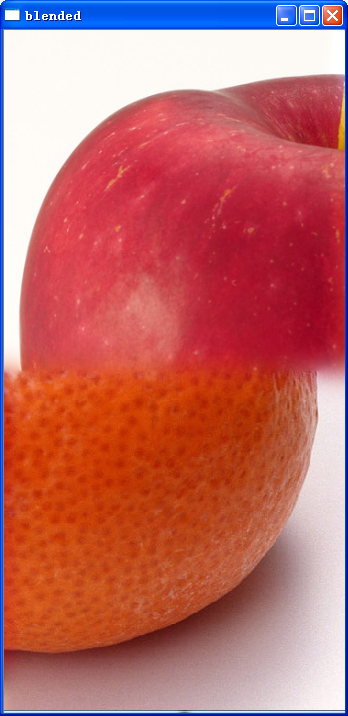 ;
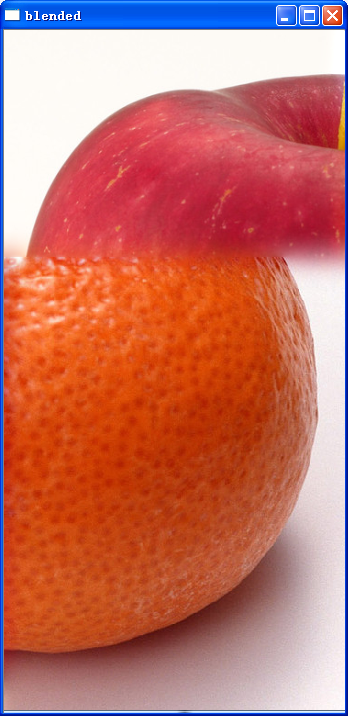
;
使用liner、feather、multiband对已经拼接的数据进行融合(下)的更多相关文章
- 使用liner、feather、multiband对已经拼接的数据进行融合
所谓"blend",英文解释为“vt. 混合vi. 混合:协调n. 混合:掺合物”这里应该理解为是图像数据的融合.这是“识别->对准->融合”的最后一步.融合是决定拼接 ...
- 关于json动态拼接响应数据
在EasyUI http://www.jeasyui.com/demo/main/get_users.php 响应数据如下格式: { "total": "11" ...
- 使用concat做字符串拼接和数据迁移
作用: 解决一开始数据库建立不合理造成的字段冗余,从而提取部分字段,数据迁移.拼接字符串的功能. 格式: concat(字段1,'间隔符',字段2....) concat_ws('间隔符',字段1,字 ...
- Python接口测试-以&连接拼接字典数据(get中url请求数据)
get请求的utl数据是这样的,例如:/banner/findBanner?bannerType=1&_=1556107073181 ''' 1-banner图-banner/findBann ...
- python 手动拼接json数据
第一步:分别拼接为字符串 第二步:将字符串转化为list 第三歩:将两个list合并为dict 第四步:将dict转换为接送数据 如: import json keys = ['a', 'b', ' ...
- udp拼接传递数据包
1.拼接项少 pl = ["<0112>","<32>","<1024x768>","< ...
- sql server full join拼接表数据,按组加序号
--查询所有数据select A.*,B.* from(select z.id,z.requestId,z.FBillNo,dt5.FCauseAndProcess,dt5.FEquipmentNo, ...
- SQL拼接字段数据
查询语句: SELECT STUFF ( ( SELECT ',' + --分隔符 KeyID --查询字段 FROM #tmp --查询数据表 WITH(NOLOCK) --查询条件 FOR XML ...
- C#拼接SQL语句,SQL Server 2005+,多行多列大数据量情况下,使用ROW_NUMBER实现的高效分页排序
/// <summary>/// 单表(视图)获取分页SQL语句/// </summary>/// <param name="tableName"&g ...
随机推荐
- (转载)spring单例和多例详解。如何在单例中调用多例对象
spring生成对象默认是单例的.通过scope属性可以更改为多例. <bean id="user" class="modle.User" scope=& ...
- Tomcat任意文件上传漏洞CVE-2017-12615
文章来源:https://blog.csdn.net/qq1124794084/article/details/78044756 漏洞影响的tomcat版本为tomcat7.0.0-7.0.81版本 ...
- Vuejs核心思想学习笔记
习Vue已经有一段时间了,但未对其核心思想作自己的总结和理解 Vue核心思想有两个 : 数据驱动和组件化(系统组件) 数据驱动 数据驱动目的是让数据和DOM保持同步, 只要修改了data数据,DOM就 ...
- caffe中通过prototxt文件查看神经网络模型结构的方法
在修改propotxt之前我们可以对之前的网络结构进行一个直观的认识: 可以使用http://ethereon.github.io/netscope/#/editor 这个网址. 将propotxt文 ...
- CG标准函数库
(1)数学函数 函数 功能描述 abs(x) 返回输入参数的绝对值 acos(x) 反余切函数,输入参数范围为[-1,1], 返回[0,π]区间的角度值 all(x) 如果输入参数均不为0,则返回tu ...
- https加密过程
https加密完整过程 step1: “客户”向服务端发送一个通信请求 “客户”->“服务器”:你好 step2: “服务器”向客户发送自己的数字证书.证书中有一个公钥用来加密信息,私钥由“服务 ...
- 软工网络15团队作业4——Alpha阶段敏捷冲刺8.0
软工网络15团队作业4--Alpha阶段敏捷冲刺8.0 1.每天举行站立式会议,提供当天站立式会议照片一张. 2.项目每个成员的昨天进展.存在问题.今天安排. 2.1 任务完成安排: 成员 昨日已完成 ...
- os.system
python os.system os.system()函数在不同的系统下可以实现不同的作用 一.window下: os.system("ping www.baidu.com" ...
- ReactiveObjC
简介: RAC 指的就是 RactiveCocoa ,是 Github 的一个开源框架,能够帮我们提供大量方便的事件处理方案,让我们更简单粗暴地去处理事件,现在分为 ReactiveObjC 和 Re ...
- 连接远程数据库时出现 SSH: expected key exchange group packet from server / 2003 - Can't connect to MySQL server on 'XXX' (10038) / 1130 - Host 'XXX' is not allowed to connect to this MySQL server
昨天在自己的远程服务器上玩,把系统重装了.新装了MySQL,在本地用navicat连接的时候出了几个小问题. 问题一:SSH: expected key exchange group packet f ...