
ASP.NET AJAX入门系列(5):使用UpdatePanel控件(二) UpdatePanel
UpdatePanel可以用来创建丰富的局部更新Web应用程序,它是ASP.NET 2.0 AJAX Extensions中很重要的一个控件,其强大之处在于不用编写任何客户端脚本,只要在一个页面上添加几个UpdatePanel控件和一个ScriptManager控件就可以自动实现局部更新。通过本文来学习一下UpdatePanel其他的一些使用方法(第二篇)。
主要内容
1.用编程的方法控制UpdatePanel的更新
2.UpdatePanel的嵌套使用
3.同一页面上使用多个UpdatePanel
一.用编程的方法控制UpdatePanel的更新
对于UpdatePanel,我们也可以使用编程的方法来控制它的更新,可以通过ScriptManager的RegisterAsyncPostBackControl()方法注册一个异步提交的控件,并且调用UpdatePanel的Update()方法来让它更新。再次用我在前面的文章中用到的一个无聊的时间更新例子来看一下,有时候我觉得例子过于复杂更加不好说明白所要讲的内容,如下代码所示,注意Button1并不包含在UpdatePanel中:
<%@ Page Language="C#" AutoEventWireup="true" CodeFile="Default.aspx.cs" Inherits="_Default" %>

<script runat="server">

    void Button1_Click(object sender, EventArgs e)

    {

        this.Label2.Text = DateTime.Now.ToString();

    }

</script>

<html xmlns="http://www.w3.org/1999/xhtml">

<head runat="server">

    <title>Refreshing an UpdatePanel Programmatically</title>

</head>

<body>

    <form id="form1" runat="server">

        <asp:ScriptManager ID="ScriptManager1" runat="server"/>

        <div>

            <asp:UpdatePanel ID="UpdatePanel1" runat="server" UpdateMode="Conditional">

                <ContentTemplate>

                    <asp:Label ID="Label1" runat="server" Text="更新时间:"></asp:Label>

                    <asp:Label ID="Label2" runat="server" Text="Label" ForeColor="Red"></asp:Label><br/><br/>

                </ContentTemplate>

            </asp:UpdatePanel>

             <asp:Button ID="Button1" runat="server" Text="Button"  OnClick = "Button1_Click"/>

        </div>

    </form>

</body>

</html>
这时候不用多说,肯定是整页提交了,运行如下图所示:

再次修改上面的例子,使用ScriptManager的RegisterAsyncPostBackControl()注册Button1为一个异步提交控件,并且调用UpdatePanel的Update()方法:
<%@ Page Language="C#" AutoEventWireup="true" CodeFile="Default.aspx.cs" Inherits="_Default" %>

<script runat="server">

    void Page_Load(object sender, EventArgs e)

    {

        ScriptManager1.RegisterAsyncPostBackControl(Button1);

    }

    void Button1_Click(object sender, EventArgs e)

    {

        this.Label2.Text = DateTime.Now.ToString();

        this.UpdatePanel1.Update();

    }

</script>

<html xmlns="http://www.w3.org/1999/xhtml">

<head runat="server">

    <title>Refreshing an UpdatePanel Programmatically</title>

</head>

<body>

    <form id="form1" runat="server">

        <asp:ScriptManager ID="ScriptManager1" runat="server"/>

        <div>

            <asp:UpdatePanel ID="UpdatePanel1" runat="server" UpdateMode="Conditional">

                <ContentTemplate>

                    <asp:Label ID="Label1" runat="server" Text="更新时间:"></asp:Label>

                    <asp:Label ID="Label2" runat="server" Text="Label" ForeColor="Red"></asp:Label><br/><br/>

                </ContentTemplate>

            </asp:UpdatePanel>

             <asp:Button ID="Button1" runat="server" Text="Button"  OnClick = "Button1_Click"/>

        </div>

    </form>

</body>

</html>
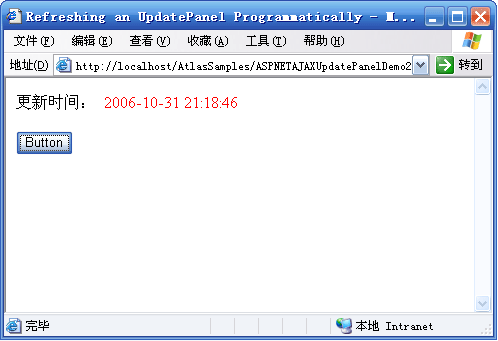
这时候可以看到,已经是异步提交了:
二. UpdatePanel的嵌套使用
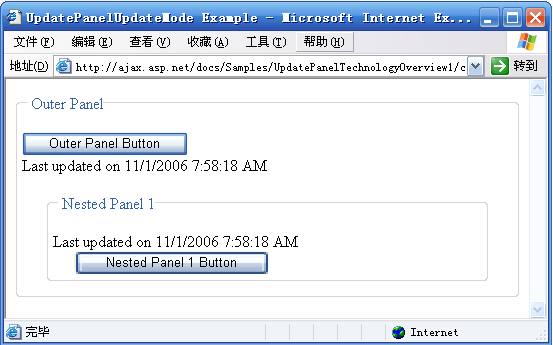
UpdatePanel还可以嵌套使用,即在一个UpdatePanel的ContentTemplate中还可以放入另一个UpdatePanel。当最外面的UpdatePanel被触发更新时,它里面的子UpdatePanel也随着更新,里面的UpdatePanel触发更新时,只更新它自己,而不会更新外层的UpdatePanel。看下面的例子:
<%@ Page Language="C#" AutoEventWireup="true" CodeFile="Default2.aspx.cs" Inherits="Default2" %>

<script runat="server">

</script>

<html xmlns="http://www.w3.org/1999/xhtml">

<head id="Head1" runat="server">

    <title>UpdatePanelUpdateMode Example</title>

    <style type="text/css">

    div.NestedPanel

    {

      position: relative;

      margin: % % % %;

    }

    </style>

</head>

<body>

    <form id="form1" runat="server">

        <div>

            <asp:ScriptManager ID="ScriptManager"

                               runat="server" />

            <asp:UpdatePanel ID="OuterPanel"

                             UpdateMode="Conditional"

                             runat="server">

                <ContentTemplate>

                    <div>

                        <fieldset>

                            <legend>Outer Panel </legend>

                            <br />

                            <asp:Button ID="OPButton1"

                                        Text="Outer Panel Button"

                                        runat="server" />

                            <br />

                            Last updated on

                            <%= DateTime.Now.ToString() %>

                            <br />

                            <br />

                            <asp:UpdatePanel ID="NestedPanel1"

                                               UpdateMode="Conditional"

                                               runat="server">

                                <ContentTemplate>

                                    <div class="NestedPanel">

                                        <fieldset>

                                            <legend>Nested Panel </legend>

                                            <br />

                                            Last updated on

                                            <%= DateTime.Now.ToString() %>

                                            <br />

                                            <asp:Button ID="NPButton1"

                                                        Text="Nested Panel 1 Button"

                                                        runat="server" />

                                        </fieldset>

                                    </div>

                                </ContentTemplate>

                            </asp:UpdatePanel>

                        </fieldset>

                    </div>

                </ContentTemplate>

            </asp:UpdatePanel>

        </div>

    </form>

</body>

</html>
运行后如下:
三.同一页面上使用多个UpdatePanel
使用UpdatePanel的时候并没有限制在一个页面上用多少个UpdatePanel,所以我们可以为不同的需要局部更新的页面区域加上不同的UpdatePanel。由于UpdatePanel默认的UpdateMode是Always,如果页面上有一个局部更新被触发,则所有的UpdatePanel都将更新,这是我们不愿看到的,我们只需要UpdatePanel在它自己的触发器触发的时候更新就可以了,所以需要把UpdateMode设置为Conditional。
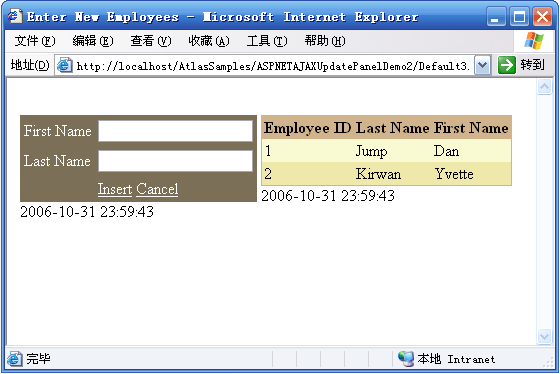
来看一下官方网站上提供的一个例子:包括两个UpdatePanel,其中一个用来用户输入而另一个则用来显示数据,每一个UpdatePanel的UpdateMode属性都设置为Conditional。当我们单击Cancel按钮时,只有用来用户输入的那个UpdatePanel刷新,当单击Insert按钮时,两个UpdatePanel都刷新。代码如下:
<%@ Page Language="C#" %>
<%@ Import Namespace="System.Collections.Generic" %>
<html xmlns="http://www.w3.org/1999/xhtml" >
<head id="Head1" runat="server">
<title>Enter New Employees</title>
<script runat="server">
private List<Employee> EmployeeList;
protected void Page_Load()
{
if (!IsPostBack)
{
EmployeeList = new List<Employee>();
EmployeeList.Add(new Employee(, "Jump", "Dan"));
EmployeeList.Add(new Employee(, "Kirwan", "Yvette"));
ViewState["EmployeeList"] = EmployeeList;
}
else
EmployeeList = (List<Employee>)ViewState["EmployeeList"];
EmployeesGridView.DataSource = EmployeeList;
EmployeesGridView.DataBind();
}
protected void InsertButton_Click(object sender, EventArgs e)
{
if (String.IsNullOrEmpty(FirstNameTextBox.Text) ||
String.IsNullOrEmpty(LastNameTextBox.Text)) { return; }
int employeeID = EmployeeList[EmployeeList.Count-].EmployeeID + ;
string lastName = Server.HtmlEncode(FirstNameTextBox.Text);
string firstName = Server.HtmlEncode(LastNameTextBox.Text);
FirstNameTextBox.Text = String.Empty;
LastNameTextBox.Text = String.Empty;
EmployeeList.Add(new Employee(employeeID, lastName, firstName));
ViewState["EmployeeList"] = EmployeeList;
EmployeesGridView.DataBind();
EmployeesGridView.PageIndex = EmployeesGridView.PageCount;
}
protected void CancelButton_Click(object sender, EventArgs e)
{
FirstNameTextBox.Text = String.Empty;
LastNameTextBox.Text = String.Empty;
}
[Serializable]
public class Employee
{
private int _employeeID;
private string _lastName;
private string _firstName;
public int EmployeeID
{
get { return _employeeID; }
}
public string LastName
{
get { return _lastName; }
}
public string FirstName
{
get { return _firstName; }
}
public Employee(int employeeID, string lastName, string firstName)
{
_employeeID = employeeID;
_lastName = lastName;
_firstName = firstName;
}
}
</script>
</head>
<body>
<form id="form1" runat="server">
<div>
</div>
<asp:ScriptManager ID="ScriptManager1" runat="server" EnablePartialRendering="true" />
<table>
<tr>
<td style="height: 206px" valign="top">
<asp:UpdatePanel ID="InsertEmployeeUpdatePanel" runat="server" UpdateMode="Conditional">
<ContentTemplate>
<table cellpadding="" border="" style="background-color:#7C6F57">
<tr>
<td><asp:Label ID="FirstNameLabel" runat="server" AssociatedControlID="FirstNameTextBox"
Text="First Name" ForeColor="White" /></td>
<td><asp:TextBox runat="server" ID="FirstNameTextBox" /></td>
</tr>
<tr>
<td><asp:Label ID="LastNameLabel" runat="server" AssociatedControlID="LastNameTextBox"
Text="Last Name" ForeColor="White" /></td>
<td><asp:TextBox runat="server" ID="LastNameTextBox" /></td>
</tr>
<tr>
<td></td>
<td>
<asp:LinkButton ID="InsertButton" runat="server" Text="Insert" OnClick="InsertButton_Click" ForeColor="White" />
<asp:LinkButton ID="Cancelbutton" runat="server" Text="Cancel" OnClick="CancelButton_Click" ForeColor="White" />
</td>
</tr>
</table>
<asp:Label runat="server" ID="InputTimeLabel"><%=DateTime.Now %></asp:Label>
</ContentTemplate>
</asp:UpdatePanel>
</td>
<td style="height: 206px" valign="top">
<asp:UpdatePanel ID="EmployeesUpdatePanel" runat="server" UpdateMode="Conditional">
<ContentTemplate>
<asp:GridView ID="EmployeesGridView" runat="server" BackColor="LightGoldenrodYellow" BorderColor="Tan"
BorderWidth="1px" CellPadding="" ForeColor="Black" GridLines="None" AutoGenerateColumns="False">
<FooterStyle BackColor="Tan" />
<SelectedRowStyle BackColor="DarkSlateBlue" ForeColor="GhostWhite" />
<PagerStyle BackColor="PaleGoldenrod" ForeColor="DarkSlateBlue" HorizontalAlign="Center" />
<HeaderStyle BackColor="Tan" Font-Bold="True" />
<AlternatingRowStyle BackColor="PaleGoldenrod" />
<Columns>
<asp:BoundField DataField="EmployeeID" HeaderText="Employee ID" />
<asp:BoundField DataField="LastName" HeaderText="Last Name" />
<asp:BoundField DataField="FirstName" HeaderText="First Name" />
</Columns>
<PagerSettings PageButtonCount="" />
</asp:GridView>
<asp:Label runat="server" ID="ListTimeLabel"><%=DateTime.Now %></asp:Label>
</ContentTemplate>
<Triggers>
<asp:AsyncPostBackTrigger ControlID="InsertButton" EventName="Click" />
</Triggers>
</asp:UpdatePanel>
</td>
</tr>
</table>
</form>
</body>
</html>
运行后效果如下:
示例代码下载:http://files.cnblogs.com/Terrylee/ASPNETAJAXUpdatePanelDemo2.rar
ASP.NET AJAX入门系列(5):使用UpdatePanel控件(二) UpdatePanel的更多相关文章
- ASP.NET AJAX入门系列(4):使用UpdatePanel控件(一)
UpdatePanel可以用来创建丰富的局部更新Web应用程序,它是ASP.NET 2.0 AJAX Extensions中很重要的一个控件,其强大之处在于不用编写任何客户端脚本,只要在一个页面上添加 ...
- ASP.NET AJAX入门系列(1):概述
经常关注我的Blog的朋友可能注意到了,在我Blog的左边系列文章中,已经移除了对Atlas学习手记系列文章的推荐,因为随着ASP.NET AJAX 1.0 Beta版的发布,它们已经不再适用,为了不 ...
- ASP.NET AJAX入门系列
ASP.NET AJAX入门系列将会写关于ASP.NET AJAX一些控件的使用方法以及基础知识,其中部分文章为原创,也有一些文章是直接翻译自官方文档,本部分内容会不断更新. 目录 ASP.NET A ...
- ASP.NET AJAX入门系列(10):Timer控件简单使用
本文主要通过一个简单示例,让Web页面在一定的时间间隔内局部刷新,来学习一下ASP.NET AJAX中的服务端Timer控件的简单使用. 主要内容 Timer控件的简单使用 1.添加新页面并切换到设计 ...
- ASP.NET AJAX入门系列(5):使用UpdatePanel控件(二)
UpdatePanel可以用来创建丰富的局部更新Web应用程序,它是ASP.NET 2.0 AJAX Extensions中很重要的一个控件,其强大之处在于不用编写任何客户端脚本,只要在一个页面上添加 ...
- ASP.NET AJAX入门系列(9):在母版页中使用UpdatePanel
本文简单介绍一下在母版页中使用UpdatePanel控件,翻译自官方文档. 主要内容 1.添加UpdatePanel控件到Content Page 2.通过Master Page刷新UpdatePan ...
- ASP.NET AJAX入门系列(11):在多个UpdatePanle中使用Timer控件
本文将使用Timer控件更新两个UpdatePanel控件,Timer控件将放在UpdatePanel控件的外面,并将它配置为UpdatePanel的触发器,翻译自官方文档. 主要内容 在多个Upda ...
- ASP.NET AJAX入门系列(7):使用客户端脚本对UpdateProgress编程
在本篇文章中,我们将通过编写JavaScript来使用客户端行为扩展UpdateProgress控件,客户端代码将使用ASP.NET AJAX Library中的PageRequestManager, ...
- ASP.NET AJAX入门系列(6):UpdateProgress控件简单介绍
在ASP.NET AJAX Beta2中,UpdateProgress控件已经从“增值”CTP中移到了ASP.NET AJAX核心中.以下两篇关于UpdateProgress的文章基本翻译自ASP.N ...
随机推荐
- SQL server的高可用
SQL server 2012实现数据库中的表同步到局域网中的另外一个服务器上的数据库的方法: 1.发布.订阅功能 2.AlwayOn功能(最稳定.最优的方案) 3.修改程序,写两份数据,或者用触发器 ...
- ChinaCock让Android App应用不锁屏
<meta-data android:name="keepScreenOn" android:value="true"> </meta-dat ...
- orm的理解
orm:是对象->关系->映射,的简称. mvc或者mvc框架中包括一个重要的部分,就是orm,它实现了数据模型于数据库的解耦,即数据模型的设计不需要依赖于特定的数据库,通过简单的配置就可 ...
- 【Maven】Project configuration is not up-to-date with pom.xml错误解决方法
导入一个Maven项目之后发现有一个如下的错误: Project configuration is not up-to-date with pom.xml. Run project configura ...
- ANDROID BINDER机制浅析
Binder是Android上一种IPC机制,重要且较难理解.由于Linux上标准IPC在灵活和可靠性存在一定不足,Google基于OpenBinder的设计和构想实现了Binder. 本文只简单介绍 ...
- qt 内置图标使用
QToolButton *button = new QToolButton(this); button->resize(100,30); button->setToolButtonStyl ...
- Ideal部署web工程
- js的数据类型。
字符串 String 数字 Number 布尔 Boolean Null 空 Undefined Object 对象 Array 数组 json function ...
- 1.Tensorflow的基本概念:
1.Tensorflow的基本概念: 1.使用图(graphs)来表示计算任务 2.在被称之为会话(Session)的上下文(context)中执行图 3.使用tensor表示数据 4.通过变量(Va ...
- vue项目的创建
https://jingyan.baidu.com/article/456c463b359e630a5931444e.html