
Redis在SSM项目中的简单使用
一、基于SSM的Redis环境配置
前提是你的开发电脑安装和配置好了redis,如果没安装请看Window配置Redis环境和简单使用
1.1、pom文件中引入redis客户端jar包(pom.xml)
 <!-- https://mvnrepository.com/artifact/redis.clients/jedis -->

    <dependency>

      <groupId>redis.clients</groupId>

      <artifactId>jedis</artifactId>

      <version>2.9.</version>

    </dependency>
1.2、redis属性配置文件(redis.properties)
#redis.host=127.0.0.1

redis.host=localhost

redis.port=

redis.password=你的redis密码

redis.maxIdle=

redis.maxTotal=

redis.maxWaitMillis=

redis.testOnBorrow=true

redis.timeout=
1.3、spring和redis的配置文件(spring-redis.xml)
指定了redis属性配置文件的路径
<?xml version="1.0" encoding="UTF-8"?>

<beans xmlns="http://www.springframework.org/schema/beans"

       xmlns:xsi="http://www.w3.org/2001/XMLSchema-instance"

       xmlns:util="http://www.springframework.org/schema/util"

       xmlns:p="http://www.springframework.org/schema/p"

       xsi:schemaLocation="

             http://www.springframework.org/schema/beans

             http://www.springframework.org/schema/beans/spring-beans.xsd

             http://www.springframework.org/schema/util

             http://www.springframework.org/schema/util/spring-util.xsd">

    <util:properties id="redisConfig" location="classpath:/config/redis.properties"></util:properties>

    <bean id="jedisPoolConfig" class="redis.clients.jedis.JedisPoolConfig">

        <property name="maxIdle" value="#{redisConfig['redis.maxIdle']}" />

        <property name="maxTotal" value="#{redisConfig['redis.maxTotal']}" />

        <property name="maxWaitMillis" value="#{redisConfig['redis.maxWaitMillis']}" />

        <property name="testOnBorrow" value="#{redisConfig['redis.testOnBorrow']}" />

    </bean>

    <bean id="jedisPool" class="redis.clients.jedis.JedisPool">

        <constructor-arg index="" ref="jedisPoolConfig" />

        <!-- 端口,默认6379 -->

        <constructor-arg index="" value="#{redisConfig['redis.host']}" name="host" type="java.lang.String"/>

        <constructor-arg index="" value="#{redisConfig['redis.port']}"  name="port" type="int"/>

        <constructor-arg index="" value="#{redisConfig['redis.timeout']}"  name="timeout" type="int"/>

        <constructor-arg index="" value="#{redisConfig['redis.password']}"  name="password" type="java.lang.String"/>

    </bean>

</beans>
1.4、springmvc中引入Spring和redis的配置(spring-mvc.xml)
最下方利用import标签引入redis的配置文件
<?xml version="1.0" encoding="UTF-8"?>

<beans xmlns="http://www.springframework.org/schema/beans"

    xmlns:xsi="http://www.w3.org/2001/XMLSchema-instance" xmlns:context="http://www.springframework.org/schema/context"

    xmlns:mvc="http://www.springframework.org/schema/mvc"

    xsi:schemaLocation="http://www.springframework.org/schema/beans

    http://www.springframework.org/schema/beans/spring-beans.xsd

    http://www.springframework.org/schema/context

    http://www.springframework.org/schema/context/spring-context-4.0.xsd

    http://www.springframework.org/schema/mvc

    http://www.springframework.org/schema/mvc/spring-mvc-4.0.xsd">

    <!-- 注解扫描包 -->

    <context:component-scan base-package="com.king.weixin"/>

    <!-- 开启注解 -->

    <mvc:annotation-driven/>

    <!--

    配置静态资源,直接映射到对应的文件夹,不被DispatcherServlet处理,.04新增功能,需要重新设置spring-mvc-3.0.xsd

    -->

    <mvc:resources mapping="/img/**" location="/img/" />

    <mvc:resources mapping="/js/**" location="/js/" />

    <mvc:resources mapping="/css/**" location="/css/" />

    <mvc:resources mapping="/html/**" location="/html/" />

    <mvc:resources mapping="/tinymce/**" location="/tinymce/" />

    <mvc:resources mapping="/upload/**" location="/upload/" />

    <!-- 定义跳转的文件的前后缀 ,视图模式配置-->

    <bean id="viewResolver"

        class="org.springframework.web.servlet.view.InternalResourceViewResolver">

        <!-- 这里的配置我的理解是自动给后面action的方法return的字符串加上前缀和后缀,变成一个 可用的url地址 -->

        <property name="prefix" value="/" />

        <property name="suffix" value=".jsp" />

    </bean>

    <!-- redis配置 -->

    <import resource="spring-redis.xml"/>

</beans>
二、测试和验证
采用jedis获取redis资源和操作redis,添加值并且给值设置生命周期
public String addStringValue(String key, String value, int expireSeconds) {

        String result = null;

        Jedis jedis = null;

        try {

            jedis = jedisManager.getResource();

            //result = jedis.set(key, value);

            result = jedis.set(key,value).toString();

            if (expireSeconds != ) {

                //EXPIRE key seconds 为给定 key 设置生存时间,当 key 过期时(生存时间为 0 ),它会被自动删除。

                jedis.expire(key, expireSeconds);

            }

        } catch (Exception e) {

            e.printStackTrace();

        } finally {

            jedisManager.returnResource(jedis);

        }

        return result;

    }
获取值得生命周期方法,ttl (key)
  public long getStringValueTTLByKey(String key){

        long result = ;

        Jedis jedis = null;

        try {

            jedis = jedisManager.getResource();

            //Redis TTL 命令以秒为单位返回 key 的剩余过期时间。

            result  = jedis.ttl(key);

        } catch (Exception e) {

            e.printStackTrace();

        } finally {

            jedisManager.returnResource(jedis);

        }

        return result;

    }
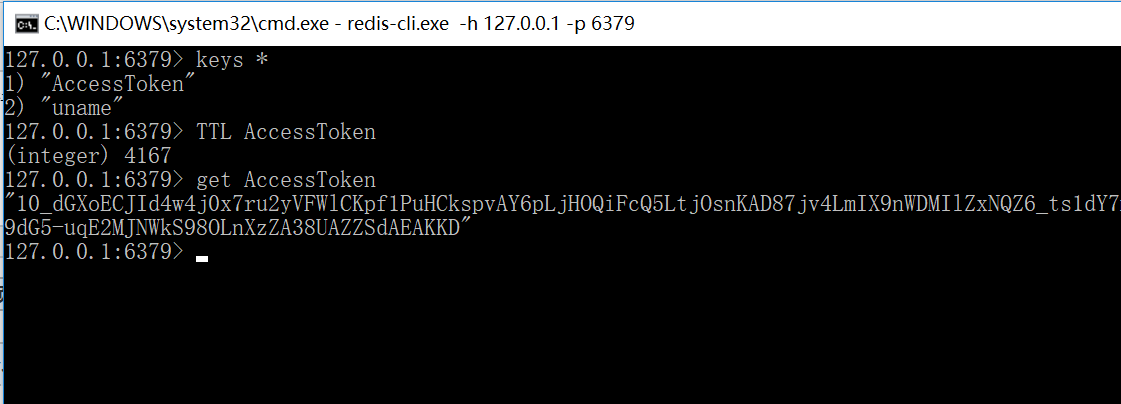
在命令行查看redis中的所有key值和剩余生命周期,如下图可以使用keys * 查看所有缓存的key ,利用TTL key可以查看该key值对应对象的剩余生命周期
Redis在SSM项目中的简单使用的更多相关文章
- redis在java项目中的使用
在上一篇文章中已经讲了redis的spring配置,这篇将会描述redis在java项目中的使用. redis存储形式都是key-value(键值对),按照存储的内容分为两种,一种是存简单数据,即数字 ...
- Jwt在Java项目中的简单实际应用
1.什么是jwt 双方之间传递安全信息的简洁的.URL安全的表述性声明规范.JWT作为一个开放的标准(RFC 7519),定义了一种简洁的,自包含的方法用于通信双方之间以Json对象的形式安全的传递信 ...
- ssm项目中遇到微信用户名称带有表情,插入失败问题
ssm项目中遇到微信用户名称带有表情,插入失败问题 问题 Mysql的utf8编码最多3个字节,而Emoji表情或者某些特殊字符是4个字节. 因此会导致带有表情的昵称插入数据库时出错. 解决方法 一. ...
- Redis在新项目中的使用场景
Redis在新项目中的使用场景 数据类型 使用场景 string 比如说,我想知道什么时候封锁一个Ip地址,Incrby命令(使用这个命令记录被访问的次数) Hash 存储用户的信息[id,name, ...
- ssm项目中中文字符乱码
昨天给同学改一个错,在SSM项目中,表单输入的String类型中,中文字符值,总是乱码,在控制器层获取的数据就开始乱码,先后进行了如下排查: web.xml中配置设置字符编码的监听器(过滤器), js ...
- 当你的SSM项目中的springmvc.xml发生第一行错误解决方案
当你新建了一个SSM项目,你复制网上的xml文件来配置或者你下载了一个SSM项目打开发现xml文件错误,打开是第一行报错的时候你是不是很懵逼 或者是这样 总之就是xml文件中<?xml vers ...
- python JoinableQueue在生产者消费者项目中的简单应用
class multiprocessing.JoinableQueue([maxsize]) JoinableQueue, a Queue subclass, is a queue which add ...
- Redis在实际项目中的一应用场景
1.在游戏的等级排名,可以将用户信息放入到redis的有序集合中,然后取得相应的排名,不用自己写代码去排序. 2.利用rediss的数据特性的自增,自减属性,可以将项目中的一些列入阅读数,点赞数放入到 ...
- redis缓存在项目中的使用
关于redis为什么能作为缓存这个问题我们就不说了,直接来说一下redis缓存到底如何在项目中使用吧: 1.redis缓存如何在项目中配置? 1.1redis缓存单机版和集群版配置?(redis的客户 ...
随机推荐
- 自动化测试使用cookie跳过验证码
准备工具: fiddler Python+selenium 安装fidder fidder官方下载地址 fidder首次安装需要设置才能抓取https参考如下 fidder设置抓取https 开始 1 ...
- LINQ学习之旅(二)
一:查询表达式(LINQ)简介 LINQ是Language Integrated Query的简称,它是集成在.NET编程语言中的一种特性.已成为编程语言的一个组成部分,在编写程序时可以得到很好的编译 ...
- poj 2349 求MST中第S大的权值
题目大意: 有一些炮台,如果这个炮台有卫星接收器,那么任意两个有卫星接收器的炮台可以通信,不受距离限制:否者,两个炮台之间只能通过对讲机通信,这是受距离限制的.要买一种对讲机,用在需要的炮台上,要求所 ...
- POJ 2976 3111(二分-最大化平均值)
POJ 2976 题意 给n组数据ai,bi,定义累计平均值为: 现给出一个整数k,要求从这n个数中去掉k个数后,最大累计平均值能有多大?(四舍五入到整数) 思路 取n−k个数,使得累计平均值最大. ...
- 【noip模拟赛9】123法典
描述 很久很久以前,有个叫123的国家,这个国家的国王很喜欢颁布各种法令,并把这些法令记录在一部<123法典>中.最近这部法典终于被发掘了出来,专家们经过研究发现法典中的法令是按颁布的时间 ...
- Immediate Decodability HDU1305
类似phonelist 一次ac 判断失败主要有两个要点 1. 是否包含了某段的结尾结点 说明某段被此段包含 2.此段的结尾结点是否为某段的痕迹 说明此段被包含 #include<bi ...
- 8.Django-form组件
1.form组件的校验功能 文件formsdemo models from django.db import models # Create your models here. class UserI ...
- Enrolment API
由于Moodle 2.0有一个用户注册的新概念,它们完全独立于角色和功能.能力通常与注册状态结合使用. 什么是注册? 登记的用户可以完全参加一门课程.活跃用户注册允许用户输入课程.只有注册的用户可能是 ...
- Python 调试器之pdb
使用PDB的方式有两种: 1. 单步执行代码,通过命令 python -m pdb xxx.py 启动脚本,进入单步执行模式 pdb命令行: 1)进入命令行Debug模式,python -m pdb ...
- 针对SSL/TLS的拒绝服务攻击以及使用ettercap进行DNS欺骗
一. thc-ssl-dos 1.简介 (1).SSL 协商加密对性能开销增加,大量握手请求会导致 DOS (2).利用 SSL secure Renegotiation 特性,在单一 TCP 连接中 ...