
Serial interface (RS-232)
转自:http://www.fpga4fun.com/SerialInterface.html
A serial interface is a simple way to connect an FPGA to a PC. We just need a transmitter and receiver module.
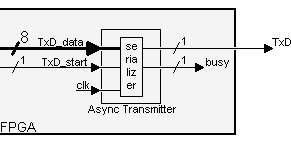
Async transmitter
It creates a signal "TxD" by serializing the data to transmit.
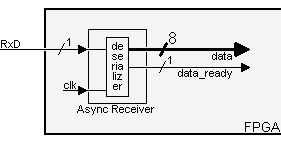
Async receiver
It takes a signal "RxD" from outside the FPGA and "de-serializes" it for easy use inside the FPGA.
This project has 5 parts
How the RS-232 serial interface works
An RS-232 interface has the following characteristics:
- Uses a 9 pins connector "DB-9" (older PCs use 25 pins "DB-25").
- Allows bidirectional full-duplex communication (the PC can send and receive data at the same time).
- Can communicate at a maximum speed of roughly 10KBytes/s.
DB-9 connector
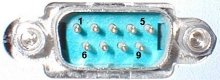
It has 9 pins, but the 3 important ones are:
- pin 2: RxD (receive data).
- pin 3: TxD (transmit data).
- pin 5: GND (ground).
Using just 3 wires, you can send and receive data.
Data is commonly sent by chunks of 8 bits (we call that a byte) and is "serialized": the LSB (data bit 0) is sent first, then bit 1, ... and the MSB (bit 7) last.
Asynchronous communication
This interface uses an asynchronous protocol. That means that no clock signal is transmitted along the data. The receiver has to have a way to "time" itself to the incoming data bits.
In the case of RS-232, that's done this way:
- Both side of the cable agree in advance on the communication parameters (speed, format...). That's done manually before communication starts.
- The transmitter sends "idle" (="1") when and as long as the line is idle.
- The transmitter sends "start" (="0") before each byte transmitted, so that the receiver can figure out that a byte is coming.
- The 8 bits of the byte data are sent.
- The transmitter sends "stop" (="1") after each byte.
Let's see how looks the byte 0x55 when transmitted:

Byte 0x55 is 01010101 in binary. But since it is transmitted LSB (bit-0) first, the line toggles like that: 1-0-1-0-1-0-1-0.
Here's another example:

Here the data is 0xC4, can you see it? The bits are harder to see. That illustrates how important it is for the receiver to know at which speed the data is sent.
How fast can we send data?
The speed is specified in baud, i.e. how many bits-per-seconds can be sent. For example, 1000 bauds would mean 1000 bits-per-seconds, or that each bit lasts one millisecond.
Common implementations of the RS-232 interface (like the one used in PCs) don't allow just any speed to be used. If you want to use 123456 bauds, you're out of luck. You have to settle to some "standard" speed. Common values are:
- 1200 bauds.
- 9600 bauds.
- 38400 bauds.
- 115200 bauds (usually the fastest you can go).
At 115200 bauds, each bit lasts (1/115200) = 8.7µs. If you transmit 8-bits data, that lasts 8 x 8.7µs = 69µs. But each byte requires an extra start and stop bit, so you actually need 10 x 8.7µs = 87µs. That translates to a maximum speed of 11.5KBytes per second.
At 115200 bauds, some PCs with buggy chips require a "long" stop bit (1.5 or 2 bits long...) which make the maximum speed drop to around 10.5KBytes per second.
Physical layer
The signals on the wires use a positive/negative voltage scheme.
- "1" is sent using -10V (or between -5V and -15V).
- "0" is sent using +10V (or between 5V and 15V).
So an idle line carries something like -10V.
Links
Baud generator
Here we want to use the serial link at maximum speed, i.e. 115200 bauds (slower speeds would also be easy to generate). FPGAs usually run at MHz speeds, well above 115200Hz (RS-232 is pretty slow by today's standards). We need to find a way to generate (from the FPGA clock) a "tick" as close as possible to 115200 times a second.
Traditionally, RS-232 chips use a 1.8432MHz clock, because that makes generating the standard baud frequencies very easy... 1.8432MHz divided by 16 gives 115200Hz.
|
// let's assume the FPGA clock signal runs at 1.8432MHz // we create a 4-bit counter reg [3:0] BaudDivCnt; always @(posedge clk) BaudDivCnt <= BaudDivCnt + 1; // count forever from 0 to 15 // and a tick signal that is asserted once every 16 clocks (so 115200 times a second) wire BaudTick = (BaudDivCnt==15); |
That was easy. But what do you do if instead of 1.8432MHz, you have a 2MHz clock? To generate 115200Hz from a 2MHz clock, we need to divide the clock by "17.361111111..." Not exactly a round number. The solution is to divide sometimes by 17, sometimes by 18, making sure the ratio stays "17.361111111". That's actually easy to do.
Look at the following "C" code:
|
while(1) // repeat forever { acc += 115200; if(acc>=2000000) printf("*"); else printf(" "); } |
That prints the "*" in the exact ratio, once every "17.361111111..." loops on average.
To obtain the same thing efficiently in an FPGA, we rely on the fact that the serial interface can tolerate a few % of error in the baud frequency generator.
It is desirable that the 2000000 be a power of two. Obviously 2000000 is not. So we change the ratio... Instead of "2000000/115200", let's use "1024/59" = 17.356. That's very close to our ideal ratio, and makes an efficient FPGA implementation: we use a 10-bit accumulator incremented by 59, with a tick marked everytime the accumulator overflows.
|
// let's assume the FPGA clock signal runs at 2.0000MHz // add 59 to the accumulator at each clock wire BaudTick = acc[10]; // so that the 11th bit is the accumulator carry-out |
Using our 2MHz clock, "BaudTick" is asserted 115234 times a second, a 0.03% error from the ideal 115200.
Parameterized FPGA baud generator
The previous design was using a 10 bits accumulator, but as the clock frequency increases, more bits are required.Here's a design with a 25MHz clock and a 16 bits accumulator. The design is parameterized, so easy to customize.
|
parameter ClkFrequency = 25000000; // 25MHz reg [BaudGeneratorAccWidth:0] BaudGeneratorAcc; |
One last implementation issue: the "BaudGeneratorInc" calculation is wrong, due to the fact that Verilog uses 32 bits intermediate results, and the calculation exceeds that. Change the line as follow for a workaround.
| parameter BaudGeneratorInc = ((Baud<<(BaudGeneratorAccWidth-4))+(ClkFrequency>>5))/(ClkFrequency>>4); |
This line has also the added advantage to round the result instead of truncating.
Now that we have a precise enough Baud generator, we can go ahead with the RS-232 transmitter and receiver modules.
Serial interface (RS-232)的更多相关文章
- Linux/drivers/usb/serial/ftdi_sio.c
Linux/drivers/usb/serial/ftdi_sio.h /* 2 * Driver definitions for the FTDI USB Single Port Serial Co ...
- 串口通信编程向导 Serial Programming Guide for POSIX Operating Systems
https://www.cmrr.umn.edu/~strupp/serial.html#CONTENTS Introduction Chapter 1, Basics of Serial Commu ...
- RS-232, RS-422, RS-485 Serial Communication General Concepts(转载)
前面转载的几篇文章重点介绍了UART及RS-232.在工控领域除了RS-232以外,常用的串行通信还有RS-485.本文转载的文章重点介绍了RS-232.RS-422和RS-485. Overview ...
- USB (Universal Serial Bus)
USB歷史簡介 USB規格演變 標準 USB 2.0 介面 實體層 訊號傳輸 傳輸速率 網路層 USB 通訊模型 Endpoints 傳輸型態 USB 資料連結 Transaction Frame P ...
- [转]Mac's and serial TTY's
Mac's are excellent tools for accessing serial device TTY ports (to console into PBX's, switches, an ...
- Freescale OSBDM JM60仿真器 BGND Interface
The BGND interface provides the standard 6 pin connection for the single wire BGND signal type devel ...
- 【转】Ultra simple ISO-7816 Interface
原文出自 http://hilbert-space.de/?p=135 While laying out a PCB for my SWP reader project I realized that ...
- Blocking Master Example QT 自带 的 serial 即 串口 例子
1.官方解释文档:http://doc.qt.io/qt-5/qtserialport-blockingmaster-example.html Blocking Master shows how to ...
- RFID-RC522、FM1702SL、M1卡初探
catalogue . 引言 . RC522芯片(读卡器)简介 . FM1702SL芯片(读卡器)简介 . RFID M1卡简介 . 读取ID/序列号(arduino uno.MFRC522芯片 Ba ...
随机推荐
- English trip V1 - B 18. Workplaces 工作地方 Teacher:Russell Key: do / does
In this lesson you will learn to talk about workplaces. 课上内容(Lesson) My English Teacher name is Russ ...
- 2. 搭建DRF项目
企业项目开发流程 一.需求分析 1.企业的web项目类型: 商城 门户网站[企业站和门户站] 社交网络 资讯论坛 内部系统 个人博客 内容收费站 前端的静态页面制作,外界开发的时候,是照着psd/pn ...
- ajax被cancel问题(事件冒泡)
发送ajax请求的时候发现ajax请求总是被cancel,但是请求却被执行了,查阅了知识之后,发现问题是:事件冒泡,记录下来,供自己和大家学习借鉴. 1. 前提,发出ajax的请求在form表单中 2 ...
- ActiveMQ的学习整理(代码实现PTP,以及Pub/Sub)
(一)由于在实习过程中需要用到ActiveMQ,在网上看了很多文章,现在整理出来以防忘记. (二)这篇文章比较适合之前没有接触过的同学,在看下面文章的过程中,建议先学习参考链接中的知识点,然后自己再参 ...
- 使用telnet模拟邮件的收发
smtp协议是一个简单的邮件传输协议,利用它我们可以将邮件发送给别人,这里将通过telnet这个程序利用smtp协议从网易向gmail发送一封邮件 基本步骤如下: 1.使用telnet连接smtp服务 ...
- element upload 一次性上传多张图片(包含自定义上传不走action)
最重要的都圈出来了
- poj 1080 基因组(LCS)
Human Gene Functions Time Limit: 1000MS Memory Limit: 10000K Total Submissions: 19376 Accepted: ...
- 2017-4-28/PHP实现Redis
谈一谈Redis的数据结构,如果换做PHP,怎么实现?如果再考虑用上LFU或LRU,又该如何实现? Redis的数据结构有String.List.Set.Sorted Set.Hash等,而PHP ...
- Spring注解之@Retention
作用是定义被它所注解的注解保留多久,一共有三种策略,定义在RetentionPolicy枚举中: package java.lang.annotation; /** * Annotation rete ...
- [CodeForces - 197A] A - Plate Game
A - Plate Game You've got a rectangular table with length a and width b and the infinite number of p ...