
Aspose.Cells Smart markers 基于模板导出Excel
Aspose.Cells可以预先定义Excel模板,然后填充数据(官方文档:http://www.aspose.com/docs/display/cellsjava/Smart+Markers)。
设置的模板是一个标准的Excel文件,包含了可视化的格式,公式,以及标记(smart markers),并且可以引用多个数据源。
支持的标记(Smart Marker Options)
&=DataSource.FieldName 数据元是ICellsDataTable或者是JavaBean
&=[Data Source].[Field Name] 数据源是 ResultSet
&=$VariableName 一个变量
&=$VariableArray 数组变量
&==DynamicFormula 暂时不清楚
&=&=RepeatDynamicFormula 动态计算
下面介绍这两种标记的使用方式
1、&=$VariableName 一个变量
2、&=$VariableArray 数组变量

Java代码
     String path = "SmartMarkerDesigner.xls";

        InputStream inputStream = ClassLoader.getSystemResourceAsStream(path);

        Workbook wb = new Workbook(inputStream);

        WorkbookDesigner designer = new WorkbookDesigner();

        designer.setWorkbook(wb);

        designer.setDataSource("Variable", "Single Variable");

        designer.setDataSource("MultiVariable", new String[]

        {

                "Variable 1", "Variable 2", "Variable 3"

        });

        designer.setDataSource("MultiVariable2", new String[]

        {

                "Skip 1", "Skip 2", "Skip 3"

        });

        designer.setDataSource("Array1Dim", new String[]

        {

                "A1", "A2", "A3"

        });

        designer.setDataSource("Array2Dim", new String[][]

        {

                {

                        "A11", "A12", "A13"

                },

                {

                        "A21", "A22", "A23", "A24"

                },

                {

                        "A31", "A32",

                },

        });

下面介绍JavaBean的使用方式
&=DataSource.FieldName 数据元是ICellsDataTable或者是JavaBean
&=Person.name(bean) 注意这个地方需要加上bean

其中&=&=C{r}*D{r} 是动态计算的标记
&=&= 构面跟一个表达式 r代表当前行,C{r}*D{r} 这样在循环的时候没一行都会计算。
上面的例子用id这列进行分组Grouping Data
normal - The group by field(s) value is not be repeated for the corresponding records in the column; instead they are printed once per data group.
分组的列不会被循环输出,只会输出一次。
merge - The same behavior as for the normal parameter, except that it merges the cells in the group by field(s) for each group set.
和normal一样,但是他会合并单元格
repeat - The group by field(s) value is repeated for the corresponding records.
分组的列会循环输出
&=subtotal9:Person.id 放在那一列下面是按照id进行分组统计。
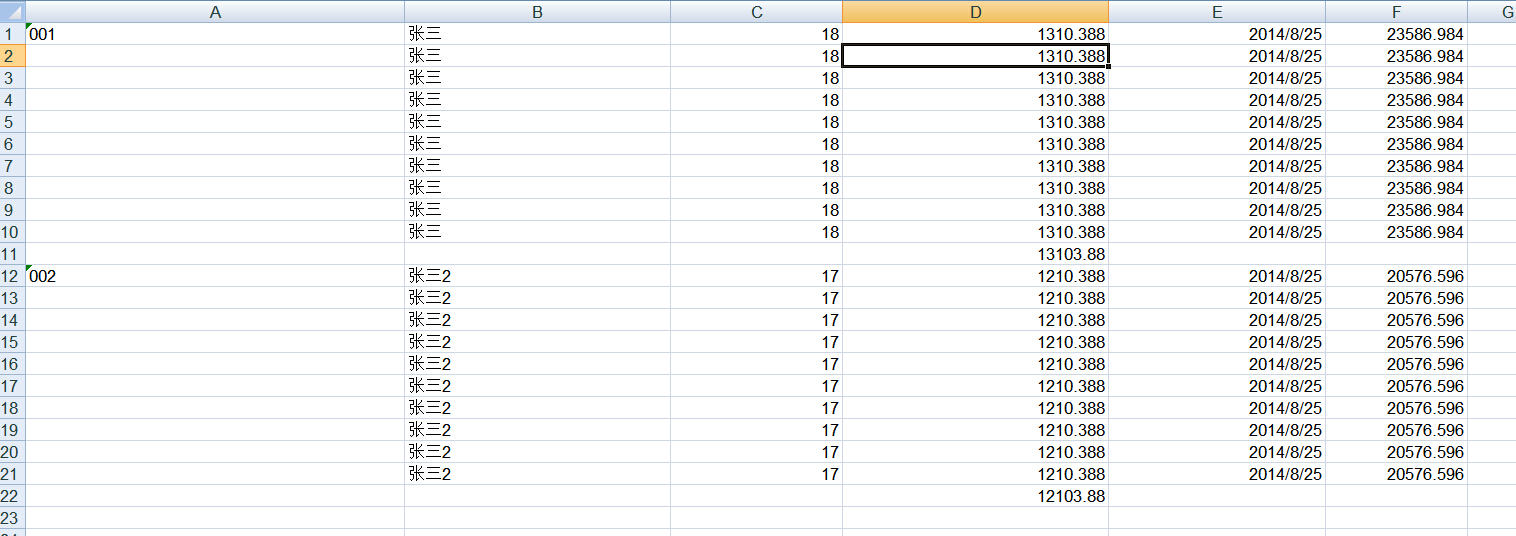
或者&=Employee.money(subtotal9:Employee.id) 这么写也行,按照id进行分组统计


subtotalN (N的值可以是1-11 平均数 总行数 最大值 最小值 总和 等等。)
Performs a summary operation for a specified field data related to a group by field. The N represents numbers between 1 and 11 which specify the function used when calculating subtotals within a list of data. (1=AVERAGE, 2=COUNT, 3=COUNTA, 4=MAX, 5=MIN,...9=SUM etc.) Refer to the Subtotal reference in Microsoft Excel's help for further details.
The format actually states as:
subtotalN:Ref where Ref refers to the group by column.
&=Products.Units(subtotal9:Products.ProductID) specifies summary function upon Units field with respect to the ProductID field in the Products table.
&=Tabx.Col3(subtotal9:Tabx.Col1) specifies summary function upon the Col3 field group by Col1 in the table Tabx.
&=Table1.ColumnD(subtotal9:Table1.ColumnA&Table1.ColumnB) specifies summary function upon ColumnD field group by ColumnA and ColumnB in the table Table1.
Aspose.Cells Smart markers 基于模板导出Excel的更多相关文章
- aspose.cells根据模板导出excel
又隔十多天没写博客了,最近都在忙项目的事情,公司人事变动也比较大,手头上就又多了一个项目.最近做用aspose.cells根据模板导出excel报价单的功能,顺便把相关的核心记下来,先上模板和导出的效 ...
- ASP.NET Core 2.2 : 十六.扒一扒新的Endpoint路由方案 try.dot.net 的正确使用姿势 .Net NPOI 根据excel模板导出excel、直接生成excel .Net NPOI 上传excel文件、提交后台获取excel里的数据
ASP.NET Core 2.2 : 十六.扒一扒新的Endpoint路由方案 ASP.NET Core 从2.2版本开始,采用了一个新的名为Endpoint的路由方案,与原来的方案在使用上差别不 ...
- Java无模板导出Excel,Apache-POI插件实现
开发环境 jdk 1.8 Maven 3.6 Tomcat 8.5 SpringBoot 2.1.4.RELEASE Apache-POI 3.6 Idea 注意: 我是在现有的基于SpringBoo ...
- poi根据excel模板导出Excel
/****单元格值对象**/public class Cells { /*** * 行 */ private int row; /** * 列 */ private int column; /** * ...
- POI通过模板导出EXCEL文件
一般的EXCEL导出使用POI先创建一个HSSFWorkbook,然后通过不断创建HSSFRow,HSSFCell后设置单元格内容便可以完成导出. 这次在项目中需要用到模板,导出的内容包括(1.模板中 ...
- .Net NPOI 根据excel模板导出excel、直接生成excel
一.根据Excel模板导出excel 1.导入NPOI.dll 2.DAL中添加类ExportExcel.cs using NPOI.SS.UserModel; using System; usin ...
- apache poi根据模板导出excel
需要预先新建编辑好一个excel文件,设置好样式. 编辑好输出的数据,根据excel坐标一一对应. 支持列表数据输出,列表中列合并. 代码如下: package com.icourt.util; im ...
- 按模板导出Excel
说明:开发环境 vs2012 asp.net mvc4 c# 注意:Excel模板有多个sheet页,导出Excel的时候,同时给多个sheet页填充数据 1.项目结构 3.Excel模板(注意she ...
- NPOI复制模板导出Excel
本人菜鸟实习生一枚,公司给我安排了一个excel导出功能.要求如下:1.导出excel文件有样式要求:2.导出excel包含一个或多个工作表:3.功能做活(我的理解就是excel样式以后可能会变方便维 ...
随机推荐
- VC下加载JPG/GIF/PNG图片的两种方法
转载自:http://blog.sina.com.cn/s/blog_6582aa410100huil.html 仅管VC有提供相应的API和类来操作bmp位图.图标和(增强)元文件,但却不支持jpg ...
- SharePoint 2013 Farm 安装指南——Least Privilege
写过很多关于SharePoint 2013 安装,这是第四篇.可能你会觉得为什么如此简单的安装至于花那么多精力去折腾吗.我的答案是肯定的.知识的积累不是一蹴而就的,而是循序渐进的去学习,每一个阶段都有 ...
- [转]Java的文件读写操作
file(内存)----输入流---->[程序]----输出流---->file(内存) 当我们读写文本文件的时候,采用Reader是非常方便的,比如FileReader,InputStr ...
- nginx 443 https mark
#user nobody; worker_processes 4; #error_log logs/error.log; #error_log logs/error.log notice; ...
- 创建多模块springcloud应用eureka server和client和消费端demo
使用环境是 STS + maven 1 创建父级 项目,springcloud-demo1 new -> maven project -> 按照要求进行配置即可.然后删除 src目录,因为 ...
- Django的AutoField字段
[Django是一个机智的框架] 默认情况下Djang会为ORM中定义的每一张表加上一个自增ID列,并且用这个列来做主键:出于一个MySQL-DBA的工作经历我觉得 Djanog还真是机智:这样么说主 ...
- 小程序踩过的一个小坑---解析二维码decodeURIComponent() url解码
因为我们需要用户扫码进入小程序,每一个货柜都有一个对应的二维码,当然每个二维码里的信息也不一样.用户扫码进入小程序之后,二维码的信息会以参数q带进去,而我们只能在onLoad事件中拿到这个参数, 但是 ...
- 使用 Zipkin 和 Brave 实现分布式系统追踪(基础篇)
一.Zipkin 1.1.简介 Zipkin 是一款开源的分布式实时数据追踪系统(Distributed Tracking System),基于 Google Dapper 的论文设计而来,由 Twi ...
- 复习下C 链表操作(双向链表)
双向链表 创建.删除.反转.插入 //struct #include <stdio.h> #include <stdlib.h> #include <string.h&g ...
- 云服务器 nginx + tomcat 部署集群 配置
nginx.conf #user nobody; worker_processes ; #error_log logs/error.log; #error_log logs/error.log not ...