
C# dmp debug, can't load pdb file
1. Project->Properties->Build->Advance,
Debug Info : Full/pdb-only .
set to [none] will not generate pdb file.
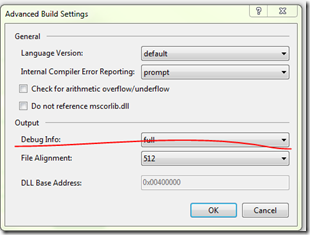
2.when new version release , rebuild whole solution , copy all files to server.
what's the difference between C# compilation setting “/debug:pdbonly” and “/debug:full”?
The main difference is about performance.
Be aware that when you create a new project in Visual Studio, the Default configuration (/optimized- and /debug:full) ,produce unoptimized code. So the C # compiler will emit NOP (no-operation) instructions into the code. (The NOP instructions are emitted for example to enabled the “edit and continue” feature while debugging, or to allow breakpoints to be set on control flow instructions such as for, while, do, if , else, try, catch and finally ) impacting directly on the speed and size of the JIT optimized code.
On the other hand, In managed environment (.NET), compiling the code is accomplished in two phases. First, the compiler passes over the source code producing IL. Then, at run time the IL must be compiled into native CPU instructions requiring more memory to be allocated and requiring additional CPU time to do the work (JIT). So having an optimized IL code quality and an optimized JIT Native code quality by setting /optimized+ and /debug:pdbonly (default configuration for compilations if Release is chosen) could improve the performance of the application.
Moral of a fable, always compile in release mode when deliver your apps to the end users and you could gain a bit of performance.
Should I compile release builds with debug info as “full” or “pdb-only”?
I would build with pdb-only. You will not be able to attach a debugger to the released product, but if you get a crash dump, you can use Visual Studio or WinDBG to examine the stack traces and memory dumps at the time of the crash.
If you go with full rather than pdb-only, you'll get the same benefits, except that the executable can be attached directly to a debugger. You'll need to determine if this is reasonable given your product & customers.
Be sure to save the PDB files somewhere so that you can reference them when a crash report comes in. If you can set up a symbol server to store those debugging symbols, so much the better.
If you opt to build with none, you will have no recourse when there's a crash in the field. You won't be able to do any sort of after-the-fact examination of the crash, which could severely hamper your ability to track down the problem.
A note about performance:
Both John Robbins and Eric Lippert have written blog posts about the /debug flag, and they both indicate that this setting has zero performance impact. There is a separate /optimize flag which dictates whether the compiler should perform optimizations.
/debug (C# Compiler Options)
One difference between /debug:pdbonly and /debug:full is that with /debug:full the compiler emits a DebuggableAttribute, which is used to tell the JIT compiler that debug information is available. Therefore, you will get an error if your code contains the DebuggableAttribute set to false if you use /debug:full.
C# dmp debug, can't load pdb file的更多相关文章
- vs2010调试程序出现“Cannot find or open the PDB file”
项目中源程序编写好以后, (一个简单的小程序) #include int main(void) { int age; int day; age = 24; printf("tom is %d ...
- Cannot find or open the PDB file问题的解决
'testcv.exe' (Win32): Loaded 'D:\Documents\Visual Studio 2013\Projects\testcv\x64\Debug\testcv.exe'. ...
- 解决Cannot find or open the PDB file问题
今天使用opencv里的mat想要保存数据里边的像素的平均值和标准差: 但是编程好了之后会出现下面的问题,不能找到pdb file .下面将提供三种解决方法以及产生问题的原因. 程序也运行不出来,整个 ...
- cannot load such file -- openssl
[test@localhost usr]$ /usr/local/ruby/bin/gem install bundler ERROR: Loading command: install (LoadE ...
- Python load json file with UTF-8 BOM header - Stack Overflow
Python load json file with UTF-8 BOM header - Stack Overflow 3 down vote Since json.load(stream) use ...
- fatal error C1083: Cannot open precompiled header file: 'Debug/xxoo.pch': No such file or directory
fatal error C1083: Cannot open precompiled header file: 'Debug/xxoo.pch': No such file or directory ...
- require './ex25' can't load such file
require './ex25' can't load such file 在练习learn ruby the hard way时候,第25题,发生了一下错误 LoadError: cannot lo ...
- bundle install 安装的 gem 提示 cannot load such file
/usr/local/lib/ruby/site_ruby/2.1.0/rubygems/core_ext/kernel_require.rb:54:in `require': cannot load ...
- redis-trib.rb报错:/usr/lib/ruby/1.9.1/rubygems/custom_require.rb:36:in `require': cannot load such file -- redis (LoadError)
报错如下: /usr/lib/ruby/1.9.1/rubygems/custom_require.rb:36:in `require': cannot load such file -- redis ...
随机推荐
- [Python Essential Reference, Fourth Edition (2009)]读书笔记
Python programs are executed by an interpreter. When you use Python interactively, the special varia ...
- display:box的兼容写法
.box{ /* display */ display: -webkit-box; display: -moz-box; display: -ms-flexbox; display: -o-box; ...
- Entity Framework应用:EntityFramework DataBase First模式
在这篇文章中讲解如何使用EF的DbFirst模式实现数据的增删改查 一.新建控制台应用程序,然后右键->添加新建项,选择数据里面的实体数据模型: 然后点击添加 二.选择来自数据库的EF设计器,并 ...
- 切换tab页
//切换Tab页 $('#tt').tabs({ border:false, onSelect:function(title){ ...
- HotSpot JVM常用参数(选项)设置
本文讨论的选项是针对HotSpot虚拟机的. 1.选项分类及语法 HotspotJVM提供以下三大类选项: 1.1.标准选项 这类选项的功能是很稳定的,在后续版本中也不太会发生变化. 运行java或者 ...
- 安卓程序代写 网上程序代写[原]BluetoothClass详解
一. BluetoothClass简介 1. 继承关系 public final class BluetoothClass extends Object implements Parcelable 该 ...
- [hadoop读书笔记] 第十五章 sqoop1.4.6小实验 - 将mysq数据导入HBASE
导入命令 sqoop import --connect jdbc:mysql://192.168.200.250:3306/sqoop --table widgets --hbase-create-t ...
- oracle PLSQL基础学习
--oracle 练习: /**************************************************PL/SQL编程基础************************** ...
- Ext3.4实现增删查改(form版)
var TaskPolicyStore = new Ext.data.JsonStore( { autoLoad : false, url : 'PolicyServlet?method= ...
- Linq to Entity 动态拼接查询条件(重点是OR)
public static class PredicateExtensions { /// <summary> /// 机关函数应用True时:单个AND有效,多个AND有效:单个OR无效 ...