
DIV内容垂直居中
css垂直居中属性设置vertical-align: middle对div不起作用,例如:
 <!DOCTYPE html>

 <html lang="zh-CN">

 <head>

 <meta charset="utf-8">

 <meta http-equiv="X-UA-Commpatible" content="IE=edge">

 <title>DIV垂直居中对齐</title>

 <style type="text/css">

 * {

     margin: 0;

     padding: 0;

 }

 html, body {

     width: 100%;

     height: 100%;

 }

 body {text-align: center; vertical-align: middle;}

 .outer {

     width: 400px;

     height: 120px;

     position: relative;

     left: 20px;

     top: 20px;

     text-align: center;

     vertical-align: middle;

     border: 1px dashed blue;

 }

 .button {

     width: 200px;

     height: 40px;

 }

 </style>

 </head>

 <body>

     <div class='outer'>

         <button class='button'>在DIV中垂直居中</button>

     </div>

 </body>

 </html>
运行后按钮没有在DIV中垂直居中:
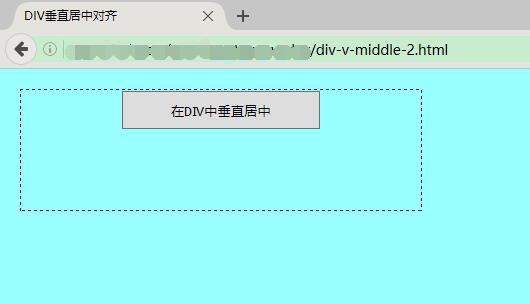
解决思路:如果div和按钮的宽高都确定为具体像素值,可以直接设定按钮的css属性:position:relative; top为(div.height - button.height)/2,left为(div.width-button.height)/2;否则给按钮添加一个div父元素,宽高和按钮相 同,position设定为relative,top和left都为50%(即左上角位置设定在外层div的中心),再将按钮左上角位置坐标设定为父元素 div宽高(也等于按钮自身宽高)的-50%
详细代码如下:
 <!DOCTYPE html>

 <html lang="zh-CN">

 <head>

 <meta charset="utf-8">

 <meta http-equiv="X-UA-Commpatible" content="IE=edge">

 <title>DIV垂直居中对齐</title>

 <style type="text/css">

 * {

     margin: 0;

     padding: 0;

 }

 html, body {

     width: 100%;

     height: 100%;

 }

 body {text-align: center; vertical-align: middle;}

 .outer {

     width: 400px;/* 或者为百分比 */

     height: 120px;

     position: relative;

     left: 20px;

     top: 20px;

     border: 1px dashed blue;

 }

 .inner {

     width: 200px;

     height: 40px;

     position: relative;

     position: relative;

     top: 50%;

     left: 50%;

 }

 .button {

     width: 200px;

     height: 40px;

     position: relative;

     top: -50%;

     left: -50%;

 }

 </style>

 </head>

 <body>

     <div class='outer'>

         <div class='inner'>

             <button class='button'>在DIV中垂直居中</button>

         </div>

     </div>

 </body>

 </html>
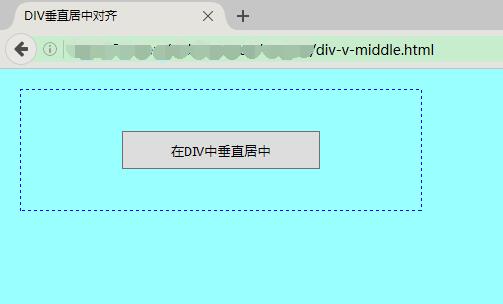
再次运行后,div中按钮上下居中显示
END
DIV内容垂直居中的更多相关文章
- div居中与div内容居中,不一样
1.div自身居中 使用margin:0 auto上下为0,左右自适应的css样式. 要让div水平居中,那么除了设置css margin:0 auto外,还不能再设置float,不然将会导致div靠 ...
- [转]如何让div中的内容垂直居中
转自:http://blog.163.com/yan_1990/blog/static/197805107201211311515454/ 虽然Div布局已经基本上取代了表格布局,但表格布局和Div布 ...
- div中的内容垂直居中的五种方法
一.行高(line-height)法 如果要垂直居中的只有一行或几个文字,那它的制作最为简单,只要让文字的行高和容器的高度相同即可,比如: p { height:30px; line-height:3 ...
- 如何让div中的内容垂直居中
虽然Div布局已经基本上取代了表格布局,但表格布局和Div布局仍然各有千秋,互有长处.比如表格布局中的垂直居中就是Div布局的一大弱项,不过好在千变万化的CSS可以灵活运用,可以制作出准垂直居中效果, ...
- CSS总结div中的内容垂直居中的五种方法
一.行高(line-height)法 如果要垂直居中的只有一行或几个文字,那它的制作最为简单,只要让文字的行高和容器的高度相同即可,比如: p { height:30px; line-height:3 ...
- 使用CSS使内容垂直居中的N中方法。
使用css+div使页面内容水平居中的方法大家并不陌生,那么如何使内容垂直居中呢? OK,下面进入正题,不如我们使用做高中数学题时经常用的思想:分情况讨论. 1.当待垂直居中的DIV高宽为已知时: ...
- 如何让div水平垂直居中
引子 我们经常遇到需要把div中的内容进行水平和垂直居中.所以,这里介绍一种方法,可以使div水平居中和垂直居中. 代码: <!DOCTYPE html> <html lang=&q ...
- DIV实现垂直居中的几种方法
说道垂直居中,我们首先想到的是vertical-align属性,但是许多时候该属性并不起作用.例如,下面的样式并不能达到内容垂直居中显示 div { width:200px; height:300px ...
- jquery鼠标移动div内容上下左右滚动
jquery鼠标移动div内容上下左右滚动 点击这里查看效果:http://keleyi.com/keleyi/phtml/jqtexiao/9.htm <!DOCTYPE html PUBLI ...
随机推荐
- SQL Server2008 R2 安装失败后的解决办法
当你第一次安装SQL Server2005,SQL Server2008,SQL Server2012失败后,第二次重新安装一般还是容易安装失败,原因就是你没有完全卸载,还存留残留文件和注册表. 我安 ...
- CentOS 6 安装python3.6
参考博客:https://www.cnblogs.com/xiaodangshan/p/7197563.html 安装过程比较简单,需要注意,安装之后,为了不影响系统自带的python2.6版本,需要 ...
- 【转载】纵观RTX51
对于使用RTX51的具体好处可以在实践中去体会,就象会用了C51,就不想再用汇编了.用了RTX51,说不定就感到再也离不开它了. 1.RTX51是实时多任务操作系统RTX51是一种实时操作系统既目前在 ...
- PHP快速入门
1.表单 <form action="processorder.php" method="post"> 表单的第一行,action的意思是说,提交表 ...
- HDU - 5806 NanoApe Loves Sequence Ⅱ 想法题
http://acm.hdu.edu.cn/showproblem.php?pid=5806 题意:给你一个n元素序列,求第k大的数大于等于m的子序列的个数. 题解:题目要求很奇怪,很多头绪但写不出, ...
- python数据结构之树(二叉树的遍历)
树是数据结构中非常重要的一种,主要的用途是用来提高查找效率,对于要重复查找的情况效果更佳,如二叉排序树.FP-树. 本篇学习笔记来自:二叉树及其七种遍历方式.python遍历与非遍历方式实现二叉树 介 ...
- centos source install
CentOS Kernel Source Install Mar 12th, 2012 | Comments CentOS kernel source install, first off if yo ...
- JS 防止表单重复提交的方法
第一种:用flag标识,下面的代码设置checkSubmitFlg标志: <script language="”JavaScript”"> var checkSubmi ...
- jquery实现选项卡(两句即可实现)
<!DOCTYPE HTML><html> <head> <meta charset="utf-8"> ...
- 【生产问题】LDF丢失
参考 : https://www.cnblogs.com/gered/p/9450622.html CREATE DATABASE db_logs ON PRIMARY ( NAME % ) LOG ...