
android 布局中 layout_gravity、gravity、orientation、layout_weight
线性布局中,有 4 个及其重要的参数,直接决定元素的布局和位置,这四个参数是
android:layout_gravity ( 是本元素相对于父元素的重力方向 )
android:gravity (是本元素所有子元素的重力方向)
android:orientation (线性布局以列或行来显示内部子元素)
android:layout_weight (线性布局内子元素对未占用空间【水平或垂直】分配权重值,其值越小,权重越大。
前提是子元素 设置了 android:layout_width = "fill_parent" 属性(水平方向)
或 android:layout_height = "fill_parent" 属性(垂直方向)
如果某个子元素的 android:layout_width = "wrap_content"
或 android:layout_height =" wrap_content” ,
则 android:layout_weight 的设置值 对该方向上空间的分配刚好相反。
下面以一个简单例子来说明这 4个参数
<? xml version = "1.0" encoding = "utf-8" ?>
< LinearLayout xmlns:android = "http://schemas.android.com/apk/res/android"
android:layout_height = "200dp"
android:layout_width = "200dp"
android:background = "#AABBCC"
android:orientation= "horizontal"
android:layout_gravity= "center" >
< TextView android:text = "ONE"
android:background = "#aa0000"
android:layout_height = "wrap_content"
android:layout_width = "wrap_content"
android:layout_margin = "1dp" />
< TextView android:text = "TWO"
android:background = "#aa0000"
android:layout_height = "wrap_content"
android:layout_width = "wrap_content"
android:layout_margin = "1dp" />
</ LinearLayout >
说明:在上面的例子中,根布局是LinearLayout, 其包含有2 个TextView 视图,为了对参数 android:layout_gravity有直观的了解,对根布局 LinearLayout 特意加了 3 个参数
android:layout_height = "200dp"
android:layout_width = "200dp"
android:background = "#AABBCC"
为布局指定了固定的宽度和高度,以及背景颜色,上面的例子运行后效果如下图:
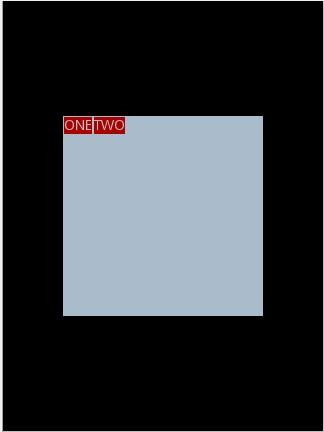
说明:对LinearLayout 中的参数android:layout_gravity 来说,其意义是指定本布局相对于父布局的重力方向,由于该布局的已经是根布局,其父布局是整个屏幕,那么该参数设置的是相对于屏幕的位置,可以换不同的参数top|bottom|left|right 等等参数来试验。
现在增加参数 android:gravity = "bottom|right" 完整 XML 如下,看看效果
<? xml version = "1.0" encoding = "utf-8" ?>
< LinearLayout xmlns:android = "http://schemas.android.com/apk/res/android"
android:layout_height = "200dp"
android:layout_width = "200dp"
android:background = "#AABBCC"
android:orientation="horizontal"
android:layout_gravity= "center"
android:gravity = "bottom|right " >
< TextView android:text = "ONE"
android:background = "#aa0000"
android:layout_height = "wrap_content"
android:layout_width = "wrap_content"
android:layout_margin = "1dp" />
< TextView android:text = "TWO"
android:background = "#aa0000"
android:layout_height = "wrap_content"
android:layout_width = "wrap_content"
android:layout_margin = "1dp" />
</ LinearLayout >
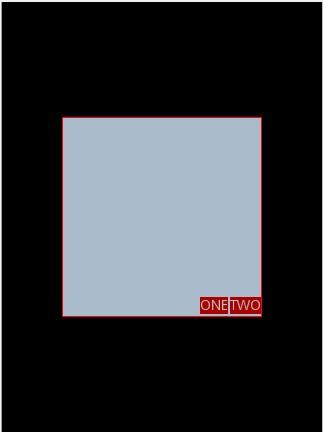
通过改变android:gravity 参数的值可以看到实际效果。
参数 android:orientation= " horizontal " 决定了每个子元素各占一列,如果
参数 android:orientation= " vertical " , 则每个子元素各占一行,也就是从上到下排列了。
对于 LinearLayout 布局的子元素,给每个子元素加上参数 android:layout_weight
看看效果
<? xml version = "1.0" encoding = "utf-8" ?>
< LinearLayout xmlns:android = "http://schemas.android.com/apk/res/android"
android:layout_height = "200dp"
android:layout_width = "200dp"
android:background = "#AABBCC"
android:layout_gravity = "center"
android:gravity = "bottom|right"
android:orientation = "horizontal" >
< TextView android:text = "ONE"
android:background = "#aa0000"
android:layout_height = "wrap_content"
android:layout_width = "wrap_content"
android:layout_margin = "1dp"
android:layout_weight = "1" />
< TextView android:text = "TWO"
android:background = "#aa0000"
android:layout_height = "wrap_content"
android:layout_width = "wrap_content"
android:layout_margin = "1dp"
android:layout_weight = "2" />
</ LinearLayout >
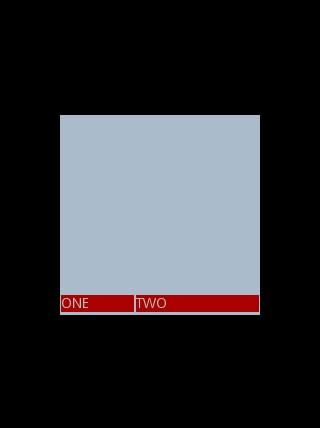
Text 为ONE 的权重为1 ,但明显占的宽度比TWO 的小,百思不得其解,后来得知,如果把TextView 的参数android:layout_width = "wrap_content" 全部修改为 android:layout_width = "fill_parent", 则 ok ,代码如下
<? xml version = "1.0" encoding = "utf-8" ?>
< LinearLayout xmlns:android = "http://schemas.android.com/apk/res/android"
android:layout_height = "200dp"
android:layout_width = "200dp"
android:background = "#AABBCC"
android:layout_gravity = "center"
android:gravity = "bottom|right"
android:orientation = "horizontal" >
< TextView android:text = "ONE"
android:background = "#aa0000"
android:layout_height = "wrap_content"
android:layout_width = " fill_parent "
android:layout_margin = "1dp"
android:layout_weight = "1" />
< TextView android:text = "TWO"
android:background = "#aa0000"
android:layout_height = "wrap_content"
android:layout_width = " fill_parent "
android:layout_margin = "1dp"
android:layout_weight = "2" />
</ LinearLayout >
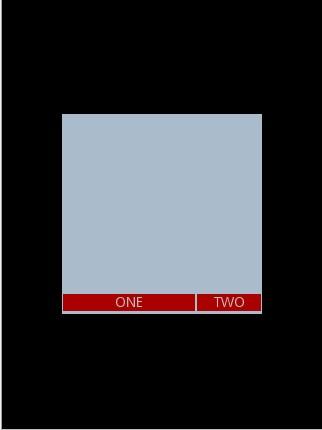
转:http://li-bonan.blog.163.com/blog/static/135564770201172441634145/
android 布局中 layout_gravity、gravity、orientation、layout_weight的更多相关文章
- android 布局中 layout_gravity、gravity、orientation、layout_weight【转】
线性布局中,有 4 个及其重要的参数,直接决定元素的布局和位置,这四个参数是 android:layout_gravity ( 是本元素相对于父元素的重力方向 ) android:gravity (是 ...
- Android布局中的空格以及占一个汉字宽度的空格的实现
在Android布局中进行使用到空格,以便实现文字的对齐.那么在Android中如何表示一个空格呢? 空格: 窄空格: 一个汉字宽度的空格: [用两个空格( )占一个汉字的宽度时,两个空格比 ...
- Android布局中的空格以及占一个汉字宽度的空格,实现不同汉字字数对齐
前言 在Android布局中进行使用到空格,以便实现文字的对齐.那么在Android中如何表示一个空格呢? 空格: (普通的英文半角空格但不换行) 窄空格: (中文全角空格 (一个中文宽度)) ...
- android布局中使用include及需注意点
在android布局中,使用include,将另一个xml文件引入,可作为布局的一部分,但在使用include时,需注意以下问题: 一.使用include引入 如现有标题栏布局block_header ...
- 从零开始学android开发-布局中 layout_gravity、gravity、orientation、layout_weight
线性布局中,有 4 个及其重要的参数,直接决定元素的布局和位置,这四个参数是 android:layout_gravity ( 是本元素相对于父元素的重力方向 ) android:gravity (是 ...
- Android布局中的layout_weight和weightSum属性的详解及使用
由于Android设备的尺寸大小不一,种类繁多,当我们在开发应用的时候就要考虑屏幕的适配型了,尽可能让我们的应用适用于主流机型的尺寸,这样我们的应用不会因为尺寸不同而不美观,解决屏幕适配问题的方法有很 ...
- Android布局中 android:layout_gravity="bottom"为何不起作用?
在android布局时我们有时会需要将位于LinearLayout布局中的控件放在布局底部,或者是同时想将几个控件底部对齐,此时我们自然会想到使用 android:layout_gravity=&qu ...
- Android 布局中 如何使控件居中
首先要分两种不同情况,在两种不同的布局方式下:LinearLayout 和RelativeLayout 1. LinearLayout a). android:layout_gravity=" ...
- 【转】在Android布局中使用include和merge标签
内容转自:http://fengweipeng1208.blog.163.com/blog/static/21277318020138229754135/ 在我们开发android布局时,经常会有很多 ...
随机推荐
- 【Longest Substring Without Repeating Characters】cpp
题目: Given a string, find the length of the longest substring without repeating characters. For examp ...
- 【Partition List】cpp
题目: Given a linked list and a value x, partition it such that all nodes less than x come before node ...
- Windows核心编程小结2
这一节看看内存管理相关的信息 首先看看虚拟内存 虚拟地址空间 32位系统 --- 4GB = 232 64 位系统 ---- 16EB = 264 虚拟内存表 当一个应用程序从硬盘加载到RAM时, ...
- vue-devtools安装
https://www.cnblogs.com/yuqing6/p/7440549.html
- 从输入url开始,完善前端体系架构
原文链接: https://segmentfault.com/a/1190000013662126 从输入URL到页面加载的过程?如何由一道题完善自己的前端知识体系! javascript 前端 23 ...
- 自己搭建一个记笔记的环境记录(leanote)
一直在找一个开源的记笔记的软件,偶然看到leanote.竟然还是开源的,还是国人开发的果断mark了.自己在电脑上搭建了一个挺好玩的.可以记录一些不给别人看的小秘密. 下面是步骤记录,当然可以到官网上 ...
- [oldboy-django][3作业汇总]相亲网
1 相亲网需求 1相亲网需求 a.登录, 基于session, 装饰器 b.数据库表: 男生表 id, username, password 女生表 id, username, password 约会 ...
- 通过 purge_relay_logs 自动清理relaylog
使用背景 线上物理备份任务是在从库上进行的,xtrabackup会在备份binlog的时候执行flush logs,relay-log会rotate到新的一个文件号,导致sql thread线程应用完 ...
- mongodb的安装和sql操作
mongodb安装环境:centos6.5https://www.mongodb.org/dl/linux/x86_64wget https://fastdl.mongodb.org/linux/mo ...
- Log4j官方文档翻译(九、输出到数据库)
log4j提供了org.apache.log4j.JDBCAppender对象,可以把日志输出到特定的数据库. 常用的属性: bufferSize 设置buffer的大小,默认是1 driver 设置 ...