
opencv学习之路(37)、运动物体检测(二)
一、运动物体轮廓椭圆拟合及中心
 #include "opencv2/opencv.hpp"

 #include<iostream>

 using namespace std;

 using namespace cv;

 Mat MoveDetect(Mat frame1, Mat frame2)

 {

     Mat result = frame2.clone();

     Mat gray1, gray2;

     cvtColor(frame1, gray1, CV_BGR2GRAY);

     cvtColor(frame2, gray2, CV_BGR2GRAY);

     Mat diff;

     absdiff(gray1, gray2, diff);

     imshow("absdiss", diff);

     threshold(diff, diff, , , CV_THRESH_BINARY);

     imshow("threshold", diff);

     Mat element = getStructuringElement(MORPH_RECT, Size(, ));

     Mat element2 = getStructuringElement(MORPH_RECT, Size(, ));

     erode(diff, diff, element);

     imshow("erode", diff);

     dilate(diff, diff, element2);

     imshow("dilate", diff);

     vector<vector<Point>> contours;

     vector<Vec4i> hierarcy;

     //画椭圆及中心

     findContours(diff, contours, hierarcy, CV_RETR_EXTERNAL, CV_CHAIN_APPROX_NONE);

     cout<<"num="<<contours.size()<<endl;

     vector<RotatedRect> box(contours.size());

     for(int i=; i<contours.size(); i++)

     {

         box[i] = fitEllipse(Mat(contours[i]));

         ellipse(result, box[i], Scalar(, , ), , );

         circle(result, box[i].center, , Scalar(, , ), -, );

     }

     return result;

 }

 void main()

 {

     VideoCapture cap("E://man.avi");

     if(!cap.isOpened()) //检查打开是否成功

          return;

     Mat frame;

     Mat result;

     Mat background;

     int count=;

     while()

     {

         cap>>frame;

         if(frame.empty())

             break;

         else{

             count++;

             if(count==)

                  background = frame.clone(); //提取第一帧为背景帧

             imshow("video", frame);

             result = MoveDetect(background, frame);

             imshow("result", result);

             if(waitKey()==)

                break;

         }

     }

     cap.release();

 }
和上一篇文章代码的不同点在30-38行,天台行人视频适合用背景减法处理,自行车视频适合帧差法处理
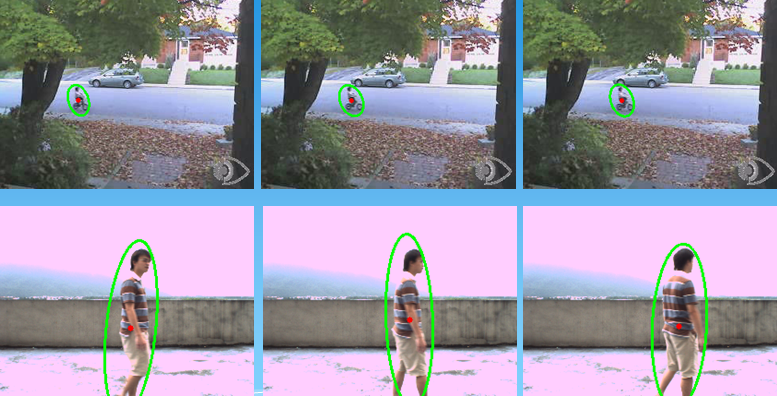
二、滤波方法去除噪声
上篇文章中使用腐蚀膨胀消除噪声,这次使用滤波方法去除噪声
中值滤波
  //二值化后使用中值滤波+膨胀
  Mat element = getStructuringElement(MORPH_RECT, Size(, ));

    medianBlur(diff, diff, );//中值滤波

    imshow("medianBlur", diff);

    dilate(diff, diff, element);

    imshow("dilate", diff);
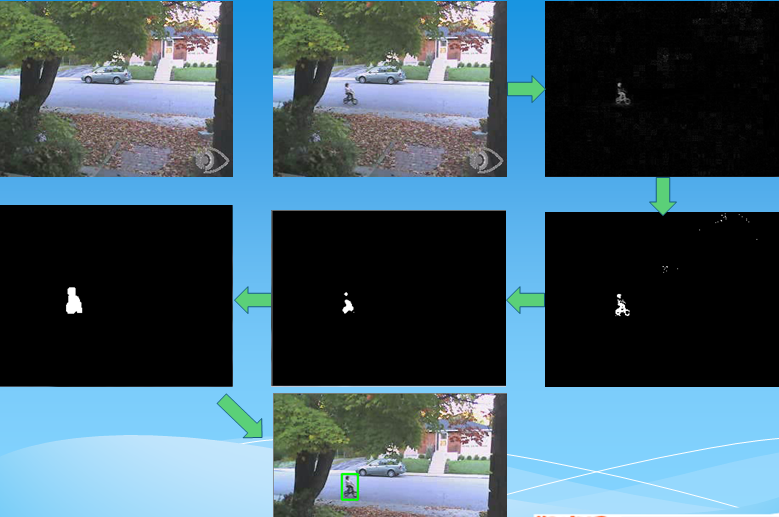
均值滤波
#include "opencv2/opencv.hpp"

#include<iostream>

using namespace std;

using namespace cv;

//int to string helper function

string intToString(int number)

{

    stringstream ss;

    ss << number;

    return ss.str();

}

Mat MoveDetect(Mat background, Mat img)

{

    Mat result = img.clone();

    Mat gray1, gray2;

    cvtColor(background, gray1, CV_BGR2GRAY);

    cvtColor(img, gray2, CV_BGR2GRAY);

    Mat diff;

    absdiff(gray1, gray2, diff);

    threshold(diff, diff, , , CV_THRESH_BINARY);

    imshow("threshold", diff);

    blur(diff, diff, Size(, ));//均值滤波

    imshow("blur", diff);

    vector<vector<Point>> contours;

    vector<Vec4i> hierarcy;

    findContours(diff, contours, hierarcy, CV_RETR_EXTERNAL, CHAIN_APPROX_NONE); //查找轮廓

    vector<Rect> boundRect(contours.size()); //定义外接矩形集合

    //drawContours(img2, contours, -1, Scalar(0, 0, 255), 1, 8);  //绘制轮廓

    int x0=, y0=, w0=, h0=;

    for(int i=; i<contours.size(); i++)

    {

        boundRect[i] = boundingRect((Mat)contours[i]); //查找每个轮廓的外接矩形

        x0 = boundRect[i].x;  //获得第i个外接矩形的左上角的x坐标

        y0 = boundRect[i].y; //获得第i个外接矩形的左上角的y坐标

        w0 = boundRect[i].width; //获得第i个外接矩形的宽度

        h0 = boundRect[i].height; //获得第i个外接矩形的高度

        //rectangle(result, Point(x0, y0), Point(x0+w0, y0+h0), Scalar(0, 255, 0), 2, 8); //绘制第i个外接矩形

        circle(result, Point(x0+w0/, y0+h0/), , Scalar(, , ), , );

        line(result, Point(x0+w0/-, y0+h0/), Point(x0+w0/+, y0+h0/), Scalar(, , ), , );

        line(result, Point(x0+w0/, y0+h0/-), Point(x0+w0/, y0+h0/+), Scalar(, , ), , );

        putText(result,"(" + intToString(x0+w0/)+","+intToString(y0+h0/)+")",Point(x0+w0/+, y0+h0/), , ,Scalar(,,),);

    }

    return result;

}

void main()

{

    VideoCapture cap("E://ball.avi");

    if(!cap.isOpened()) //检查打开是否成功

         return;

    Mat frame;

    Mat result;

    Mat background;

    int count=;

    while()

    {

        cap>>frame;

        if(frame.empty())

            break;

        else{

            count++;

            if(count==)

                 background = frame.clone(); //提取第一帧为背景帧

            imshow("video", frame);

            result = MoveDetect(background, frame);

            imshow("result", result);

            if(waitKey()==)

               break;

        }

    }

    cap.release();

}
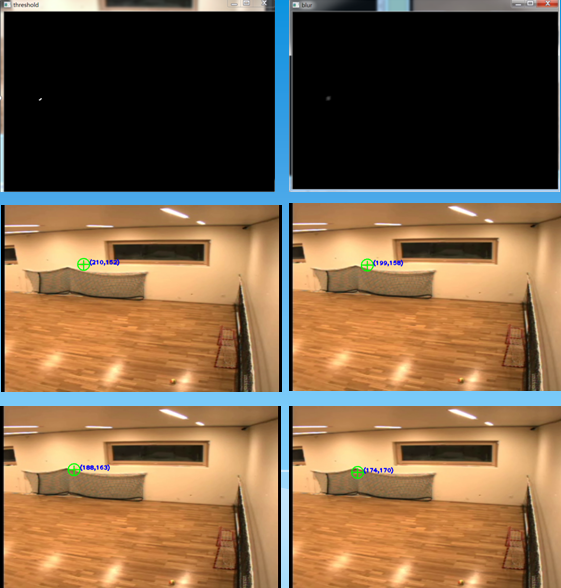
三、轮廓筛选去除噪声(效果挺好的)
    //其余代码相同

    int x0=, y0=, w0=, h0=;

    for(int i=; i<contours.size(); i++)

    {

        boundRect[i] = boundingRect((Mat)contours[i]); //查找每个轮廓的外接矩形

        x0 = boundRect[i].x;  //获得第i个外接矩形的左上角的x坐标

        y0 = boundRect[i].y; //获得第i个外接矩形的左上角的y坐标

        w0 = boundRect[i].width; //获得第i个外接矩形的宽度

        h0 = boundRect[i].height; //获得第i个外接矩形的高度

        //筛选

        if(w0> && h0>)

            rectangle(result, Point(x0, y0), Point(x0+w0, y0+h0), Scalar(, , ), , ); //绘制第i个外接矩形

    }
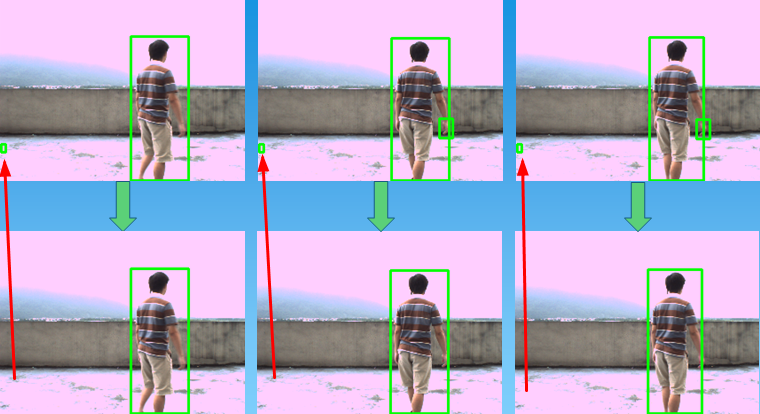
四、运动轨迹绘制
#include "opencv2/opencv.hpp"

#include<iostream>

using namespace std;

using namespace cv;

Point center;

Point fre_center;//存储前一帧中心坐标

int num=;

vector<Point> points;

Mat MoveDetect(Mat background, Mat img)

{

    Mat result = img.clone();

    Mat gray1, gray2;

    cvtColor(background, gray1, CV_BGR2GRAY);

    cvtColor(img, gray2, CV_BGR2GRAY);

    Mat diff;

    absdiff(gray1, gray2, diff);

    imshow("absdiss", diff);

    threshold(diff, diff, , , CV_THRESH_BINARY);

    imshow("threshold", diff);

    Mat element = getStructuringElement(MORPH_RECT, Size(, ));

    Mat element2 = getStructuringElement(MORPH_RECT, Size(, ));

    erode(diff, diff, element);

    imshow("erode", diff);

    dilate(diff, diff, element2);

    imshow("dilate", diff);

    vector<vector<Point>> contours;

    vector<Vec4i> hierarcy;

    findContours(diff, contours, hierarcy, CV_RETR_EXTERNAL, CHAIN_APPROX_NONE); //查找轮廓

    vector<Rect> boundRect(contours.size()); //定义外接矩形集合

    //drawContours(img2, contours, -1, Scalar(0, 0, 255), 1, 8);  //绘制轮廓

    vector<RotatedRect> box(contours.size());

    int x0=, y0=, w0=, h0=;

    for(int i=; i<contours.size(); i++)

    {

        boundRect[i] = boundingRect((Mat)contours[i]); //查找每个轮廓的外接矩形

        x0 = boundRect[i].x;  //获得第i个外接矩形的左上角的x坐标

        y0 = boundRect[i].y; //获得第i个外接矩形的左上角的y坐标

        w0 = boundRect[i].width; //获得第i个外接矩形的宽度

        h0 = boundRect[i].height; //获得第i个外接矩形的高度

        if(w0> && h0>)//筛选长宽大于30的轮廓

        {

            num++;

            //rectangle(result, Point(x0, y0), Point(x0+w0, y0+h0), Scalar(0, 255, 0), 2, 8); //绘制第i个外接矩形

            box[i] = fitEllipse(Mat(contours[i]));

            ellipse(result, box[i], Scalar(, , ), , );            //椭圆轮廓

            circle(result, box[i].center, , Scalar(, , ), -, ); //画中心

            center = box[i].center;//当前帧的中心坐标

            points.push_back(center);//中心塞进points向量集

            if(num !=)

            {

                //line(result, fre_center, center, Scalar(255, 0, 0), 2, 8);

                for(int j=; j<points.size()-; j++)

                    line(result, points[j], points[j+], Scalar(, , ), , );

            }

            //fre_center = center;

        }

    }

    return result;

}

void main()

{

    VideoCapture cap("E://man.avi");

    if(!cap.isOpened()) //检查打开是否成功

         return;

    Mat frame;

    Mat background;

    Mat result;

    int count=;

    while()

    {

        cap>>frame;

        if(!frame.empty())

        {

            count++;

            if(count==)

                background = frame.clone(); //提取第一帧为背景帧

            imshow("video", frame);

            result = MoveDetect(background, frame);

            imshow("result", result);

            if(waitKey()==)

               break;

        }

        else

            break;

    }

    cap.release();

}
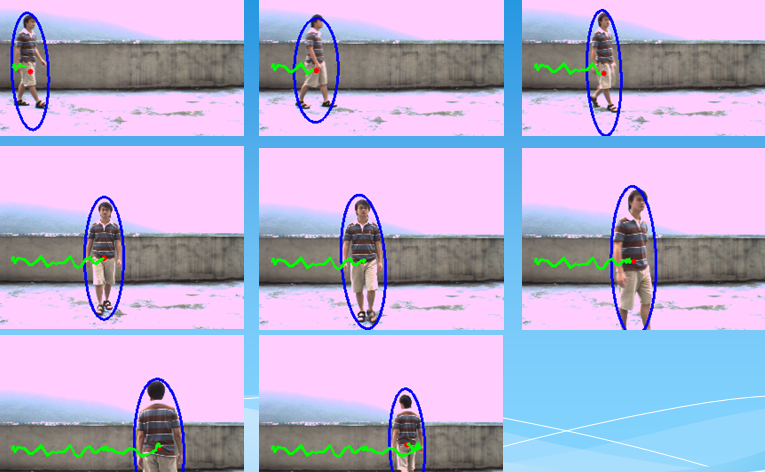
五、车辆数量检测
1.帧差法检测运动目标
2.预处理:a.转灰度图,绝对值做差 b.二值化,腐蚀,中值滤波,膨胀 c.查找轮廓,筛选轮廓,绘制外接矩形,计数,输出
 #include "opencv2/opencv.hpp"

 #include<iostream>

 using namespace std;

 using namespace cv;

 int CarNum = ;

 //int to string helper function

 string intToString(int number)

 {

     //this function has a number input and string output

     stringstream ss;

     ss << number;

     return ss.str();

 }

 Mat MoveDetect(Mat frame1, Mat frame2) {

     Mat result = frame2.clone();

     Mat gray1, gray2;

     cvtColor(frame1, gray1, CV_BGR2GRAY);

     cvtColor(frame2, gray2, CV_BGR2GRAY);

     Mat diff;

     absdiff(gray1, gray2, diff);

     //imshow("absdiss", diff);

     threshold(diff, diff, , , CV_THRESH_BINARY);

     imshow("threshold", diff);

     Mat element = getStructuringElement(MORPH_RECT, Size(, ));

     Mat element2 = getStructuringElement(MORPH_RECT, Size(, ));

     erode(diff, diff, element);

     //imshow("erode", dst);

     medianBlur(diff, diff, );

     imshow("medianBlur", diff);

     dilate(diff, diff, element2);

     imshow("dilate", diff);

     vector<vector<Point>> contours;

     vector<Vec4i> hierarcy;

     findContours(diff, contours, hierarcy, CV_RETR_EXTERNAL, CV_CHAIN_APPROX_SIMPLE, Point(, ));//查找轮廓

     vector<vector<Point>>contours_poly(contours.size());

     vector<Rect> boundRect(contours.size()); //定义外接矩形集合

                                              //drawContours(img2, contours, -1, Scalar(0, 0, 255), 1, 8);  //绘制轮廓

     int x0 = , y0 = , w0 = , h0 = ;

     for (int i = ; i<contours.size(); i++)

     {

         approxPolyDP(Mat(contours[i]), contours_poly[i], , true);//对图像轮廓点进行多边形拟合:轮廓点组成的点集,输出的多边形点集,精度(即两个轮廓点之间的距离),输出多边形是否封闭

         boundRect[i] = boundingRect(Mat(contours_poly[i]));

         if (boundRect[i].width> && boundRect[i].width< && boundRect[i].height> && boundRect[i].height<) {//轮廓筛选

             x0 = boundRect[i].x;

             y0 = boundRect[i].y;

             w0 = boundRect[i].width;

             h0 = boundRect[i].height;

             rectangle(result, Point(x0, y0), Point(x0 + w0, y0 + h0), Scalar(, , ), , , );

             if ((y0 + h0 /  + ) >=  && (y0 + h0 /  - ) <= ) {//经过这条线(区间),车辆数量+1

                 CarNum++;

             }

         }

         line(result, Point(, ), Point(, ), Scalar(, , ), , );//画红线

         Point org(, );

         putText(result, "CarNum=" + intToString(CarNum), org, CV_FONT_HERSHEY_SIMPLEX, 0.8f, Scalar(, , ), );

     }

     return result;

 }

 void main()

 {

     VideoCapture cap("E://2.avi");

     if (!cap.isOpened()) //检查打开是否成功

         return;

     Mat frame;

     Mat tmp;

     Mat result;

     int count = ;

     while ()

     {

         cap >> frame;

         if(frame.empty())//检查视频是否结束

             break;

         else{

             count++;

             if (count == )

                 result = MoveDetect(frame, frame);

             else    result = MoveDetect(tmp, frame);

             imshow("video", frame);

             imshow("result", result);

             tmp = frame.clone();

             if (waitKey() == )

                 break;

         }

     }

     cap.release();

 }

opencv学习之路(37)、运动物体检测(二)的更多相关文章
- opencv学习之路【四】——opencv文件结构介绍
这里要感谢这篇博主的文章 部分内容转载自此 opencv在2.3版本之前 都是用的c语言实现的 而在2.3以后的版本 做了很多重大的改变 其中最主要的是用c++重写大部分结构 然后文件的结构和2.0之 ...
- opencv学习之路(36)、运动物体检测(一)
一.简介 二.背景减法 图片说明 #include "opencv2/opencv.hpp"using namespace cv; void main() { Mat img1 = ...
- opencv学习之路(32)、角点检测
一.角点检测的相关概念 二.Harris角点检测——cornerHarris() 参考网址: http://www.cnblogs.com/ronny/p/4009425.html #include ...
- OpenCV 学习笔记03 直线和圆检测
检测边缘和轮廓不仅重要,还经常用到,它们也是构成其他复杂操作的基础. 直线和形状检测与边缘和轮廓检测有密切的关系. 霍夫hough 变换是直线和形状检测背后的理论基础.霍夫变化是基于极坐标和向量开展的 ...
- Opencv学习之路—Opencv下基于HOG特征的KNN算法分类训练
在计算机视觉研究当中,HOG算法和LBP算法算是基础算法,但是却十分重要.后期很多图像特征提取的算法都是基于HOG和LBP,所以了解和掌握HOG,是学习计算机视觉的前提和基础. HOG算法的原理很多资 ...
- opencv学习之路(41)、人脸识别
一.人脸检测并采集个人图像 //take_photo.cpp #include<opencv2/opencv.hpp> using namespace cv; using namespac ...
- opencv学习之路(35)、SURF特征点提取与匹配(三)
一.简介 二.opencv中的SURF算法接口 三.特征点匹配方法 四.代码 1.特征点提取 #include "opencv2/opencv.hpp" #include < ...
- opencv学习之路(34)、SIFT特征匹配(二)
一.特征匹配简介 二.暴力匹配 1.nth_element筛选 #include "opencv2/opencv.hpp" #include <opencv2/nonfree ...
- opencv学习之路(33)、SIFT特征点提取(一)
一.简介 二.OpenCV中的SIFT算法接口 #include "opencv2/opencv.hpp" #include <opencv2/nonfree/nonfree ...
随机推荐
- ASP.NET Core 问题排查:Request.EnableRewind 后第一次读取不到 Request.Body
实际应用场景是将用户上传的文件依次保存到阿里云 OSS 与腾讯云 COS ,实现方式是在启用 Request.EnableRewind() 的情况下通过 Request.Body 读取流,并依次通过 ...
- linux权限字母的含义
无 --- 只能列出文件 r-- 访问文件 r-x 创建和删除文件 rwx
- day24:继承
1,复习1 # 面向对象编程 # 思想:角色的抽象,创建类,创建角色(实例化),操作这些示例 # 面向对象的关键字 class 类名: 静态属性 = 'aaa' def __init__(self): ...
- keras,tensorflow,numpy,jupyter
docker-tensorflow:https://segmentfault.com/a/1190000015053704 pip install scipy pip install keras do ...
- sql的基本语句
SQL中的inner join, left join, right join, full join 创建两个测试表并且输入相关值create table test_a(aid int,aNum var ...
- 附录A application.properties配置项
摘自官网,仅作为参考用 Part X. Appendices # =================================================================== ...
- ES6的Proxy和Reflect
Proxy 有一个原始的数据对象,通过代理出来一个新的对象,用户操作的是这个新的对象 { let obj ={ time:'2018-01-01', name:'lx' , _r:123 } let ...
- MYSQL 比较集
1.什么是较对集合:字符集的字符比较规则(collation,collate),一个字符集有多个较对集合. mysql> create table ss (id int primary key ...
- 搭建docker私有仓库
保存镜像的地方成为仓库(registry).目前有2种仓库:公共仓库和私有仓库. 最方便的是使用公共仓库上传和下载镜像,下载不需要注册,上传需要到公共仓库注册.公共仓库网站:https://hub.d ...
- 一次完整的http请求过程
转载:https://blog.51cto.com/linux5588/1351007 当我们在浏览器的地址栏输入 www.linux178.com,然后回车,回车这一瞬间到看到页面到底发生了什么呢? ...