
Kubernetes 编写自定义 controller
原文链接:Kubernetes编写自定义controller
来自kubernetes官方github的一张图:
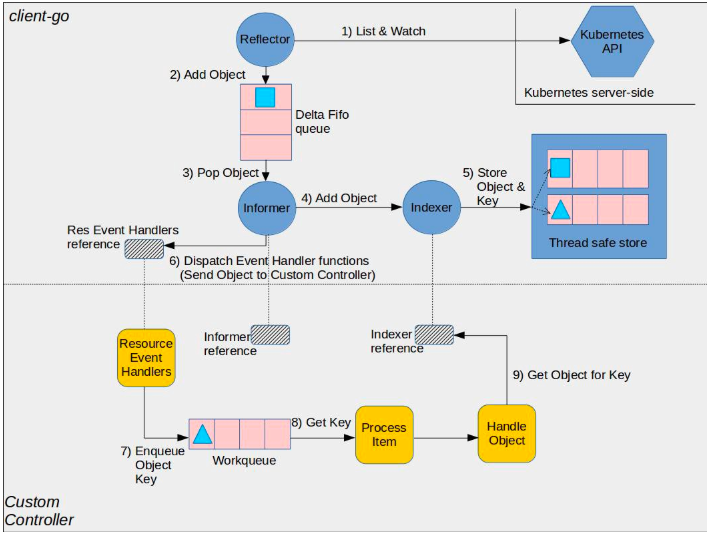
如图所示,图中的组件分为client-go和custom controller两部分:
client-go部分
- Reflector: 监视特定资源的k8s api, 把新监测的对象放入Delta Fifo队列,完成此操作的函数是ListAndWatch。
- Informer: 从Delta Fifo队列拿出对象,完成此操作的函数是processLoop。
- Indexer: 提供线程级别安全来存储对象和key。
custom-controller部分
- Informer reference: Informer对象引用
- Indexer reference: Indexer对象引用
- Resource Event Handlers: 被Informer调用的回调函数,这些函数的作用通常是获取对象的key,并把key放入Work queue,以进一步做处理。
- Work queue: 工作队列,用于将对象的交付与其处理分离,编写Resource event handler functions以提取传递的对象的key并将其添加到工作队列。
- Process Item: 用于处理Work queue中的对象,可以有一个或多个其他函数一起处理;这些函数通常使用Indexer reference或Listing wrapper来检索与该键对应的对象。
client-go官方代码例子
package main

import (

    "flag"

    "fmt"

    "time"

    "k8s.io/klog"

    "k8s.io/api/core/v1"

    meta_v1 "k8s.io/apimachinery/pkg/apis/meta/v1"

    "k8s.io/apimachinery/pkg/fields"

    "k8s.io/apimachinery/pkg/util/runtime"

    "k8s.io/apimachinery/pkg/util/wait"

    "k8s.io/client-go/kubernetes"

    "k8s.io/client-go/tools/cache"

    "k8s.io/client-go/tools/clientcmd"

    "k8s.io/client-go/util/workqueue"

)

// 定义一个结构体Controller

type Controller struct {

    indexer  cache.Indexer

    queue    workqueue.RateLimitingInterface

    informer cache.Controller

}

// 获取controller的函数

func NewController(queue workqueue.RateLimitingInterface, indexer cache.Indexer, informer cache.Controller) *Controller {

    return &Controller{

        informer: informer,

        indexer:  indexer,

        queue:    queue,

    }

}

// 处理workqueue中的对象

func (c *Controller) processNextItem() bool {

    // Wait until there is a new item in the working queue

    key, quit := c.queue.Get()

    if quit {

        return false

    }

    // Tell the queue that we are done with processing this key. This unblocks the key for other workers

    // This allows safe parallel processing because two pods with the same key are never processed in

    // parallel.

    defer c.queue.Done(key)

    // Invoke the method containing the business logic

    err := c.syncToStdout(key.(string))

    // Handle the error if something went wrong during the execution of the business logic

    c.handleErr(err, key)

    return true

}

// syncToStdout is the business logic of the controller. In this controller it simply prints

// information about the pod to stdout. In case an error happened, it has to simply return the error.

// The retry logic should not be part of the business logic.

func (c *Controller) syncToStdout(key string) error {

    obj, exists, err := c.indexer.GetByKey(key)

    if err != nil {         klog.Errorf("Fetching object with key %s from store failed with %v", key, err)

        return err

    }

    if !exists {         // Below we will warm up our cache with a Pod, so that we will see a delete for one pod

        fmt.Printf("Pod %s does not exist anymore\n", key)

    } else {

        // Note that you also have to check the uid if you have a local controlled resource, which

        // is dependent on the actual instance, to detect that a Pod was recreated with the same name

        fmt.Printf("Sync/Add/Update for Pod %s\n", obj.(*v1.Pod).GetName())

    }

    return nil

}

// handleErr checks if an error happened and makes sure we will retry later.

func (c *Controller) handleErr(err error, key interface{}) {

    if err == nil {

        // Forget about the #AddRateLimited history of the key on every successful synchronization.

        // This ensures that future processing of updates for this key is not delayed because of

        // an outdated error history.

        c.queue.Forget(key)

        return

    }

    // This controller retries 5 times if something goes wrong. After that, it stops trying.

    if c.queue.NumRequeues(key) <  {

        klog.Infof("Error syncing pod %v: %v", key, err)

        // Re-enqueue the key rate limited. Based on the rate limiter on the

        // queue and the re-enqueue history, the key will be processed later again.

        c.queue.AddRateLimited(key)

        return

    }

    c.queue.Forget(key)

    // Report to an external entity that, even after several retries, we could not successfully process this key

    runtime.HandleError(err)

    klog.Infof("Dropping pod %q out of the queue: %v", key, err)

}

func (c *Controller) Run(threadiness int, stopCh chan struct{}) {

    defer runtime.HandleCrash()

    // Let the workers stop when we are done

    defer c.queue.ShutDown()

    klog.Info("Starting Pod controller")

    go c.informer.Run(stopCh)

    // Wait for all involved caches to be synced, before processing items from the queue is started

    if !cache.WaitForCacheSync(stopCh, c.informer.HasSynced) {         runtime.HandleError(fmt.Errorf("Timed out waiting for caches to sync"))

        return

    }

    for i := ; i < threadiness; i++ {

        go wait.Until(c.runWorker, time.Second, stopCh)

    }

    <-stopCh

    klog.Info("Stopping Pod controller")

}

func (c *Controller) runWorker() {

    for c.processNextItem() {

    }

}

func main() {

    var kubeconfig string

    var master string

    // 指定kubeconfig文件

    flag.StringVar(&kubeconfig, "kubeconfig", "", "absolute path to the kubeconfig file")

    flag.StringVar(&master, "master", "", "master url")

    flag.Parse()

    // creates the connection

    config, err := clientcmd.BuildConfigFromFlags(master, kubeconfig)

    if err != nil {         klog.Fatal(err)

    }

    // creates the clientset

    clientset, err := kubernetes.NewForConfig(config)

    if err != nil {         klog.Fatal(err)

    }

    // create the pod watcher

    podListWatcher := cache.NewListWatchFromClient(clientset.CoreV1().RESTClient(), "pods", v1.NamespaceDefault, fields.Everything())

    // create the workqueue

    queue := workqueue.NewRateLimitingQueue(workqueue.DefaultControllerRateLimiter())

    // Bind the workqueue to a cache with the help of an informer. This way we make sure that

    // whenever the cache is updated, the pod key is added to the workqueue.

    // Note that when we finally process the item from the workqueue, we might see a newer version

    // of the Pod than the version which was responsible for triggering the update.

    indexer, informer := cache.NewIndexerInformer(podListWatcher, &v1.Pod{}, , cache.ResourceEventHandlerFuncs{

        AddFunc: func(obj interface{}) {

            key, err := cache.MetaNamespaceKeyFunc(obj)

            if err == nil {

                queue.Add(key)

            }

        },

        UpdateFunc: func(old interface{}, new interface{}) {

            key, err := cache.MetaNamespaceKeyFunc(new)

            if err == nil {

                queue.Add(key)

            }

        },

        DeleteFunc: func(obj interface{}) {

            // IndexerInformer uses a delta queue, therefore for deletes we have to use this

            // key function.

            key, err := cache.DeletionHandlingMetaNamespaceKeyFunc(obj)

            if err == nil {

                queue.Add(key)

            }

        },

    }, cache.Indexers{})

    controller := NewController(queue, indexer, informer)

    // We can now warm up the cache for initial synchronization.

    // Let's suppose that we knew about a pod "mypod" on our last run, therefore add it to the cache. // If this pod is not there anymore, the controller will be notified about the removal after the // cache has synchronized. indexer.Add(&v1.Pod{ ObjectMeta: meta_v1.ObjectMeta{ Name: "mypod", Namespace: v1.NamespaceDefault, }, }) // Now let's start the controller

    stop := make(chan struct{})

    defer close(stop)

    go controller.Run(, stop)

    // Wait forever

    select {}

}
Kubernetes 编写自定义 controller的更多相关文章
- k8s自定义controller设计与实现
k8s自定义controller设计与实现 创建CRD 登录可以执行kubectl命令的机器,创建student.yaml apiVersion: apiextensions.k8s.io/v1bet ...
- 用mel编写自定义节点的属性编辑器界面
用mel编写自定义节点的属性编辑器界面比较麻烦,而且网上例子又少,下面给出一个范例,说明基本的格式 // 初始化节点时调用 global proc initControl(string $attrNa ...
- MVC自定义过滤器,自定义Area过滤器,自定义Controller,Action甚至是ViewData过滤器
实现MVC自定义过滤器,自定义Area过滤器,自定义Controller,Action甚至是ViewData过滤器 MVC开发中几种以AOP方式实现的Filters是非常好用的,默认情况下,我们通过A ...
- django “如何”系列4:如何编写自定义模板标签和过滤器
django的模板系统自带了一系列的内建标签和过滤器,一般情况下可以满足你的要求,如果觉得需更精准的模板标签或者过滤器,你可以自己编写模板标签和过滤器,然后使用{% load %}标签使用他们. 代码 ...
- RobotFramework自动化测试框架-使用Python编写自定义的RobotFramework Lib
使用Python构建Lib工程 可以用来开发Python Lib的IDE工具有很多,常见的有Pycharm,Eclipse with PyDev插件等,而且在RobotFramework官网中也已经提 ...
- SpringBoot编写自定义的starter 专题
What’s in a name All official starters follow a similar naming pattern; spring-boot-starter-*, where ...
- kubernetes nginx ingress controller部署
Kubernetes nginx ingress controller部署 1.下载kubernetes nginx的yaml文件 Wget https://raw.githubusercontent ...
- SpringBoot编写自定义配置信息
⒈编写自定义配置类 1.浏览器配置 package cn.coreqi.security.properties; public class BrowserProperties { private St ...
- R语言-编写自定义函数 ZZ
一.函数构造器 每一个R函数都包括三个部分:函数名,程序主体以及参数集合,在编写自定义R函数时,需要将三个部分各自储存在一个R对象中.这里需要使用function函数,形如: my_function& ...
随机推荐
- 关于docker--详解安装,常规操作,导入导出等(2017-3-29)
测试环境 :CentOS 7.1 64位 目的:展示docker的常规使用(安装,常规操作,导入导出等) 其他:关于原理等请参考文章后面的延伸阅读,本文不做深入探讨,且方法不唯一 0x01 关于安装d ...
- python关于字符编码的基本操作
字符编码 (注意:关于字符编码,如果没有特殊业务要求,请牢记仅使用UTF-8编码) 由于Python的字符串类型是str,在内存中以Unicode表示,一个字符对应若干个字节.如果要在网络上传输,或者 ...
- Django开发之ORM批量操作
版本 1 Python 3.8.2 2 Django 3.0.6 批量入库 场景: 前端页面通过 textarea 文本框提交一列多行数据到Django后台,后台通过ORM做入库操作 表名: Tabl ...
- Django学习路36_函数参数 反向解析 修改404 页面
在 templates 中创建对应文件名的 html 文件 (.html) 注: 开发者服务器发生变更是因为 python 代码发生变化 如果 html 文件发生变化,服务器不会进行重启 需要自己手动 ...
- Python打印到屏幕_读取键盘输入
Python打印到屏幕_读取键盘输入: print( ): 打印输出括号中的值 print("hello") # hello strs = 'hello' print(" ...
- 教你在 Linux 下时光穿梭
时光穿梭?电影里的桥段吧?良许你又在唬人? 非也非也,良许在这里要给大家介绍 touch 命令,有了它你就可以改变时间戳,达到时光穿梭的目的. touch 命令在我们的工作中使用也相当频繁,我们就由浅 ...
- luogu P4562 [JXOI2018]游戏 组合数学
LINK:游戏 当L==1的时候 容易想到 答案和1的位置有关. 枚举1的位置 那么剩下的方案为(R-1)! 那么总答案为 (R+1)*R/2(R-1)! 考虑L==2的时候 对于一个排列什么时候会终 ...
- mit-6.828 Lab01:Booting a PC exercise1.1
Lab01:Booting a PC 目录 Lab01:Booting a PC JOS BIOS 背景知识 8086的基本知识 GDB 常用调试指令 Real mode && Pro ...
- 问题记录,php webserver端跨子域setcookie后浏览器不存
如题. path已设置成/,domain也已指定成父级域名,数据包response中可见Set-Cookie header为期望的cookie数据,但浏览器就是不接收.存储该cookie, 浏览器端也 ...
- Phantomjs实现后端生成图片文件
目录 PhantomJS简介 了解rasterize.js 使用方法 今天,给大家分享一个Java后端利用Phantomjs实现生成图片的功能,同学们使用的时候,可以参考下! PhantomJS简介 ...