
WPF整理-使用ResourceDictionary管理Logical Resources
“Logical resources may be of various types, such as brushes, geometries, styles, and templates.
Placing all those resources in a single file such as App.xaml hinders maintainability. A better
approach would be to separate resources of different types (or based on some other criteria) to
their own files. Still, they must be referenced somehow from within a common file such as App.
xaml so they are recognized.”
为了增加资源文件的可维护性,我们应该使用ResourceDictionary对资源进行:分类、汇总。
如何实现呢?举个例子
1.新建一个WPF Application,在Application中添加一个New Item,选择ResourceDictionary。

譬如,命名为Brushes.xaml,我们用它来存放一些笔刷。打开,我们添加一个笔刷如下:
Brushes.xaml:
<ResourceDictionary xmlns="http://schemas.microsoft.com/winfx/2006/xaml/presentation"

                    xmlns:x="http://schemas.microsoft.com/winfx/2006/xaml">

    <LinearGradientBrush EndPoint="1,0" x:Key="brush1">

        <GradientStop Color="Violet" Offset="0" />

        <GradientStop Color="Orange" Offset=".7" />

        <GradientStop Color="Brown" Offset="1" />

    </LinearGradientBrush>

</ResourceDictionary>
2.在App.xaml中Merge则个Resource。
“Open App.xaml. We need to merge external resource dictionaries into the main
application dictionary.”
打开App.xaml,添加如下内容:
<Application x:Class="ManagingLogicalResources.App"

             xmlns="http://schemas.microsoft.com/winfx/2006/xaml/presentation"

             xmlns:x="http://schemas.microsoft.com/winfx/2006/xaml"

             StartupUri="MainWindow.xaml">

    <Application.Resources>

        <ResourceDictionary>

            <ResourceDictionary.MergedDictionaries>

                <ResourceDictionary Source="Brushes.xaml"/>

            </ResourceDictionary.MergedDictionaries>

        </ResourceDictionary>

    </Application.Resources>

</Application>
3.这样我们就可以在页面中正常使用了。
<Window x:Class="ManagingLogicalResources.MainWindow"

        xmlns="http://schemas.microsoft.com/winfx/2006/xaml/presentation"

        xmlns:x="http://schemas.microsoft.com/winfx/2006/xaml"

        Title="MainWindow" Height="350" Width="525">

    <Grid>

        <Ellipse Fill="{StaticResource brush1}"/>

    </Grid>

</Window>
效果如下: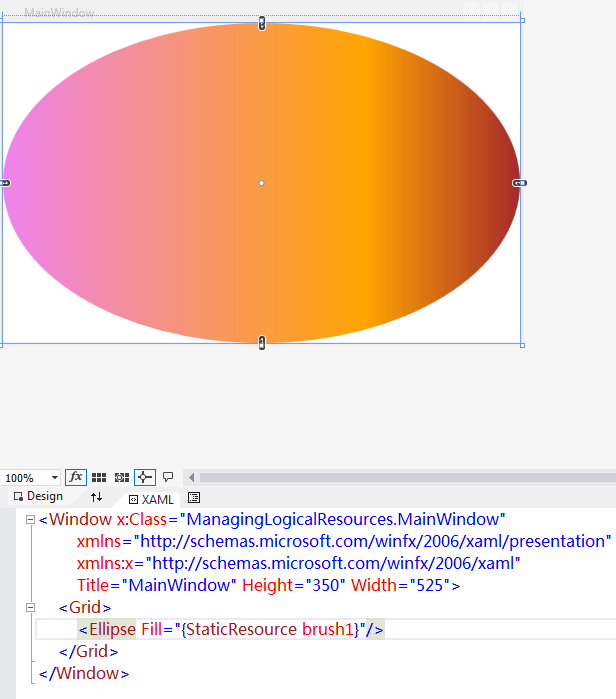
-----------------------------------
在实际开发中更常用的做法是:直接在使用的View内部Merge。
<Window x:Class="WPFMergedDicitonary.MainWindow"

        xmlns="http://schemas.microsoft.com/winfx/2006/xaml/presentation"

        xmlns:x="http://schemas.microsoft.com/winfx/2006/xaml"

        Title="MainWindow" Height="350" Width="525">

    <Window.Resources>

        <ResourceDictionary>

            <ResourceDictionary.MergedDictionaries>

                <ResourceDictionary Source="Brushes.xaml"/>

            </ResourceDictionary.MergedDictionaries>

        </ResourceDictionary>

    </Window.Resources>

    <Grid>

        <Ellipse Fill="{StaticResource brush1}"/>

    </Grid>

</Window>
效果同上,如下:
WPF整理-使用ResourceDictionary管理Logical Resources的更多相关文章
- 使用ResourceDictionary管理Logical Resources
WPF整理-使用ResourceDictionary管理Logical Resources “Logical resources may be of various types, such as br ...
- WPF整理-使用逻辑资源
"Traditional application resources consist of binary chunks of data, typically representing thi ...
- WPF整理-Style
"Consistency in a user interface is an important trait; there are many facets of consistency, ...
- WPF整理-XAML构建后台类对象
1.XAML 接触WPF的第一眼就是XAML---XAML是用来描绘界面的.其实不然! "Actually, XAML has nothing to do with UI. It's mer ...
- WPF整理-使用用户选择主题的颜色和字体
“Sometimes it's useful to use one of the selected colors or fonts the user has chosen in theWindows ...
- WPF整理-自定义一个扩展标记(custom markup extension)
"Markup extensions are used to extend the capabilities of XAML, by providing declarativeoperati ...
- WPF整理-XAML访问静态属性
"XAML provides an easy way to set values of properties—type converters and the extended propert ...
- WPF整理--动态绑定到Logical Resource
“What happens if we replace aspecific resource? Would that be reflected in all objects using the res ...
- WPF整理-二进制资源和内容
WPF中的Binary Resource(二进制资源)是相对于前面所说的Logical resource(逻辑资源)而说的,一般指Image.XML文件等. 注意:这里说的是Resource" ...
随机推荐
- Django-Admin后台管理
Rhel6.5 Django1.10 Python3.5 应用环境:Python+Virtualenv(Python Virtualenv运行Django环境配置) Django-Admin后台管理 ...
- 手把手教你玩转nginx负载均衡(五)----配置后端服务器组
引言 在前面几篇中,我们成功的搭建起了一台nginx服务器,所以我们要重复前面的步骤,把服务器的数量增加到3台以上,我这里已经建好了另外两台,分别是centos7-22,centos7-23,对应的i ...
- CPT单臂路由
路由器配置:Router>enableRouter#configure terminal 进入全局配置模式Router(config)#int fa0/1 进入端口R ...
- linux系统加快大文件的写入速度
linux系统加快大文件的写入速度 setvbuf进行优化内存IO
- java中包的命令行(cmd)操作详解
一.什么是包? 为了更好地组织类,防止在一个空间下出现类重名,Java提供了包机制.包是类的容器,用于分隔类名空间(类型于C++中的命名空间).如果没有指定包名,所有的示例都属于一个默认的无名包(又称 ...
- 安装hadoop+zookeeper ha
安装hadoop+zookeeper ha 前期工作配置好网络和主机名和关闭防火墙 chkconfig iptables off //关闭防火墙 1.安装好java并配置好相关变量 (/etc/pro ...
- 编写高质量的 Java 代码
代码质量概述 代码质量所涉及的5个方面,编码标准.代码重复.代码覆盖率.依赖项分析.复杂度分析.这5方面很大程序上决定了一份代码的质量高低. 我们分别来看一下这5方面:编码标准:这个想必都很清楚,每个 ...
- python 爬虫(三)
爬遍整个域名 六度空间理论:任何两个陌生人之间所间隔的人不会超过六个,也就是说最多通过五个人你可以认识任何一个陌生人.通过维基百科我们能够通过连接从一个人连接到任何一个他想连接到的人. 1. 获 ...
- curl模拟post,get,put,delete
安装curl:https://curl.haxx.se/download.html 测试:tomcat默认禁用put,delete返回403 GET curl -HAccept:text/plain ...
- cant create oci environment
网上这些人真是七里八里呀,下了navicat premium,想连接远程数据库,结果报cant create oci environment. 看了好几篇帖子博客,都说要下一个instantclien ...