
jenkins2 pipeline高级
jenkins2 pipeline里groovy的高级用法。翻译自:https://github.com/jenkinsci/pipeline-plugin/blob/master/TUTORIAL.md
文章来自:http://www.ciandcd.com
文中的代码来自可以从github下载: https://github.com/ciandcd
1. 在groovy里使用函数,条件控制,循环,异常捕获等
node('remote') {
git url: 'https://github.com/jglick/simple-maven-project-with-tests.git'
def v = version()
if (v) {
echo "Building version ${v}"
}
def mvnHome = tool 'M3'
sh "${mvnHome}/bin/mvn -B -Dmaven.test.failure.ignore verify"
step([$class: 'ArtifactArchiver', artifacts: '**/target/*.jar', fingerprint: true])
step([$class: 'JUnitResultArchiver', testResults: '**/target/surefire-reports/TEST-*.xml'])
}
def version() {
def matcher = readFile('pom.xml') =~ '<version>(.+)</version>'
matcher ? matcher[0][1] : null
}
上面的代码中:
def用来定义groovy变量或函数;
=~表示正则表达式的匹配;
master[0][1]表示取出匹配结果中第一个匹配项中的第一个group的值;
readFile为groovy的函数用来从workspace里读取文件返回文件的内容,同时还可以使用writeFile来保存内容到文件,fileExists用来判断文件是否存在;
注意 groovy脚本框下面的checkbox:use groovy sandbox,如果选中的话,groovy 脚本会在沙盒里运行有限的功能, 否则如果不是管理员运行的话会报错或者仍然运行就的脚本,需要管理员来approve groovy script。
如果遇到RejectedAccessException权限问题,需要jenkins管理员在Manage Jenkins » In-process Script Approval中approve 权限staticMethod org.codehaus.groovy.runtime.ScriptBytecodeAdapter findRegex java.lang.Object java.lang.Object。
2. 本地变量的序列化
如下的代码在运行时可能会遇到错误java.io.NotSerializableException: java.util.regex.Matcher,错误的原因是Matcher是不可序列化的类型。
node('remote') {
git url: 'https://github.com/jglick/simple-maven-project-with-tests.git'
def matcher = readFile('pom.xml') =~ '<version>(.+)</version>'
if (matcher) {
echo "Building version ${matcher[0][1]}"
}
def mvnHome = tool 'M3'
sh "${mvnHome}/bin/mvn -B -Dmaven.test.failure.ignore verify"
step([$class: 'ArtifactArchiver', artifacts: '**/target/*.jar', fingerprint: true])
step([$class: 'JUnitResultArchiver', testResults: '**/target/surefire-reports/TEST-*.xml'])
}
pipeline job为了支持能够在jenkins重启后恢复继续运行,jenkins在后台定期地将job的运行状态保存到硬盘。保存的动作一般在每个step结束后,或者在一些step的中间,例如sh step的中间。
jenkins保存的job的状态,包括整个控制流程,例如局部变量,循环所在的位置,等等。正因为如此,groovy里的任何变量必须是number,string或可序列化的类型,其他的例如网络连接等是不能够序列化的。
如果你临时地使用不可序列化的类型,则需要在使用完马上释放。如果局部变量在函数中,函数调用结束的时候局部变量也会被自动释放。我们也可以显示地释放局部变量。 如下
node('remote') {
git url: 'https://github.com/jglick/simple-maven-project-with-tests.git'
def matcher = readFile('pom.xml') =~ '<version>(.+)</version>'
if (matcher) {
echo "Building version ${matcher[0][1]}"
}
matcher = null
def mvnHome = tool 'M3'
sh "${mvnHome}/bin/mvn -B -Dmaven.test.failure.ignore verify"
step([$class: 'ArtifactArchiver', artifacts: '**/target/*.jar', fingerprint: true])
step([$class: 'JUnitResultArchiver', testResults: '**/target/surefire-reports/TEST-*.xml'])
}
然而最安全的方法是将不可序列化的语句隔离到函数中,且在函数的前面增加属性@NonCPS。通过这种方法pipeline将识别此函数为native且不保存对应的局部变量。另外使用了@NoCPS的函数中不能够调用其他的pipeline steps,例如必须将readFile放到函数外面:
node('remote') {
git url: 'https://github.com/jglick/simple-maven-project-with-tests.git'
def v = version(readFile('pom.xml'))
if (v) {
echo "Building version ${v}"
}
def mvnHome = tool 'M3'
sh "${mvnHome}/bin/mvn -B -Dmaven.test.failure.ignore verify"
step([$class: 'ArtifactArchiver', artifacts: '**/target/*.jar', fingerprint: true])
step([$class: 'JUnitResultArchiver', testResults: '**/target/surefire-reports/TEST-*.xml'])
}
@NonCPS
def version(text) {
def matcher = text =~ '<version>(.+)</version>'
matcher ? matcher[0][1] : null
}
上面的加了@NoCPS的version函数将被正常的groovy运行时执行,所以任何的局部变量都是允许的。
3. 创建多线程
pipeline能够使用parallel来同时执行多个任务。 parallel的调用需要传入map类型作为参数,map的key为名字,value为要执行的groovy脚本。
为了测试parallel的运行,可以安装parallel test executor插件。此插件可以将运行缓慢的测试分割splitTests。
用下面的脚本新建pipeline job:
node('remote') {
git url: 'https://github.com/jenkinsci/parallel-test-executor-plugin-sample.git'
archive 'pom.xml, src/'
}
def splits = splitTests([$class: 'CountDrivenParallelism', size: 2])
def branches = [:]
for (int i = 0; i < splits.size(); i++) {
def exclusions = splits.get(i);
branches["split${i}"] = {
node('remote') {
sh 'rm -rf *'
unarchive mapping: ['pom.xml' : '.', 'src/' : '.']
writeFile file: 'exclusions.txt', text: exclusions.join("\n")
sh "${tool 'M3'}/bin/mvn -B -Dmaven.test.failure.ignore test"
step([$class: 'JUnitResultArchiver', testResults: 'target/surefire-reports/*.xml'])
}
}
}
parallel branches
如果遇到RejectedAccessException错误,需要管理员approve权限staticMethod org.codehaus.groovy.runtime.ScriptBytecodeAdapter compareLessThan java.lang.Object java.lang.Object。
当第一次运行上面的pipeline job的时候,所有的测试顺序执行。当第二次或以后执行的时候,splitTests将会将所有的测试分割为大概等价的两份,然后两个task并行运行。如果两个task运行在不同的slave上,则可以看到job总的时间将会减半。
下面的等价语句用来打包pom.xml和源代码:
archive 'pom.xml, src/'
step([$class: 'ArtifactArchiver', artifacts: 'pom.xml, src/'])
我们可以看到prallel里的语句使用了node,这意味着并行执行的任务将会在新的node/slave上执行,且使用不同的workspace,为了确保所有的node和workspace使用相同的代码,所以才有了前面的打包archive和parallel里的解包unarchive。
上面的例子中我们可以看到同一个pipeline job里可以使用多个node,多个node会有不同的workspace,我们需要确保每个workspace的内容都是我们想要的内容。
另一个问题,如果在pipeline中使用env,环境变量的修改会在整个pipeline起作用,如果只修改parallel并行的线程的变量,可以使用withEnv。
在使用了parallel的console log里,并行的log都混在了一起,需要在job的pipeline steps页面查看按逻辑分割的更情况的log。
4. 创建stage
默认地,pipeline的多个job可以并行地运行。使用stage可以限制job里的某些阶段的并行数量。新的job用于更高的优先级,旧的job遇到stage的并行限制会直接退出。
并行性的限制有的时候很有用,例如部署到单个server,在同一时间只能有最新的一个job部署。
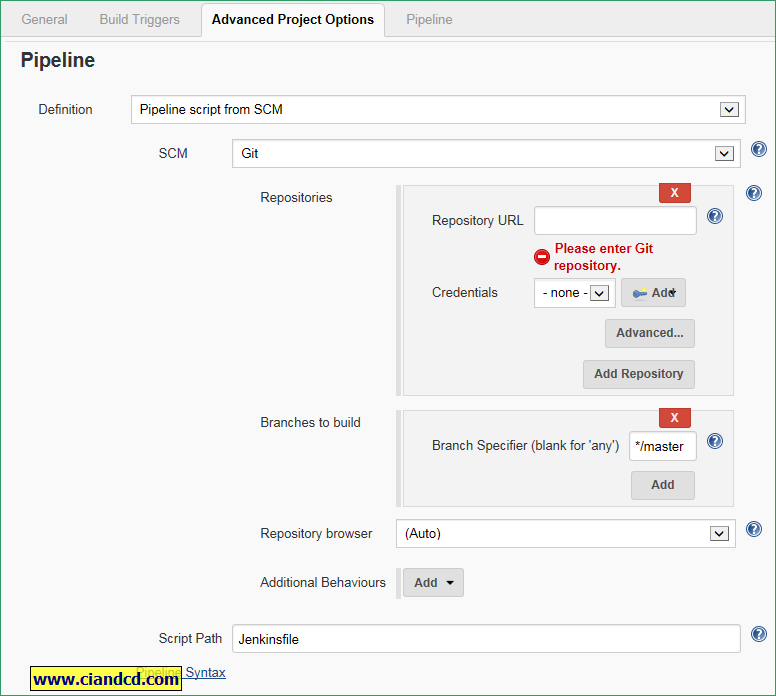
5. 从外部加载groovy脚本
jenkins2 pipeline高级的更多相关文章
- jenkins2 pipeline 语法快速参考
jenkins2 pipeline中常用的语法快速参考. 文章来自:http://www.ciandcd.com文中的代码来自可以从github下载: https://github.com/ciand ...
- jenkins2 pipeline介绍
文章来自:http://www.ciandcd.com 文中的代码来自可以从github下载: https://github.com/ciandcd 什么是jenkins2的pipeline? ...
- jenkins2 -pipeline 常用groovy脚本
jenkins2的核心是pipeline,pipeline的核心是groovy. 那有一些基础的groovy是必须经常使用的,如变量赋值,变量引用,打印变量,输出字符,任务调用,循环判断等. Groo ...
- jenkins2 pipeline插件的10个最佳实践
jenkins pipeline的10个最佳实践. 文章来自:http://www.ciandcd.com文中的代码来自可以从github下载: https://github.com/ciandcd ...
- jenkins2 pipeline实例
比较完整的实例,使用了maven打包,git tag,发通知邮件,等待用户deploy,deploy到nexus. 文章来自:http://www.ciandcd.com文中的代码来自可以从githu ...
- jenkins2 pipeline入门
本文通过简单的pipeline的实例和详细的讲解,能够学习基本pipeline的groovy用法,然后开始实现自己的pipeline job. 翻译和修改自:https://github.com/je ...
- Jenkins Pipeline高级用法-ShareLibrary
1.Github配置 1.1 上传jenkinsfile到github https://github.com/zeyangli/ShareLibrary-jenkins.git 2.Jenkins配置 ...
- Jenkins2 插件 Pipeline+BlueOcean 实现持续交付的初次演练
需要完成的目标 使用Pipeline完成项目的checkout,package.deploy.restart 提取出公有部分封装为公有JOB 实现pipeline对其他JOB的调用和逻辑的判断 实现任 ...
- Jenkins pipeline 入门到精通系列文章
Jenkins2 入门到精通系列文章. Jenkins2 下载与启动jenkins2 插件安装jenkins2 hellopipelinejenkins2 pipeline介绍jenkins2 jav ...
随机推荐
- MySQL Innodb的两种表空间方式
要说表空间,MySQL的表空间管理远远说不上完善.换句话说,事实上MySQL根本没有真正意义上的表空间管理.MySQL的Innodb包含两种表空间文件模式,默认的共享表空间和每个表分离的独立表空间.只 ...
- C语言 malloc、calloc、realloc的区别
三个函数的申明分别是: void* malloc(unsigned size); void* realloc(void* ptr, unsigned newsize); void* calloc(si ...
- Android菜鸟成长记6 -- 网络连接的检查
在android开发中我们要经常考虑到各种问题.在开发android应用时,涉及到要进行网络访问,时常需要进行网络状态的检查,以提供给用户必要的提醒.一般可以通过ConnectivityManager ...
- MapGIS6.7安装图文教程(完美破解)
mapgis安装比较简单,主要注意在安装的时候,先打开软件狗,然后再进行软件安装,一般就不会照成其他安装失败的现象,有时候安装之前没有打开软件狗也安装成功了,也有这情况,不过软件使用也需要软件狗的支持 ...
- 使用C# WinForm制作 员工打卡项目 -- S2 2.3
新建一个员工类,存储员工的信息 新建一个List<>集合,并在load事件中实例化三个员工对象 DataGridView绑定数据源,可以显示出数据 点击查询按钮,查询工号等同于输入的数的员 ...
- 使用rownum对oracle分页
以Student表为例进行分页 建表及插入 -- 有表结构如下 create table STUDENT ( sno INTEGER, sname ), sage INTEGER ); -- 插入数据 ...
- Java多线程断点下载
public static class DownloadThread extends Thread{ private int threadId; private int startIndex; pri ...
- win7 64位 mongodb2.6.0 安装服务启动
Workaround to install as a service You can manually install 2.6.0 as a service on Windows from an Ad ...
- iOS 地图
MapKit框架使用前提 导入框架 导入主头文件 #import <MapKit/MapKit.h> MapKit框架使用须知 MapKit框架中所有数据类型的前缀都是MK MapKi ...
- jsp学习---css基础知识学习,float,position,padding,div,margin
1.常用页面布局 效果图: 代码: <!DOCTYPE html> <html> <head> <meta charset="UTF-8" ...