
Chart系列(二):数据绑定
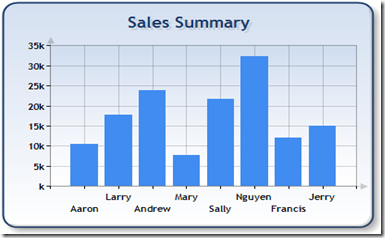
1.绑定到OleDbDataReader:
// Define the database query

string mySelectQuery="SELECT Name, Sales FROM REPS;";

// 。。。。。。
// Create a database reader

OleDbDataReader myReader = myCommand.ExecuteReader(CommandBehavior.CloseConnection);

// Since the reader implements and IEnumerable, pass the reader directly into

// the DataBindTable method with the name of the Column to be used as the XValue

Chart1.DataBindTable(myReader, "Name");
2.绑定DataSource
// Define the database query

string mySelectQuery="SELECT * FROM REPS;";

// Create a database connection object using the connection string

OleDbConnection myConnection = new OleDbConnection(myConnectionString);

// Create a database command on the connection using query

OleDbCommand myCommand = new OleDbCommand(mySelectQuery, myConnection);

myConnection.Open();
// set chart data source - the data source must implement IEnumerable

chart1.DataSource = myCommand.ExecuteReader(CommandBehavior.CloseConnection);


// Set series members names for the X and Y values

chart1.Series["Series 1"].XValueMember = "Name";

chart1.Series["Series 1"].YValueMembers = "Sales";

// Data bind to the selected data source

chart1.DataBind();

3.绑定Y值
// Create a database reader

OleDbDataReader myReader = myCommand.ExecuteReader(CommandBehavior.CloseConnection);

// Since the reader implements and IEnumerable, pass the reader directly into

// the DataBind method with the name of the Column selected in the query

chart1.Series["Default"].Points.DataBindY(myReader, "GrossSales");

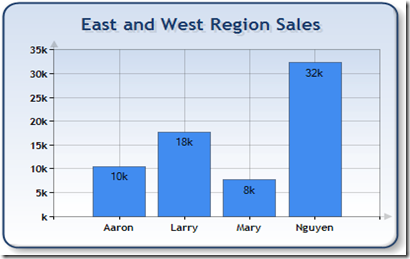
4.绑定X和Y
// Create a database reader

OleDbDataReader myReader = myCommand.ExecuteReader(CommandBehavior.CloseConnection);

// Since the reader implements IEnumerable, pass the reader directly into

//   the DataBind method with the name of the Column selected in the query

chart1.Series["Default"].Points.DataBindXY(myReader, "Name", myReader, "Sales");
Chart系列(二):数据绑定的更多相关文章
- WPF入门教程系列二十三——DataGrid示例(三)
DataGrid的选择模式 默认情况下,DataGrid 的选择模式为“全行选择”,并且可以同时选择多行(如下图所示),我们可以通过SelectionMode 和SelectionUnit 属性来修改 ...
- [知识库分享系列] 二、.NET(ASP.NET)
最近时间又有了新的想法,当我用新的眼光在整理一些很老的知识库时,发现很多东西都已经过时,或者是很基础很零碎的知识点.如果分享出去大家不看倒好,更担心的是会误人子弟,但为了保证此系列的完整,还是选择分享 ...
- highcharts 结合phantomjs纯后台生成图片系列二之php2
上篇文章中介绍了phantomjs的使用场景,方法. 本篇文章详细介绍使用php,highcharts 结合phantomjs纯后台生成图片.包含一步步详细的php代码 一.highcharts 结合 ...
- highcharts 结合phantomjs纯后台生成图片系列二之php
上篇文章中介绍了phantomjs的使用场景,方法.本篇文章详细介绍使用php,highcharts 结合phantomjs纯后台生成图片. 一.准备: 下载phantomjs解析插件,从 highc ...
- 前端构建大法 Gulp 系列 (二):为什么选择gulp
系列目录 前端构建大法 Gulp 系列 (一):为什么需要前端构建 前端构建大法 Gulp 系列 (二):为什么选择gulp 前端构建大法 Gulp 系列 (三):gulp的4个API 让你成为gul ...
- Web 开发人员和设计师必读文章推荐【系列二十九】
<Web 前端开发精华文章推荐>2014年第8期(总第29期)和大家见面了.梦想天空博客关注 前端开发 技术,分享各类能够提升网站用户体验的优秀 jQuery 插件,展示前沿的 HTML5 ...
- Web 前端开发人员和设计师必读文章推荐【系列二十八】
<Web 前端开发精华文章推荐>2014年第7期(总第28期)和大家见面了.梦想天空博客关注 前端开发 技术,分享各类能够提升网站用户体验的优秀 jQuery 插件,展示前沿的 HTML5 ...
- Web 开发精华文章集锦(jQuery、HTML5、CSS3)【系列二十七】
<Web 前端开发精华文章推荐>2014年第6期(总第27期)和大家见面了.梦想天空博客关注 前端开发 技术,分享各类能够提升网站用户体验的优秀 jQuery 插件,展示前沿的 HTML5 ...
- Web 前端开发人员和设计师必读精华文章【系列二十六】
<Web 前端开发精华文章推荐>2014年第5期(总第26期)和大家见面了.梦想天空博客关注 前端开发 技术,分享各类能够提升网站用户体验的优秀 jQuery 插件,展示前沿的 HTML5 ...
- Web 前端开发精华文章推荐(HTML5、CSS3、jQuery)【系列二十三】
<Web 前端开发精华文章推荐>2014年第2期(总第23期)和大家见面了.梦想天空博客关注 前端开发 技术,分享各类能够提升网站用户体验的优秀 jQuery 插件,展示前沿的 HTML5 ...
随机推荐
- C语言内存对齐详解(1)
一.什么是字节对齐,为什么要对齐? 现代计算机中内存空间都是按照byte划分的,从理论上讲似乎对任何类型的变量的访问可以从任何地址开始,但实际情况是在访问特定类型变量的时候经常在特定的内存地址访问,这 ...
- DCMTK开源库的学习笔记4:利用ini配置文件对dcm影像进行归档
转:http://blog.csdn.net/zssureqh/article/details/8846337 背景介绍: 医学影像PACS工作站的服务端需要对大量的dcm文件进行归档,写入数据库处理 ...
- Burst Balloons
Given n balloons, indexed from 0 to n-1. Each balloon is painted with a number on it represented by ...
- mysql中int、bigint、smallint 和 tinyint的区别与长度的含义
最近使用mysql数据库的时候遇到了多种数字的类型,主要有int,bigint,smallint和tinyint.其中比较迷惑的是int和smallint的差别.今天就在网上仔细找了找,找到如下内容, ...
- iterator与const_iterator及const iterator区别
如果你传递过来一个const类型的容器,那么只能用const_iterator来遍历. C++ Code 12345 void Method(const vector<int> v ...
- 25.在从1到n的正数中1出现的次数[NumberOf1Between1_N]
[题目] 输入一个整数n,求从1到n这n个整数的十进制表示中1出现的次数.例如输入12,从1到12这些整数中包含1 的数字有1,10,11和12,1一共出现了5次. [分析] 这是一道广为流传的goo ...
- 正则表达式里"-"中划线的使用注意
今天要匹配正则表达式,把非法的字符找出来,开始的写法是这个 [^A-Za-z0-9_.*-+%!],我的目的是把_.*-+%!这7个字符算合法字符,但是发现有许多其他字符也合法了,原来是中划线的位置不 ...
- iOS 定制controller过渡动画 ViewController Custom Transition使用体会
最近学习了一下ios7比较重要的一项功能,就是 controller 的 custom transition. 在ios7中,navigation controller 中就使用了交互式过渡来返回上级 ...
- 【USACO】sprime
有了前面的基础,做这道题真是so easy啊. 因为要分解后每个数都是素数,所以采用先生成短的素数,长的素数在短素数的基础上生成. 比如长度为1的素数只有 2 3 5 7, 那么符合要求的长度为2的素 ...
- Gym 100851E Easy Problemset (模拟题)
Problem E. Easy ProblemsetInput file: easy.in Output file: easy.outPerhaps one of the hardest problems ...