
NetCore部署到Linux服务器+Supervisor的步骤及过程中踩过的坑
本文作备忘使用
服务器配置:
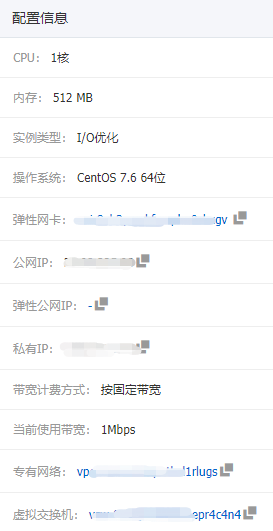
下面是所有操作的具体步骤:
1.安装nginx 参考
1.1 添加源:默认情况Centos7中没有Nginx源,最近Nginx官网提供了Centos的源地址。
sudo rpm -Uvh http://nginx.org/packages/centos/7/noarch/RPMS/nginx-release-centos-7-0.el7.ngx.noarch.rpm
注:上面的命令执行后不确定是否需要update一下yum,我没有update也能安装成功

1.2 安装Nginx:通过yum search nginx看看是否已经添加源成功。如果成功则执行下列命令安装Nginx。
sudo yum install -y nginx
1.3 启动Nginx并设置开机自动运行
sudo systemctl start nginx.service

sudo systemctl enable nginx.service
1.4 浏览查看效果
在浏览器中输入您的服务器地址:http://x.x.x.x/
2.安装supervisor 参考
2.1 执行以下命令以安装supervisor
yum install python-setuptools

easy_install supervisor
注:据说会发生无法安装的情况,不过我没有遇到,看来还是幸运的。还有很多方法,还没有尝试其他的方法。懒~~
2.2 配置supervisor
2.2.1 创建配置文件目录及文件
#mkdir -p /etc/supervisor

#mkdir -p /etc/supervisor/conf.d

#echo_supervisord_conf > /etc/supervisor/supervisord.conf

#vim /etc/supervisor/supervisord.conf
2.2.2 配置内容如下(参考)
# 启用访问web控制界面,inet_http_server区段修改为

[inet_http_server]

port=*:

# 修改log路径

[supervisord]

logfile=/var/log/supervisord.log

# 修改 unix_http_server file 路径,避免被系统删除

[unix_http_server]

file=/var/lock/supervisor.sock

# 和unix_http_server file保持一致

[supervisorctl]

serverurl=unix:///var/lock/supervisor.sock

# include区段修改为

[include]

files = /etc/supervisor/conf.d/*.conf
2.3 配置supervisor的开机服务
#vim /etc/rc.d/init.d/supervisord
2.3.1 文件内容如下:
#!/bin/sh

#

# /etc/rc.d/init.d/supervisord

#

# Supervisor is a client/server system that

# allows its users to monitor and control a

# number of processes on UNIX-like operating

# systems.

#

# chkconfig: -

# description: Supervisor Server

# processname: supervisord

# Source init functions

. /etc/init.d/functions

RETVAL=

prog="supervisord"

pidfile="/tmp/supervisord.pid"

lockfile="/var/lock/supervisor.sock"

start()

{

        echo -n $"Starting $prog: "

        daemon --pidfile $pidfile supervisord -c /etc/supervisor/supervisord.conf

        RETVAL=$?

        echo

        [ $RETVAL -eq  ] && touch ${lockfile}

}

stop()

{

        echo -n $"Shutting down $prog: "

        killproc -p ${pidfile} /usr/bin/supervisord

        RETVAL=$?

        echo

        if [ $RETVAL -eq  ] ; then

                rm -f ${lockfile} ${pidfile}

        fi

}

case "$1" in

  start)

    start

  ;;

  stop)

    stop

  ;;

  status)

        status $prog

  ;;

  restart)

    stop

    start

  ;;

  *)

    echo "Usage: $0 {start|stop|restart|status}"

  ;;

esac
保存退出
增加开机服务
chmod +x /etc/rc.d/init.d/supervisord

chkconfig --add supervisord

chkconfig supervisord on
启动服务并验证
service supervisord start
如果服务器启动了防火墙
firewall-cmd --zone=public --add-port=/tcp --permanent

firewall-cmd --reload
3.安装netcore SDK 跳转
添加dotnet产品Feed
在安装.NET之前,您需要注册Microsoft密钥,注册产品存储库并安装所需的依赖项。这只需要每台机器完成一次。
打开终端并运行以下命令:
sudo rpm -Uvh https://packages.microsoft.com/config/rhel/7/packages-microsoft-prod.rpm
安装.NET SDK
更新可用于安装的产品,然后安装.NET SDK。
在终端中,运行以下命令:
sudo yum update

sudo yum install dotnet-sdk-2.2
4.安装chrome+chromedriver(参考)
4.1 利用 yum 命令安装 google-chrome 超级简单(安装最新版):
yum install https://dl.google.com/linux/direct/google-chrome-stable_current_x86_64.rpm
4.2 查看chrome版本
google-chrome --version
4.3 下载chromedirver
*********目前搜集到的有两个下载地址*********
************看你喜欢,任君选择************
官网提供 http://chromedriver.storage.googleapis.com/index.html
淘宝镜像 http://npm.taobao.org/mirrors/chromedriver/

注:1.需要下载与chrome版本对应的版本,每个版本里面有一个notes.txt文本,里面有支持的chrome版本。
  2.下载后上传到服务器/usr/bin目录
5.配置supervisor进程
在/etc/supervisor/conf.d目录下面新建一个你项目名的配置文件,如:MyDotNetName.conf
内容如下:
[program:MyDotNetName]

command=/bin/bash -c "dotnet MyDotNetName.dll"

directory=/usr/PublishOutput/

stderr_logfile=/var/log/MyDotNetName.error.log

stdout_logfile=/var/log/MyDotNetName.stdout.log

environment=ASPNETCORE_ENVIRONMENT=Production

user=root

stopsignal=INT

autostart=true

autorestart=true

startsecs=
:wq保存退出编辑当前配置文件
注:我在操作完上面这步后,进程并没有及时启动,后来查找了一翻资料后,执行了附里面的第一二条命令后才正常启动,具体是先执行的哪条不太记得了。不过我想这个影响应该不大吧。
附:supervisor的运维命令
# 读取有更新(增加)的配置文件,不会启动新添加的程序
supervisorctl reread
# 重启配置文件修改过的程序

supervisorctl update
# 查看程序状态

supervisorctl status

# 关闭程序

supervisorctl stop app-name

# 启动程序

supervisorctl start app-name

# 重启

supervisorctl restart app-name
补充:每次替换新发布的项目文件内容后,发现都会报错。查看后应该是chromedriver没有执行权限,我的操作是执行如下所示的命令,对当前项目文件所在目录赋予执行权限
chmod -R /usr/youpath
如果有哪位大能有更好的解决方案欢迎留言指教,谢谢!
2019年3月19日 补充
发现使用9001端口远程管理进行多次重启进程后就出现了各种报错,后来查看资料后的解决办法就是:结束掉chrome及chromedriver的所有进程
批量结束某个应用的所有进程命令如下(例如结束掉所有chrome进程)
ps -aux|grep chrome|awk '{print $2}'|xargs kill -
后来在supervisor子进程配置文件中添加配置(目前正在试着运行)
#vim /etc/supervisor/supervisord.conf
killasgroup = true

stopasgroup = true
NetCore部署到Linux服务器+Supervisor的步骤及过程中踩过的坑的更多相关文章
- NET Core站点部署到Linux服务器
.NET跨平台之旅:将QPS 100左右的ASP.NET Core站点部署到Linux服务器上 今天下午我们将生产环境中一个单台服务器 QPS(每秒请求数)在100左右的 ASP.NET Core 站 ...
- ASP.NET项目部署到Linux服务器出现服务器错误
在Linux系统中安装了Mono和Apache作为Web服务器,使用Visual Studio开发的ASP.NET Web应用或者API应用,在部署到Linux服务器后出现服务器错误,其中一个原因是由 ...
- [问题解决] 程序部署到Linux服务器乱码
错误: 在windows下开发的eclipse项目需要用java mail发送邮件,在将整个项目部署到linux服务器之后发送的邮件出现了乱码. 发生场景: Linux服务器下的Java mail程序 ...
- springboot 定时任务部署至linux服务器上后会执行两次问题
springboot定时任务在本地运行时,正常执行且只执行一次,但是在maven打包成war包,部署至linux服务器上之后,定时任务奇怪的执行了两次. 由于未做负载均衡,所以可以先排除是因为多台服务 ...
- 43-将javaweb项目部署到Linux服务器
这是第二次弄了,感觉由于上次积累了点资源,这次要少走很多弯路了,再次记录下来吧. 第一次的记录:将本地的javaweb项目部署到Linux服务器的一般操作 1. 在Linux上建立数据库,我是将本地的 ...
- windows环境jar包部署到linux服务器,一键操作
背景: windows系统下生成的jar包通过FTP上传到linux服务器,然后通过XShell进行jar包的发布,这样反复了几个月后,开发阶段需要频繁更新包的部署.个人觉得很繁琐,想一键式把这个工作 ...
- netcore一键部署到linux服务器以服务方式后台运行
@font-face { font-family: octicons-link; src: url("data:font/woff;charset=utf-8;base64,d09GRgAB ...
- .NET跨平台之旅:将QPS 100左右的ASP.NET Core站点部署到Linux服务器上
今天下午我们将生产环境中一个单台服务器 QPS(每秒请求数)在100左右的 ASP.NET Core 站点部署到了 Linux 服务器上,这是我们解决了在 .NET Core 上使用 EnyimMem ...
- 案例 (一)如何把python项目部署到linux服务器上
一.背景 用Python写了个脚本,需要部署到Linux环境的服务器上,由于服务器linux系统(centos,redhat等)自带的是python2,现在的python萌新都是从python3开 ...
随机推荐
- python网络之web框架
逐步引入: 1. 最简单的web server #!/usr/bin/env python # coding:utf-8 import socket sk = socket.socket() sk.b ...
- sessionFactory中的openSession和getCurrentSession的一些注意事项
今天进行Hibernate测试时遇到了一个问题 我在用sessionFactory生产seesion时出现了故障,使用getCurrentsesstion时产生异常: Exception in thr ...
- python实现批量压缩文件夹
前段时间碰到一个需要把目录下文件夹压缩的项目,但是度娘里没找到,只好自己写脚本了. #coding:utf-8 import os filePath = raw_input("请输入路径:& ...
- The eventual following stack trace is caused by an error thrown for debugging purposes as well as to attempt to terminate the thread which caused the illegal access, and has no functional impact.
好久没有冒泡了,最近在新环境上搭建应用时,启动报错: INFO: Illegal access: this web application instance has been stopped alre ...
- ZT Linux可用的最新版本的sublime text注册
更改hosts:sudo vim /private/etc/hosts 127.0.0.1 www.sublimetext.com 127.0.0.1 license.sublimehq.com 1 ...
- Request.ServerVariables参数说明
Request.ServerVariables["SERVER_NAME"] '获取服务器IP Request.ServerVariables["HTTP_REFERER ...
- Filter 中空指针错误
Filter 是过滤器,凡是通过servlet JSP 的请求需要filter 进行过滤或者拦截操作,保证数据的合法或者逻辑正确性 但是写第一个filter 配置完成后,发现jsp 文件进不去了,直 ...
- 安卓开发学习之Menu
安卓开发中菜单是一个很重要的组件,从安卓开发文档(http://wear.techbrood.com/guide/index.html)中可以看到,安卓UI设计中的Menu主要分为: A.Option ...
- 动态改变Spring定时任务执行频率
@Component@EnableSchedulingpublic class updateCronTask implements SchedulingConfigurer { public stat ...
- Python全栈之路----目录
Module1 Python基本语法 Python全栈之路----编程基本情况介绍 Python全栈之路----常用数据类型--集合 Module2 数据类型.字符编码.文件操作 Python全栈之路 ...