
ue4 c++ anim notify
http://blog.csdn.net/or_7r_ccl/article/details/54564962
直接在sequence or montage中new个Event
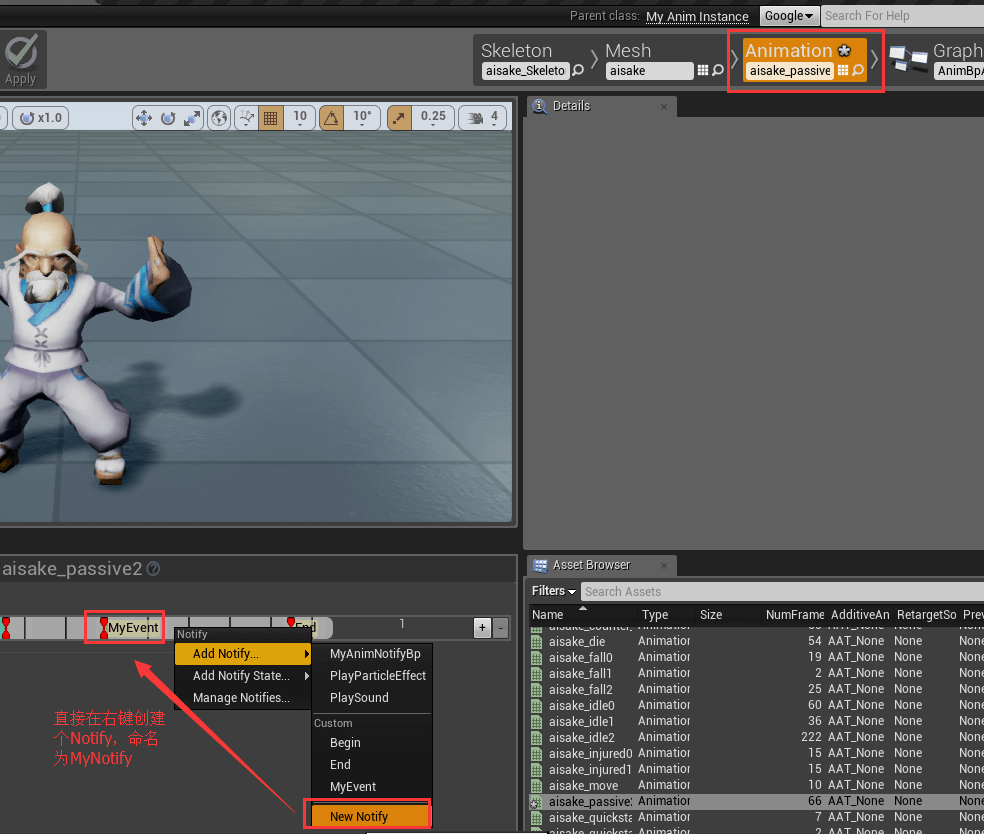
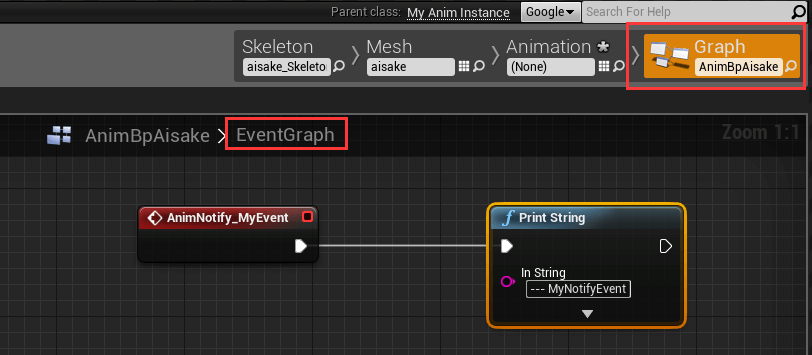
然后在graph中接收。
2、简单的通知(c++)
首先,animation bp必须是继承自定义的AnimInstance

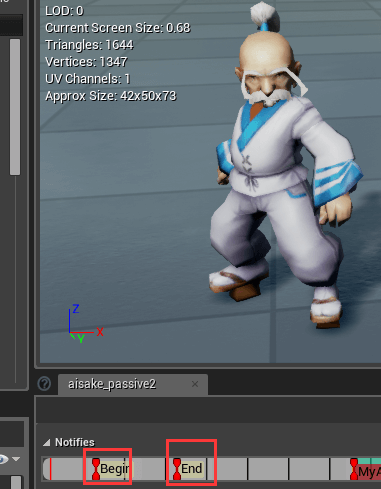
然后新建两个通知AnimNotify_Begin和AnimNotify_End
方法的命名规则必须是AnimNotify_XXX,因为引擎里的代码就是这样匹配的
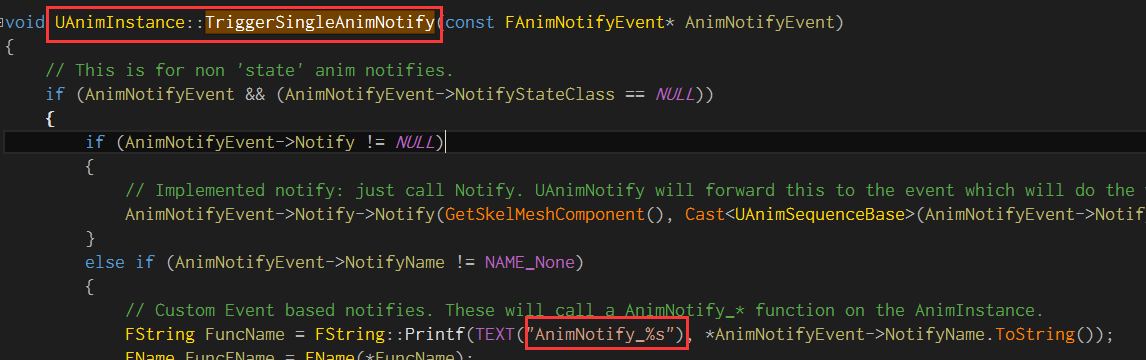
完整代码
MyAnimInstance.h
#pragma once

#include "Animation/AnimInstance.h"

#include "MyAnimInstance.generated.h"

/**

 *

 */

UCLASS()

class MYSLATE_API UMyAnimInstance : public UAnimInstance

{

    GENERATED_BODY()

public:

    UMyAnimInstance();

    UFUNCTION(BlueprintCallable, Category = "MyAnim")

        bool IsMoving();

    UFUNCTION(BlueprintCallable, Category = "MyAnim")

        ACharacter* GetOwnerChar();

    UFUNCTION(BlueprintCallable, Category = "MyAnim")

        void AnimNotify_Begin(UAnimNotify* Notify);

    UFUNCTION(BlueprintCallable, Category = "MyAnim")

        void AnimNotify_End(UAnimNotify* Notify);

private:

    ACharacter* mOwnerChar;

};- 1
- 2
- 3
- 4
- 5
- 6
- 7
- 8
- 9
- 10
- 11
- 12
- 13
- 14
- 15
- 16
- 17
- 18
- 19
- 20
- 21
- 22
- 23
- 24
- 25
- 26
- 27
- 28
- 29
- 1
- 2
- 3
- 4
- 5
- 6
- 7
- 8
- 9
- 10
- 11
- 12
- 13
- 14
- 15
- 16
- 17
- 18
- 19
- 20
- 21
- 22
- 23
- 24
- 25
- 26
- 27
- 28
- 29
MyAnimInstance.cpp
#include "MySlate.h"

#include "MyAnimInstance.h"

#include "Engine.h"

#include "MyChar.h"

UMyAnimInstance::UMyAnimInstance()

{

    mOwnerChar = nullptr;

}

bool UMyAnimInstance::IsMoving()

{

    ACharacter* character = GetOwnerChar();

    if (!character)

        return false;

    float wallSpeed = FVector::DotProduct(character->GetVelocity(), character->GetActorRotation().Vector());

    return wallSpeed > 0.f ? true : false;

}

ACharacter* UMyAnimInstance::GetOwnerChar()

{

    if (!mOwnerChar)

    {

        APawn* owner = TryGetPawnOwner();

        mOwnerChar = owner ? Cast<ACharacter>(owner) : nullptr;

    }

    return mOwnerChar;

}

void UMyAnimInstance::AnimNotify_Begin(UAnimNotify * Notify)

{

    AMyChar* mychar = Cast<AMyChar>(GetOwnerChar());

    if (mychar)

    {

        FString str = FString::Printf(TEXT("--- AnimNotify_Begin - %d"), mychar->mHealth);

        GEngine->AddOnScreenDebugMessage(0, 5.0f, FColor::Green, str);

    }

}

void UMyAnimInstance::AnimNotify_End(UAnimNotify * Notify)

{

    FString str = FString::Printf(TEXT("--- AnimNotify_End"));

    GEngine->AddOnScreenDebugMessage(0, 5.0f, FColor::Yellow, str);

}- 1
- 2
- 3
- 4
- 5
- 6
- 7
- 8
- 9
- 10
- 11
- 12
- 13
- 14
- 15
- 16
- 17
- 18
- 19
- 20
- 21
- 22
- 23
- 24
- 25
- 26
- 27
- 28
- 29
- 30
- 31
- 32
- 33
- 34
- 35
- 36
- 37
- 38
- 39
- 40
- 41
- 42
- 43
- 44
- 45
- 1
- 2
- 3
- 4
- 5
- 6
- 7
- 8
- 9
- 10
- 11
- 12
- 13
- 14
- 15
- 16
- 17
- 18
- 19
- 20
- 21
- 22
- 23
- 24
- 25
- 26
- 27
- 28
- 29
- 30
- 31
- 32
- 33
- 34
- 35
- 36
- 37
- 38
- 39
- 40
- 41
- 42
- 43
- 44
- 45
蓝图中直接new一个notify就ok了,逻辑都在c++中做。
当然,你可以new个bp继承MyAnimInstance,然后动画蓝图再继承这个bp,这样扩展性好了。
3、单独起个AnimNotify类(blueprint,c++自己去转换)
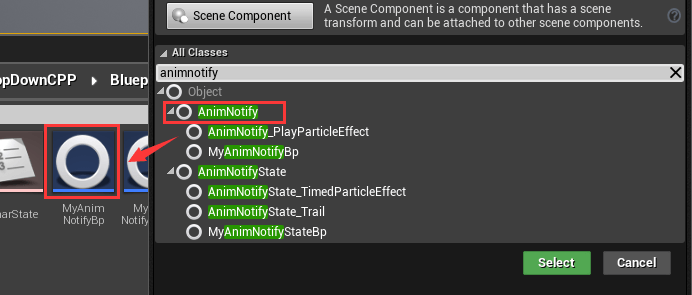
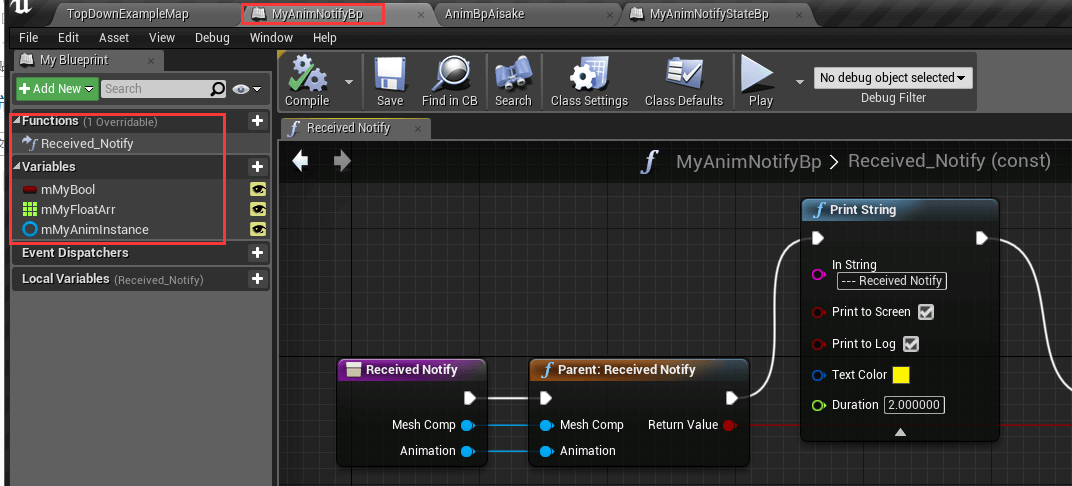
可以重写两个方法,和其一些变量
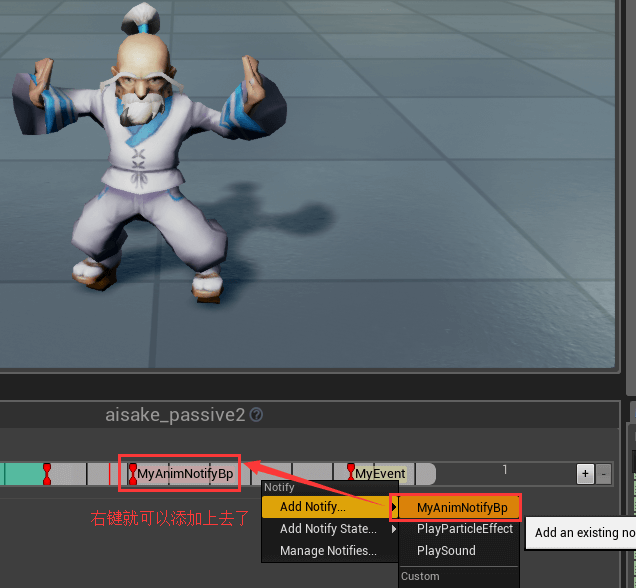
然后添加到animation sequence or montage中
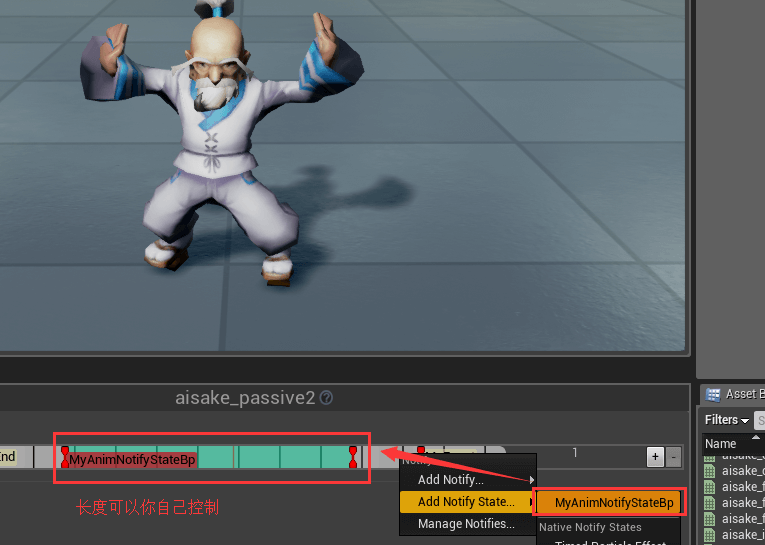
4、(最灵活)单独起个AnimNotifyState类(blueprint,c++自己去转换)
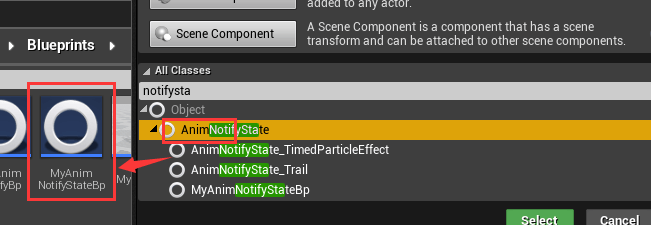
可以重写4个方法
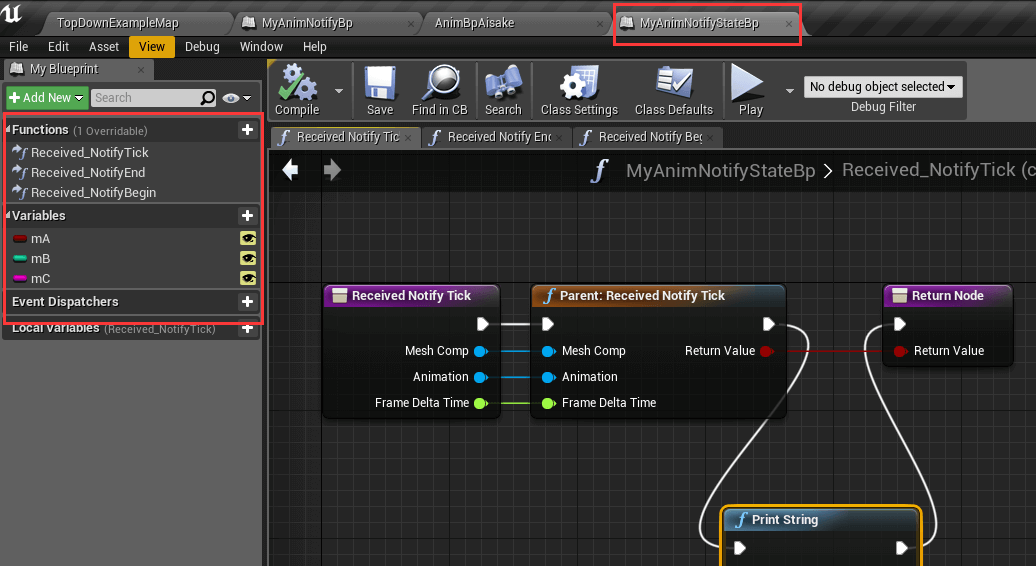
然后添加到animation sequence or montage中,可以控制通知长度,也就是tick
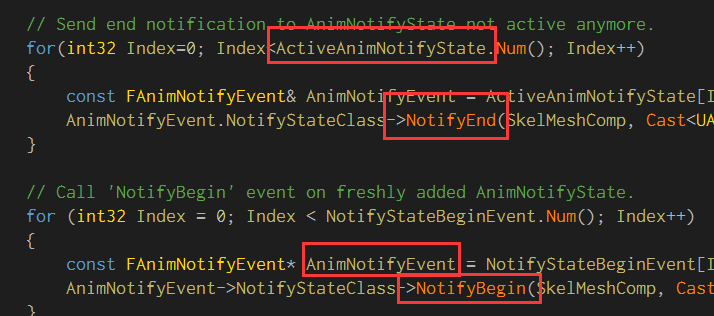
其实看下源码就可以知道,里面这些东西是怎么调用的
ue4 c++ anim notify的更多相关文章
- 张瀚荣:如何用UE4制作3D动作游戏
转自:http://www.gamelook.com.cn/2015/06/218267 GameLook报道/ 6月5日,2015年第三期GameLook开放日‧虚幻引擎专场活动在上海正式举行,此次 ...
- ue4粒子实现流血效果
---恢复内容开始--- 动作/射击游戏中,击中角色时常常伴随着血花效果,增强打击感的同时,也方便了玩家对命中与否的判断. 血液效果分两块,首先是受伤部位在受击瞬间产生血雾粒子,然后在身体.地面.墙面 ...
- Modeling -> Mixamo auto rigging -> UE4 retargeting
In general, there are 3 ways we can work with the Blender-UE4 pipeline: 1 Model character Export m ...
- UE4高级运动系统(Advanced Locomotion System V3)插件分析
Advanced Locomotion System V3是虚幻商城的一款第三方插件.它相比UE4的基础走跑跳表现,实现了更多动作游戏里常用的运动特性,虽然价格定价不菲,依然备受关注.笔者试用了这款插 ...
- Unreal Engine 4 系列教程 Part 7:音频教程
.katex { display: block; text-align: center; white-space: nowrap; } .katex-display > .katex > ...
- UE4开发神秘海域类游戏原型 初阶(二):动画资源的整合
前一篇已经确定神海类游戏原型的目标,首先要做的就是3C's(Character, Controls, Camera)的开发. UE4的3C's的程序部分开发主要也就是基于他的GamePlay Fr ...
- 游戏开发之UE4添加角色到场景中
接着上次继续学习,现在我们已经有了一个场景并且运行了,我们需要添加一个角色到场景中.要这样做,我们必须从UE4的GameFramework类继承它. 一. 创建一个从Character类继承的类 从基 ...
- ue4音效、动画结合实例
在游戏中,许多音效需要在动画恰当的时机出现,例如行走.奔跑,就需要恰好在足部落地瞬间播放. 而AnimNotify就能非常方便地处理此类问题. AnimNotify,顾名思义就是动画通知,能在特定的动 ...
- UE4的委托
UE中委托的使用很广泛,许多Event的触发都有对应的虚函数和委托,虚函数不用讲,只能在派生类中使用,而委托可以在别的类或者蓝图中使用,就应用范围而言,委托的使用更灵活.以AActor的 /** * ...
随机推荐
- Action类的工作机制
Action类的工作机制 Execute()方法包含以下参数 ActionMapping:包含了这个Action的配置信息,和struts-config.xml文件中的<action>元素 ...
- 小程序开发之xxx is not defined
遇到问题 在小程序开发中直接在函数中调用data中的变量直接赋值给新的变量,就会出现如下错误 VM33895:1 thirdScriptErrorapaymoney is not defined; [ ...
- 登录令牌 Token 介绍
Token值介绍 token 值: 登录令牌.利用 token 值来判断用户的登录状态.类似于 MD5 加密之后的长字符串. 用户登录成功之后,在后端(服务器端)会根据用户信息生成一个唯一的值.这个 ...
- HTML5/CSS3简易版俄罗斯方块游戏
在线演示 本地下载
- GDB调试core文件(3)
列出一些常见问题: 一,如何使用core文件 使用core文件 在core文件所在目录下键入: gdb -c core 它会启动GNU的调试器,来调试core文件,并且会显示生成此core文件的程序名 ...
- Protothread 机制
一.概述 很多传感器操作系统都是基于事件驱动模型的,事件驱动模型不用为每个进程都分配一个进程栈,这对内存资源受限的无线传感器网络嵌入式系统尤为重要. 然而事件驱动模型不支持阻塞等待抽象语句,因此程序员 ...
- echarts如何显示在页面上
echarts如何显示在页面上 1.引入echarts的相关.js文件 <script src="js/echarts.min.js"></script> ...
- Linux-Yum服务器搭建
Yum(全称为 Yellow dog Updater, Modified)是一个在Fedora和RedHat以及CentOS中的Shell前端软件包管理器.基于RPM包管理,能够从指定的服务器自动下载 ...
- SpringBoot_Exception_02_Failed to execute goal org.springframework.boot:spring-boot-maven-plugin:1.5.6.RELEASE:run
一.现象 上一个异常解决之后,出现了这个异常: [WARNING] The requested profile "pom.xml" could not be activated b ...
- hdu-5816 Hearthstone(状压dp+概率期望)
题目链接: Hearthstone Time Limit: 2000/1000 MS (Java/Others) Memory Limit: 65536/65536 K (Java/Other ...