
python爬虫知识点总结(三)urllib库详解
一、什么是Urllib?
官方学习文档:https://docs.python.org/3/library/urllib.html
Python内置的HTTP请求库
urllib.request 请求模块
urllib.error 异常处理模块
urllib.parse url解析模块
urllib.robotparser robots.txt解析模块
二、相比Python2的变化
Pyhton2
import urllib2

response = urllib2.urlopen('http://www.baidu.com')
Python3
import urllib.request

response = urllib.request

response = urllib.request.urlopen('http://www.baidu.com')
三、用法讲解
urlopen
urllib.request.urlopen(url,data=None,[timeout,]*,cafile=None,capath=None,cadefault=False,context=None)
import urllib.request

response = urllib.request.urlopen('http://www.baidu.com')

print(response.read().decode('utf-8'))
import urllib.parse

import urllib.request

data = bytes(urllib.parse.urlencode({'word':'hello'}),encoding='utf8')

response = urllib.request.urlopen('http://httpbin.org/post',data=data)

print(response.read)
import urllib.request

response = urllib.request.urlopen('http://httpbin.org/get',timeout=1)

print(response.read)
import socket

import urllib.request

import urllib.error

try:

    response = urllib.request.urlopen('http://httpbin.org/get',timeout=0.1)

except urllib.error.URLError as e:

    if isinstance(e.reason,socket.timeout):

        print('TIME OUT')
响应
响应类型
import urllib.request

response = urllib.request.urlopen('http://www.python.org')

print(type(response))
状态码、响应头
import urllib.request

response = urllib.request.urlopen('https://www.python.org')

print(response.status)

print(response.getheaders())

print(response.getheader('Server'))

print(response.read().decode('utf-8'))
Request
import urllib.request

request = urllib.request.Request('https://python.org')

response = urllib.request.urlopen(request)

print(response.read().decode('utf-8'))
from urllib import request,parse

url = 'http://httpbin.org/post'

headers = {

    'user-agent':'Mozilla/5.0 (Windows NT 10.0; Win64; x64) AppleWebKit/537.36 (KHTML, like Gecko) Chrome/68.0.3440.75 Safari/537.36'

}

dict = {

    'name':'jack'

}

data = bytes(parse.urlencode(dict),encoding='utf8')

req = request.Request(url=url,data=data,headers=headers,method='POST')

response = request.urlopen(req)

print(response.read().decode('utf-8'))
from urllib import request,parse

url = 'http://httpbin.org/post'

dict = {

    'name':'jack'

}

data = bytes(parse.urlencode(dict),encoding='utf8')

req = request.Request(url=url,data=data,method='POST')

user_agent = 'Mozilla/4.0 (compatible; MSIE 5.5; Windows NT)'

req.add_header( 'User-Agent', user_agent)

response = request.urlopen(req)

print(response.read().decode('utf-8'))
handler
代理
import urllib.request

proxy_handler = urllib.request.ProxyHandler({

    'http':'http://127.0.0.1.9743',

    'https':'https://127.0.0.1.9743'

})

opener = urllib.request.build_opener(proxy_handler)

response = opener.open('http://www.baidu.com')

print(response.read())
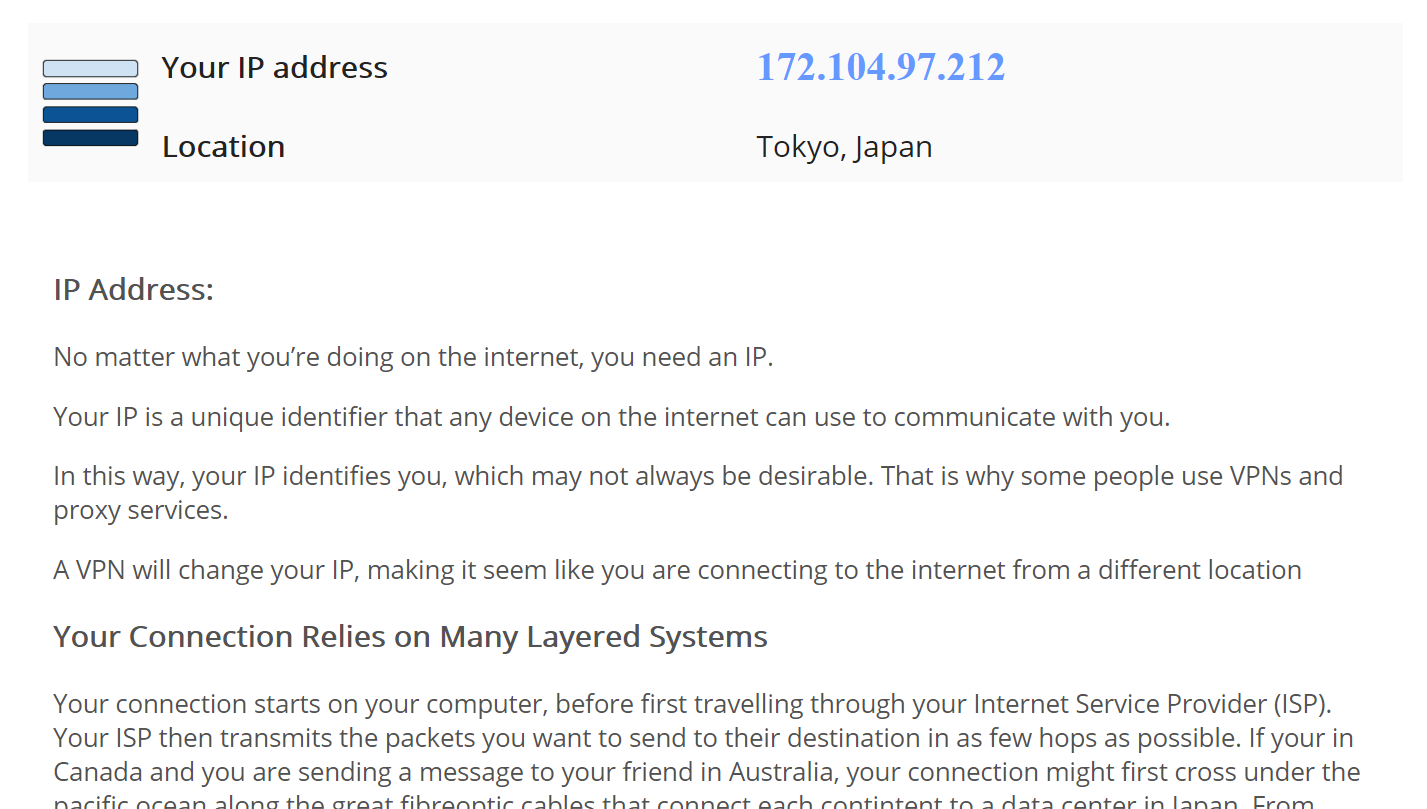
通过代理可以伪装一个ip,比如现在用一个科学上网工具,伪装的是日本ip,那这段代码会弹出浏览器显示如图信息:
Cookie
import http.cookiejar,urllib.request

cookie = http.cookiejar.CookieJar()

handler = urllib.request.HTTPCookieProcessor(cookie)

opener = urllib.request.build_opener(handler)

response = opener.open('http://www.baidu.com')

for item in cookie:

    print(item.name+"="+item.value)
import http.cookiejar,urllib.request

filename = "cookie.txt"

cookie = http.cookiejar.MozillaCookieJar(filename)

handler = urllib.request.HTTPCookieProcessor(cookie)

opener = urllib.request.build_opener(handler)

response = opener.open('http://www.baidu.com')

cookie.save(ignore_discard = True,ignore_expires = True)
import http.cookiejar,urllib.request

filename = "cookie.txt"

cookie = http.cookiejar.LWPCookieJar(filename)

handler = urllib.request.HTTPCookieProcessor(cookie)

opener = urllib.request.build_opener(handler)

response = opener.open('http://www.baidu.com')

cookie.save(ignore_discard = True,ignore_expires = True)
import http.cookiejar,urllib.request

cookie = http.cookiejar.LWPCookieJar()

cookie.load('cookie.txt',Ignore_discard = True,Ignore_expires=True)

handler = urllib.request.HTTPCookieProcessor(cookie)

opener = urllib.request.build_opener(handler)

response = opener.open('http://www.baidu.com')

print(response.read().decode('utf-8'))
异常处理
from urllib import request,error

try:

    response = request.urlopen('http://culdjiadaqingcal.com/index.html')

except error.URLError as e:

    print(e.reason)
from urllib import request,error

try:

    response  =request.urlopen('http://www.baidu.com/index.html')

except error.HTTPError as e:

    print(e.reason,e.code,e.headers,sep = '\n')

except error.URLError as e:

    print(e.reason)

else:

    print('Request Successfully')
import socket

import urllib.request

import urllib.error

try:

    response = urllib.request.urlopen('https://www.baidu.com',timeout=0.01)

except urllib.error.URLError as e:

    print(type(e.reason))

    if isinstance(e.reason,socket.timeout):

        print("TIME OUT")
URL解析
urlparse
urllib.parse.urlparse(urlstring,scheme='',allow_fragment=True)
from urllib.parse import urlparse

result = urlparse('http://www.baidu.com/index.html;user?id=5#comment')

print(type(result),result)
from urllib.parse import urlparse

result = urlparse('www.baidu.com/index.html;user?id=5#comment',scheme = 'https')

print(result)
from urllib.parse import urlparse

result = urlparse('http://www.baidu.com/index.html;user?id=5#comment',scheme = 'https')

print(result)
from urllib.parse import urlparse

result = urlparse('http://www.baidu.com/index.html;user?id=5#comment',allow_fragments=False)

print(result)
urlunparse
from urllib.parse import urlunparse

data = {'http','www.baidu.com','index.html','user','id=6','comment'}

print(urlunparse(data))
urljoin
from urllib.parse import urljoin

print(urljoin('http://www.baidu.com','FAQ.html'))

print(urljoin('http://www.baidu.com','https://curere.com/FAQ.html'))

print(urljoin('http://www.baidu.com/about.html','https://curere.com/FAQ.html'))

print(urljoin('http://www.baidu.com/about.html','https://curere.com/FAQ.html?question=2'))

print(urljoin('http://www.baidu.com?wd=abc','https://curere.com/index.php'))

print(urljoin('http://www.baidu.com','?catefory=2#comment'))

print(urljoin('www.baidu.com','?category=2#comment'))

print(urljoin('www.baidu.com#comment','?category=2'))
urlencode
from urllib.parse import urlencode

params = {

     'name':'jack',

    'age':22

}

base_url = 'http://www.baidu.com?'

url = base_url+urlencode(params)

print(url)
robotparser
import urllib.robotparser

rp = urllib.robotparser.RobotFileParser()

rp.set_url("http://www.musi-cal.com/robots.txt")

rp.read()

rrate = rp.request_rate("*")

rrate.requests

rrate.seconds

rp.crawl_delay("*")

rp.can_fetch("*", "http://www.musi-cal.com/cgi-bin/search?city=San+Francisco")

rp.can_fetch("*", "http://www.musi-cal.com/")
python爬虫知识点总结(三)urllib库详解的更多相关文章
- Python爬虫系列-Urllib库详解
Urllib库详解 Python内置的Http请求库: * urllib.request 请求模块 * urllib.error 异常处理模块 * urllib.parse url解析模块 * url ...
- 爬虫入门之urllib库详解(二)
爬虫入门之urllib库详解(二) 1 urllib模块 urllib模块是一个运用于URL的包 urllib.request用于访问和读取URLS urllib.error包括了所有urllib.r ...
- Python爬虫入门四之Urllib库的高级用法
1.设置Headers 有些网站不会同意程序直接用上面的方式进行访问,如果识别有问题,那么站点根本不会响应,所以为了完全模拟浏览器的工作,我们需要设置一些Headers 的属性. 首先,打开我们的浏览 ...
- 转 Python爬虫入门四之Urllib库的高级用法
静觅 » Python爬虫入门四之Urllib库的高级用法 1.设置Headers 有些网站不会同意程序直接用上面的方式进行访问,如果识别有问题,那么站点根本不会响应,所以为了完全模拟浏览器的工作,我 ...
- Python爬虫学习笔记-1.Urllib库
urllib 是python内置的基本库,提供了一系列用于操作URL的功能,我们可以通过它来做一个简单的爬虫. 0X01 基本使用 简单的爬取一个页面: import urllib2 request ...
- 爬虫(二):Urllib库详解
什么是Urllib: python内置的HTTP请求库 urllib.request : 请求模块 urllib.error : 异常处理模块 urllib.parse: url解析模块 urllib ...
- python WEB接口自动化测试之requests库详解
由于web接口自动化测试需要用到python的第三方库--requests库,运用requests库可以模拟发送http请求,再结合unittest测试框架,就能完成web接口自动化测试. 所以笔者今 ...
- urllib库详解 --Python3
相关:urllib是python内置的http请求库,本文介绍urllib三个模块:请求模块urllib.request.异常处理模块urllib.error.url解析模块urllib.parse. ...
- python爬虫(1)--Urllib库的基本使用
这里使用python2.7,pycharm进行代码编写 1.爬一个静态网页示例 import urllib2 response = urllib2.urlopen("http://www.b ...
随机推荐
- 在tomcat中用jndi配置数据源启动java web程序
1.在web.xml中添加: <resource-ref> <res-ref-name>jdbc/MTSDB</res-ref-name> <re ...
- Spark Streaming和Kafka整合开发指南(一)
Apache Kafka是一个分布式的消息发布-订阅系统.可以说,任何实时大数据处理工具缺少与Kafka整合都是不完整的.本文将介绍如何使用Spark Streaming从Kafka中接收数据,这里将 ...
- vsftpd 虚拟用户限定在虚拟用户目录
1.安装vsftpd yum -y install pam pam-devel db4 db4-tcl vsftpd 2.更名默认配置文件,以便恢复 cp /etc/vsftpd/vsftpd.con ...
- HTML5实现两个视频循环播放!
<!DOCTYPE html PUBLIC "-//W3C//DTD XHTML 1.0 Transitional//EN" "http://www.w3.org/ ...
- MySQL技术内幕InnoDB存储引擎(表&索引算法和锁)
表 4.1.innodb存储引擎表类型 innodb表类似oracle的IOT表(索引聚集表-indexorganized table),在innodb表中每张表都会有一个主键,如果在创建表时没有显示 ...
- 关于python webpy的request
获取get值i = web.input()keyword = i.get('keyword') 判断get值是否存在if i.has_key('keyword')
- BCH硬分叉在即,Bitcoin ABC和NChain两大阵营PK
混迹币圈,我们都知道,BTC分叉有了BCH,而近期BCH也将面临分叉,这次分叉将是Bitcoin ABC和NChain两大阵营的较量,最后谁能成为主导,我们拭目以待. 比特币现金(BCH)的价格自上周 ...
- /etc/init.d/nginx
#! /bin/sh PATH=/usr/local/sbin:/usr/local/bin:/sbin:/bin:/usr/sbin:/usr/bin DESC="nginx daemon ...
- A. Drazil and Date
这是codeforces#292 div2 的一道题,因为本人比较水,目前只能做div2了.问题简化版就是: 从 (0,0) 走到 (a, b) ,s 步能不能走完.每次能向上下左右走,且只能走一步. ...
- 常用的.gitignore文件
target/ !.mvn/wrapper/maven-wrapper.jar ### STS ### .apt_generated .classpath .factorypath .project ...