
构建ASP.NET MVC4+EF5+EasyUI+Unity2.x注入的后台管理系统(48)-工作流设计-起草新申请
原文:构建ASP.NET MVC4+EF5+EasyUI+Unity2.x注入的后台管理系统(48)-工作流设计-起草新申请
创建新表单之后,我们就可以起草申请了,申请按照严格的表单步骤和分支执行。
起草的同时,我们分解流转的规则中的审批人并保存,具体流程如下
接下来创建DrafContoller控制器,此控制器只有2个页面,一个Create(起草页面)Index(表单列表)
表单列表显示个人想法,我是根据分类直接获取其下表单,即Flow_Type下的Flow_Form
 public ActionResult Index()

        {

            List<Flow_TypeModel> list = m_BLL.GetList(ref setNoPagerAscBySort, "");

            foreach (var v in list)

            {

                v.formList = new List<Flow_FormModel>();

                List<Flow_FormModel> formList = formBLL.GetListByTypeId(v.Id);

                v.formList = formList;

            }

            ViewBag.DrafList = list;

            return View();

        }
Index ActionResult
@using App.Admin;

@using App.Common;

@using App.Models.Sys;

@using App.Lang;

@{

    ViewBag.Title = "起草申请";

    Layout = "~/Views/Shared/_Index_Layout.cshtml";

}

<div style="padding:10px;">

@foreach (var v in (List<App.Models.Flow.Flow_TypeModel>)ViewBag.DrafList)

{

    <fieldset class="accordion" style="margin: 0px; padding: 0px; padding-bottom:10px; margin-bottom: 10px;">

        <legend class="tabs-header panel-title" style="border: 0px; padding: 5px; margin: 20px; margin-bottom:5px;">@v.Name</legend>

        <div style="padding-left:20px;color:#808080">备注:@v.Remark</div>

        <div style="padding: 0px 20px 40px 20px;">

            @foreach (var r in v.formList)

            {

                <div style="float: left; width: 120px; margin:10px 0px 10px 0px;">

                    <a href="javascript:void(0)" class="easyui-linkbutton" data-options="plain:true,iconCls:'icon-details'" onclick="javascript:window.parent.addTab('@r.Name','/Flow/Draf/Create?id=@r.Id','icon-add')">@r.Name</a>

                </div>

            }

        </div>

    </fieldset>

}

    </div>
Index.cshtml
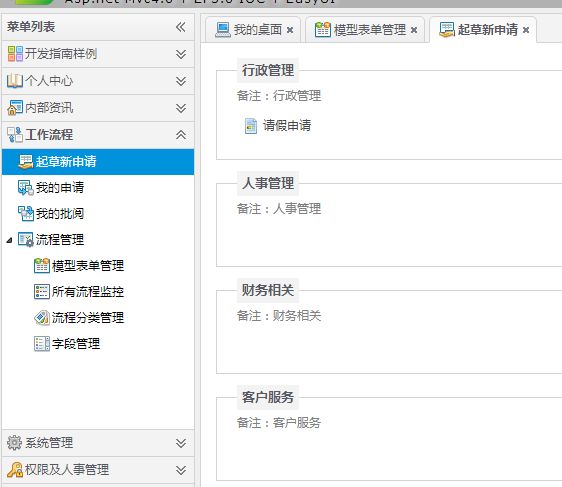
上面的表单列表简单完成之后,进入最复杂的一步,获取字段组成表单
获取字段组成表单可以做得很漂亮,即在设计表单的时候设计布局,直接读取布局,否则按照表单的控件顺序读取布局。
具体对比如下:
 VS
VS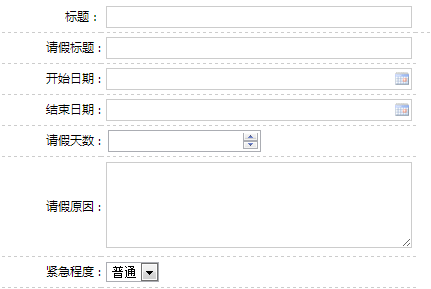
明显前者更利于打印和阅读。我们先布局第二种形式
根据表Flow_FormContent设置Create页面的固定头尾
@model App.Models.Flow.Flow_FormContentModel

@using App.Common;

@using App.Models.Flow;

@using App.Admin;

@using App.Models.Sys;

@{

    ViewBag.Title = "创建";

    Layout = "~/Views/Shared/_Index_Layout.cshtml";

    List<permModel> perm = (List<permModel>)ViewBag.Perm;

    if (perm == null)

    {

        perm = new List<permModel>();

    }

}

<script src="~/Scripts/My97DatePicker/WdatePicker.js"></script>

<script type="text/javascript">

    $(function () {

        $("#btnSave").click(function () {

            if ($("#Title").val() == "")

            {

                $.messageBox5s("提示", "表单标题必须填写!");

                return false;

            }

            if (CheckForm()) {

                $.ajax({

                url: "@Url.Action("Create")",

                type: "Post",

                data: $("form").serialize(),

                dataType: "json",

                success: function (data) {

                    if (data.type == 1) {

                        $.messageBox5s("添加成功!", data.message);

                        $("#btnSave").hide();

                    }

                    else {

                        window.parent.frameReturnByMes(data.message);

                    }

                }

            });

        }

        return false;

    });

        $("#btnReturn").click(function () {

            if ($("#btnSave").is(":hidden")) {

                window.parent.CloseCurrentWin();

            } else {

                $.messager.confirm('提示', '没有保存的数据将会丢失,你确定要返回吗?', function (r) {

                    if (r) {

                        window.parent.CloseCurrentWin();

                    }

                });

            }

    });

});

</script>

@Html.Raw(ViewBag.HtmlJS)

<div class="mvctool ">

@Html.ToolButton("btnSave", "icon-save", "保存", perm, "Create", true)

@Html.ToolButton("btnReturn", "icon-return", "返回",false)

</div>

@using (Html.BeginForm())

{

     <table class="fromEditTable setTextWidth300">

    <tbody>

             @Html.HiddenFor(model => model.Id)

             @Html.HiddenFor(model => model.FormId)

             @Html.HiddenFor(model => model.UserId)

             <input id="CreateTime" type="hidden" name="CreateTime" value="2000-1-1" />

         <input id="TimeOut" type="hidden" name="TimeOut" value="2111-1-1" />

            <tr>

            <td style="width:100px; text-align:right;">

                @Html.LabelFor(model => model.Title):

            </td>

            <td style="width:310px">

                @Html.EditorFor(model => model.Title)

            </td>

            <td>@Html.ValidationMessageFor(model => model.Title)</td>

            </tr>

             @Html.Raw(ViewBag.Html)

            <tr><td style='width:100px; text-align:right;'>紧急程度 :</td><td><select name="FormLevel" id="FormLevel"><option value="普通">普通</option><option value="重要">重要</option><option value="紧急">紧急</option></select></td></tr>

            </tbody>

</table>

}
代码
@Html.Raw(ViewBag.Html)就是我们的表单核心部分。所以Create必须返回ViewBag.Html内容为设计表单的JS和字段
这里代码有点别扭,因为有26个字段,所以要循环26个字段去判断是否有关联来读取。很麻烦。可以用反射来做可以省很多代码
先创建一个类,这个类是辅助工作流的通用类
using App.Models.Flow;

using System;

using System.Collections.Generic;

using System.Linq;

using System.Web;

namespace App.Admin

{

    public class FlowHelper

    {

        //获取指定类型的HTML表单

        public string GetInput(string type, string id, string attrNo)

        {

            string str = "";

            if (type == "文本")

            {

                str = "<input id='" + id + "'  name='" + attrNo + "'  type='text' />";

            }

            else if (type == "多行文本")

            {

                str = "<textarea id='" + id + "' name='" + attrNo + "'  cols='60' style='height: 80px;' rows='5'></textarea>";

            }

            else if (type == "日期")

            {

                str = "<input type='text'  name='" + attrNo + "' class='Wdate' onfocus=\"WdatePicker({dateFmt:'yyyy-MM-dd'})\"  id='" + id + "'  />";

            }

            else if (type == "时间")

            {

                str = "<input type='text'  name='" + attrNo + "' class='Wdate' onfocus=\"WdatePicker({dateFmt:'yyyy-MM-dd HH:mm'})\"  id='" + id + "'  />";

            }

            else if (type == "数字")

            {

                str = "<input type='number'  name='" + attrNo + "'  id='" + id + "'  />";

            }

            return str;

        }

    }

}
FlowHelper.cs
[SupportFilter]

        public ActionResult Create(string id)

        {

            ViewBag.Perm = GetPermission();

            ViewBag.Html = ExceHtmlJs(id);

            Flow_FormContentModel model = new Flow_FormContentModel();

            model.FormId = id;

            return View(model);

        }

        //根据设定公文,生成表单及控制条件

        private string ExceHtmlJs(string id)

        {

            //定义一个sb为生成HTML表单

            StringBuilder sbHtml = new StringBuilder();

            StringBuilder sbJS = new StringBuilder();

            sbJS.Append("<script type='text/javascript'>function CheckForm(){");

            Flow_FormModel model = formBLL.GetById(id);

            #region 判断流程是否有字段,有就生成HTML表单

            //获得对象的类型,model

            Type formType = model.GetType();

            //查找名称为"A-Z"的属性

            string[] arrStr = { "AttrA", "AttrB", "AttrC", "AttrD", "AttrE", "AttrF", "AttrG", "AttrH", "AttrI", "AttrJ", "AttrK"

                                  , "AttrL", "AttrM", "AttrN", "AttrO", "AttrP", "AttrQ", "AttrR", "AttrS", "AttrT", "AttrU"

                                  , "AttrV", "AttrW", "AttrX", "AttrY", "AttrZ"};

            foreach (string str in arrStr)

            {

                object o = formType.GetProperty(str).GetValue(model, null);

                if (o != null)

                {

                    sbHtml.Append(JuageExc(o.ToString(), str, ref sbJS));

                }

            }

            #endregion

            sbJS.Append("return true}</script>");

            ViewBag.HtmlJS = sbJS.ToString();

            return sbHtml.ToString();

        }

        private string JuageExc(string attr, string no,ref StringBuilder sbJS)

        {

            if (!string.IsNullOrEmpty(attr))

            {

                return GetHtml(attr, no, ref sbJS);

            }

            return "";

        }

            //获取指定名称的HTML表单

        private string GetHtml(string id, string no, ref StringBuilder sbJS)

        {

            StringBuilder sb = new StringBuilder();

            Flow_FormAttrModel attrModel = formAttrBLL.GetById(id);

            sb.AppendFormat("<tr><td style='width:100px; text-align:right;'>{0} :</td>", attrModel.Title);

            //获取指定类型的HTML表单

            sb.AppendFormat("<td>{0}</td></tr>", new FlowHelper().GetInput(attrModel.AttrType, attrModel.Name, no));

            sbJS.Append(attrModel.CheckJS);

            return sb.ToString();

        }
引入命名空间using System;
代码结构:上面没有什么特殊算法。主要是26个字段用反射来读取。自己细细消化一下就行
应该可以用了,点击请假申请看看!
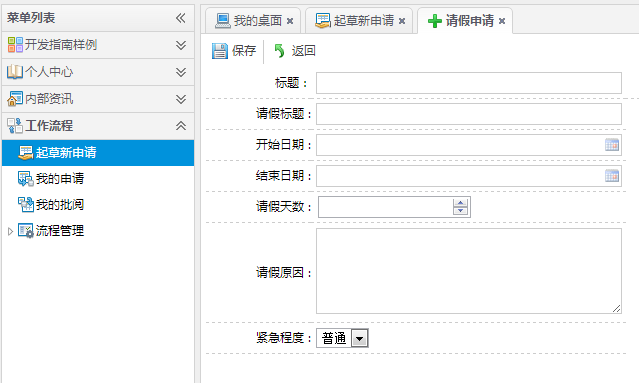
完成。可以起草新的申请了。接下来就是保存申请...
保存是最复杂的一步要取得表单,分解步骤,分解分支,最后指定审核人
看Create方法
 public JsonResult Create(Flow_FormContentModel model)

        {

            model.Id = ResultHelper.NewId;

            model.CreateTime = ResultHelper.NowTime;

            model.UserId = GetUserId();

            if (model != null && ModelState.IsValid)

            {

                if (formContentBLL.Create(ref errors, model))

                {

                    //当前的Form模版

                    Flow_FormModel formModel = formBLL.GetById(model.FormId);

                    //创建成功后把步骤取出

                    List<Flow_StepModel> stepModelList = stepBLL.GetList(ref setNoPagerAscBySort,model.FormId);

                    //查询步骤

                    bool IsEnd = true;

                    foreach (Flow_StepModel stepModel in stepModelList)

                    {

                        List<Flow_StepRuleModel> stepRuleModelList = stepRuleBLL.GetList(stepModel.Id);

                        //获取规则判断流转方向

                        foreach (Flow_StepRuleModel stepRuleModel in stepRuleModelList)

                        {

                           string val =new FlowHelper().GetFormAttrVal(stepRuleModel.AttrId, formModel, model);

                            //有满足不流程结束的条件

                           if (!JudgeVal(stepRuleModel.AttrId, val, stepRuleModel.Operator, stepRuleModel.Result))

                           {

                               if (stepRuleModel.NextStep != "")

                               {

                                   IsEnd = false;

                               }

                           }

                        }

                        //插入步骤审核表

                        Flow_FormContentStepCheckModel stepCheckModel = new Flow_FormContentStepCheckModel();

                        stepCheckModel.Id = ResultHelper.NewId;

                        stepCheckModel.ContentId = model.Id;

                        stepCheckModel.StepId = stepModel.Id;

                        stepCheckModel.State = ;//0不通过1通过2审核中

                        stepCheckModel.StateFlag = false;//true此步骤审核完成

                        stepCheckModel.CreateTime = ResultHelper.NowTime;

                        stepCheckModel.IsEnd = IsEnd;//是否流程的最后一步

                        if (stepCheckBLL.Create(ref errors, stepCheckModel))//新建步骤成功

                        {

                            //获得流转规则下的审核人员

                            List<string> userIdList = GetStepCheckMemberList(stepModel.Id,model.Id);

                            foreach (string userId in userIdList)

                            {

                                //批量建立步骤审核人表

                                Flow_FormContentStepCheckStateModel stepCheckModelState = new Flow_FormContentStepCheckStateModel();

                                stepCheckModelState.Id = ResultHelper.NewId;

                                stepCheckModelState.StepCheckId = stepCheckModel.Id;

                                stepCheckModelState.UserId = userId;

                                stepCheckModelState.CheckFlag = ;

                                stepCheckModelState.Reamrk = "";

                                stepCheckModelState.TheSeal = "";

                                stepCheckModelState.CreateTime = ResultHelper.NowTime;

                                stepCheckStateBLL.Create(ref errors, stepCheckModelState);

                            }

                        }

                        if (IsEnd)//如果是最后一步就无需要下面继续了

                        {

                            break;

                        }

                        IsEnd = true;

                    }

                    LogHandler.WriteServiceLog(GetUserId(), "Id" + model.Id + ",AttrA" + model.AttrA, "成功", "创建", "Flow_FormContent");

                    return Json(JsonHandler.CreateMessage(, Suggestion.InsertSucceed));

                }

                else

                {

                    string ErrorCol = errors.Error;

                    LogHandler.WriteServiceLog(GetUserId(), "Id" + model.Id + ",AttrA" + model.AttrA + "," + ErrorCol, "失败", "创建", "Flow_FormContent");

                    return Json(JsonHandler.CreateMessage(, Suggestion.InsertFail + ErrorCol));

                }

            }

            else

            {

                return Json(JsonHandler.CreateMessage(, Suggestion.InsertFail));

            }

        }
 //无分页获取

        public GridPager setNoPagerAscBySort = new GridPager()

        {

            rows = ,

            page = ,

            sort = "Sort",

            order = "asc"

        };

        //无分页获取

        public GridPager setNoPagerDescBySort = new GridPager()

        {

            rows = ,

            page = ,

            sort = "Sort",

            order = "desc"

        };
using System.Collections.Generic;

using System.Linq;

using System.Web.Mvc;

using App.Common;

using App.IBLL;

using App.Models.Sys;

using Microsoft.Practices.Unity;

using App.Flow.IBLL;

using App.Models.Flow;

using System.Text;

using System;

namespace App.Admin.Areas.Flow.Controllers

{

    public class DrafController : BaseController

    {

        [Dependency]

        public ISysUserBLL userBLL { get; set; }

        [Dependency]

        public IFlow_TypeBLL m_BLL { get; set; }

        [Dependency]

        public IFlow_FormBLL formBLL { get; set; }

        [Dependency]

        public IFlow_FormAttrBLL formAttrBLL { get; set; }

        [Dependency]

        public IFlow_FormContentBLL formContentBLL { get; set; }

        [Dependency]

        public IFlow_StepBLL stepBLL { get; set; }

        [Dependency]

        public IFlow_StepRuleBLL stepRuleBLL { get; set; }

        [Dependency]

        public IFlow_FormContentStepCheckBLL stepCheckBLL { get; set; }

        [Dependency]

        public IFlow_FormContentStepCheckStateBLL stepCheckStateBLL { get; set; }

        ValidationErrors errors = new ValidationErrors();

        public ActionResult Index()

        {

            List<Flow_TypeModel> list = m_BLL.GetList(ref setNoPagerAscBySort, "");

            foreach (var v in list)

            {

                v.formList = new List<Flow_FormModel>();

                List<Flow_FormModel> formList = formBLL.GetListByTypeId(v.Id);

                v.formList = formList;

            }

            ViewBag.DrafList = list;

            return View();

        }

        [HttpPost]

        [SupportFilter]

        public JsonResult Create(Flow_FormContentModel model)

        {

            model.Id = ResultHelper.NewId;

            model.CreateTime = ResultHelper.NowTime;

            model.UserId = GetUserId();

            if (model != null && ModelState.IsValid)

            {

                if (formContentBLL.Create(ref errors, model))

                {

                    //当前的Form模版

                    Flow_FormModel formModel = formBLL.GetById(model.FormId);

                    //创建成功后把步骤取出

                    List<Flow_StepModel> stepModelList = stepBLL.GetList(ref setNoPagerAscBySort,model.FormId);

                    //查询步骤

                    bool IsEnd = true;

                    foreach (Flow_StepModel stepModel in stepModelList)

                    {

                        List<Flow_StepRuleModel> stepRuleModelList = stepRuleBLL.GetList(stepModel.Id);

                        //获取规则判断流转方向

                        foreach (Flow_StepRuleModel stepRuleModel in stepRuleModelList)

                        {

                           string val =new FlowHelper().GetFormAttrVal(stepRuleModel.AttrId, formModel, model);

                            //有满足流程结束的条件

                           if (!JudgeVal(stepRuleModel.AttrId, val, stepRuleModel.Operator, stepRuleModel.Result))

                           {

                               if (stepRuleModel.NextStep != "")

                               {

                                   IsEnd = false;

                               }

                           }

                        }

                        //插入步骤审核表

                        Flow_FormContentStepCheckModel stepCheckModel = new Flow_FormContentStepCheckModel();

                        stepCheckModel.Id = ResultHelper.NewId;

                        stepCheckModel.ContentId = model.Id;

                        stepCheckModel.StepId = stepModel.Id;

                        stepCheckModel.State = ;//0不通过1通过2审核中

                        stepCheckModel.StateFlag = false;//true此步骤审核完成

                        stepCheckModel.CreateTime = ResultHelper.NowTime;

                        stepCheckModel.IsEnd = IsEnd;//是否流程的最后一步

                        if (stepCheckBLL.Create(ref errors, stepCheckModel))//新建步骤成功

                        {

                            //获得流转规则下的审核人员

                            List<string> userIdList = GetStepCheckMemberList(stepModel.Id,model.Id);

                            foreach (string userId in userIdList)

                            {

                                //批量建立步骤审核人表

                                Flow_FormContentStepCheckStateModel stepCheckModelState = new Flow_FormContentStepCheckStateModel();

                                stepCheckModelState.Id = ResultHelper.NewId;

                                stepCheckModelState.StepCheckId = stepCheckModel.Id;

                                stepCheckModelState.UserId = userId;

                                stepCheckModelState.CheckFlag = ;

                                stepCheckModelState.Reamrk = "";

                                stepCheckModelState.TheSeal = "";

                                stepCheckModelState.CreateTime = ResultHelper.NowTime;

                                stepCheckStateBLL.Create(ref errors, stepCheckModelState);

                            }

                        }

                        if (IsEnd)//如果是最后一步就无需要下面继续了

                        {

                            break;

                        }

                        IsEnd = true;

                    }

                    LogHandler.WriteServiceLog(GetUserId(), "Id" + model.Id + ",AttrA" + model.AttrA, "成功", "创建", "Flow_FormContent");

                    return Json(JsonHandler.CreateMessage(, Suggestion.InsertSucceed));

                }

                else

                {

                    string ErrorCol = errors.Error;

                    LogHandler.WriteServiceLog(GetUserId(), "Id" + model.Id + ",AttrA" + model.AttrA + "," + ErrorCol, "失败", "创建", "Flow_FormContent");

                    return Json(JsonHandler.CreateMessage(, Suggestion.InsertFail + ErrorCol));

                }

            }

            else

            {

                return Json(JsonHandler.CreateMessage(, Suggestion.InsertFail));

            }

        }

        public List<string> GetStepCheckMemberList(string stepId,string formContentId)

        {

            List<string> userModelList = new List<string>();

            Flow_StepModel model = stepBLL.GetById(stepId);

            if (model.FlowRule == "上级")

            {

                SysUserModel userModel = userBLL.GetById(GetUserId());

                string[] array = userModel.Lead.Split(',');//获得领导,可能有多个领导

                foreach (string str in array)

                {

                    userModelList.Add(str);

                }

            }

            else if (model.FlowRule == "职位")

            {

                string[] array = model.Execution.Split(',');//获得领导,可能有多个领导

                foreach (string str in array)

                {

                    List<SysUserModel> userList = userBLL.GetListByPosId(str);

                    foreach (SysUserModel userModel in userList)

                    {

                        userModelList.Add(userModel.Id);

                    }

                }

            }

            else if (model.FlowRule == "部门")

            {

                GridPager pager = new GridPager()

                {

                    rows = ,

                    page = ,

                    sort = "Id",

                    order = "desc"

                };

                string[] array = model.Execution.Split(',');//获得领导,可能有多个领导

                foreach (string str in array)

                {

                    List<SysUserModel> userList = userBLL.GetUserByDepId(ref pager, str, "");

                    foreach (SysUserModel userModel in userList)

                    {

                        userModelList.Add(userModel.Id);

                    }

                }

            }

            else if (model.FlowRule == "人员")

            {

                string[] array = model.Execution.Split(',');//获得领导,可能有多个领导

                foreach (string str in array)

                {

                    userModelList.Add(str);

                }

            }

            else if (model.FlowRule == "自选")

            {

                string users  = formContentBLL.GetById(formContentId).CustomMember;

                string[] array = users.Split(',');//获得领导,可能有多个领导

                foreach (string str in array)

                {

                    userModelList.Add(str);

                }

            }

            return userModelList;

        }

        //对比

        private bool JudgeVal(string attrId, string rVal, string cVal, string lVal)

        {

            string attrType = formAttrBLL.GetById(attrId).AttrType;

            return new FlowHelper().Judge(attrType, rVal, cVal, lVal);

        }

        [SupportFilter]

        public ActionResult Create(string id)

        {

            ViewBag.Perm = GetPermission();

            ViewBag.Html = ExceHtmlJs(id);

            Flow_FormContentModel model = new Flow_FormContentModel();

            model.FormId = id;

            return View(model);

        }

        //根据设定公文,生成表单及控制条件

        private string ExceHtmlJs(string id)

        {

            //定义一个sb为生成HTML表单

            StringBuilder sbHtml = new StringBuilder();

            StringBuilder sbJS = new StringBuilder();

            sbJS.Append("<script type='text/javascript'>function CheckForm(){");

            Flow_FormModel model = formBLL.GetById(id);

            #region 判断流程是否有字段,有就生成HTML表单

            //获得对象的类型,model

            Type formType = model.GetType();

            //查找名称为"A-Z"的属性

            string[] arrStr = { "AttrA", "AttrB", "AttrC", "AttrD", "AttrE", "AttrF", "AttrG", "AttrH", "AttrI", "AttrJ", "AttrK"

                                  , "AttrL", "AttrM", "AttrN", "AttrO", "AttrP", "AttrQ", "AttrR", "AttrS", "AttrT", "AttrU"

                                  , "AttrV", "AttrW", "AttrX", "AttrY", "AttrZ"};

            foreach (string str in arrStr)

            {

                object o = formType.GetProperty(str).GetValue(model, null);

                if (o != null)

                {

                    sbHtml.Append(JuageExc(o.ToString(), str, ref sbJS));

                }

            }

            #endregion

            sbJS.Append("return true}</script>");

            ViewBag.HtmlJS = sbJS.ToString();

            return sbHtml.ToString();

        }

        private string JuageExc(string attr, string no,ref StringBuilder sbJS)

        {

            if (!string.IsNullOrEmpty(attr))

            {

                return GetHtml(attr, no, ref sbJS);

            }

            return "";

        }

        //获取指定名称的HTML表单

        private string GetHtml(string id, string no, ref StringBuilder sbJS)

        {

            StringBuilder sb = new StringBuilder();

            Flow_FormAttrModel attrModel = formAttrBLL.GetById(id);

            sb.AppendFormat("<tr><td style='width:100px; text-align:right;'>{0} :</td>", attrModel.Title);

            //获取指定类型的HTML表单

            sb.AppendFormat("<td>{0}</td></tr>", new FlowHelper().GetInput(attrModel.AttrType, attrModel.Name, no));

            sbJS.Append(attrModel.CheckJS);

            return sb.ToString();

        }

    }

}
FlowHelper.cs
public List<string> GetStepCheckMemberList(string stepId,string formContentId)

        {

            List<string> userModelList = new List<string>();

            Flow_StepModel model = stepBLL.GetById(stepId);

            if (model.FlowRule == "上级")

            {

                SysUserModel userModel = userBLL.GetById(GetUserId());

                string[] array = userModel.Lead.Split(',');//获得领导,可能有多个领导

                foreach (string str in array)

                {

                    userModelList.Add(str);

                }

            }

            else if (model.FlowRule == "职位")

            {

                string[] array = model.Execution.Split(',');//获得领导,可能有多个领导

                foreach (string str in array)

                {

                    List<SysUserModel> userList = userBLL.GetListByPosId(str);

                    foreach (SysUserModel userModel in userList)

                    {

                        userModelList.Add(userModel.Id);

                    }

                }

            }

            else if (model.FlowRule == "部门")

            {

                GridPager pager = new GridPager()

                {

                    rows = ,

                    page = ,

                    sort = "Id",

                    order = "desc"

                };

                string[] array = model.Execution.Split(',');//获得领导,可能有多个领导

                foreach (string str in array)

                {

                    List<SysUserModel> userList = userBLL.GetUserByDepId(ref pager, str, "");

                    foreach (SysUserModel userModel in userList)

                    {

                        userModelList.Add(userModel.Id);

                    }

                }

            }

            else if (model.FlowRule == "人员")

            {

                string[] array = model.Execution.Split(',');//获得领导,可能有多个领导

                foreach (string str in array)

                {

                    userModelList.Add(str);

                }

            }

            else if (model.FlowRule == "自选")

            {

                string users  = formContentBLL.GetById(formContentId).CustomMember;

                string[] array = users.Split(',');//获得领导,可能有多个领导

                foreach (string str in array)

                {

                    userModelList.Add(str);

                }

            }

            return userModelList;

        }
获取人员代码
代码分析:
1.填充表单内容Flow_FormContent
2.获得表单步骤Flow_Step
3.根据步骤获得Flow_StepRule
4.取得判断流程方向的标示(是否结束)
5.插入审批人
需要慢慢消化,分解过程比较复杂
构建ASP.NET MVC4+EF5+EasyUI+Unity2.x注入的后台管理系统(48)-工作流设计-起草新申请的更多相关文章
- 构建ASP.NET MVC4+EF5+EasyUI+Unity2.x注入的后台管理系统(1)-前言与目录(持续更新中...)
转自:http://www.cnblogs.com/ymnets/p/3424309.html 曾几何时我想写一个系列的文章,但是由于工作很忙,一直没有时间更新博客.博客园园龄都1年了,却一直都是空空 ...
- 构建ASP.NET MVC4+EF5+EasyUI+Unity2.x注入的后台管理系统(47)-工作流设计-补充
原文:构建ASP.NET MVC4+EF5+EasyUI+Unity2.x注入的后台管理系统(47)-工作流设计-补充 系列目录 补充一下,有人要表单的代码,这个用代码生成器生成表Flow_Form表 ...
- 构建ASP.NET MVC4+EF5+EasyUI+Unity2.x注入的后台管理系统(46)-工作流设计-设计分支
原文:构建ASP.NET MVC4+EF5+EasyUI+Unity2.x注入的后台管理系统(46)-工作流设计-设计分支 系列目录 步骤设置完毕之后,就要设置好流转了,比如财务申请大于50000元( ...
- 构建ASP.NET MVC4+EF5+EasyUI+Unity2.x注入的后台管理系统(45)-工作流设计-设计步骤
原文:构建ASP.NET MVC4+EF5+EasyUI+Unity2.x注入的后台管理系统(45)-工作流设计-设计步骤 系列目录 步骤设计很重要,特别是规则的选择. 我这里分为几个规则 1.按自行 ...
- 构建ASP.NET MVC4+EF5+EasyUI+Unity2.x注入的后台管理系统(44)-工作流设计-设计表单
原文:构建ASP.NET MVC4+EF5+EasyUI+Unity2.x注入的后台管理系统(44)-工作流设计-设计表单 系列目录 设计表单是比较复杂的一步,完成一个表单的设计其实很漫长,主要分为四 ...
- 构建ASP.NET MVC4+EF5+EasyUI+Unity2.x注入的后台管理系统(43)-工作流设计-字段分类设计
原文:构建ASP.NET MVC4+EF5+EasyUI+Unity2.x注入的后台管理系统(43)-工作流设计-字段分类设计 系列目录 建立好42节的表之后,每个字段英文表示都是有意义的说明.先建立 ...
- 构建ASP.NET MVC4+EF5+EasyUI+Unity2.x注入的后台管理系统(42)-工作流设计01
原文:构建ASP.NET MVC4+EF5+EasyUI+Unity2.x注入的后台管理系统(42)-工作流设计01 工作流在实际应用中还是比较广泛,网络中存在很多工作流的图形化插件,可以做到拉拽的工 ...
- 构建ASP.NET MVC4+EF5+EasyUI+Unity2.x注入的后台管理系统(40)-精准在线人数统计实现-【过滤器+Cache】
原文:构建ASP.NET MVC4+EF5+EasyUI+Unity2.x注入的后台管理系统(40)-精准在线人数统计实现-[过滤器+Cache] 系列目录 上次的探讨没有任何结果,我浏览了大量的文章 ...
- 构建ASP.NET MVC4+EF5+EasyUI+Unity2.x注入的后台管理系统(41)-组织架构
原文:构建ASP.NET MVC4+EF5+EasyUI+Unity2.x注入的后台管理系统(41)-组织架构 本节开始我们要实现工作流,此工作流可以和之前的所有章节脱离关系,也可以紧密合并. 我们当 ...
随机推荐
- JavaScript学习心得(五)
一时间 1970年1月1日是电脑常用的时间参考点,称为纪元(Epoch)或者UNIX时间戳(UNIX Epoch).JavaScript中的Date对象能够表示1970年1月1日子夜前后1亿天之内的任 ...
- PHP substr截取中文字符出现乱码的问题解疑
我们在使用PHP substr截取中文字符的时候,经常会出现乱码的情况,导致程序无法正常运行,这时怎么引起的呢?通过分析,我们知道,主要是substr可能硬生生的将一个中文字符“锯”成两半.解决办法: ...
- Shell之test
test命令用法.功能:检查文件和比较值 1)判断表达式 if test (表达式为真) if test !表达式为假 test 表达式1 –a 表达式2 两个表达式 ...
- button 垂直分布
UIButton *button = [UIButton buttonWithType:UIButtonTypeCustom];//button的类型 button.frame = CGRectMak ...
- rust尝鲜
官网 http://www.rust-lang.org/ 下载链接 http://static.rust-lang.org/dist/rust-0.10-i686-unknown-linux-gnu. ...
- initWithCoder: 与initWithFrame:
之前一直用代码来编写画面,现在着手使用storyboard和xib来构筑画面,遇到initWithCoder方法, 故查了下,initWithCoder方法的调用,看了篇博客,链接如下: http:/ ...
- bzoj 1022: [SHOI2008]小约翰的游戏John anti_nim游戏
1022: [SHOI2008]小约翰的游戏John Time Limit: 1 Sec Memory Limit: 162 MBSubmit: 1189 Solved: 734[Submit][ ...
- Codeforces Round #205 (Div. 2) : B
如果某个数出现的次数大于或等于2次,那么平均分配到两个容器里面: 这里利用一个k来使得当出现次数为奇数时候分配得更加均匀: 剩下的就平均分配到两个容器里: 代码: #include<iostre ...
- Android 模拟HTTP协议的编码问题 Android默认编码UTF-8
Android通过GET和POST方法请求服务器和浏览器请求的过程是不一样的. 浏览器请求服务器的时候会先将中文进行UTF-8编码,然后再发送到服务器端. Android编程下我们需要通过URLEnc ...
- ExecutorService介绍2
Thread和ExecutorService的区别 使用Thread,当子线程执行结束后,主线程如果没有其他执行任务,主线程会终止. /** * Created by litao on 15/10/7 ...