
《DSP using MATLAB》Problem 8.38

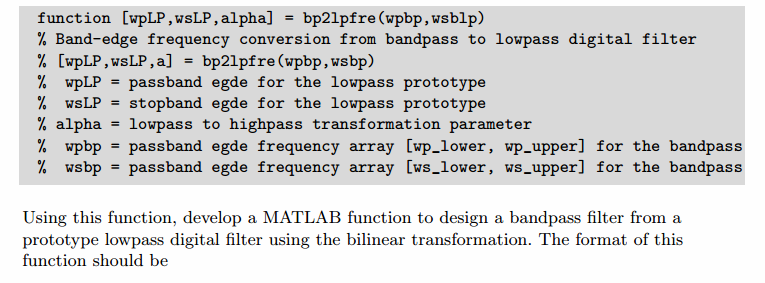
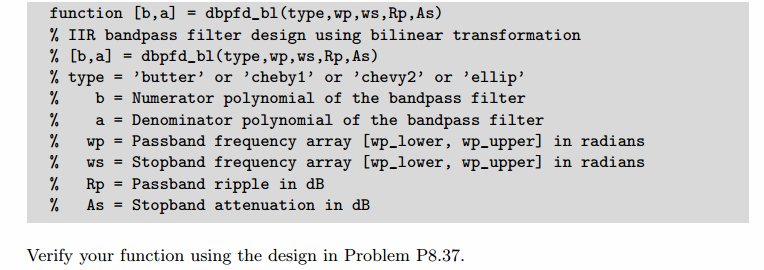
代码:
function [wpLP, wsLP, alpha] = bp2lpfre(wpbp, wsbp)

% Band-edge frequency conversion from bandpass to lowpass digital filter

% -------------------------------------------------------------------------

% [wpLP, wsLP, alpha] = bp2lpfre(wpbp, wsbp)

%   wpLP = passband edge for the lowpass digital prototype

%   wsLP = stopband edge for the lowpass digital prototype

%  alpha = lowpass to bandpass transformation parameter

%   wpbp = passband edge frequency array [wp_lower, wp_upper] for the bandpass

%   wshp = stopband edge frequency array [ws_lower, ws_upper] for the bandpass

%

%

% Determine the digital lowpass cutoff frequencies:

wpLP = 0.2*pi;

     K = cot((wpbp(2)-wpbp(1))/2)*tan(wpLP/2);

  beta = cos((wpbp(2)+wpbp(1))/2)/cos((wpbp(2)-wpbp(1))/2);

alpha1 = -2*beta*K/(K+1);

alpha2 = (K-1)/(K+1);

alpha = [alpha1, alpha2];

wsLP = -angle(-(exp(-2*j*wsbp(2))+alpha1*exp(-j*wsbp(2))+alpha2)/(alpha2*exp(-2*j*wsbp(2))+alpha1*exp(-j*wsbp(2))+1))

%wsLP = angle(-(exp(-2*j*wsbp(1))+alpha1*exp(-j*wsbp(1))+alpha2)/(alpha2*exp(-2*j*wsbp(1))+alpha1*exp(-j*wsbp(1))+1))
主程序代码:
%% ------------------------------------------------------------------------

%%            Output Info about this m-file

fprintf('\n***********************************************************\n');

fprintf('        <DSP using MATLAB> Problem 8.38.3 \n\n');

banner();

%% ------------------------------------------------------------------------

% Digital Filter Specifications:   Chebyshev-2 bandpass

wsbp = [0.30*pi 0.60*pi];             % digital stopband freq in rad

wpbp = [0.40*pi 0.50*pi];             % digital passband freq in rad

  Rp = 0.50;                          % passband ripple in dB

  As = 50;                            % stopband attenuation in dB

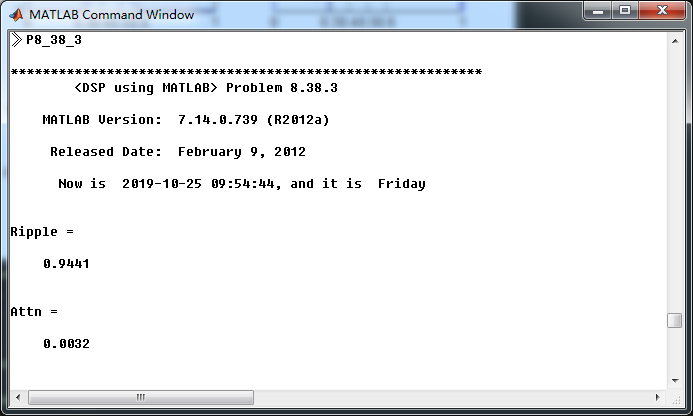
Ripple = 10 ^ (-Rp/20)           % passband ripple in absolute

Attn = 10 ^ (-As/20)             % stopband attenuation in absolute

fprintf('\n*******Digital bandpass, Coefficients of DIRECT-form***********\n');

[bbp, abp] = cheb2bpf(wpbp, wsbp, Rp, As);

[C, B, A] = dir2cas(bbp, abp)

% Calculation of Frequency Response:

[dbbp, magbp, phabp, grdbp, wwbp] = freqz_m(bbp, abp);

% ---------------------------------------------------------------

%    find Actual Passband Ripple and Min Stopband attenuation

% ---------------------------------------------------------------

delta_w = 2*pi/1000;

Rp_bp = -(min(dbbp(ceil(wpbp(1)/delta_w+1):1:ceil(wpbp(2)/delta_w+1))));      % Actual Passband Ripple

fprintf('\nActual Passband Ripple is %.4f dB.\n', Rp_bp);

As_bp = -round(max(dbbp(1:1:ceil(wsbp(1)/delta_w)+1)));                    % Min Stopband attenuation

fprintf('\nMin Stopband attenuation is %.4f dB.\n\n', As_bp);

%% -----------------------------------------------------------------

%%                             Plot

%% -----------------------------------------------------------------

figure('NumberTitle', 'off', 'Name', 'Problem 8.38.3 Chebyshev-2 bp by cheb2bpf function')

set(gcf,'Color','white');

M = 1;                          % Omega max

subplot(2,2,1); plot(wwbp/pi, magbp); axis([0, M, 0, 1.2]); grid on;

xlabel('Digital frequency in \pi units'); ylabel('|H|'); title('Magnitude Response');

set(gca, 'XTickMode', 'manual', 'XTick', [0, 0.3, 0.4, 0.5, 0.6, M]);

set(gca, 'YTickMode', 'manual', 'YTick', [0, 0.9441, 1]);

subplot(2,2,2); plot(wwbp/pi, dbbp); axis([0, M, -100, 2]); grid on;

xlabel('Digital frequency in \pi units'); ylabel('Decibels'); title('Magnitude in dB');

set(gca, 'XTickMode', 'manual', 'XTick', [0, 0.3, 0.4, 0.5, 0.6, M]);

set(gca, 'YTickMode', 'manual', 'YTick', [-80, -50, -1, 0]);

set(gca,'YTickLabelMode','manual','YTickLabel',['80'; '50';'1 ';' 0']);

subplot(2,2,3); plot(wwbp/pi, phabp/pi); axis([0, M, -1.1, 1.1]); grid on;

xlabel('Digital frequency in \pi nuits'); ylabel('radians in \pi units'); title('Phase Response');

set(gca, 'XTickMode', 'manual', 'XTick', [0, 0.3, 0.4, 0.5, 0.6, M]);

set(gca, 'YTickMode', 'manual', 'YTick', [-1:0.5:1]);

subplot(2,2,4); plot(wwbp/pi, grdbp); axis([0, M, 0, 80]); grid on;

xlabel('Digital frequency in \pi units'); ylabel('Samples'); title('Group Delay');

set(gca, 'XTickMode', 'manual', 'XTick', [0, 0.3, 0.4, 0.5, 0.6, M]);

set(gca, 'YTickMode', 'manual', 'YTick', [0:20:80]);

figure('NumberTitle', 'off', 'Name', 'Problem 8.38.3 Pole-Zero Plot')

set(gcf,'Color','white');

zplane(bbp, abp);

title(sprintf('Pole-Zero Plot'));

%pzplotz(b,a);

% -----------------------------------------------------

%              method 2  cheby2 function

% -----------------------------------------------------

% Calculation of Chebyshev-2 filter parameters:

[N, wn] = cheb2ord(wpbp/pi, wsbp/pi, Rp, As);

fprintf('\n  ********* Chebyshev-2 Digital Bandpass Filter Order is = %3.0f \n', 2*N)

% Digital Chebyshev-2 Bandpass Filter Design:

[bbp, abp] = cheby2(N, As, wn);

[C, B, A] = dir2cas(bbp, abp)

% Calculation of Frequency Response:

[dbbp, magbp, phabp, grdbp, wwbp] = freqz_m(bbp, abp);

% ---------------------------------------------------------------

%    find Actual Passband Ripple and Min Stopband attenuation

% ---------------------------------------------------------------

delta_w = 2*pi/1000;

Rp_bp = -(min(dbbp(ceil(wpbp(1)/delta_w+1):1:ceil(wpbp(2)/delta_w+1))));      % Actual Passband Ripple

fprintf('\nActual Passband Ripple is %.4f dB.\n', Rp_bp);

As_bp = -round(max(dbbp(1:1:ceil(wsbp(1)/delta_w)+1)));                    % Min Stopband attenuation

fprintf('\nMin Stopband attenuation is %.4f dB.\n\n', As_bp);

%% -----------------------------------------------------------------

%%                             Plot

%% -----------------------------------------------------------------

figure('NumberTitle', 'off', 'Name', 'Problem 8.38.3 Chebyshev-2 bp by cheby2 function')

set(gcf,'Color','white');

M = 1;                          % Omega max

subplot(2,2,1); plot(wwbp/pi, magbp); axis([0, M, 0, 1.2]); grid on;

xlabel('Digital frequency in \pi units'); ylabel('|H|'); title('Magnitude Response');

set(gca, 'XTickMode', 'manual', 'XTick', [0, 0.3, 0.4, 0.5, 0.6, M]);

set(gca, 'YTickMode', 'manual', 'YTick', [0, 0.9441, 1]);

subplot(2,2,2); plot(wwbp/pi, dbbp); axis([0, M, -100, 2]); grid on;

xlabel('Digital frequency in \pi units'); ylabel('Decibels'); title('Magnitude in dB');

set(gca, 'XTickMode', 'manual', 'XTick', [0, 0.3, 0.4, 0.5, 0.6, M]);

set(gca, 'YTickMode', 'manual', 'YTick', [-80, -50, -1, 0]);

set(gca,'YTickLabelMode','manual','YTickLabel',['80'; '50';'1 ';' 0']);

subplot(2,2,3); plot(wwbp/pi, phabp/pi); axis([0, M, -1.1, 1.1]); grid on;

xlabel('Digital frequency in \pi nuits'); ylabel('radians in \pi units'); title('Phase Response');

set(gca, 'XTickMode', 'manual', 'XTick', [0, 0.3, 0.4, 0.5, 0.6, M]);

set(gca, 'YTickMode', 'manual', 'YTick', [-1:0.5:1]);

subplot(2,2,4); plot(wwbp/pi, grdbp); axis([0, M, 0, 40]); grid on;

xlabel('Digital frequency in \pi units'); ylabel('Samples'); title('Group Delay');

set(gca, 'XTickMode', 'manual', 'XTick', [0, 0.3, 0.4, 0.5, 0.6, M]);

set(gca, 'YTickMode', 'manual', 'YTick', [0:10:40]);
运行结果:
通带、阻带指标,绝对值单位,
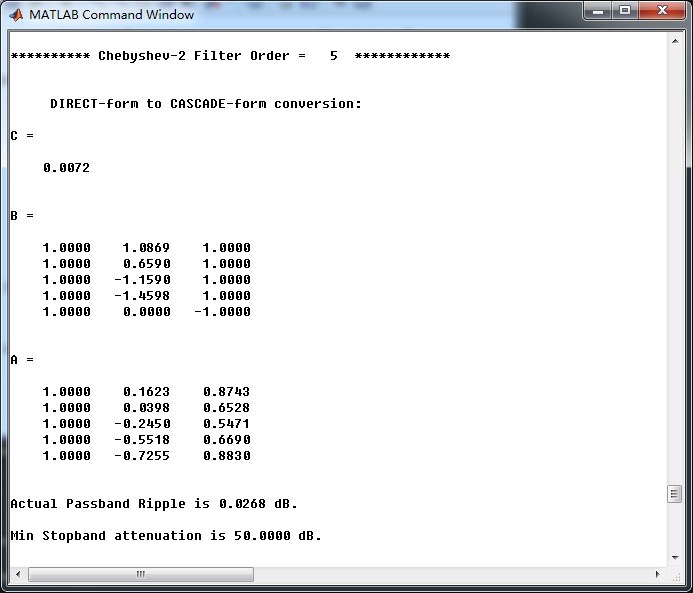
采用cheb2bpf子函数,得到Chebyshev-2型数字带通滤波器,其系统函数串联形式的系数如下
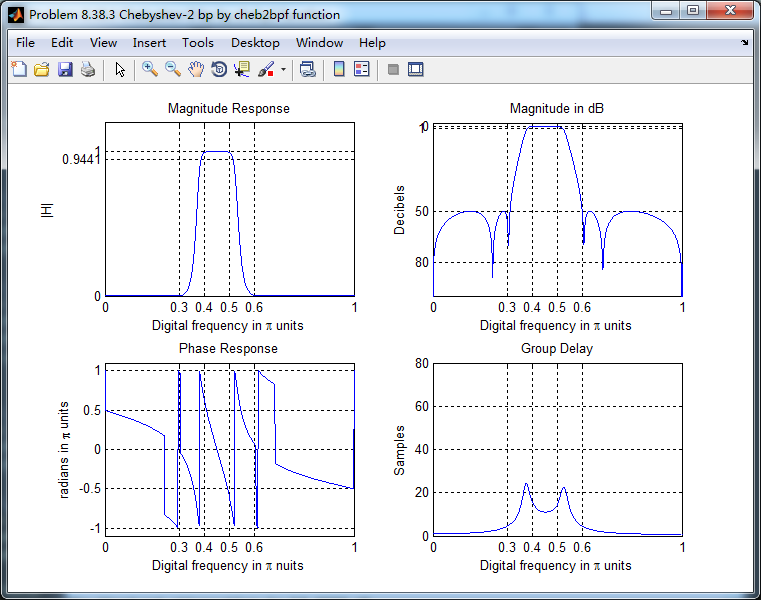
cheb2bpf函数得数字带通滤波器,幅度谱、相位谱和群延迟响应
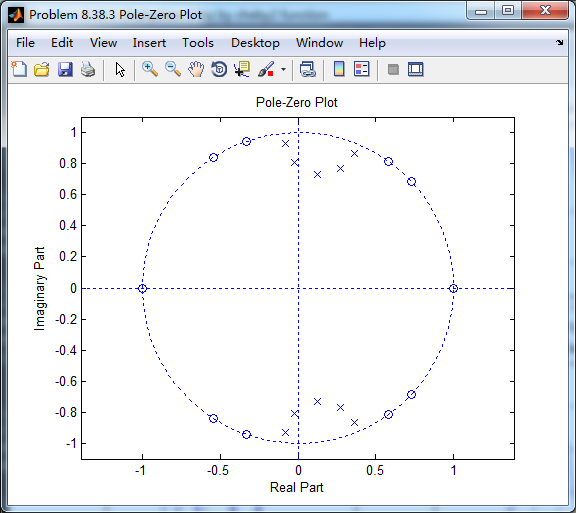
系统函数零极点图
采用cheby2函数(MATLAB工具箱函数)得到Chebyshev-2型数字带通滤波器,其系统函数串联形式的系数如下,
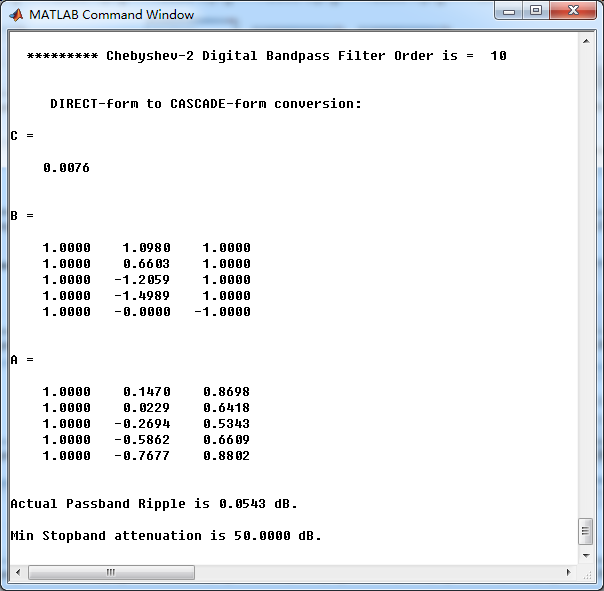
上图中的系数和cheb2bpf函数得到的系数相比,略有不同。
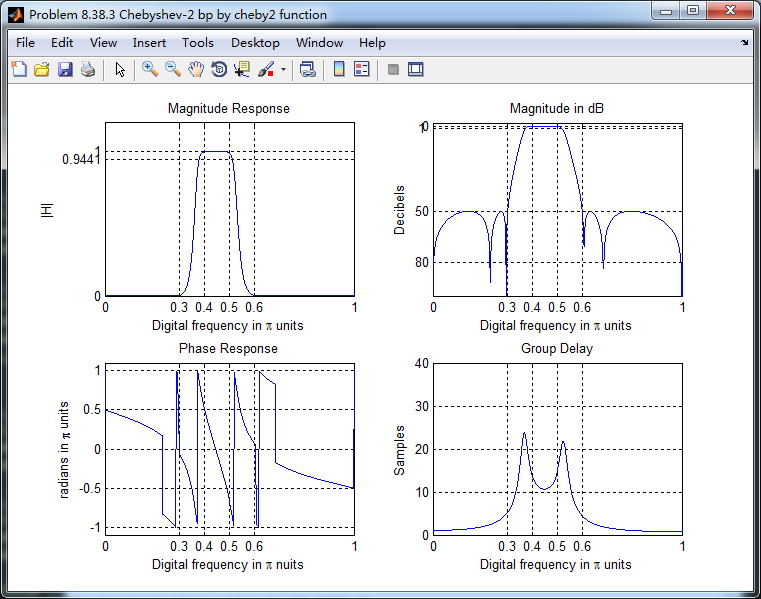
cheby2函数(MATLAB工具箱函数),得到的Chebyshev-2型数字带通滤波器,其幅度谱、相位谱和群延迟响应如下图
《DSP using MATLAB》Problem 8.38的更多相关文章
- 《DSP using MATLAB》Problem 5.38
代码: %% ++++++++++++++++++++++++++++++++++++++++++++++++++++++++++++++++++++++++++++++++ %% Output In ...
- 《DSP using MATLAB》Problem 7.38
代码: %% ++++++++++++++++++++++++++++++++++++++++++++++++++++++++++++++++++++++++++++++++ %% Output In ...
- 《DSP using MATLAB》Problem 7.27
代码: %% ++++++++++++++++++++++++++++++++++++++++++++++++++++++++++++++++++++++++++++++++ %% Output In ...
- 《DSP using MATLAB》Problem 7.26
注意:高通的线性相位FIR滤波器,不能是第2类,所以其长度必须为奇数.这里取M=31,过渡带里采样值抄书上的. 代码: %% +++++++++++++++++++++++++++++++++++++ ...
- 《DSP using MATLAB》Problem 7.25
代码: %% ++++++++++++++++++++++++++++++++++++++++++++++++++++++++++++++++++++++++++++++++ %% Output In ...
- 《DSP using MATLAB》Problem 7.24
又到清明时节,…… 注意:带阻滤波器不能用第2类线性相位滤波器实现,我们采用第1类,长度为基数,选M=61 代码: %% +++++++++++++++++++++++++++++++++++++++ ...
- 《DSP using MATLAB》Problem 7.23
%% ++++++++++++++++++++++++++++++++++++++++++++++++++++++++++++++++++++++++++++++++ %% Output Info a ...
- 《DSP using MATLAB》Problem 7.16
使用一种固定窗函数法设计带通滤波器. 代码: %% ++++++++++++++++++++++++++++++++++++++++++++++++++++++++++++++++++++++++++ ...
- 《DSP using MATLAB》Problem 7.15
用Kaiser窗方法设计一个台阶状滤波器. 代码: %% +++++++++++++++++++++++++++++++++++++++++++++++++++++++++++++++++++++++ ...
随机推荐
- PKUSC订正
Day1 T2:最大前缀和 枚举答案集合(不直接枚举答案数,相当于状态的离散化),这个集合成为答案当且仅当存在方案使得答案集合的排列后缀和>=0(如果<0就可以去掉显然更优),答案补集的前 ...
- Linux CentOS-7.0上安装Tomcat7
Linux CentOS-7.0上安装Tomcat7 安装说明 安装环境:CentOS-7.0.1406安装方式:源码安装 软件:apache-tomcat-7.0.29.tar.gz 下载地址: ...
- quartz的使用(三)
1.在数据源数据库中执行下载的quartz的sql语句(创建11张表),其中表头qrtz_可以在在配置文件中更改,对应表创建时更改org.quartz.jobStore.tablePrefix=qrt ...
- Java ----单个list 删除元素
转载:https://www.cnblogs.com/lostyears/p/8809336.html 方式一:使用Iterator的remove()方法 public class Test { pu ...
- poi之Excel上传
poi之Excel上传 @RequestMapping(value = "/import", method = RequestMethod.POST) public String ...
- 限时免费 GoodSync 10 同步工具【转】
一款不错的软件,正在开发本身的云盘,要是能够云执行任务就更好了! GoodSync 10是一种简单和可靠的文件备份和文件同步软件.它会自动分析.同步,并备份您的电子邮件.珍贵的家庭照片.联系人,.MP ...
- post请求传文件
public static JSONObject doFormDataPost(File file, String sURL) throws IOException { HttpClient cont ...
- Api:temple
ylbtech-Api: 1.返回顶部 2.返回顶部 3.返回顶部 4.返回顶部 5.返回顶部 6.返回顶部 作者:ylbtech出处:http://ylbtech.cnb ...
- 一幅图解决R语言绘制图例的各种问题
一幅图解决R语言绘制图例的各种问题 用R语言画图的小伙伴们有木有这样的感受,"命令写的很完整,运行没有报错,可图例藏哪去了?""图画的很美,怎么总是图例不协调?" ...
- [kuangbin带你飞]专题一 简单搜索 - N - Find a way
正确代码: #include<iostream> #include<queue> #define N 210 #define inf 0xffffff using namesp ...