
《DSP using MATLAB》Problem 8.13

代码:
%% ------------------------------------------------------------------------

%%            Output Info about this m-file

fprintf('\n***********************************************************\n');

fprintf('        <DSP using MATLAB> Problem 8.13 \n\n');

banner();

%% ------------------------------------------------------------------------

Wp = 20*pi; Ws = 40*pi; Rp = 0.5; As = 45;

Fp = Wp/(2*pi);

Fs = Ws/(2*pi);

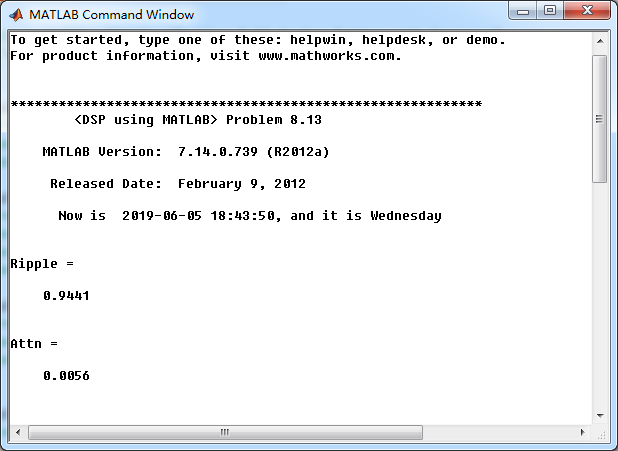
Ripple = 10 ^ (-Rp/20)

Attn = 10 ^ (-As/20)

% Analog filter design:

[b, a] = afd('butter', Fp, Fs, Rp, As);

%[b, a] = afd_butt(Wp, Ws, Rp, As);

% Calculation of second-order sections:

[C, B, A] = sdir2cas(b, a);

% Calculation of Frequency Response:

[db, mag, pha, ww] = freqs_m(b, a, 45*pi);

% Calculation of Impulse Response:

[ha, x, t] = impulse(b, a);

%% -------------------------------------------------

%%                    Plot

%% -------------------------------------------------

figure('NumberTitle', 'off', 'Name', 'Problem 8.13 Analog Butterworth lowpass')

set(gcf,'Color','white');

M = 1.0;                          % Omega max

subplot(2,2,1); plot(ww/pi, mag);  grid on; axis([-45, 45, 0, 1.2]);

xlabel(' Analog frequency in \pi*1k units'); ylabel('|H|'); title('Magnitude in Absolute');

set(gca, 'XTickMode', 'manual', 'XTick', [-45, -40, -20, 0, 20, 40, 45]);

set(gca, 'YTickMode', 'manual', 'YTick', [0, 0.005, 0.94, 1]);

subplot(2,2,2); plot(ww/pi, db);  grid on; %axis([0, M, -50, 10]);

xlabel('Analog frequency in \pi*1k units'); ylabel('Decibels'); title('Magnitude in dB ');

set(gca, 'XTickMode', 'manual', 'XTick', [-45, -40, -20, 0, 20, 40, 45]);

set(gca, 'YTickMode', 'manual', 'YTick', [-50, -45, -10, 0]);

set(gca,'YTickLabelMode','manual','YTickLabel',['50';'45';'10';' 0']);

subplot(2,2,3); plot(ww/pi, pha/pi);  grid on; axis([-45, 45, -1.2, 1.2]);

xlabel('Analog frequency in \pi*1k nuits'); ylabel('radians'); title('Phase Response');

set(gca, 'XTickMode', 'manual', 'XTick', [-45, -40, -20, 0, 20, 40, 45]);

set(gca, 'YTickMode', 'manual', 'YTick', [-1:0.5:1]);

subplot(2,2,4); plot(t, ha); grid on; %axis([0, 30, -0.05, 0.25]);

xlabel('time in seconds'); ylabel('ha(t)'); title('Impulse Response');
运行结果:
通带、阻带绝对指标
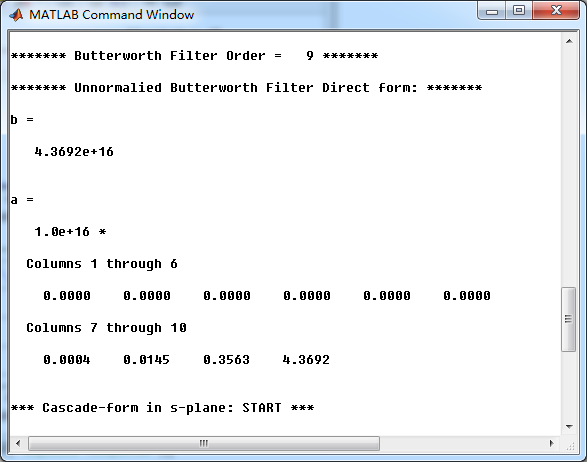
模拟butterworth低通,直接形式系数
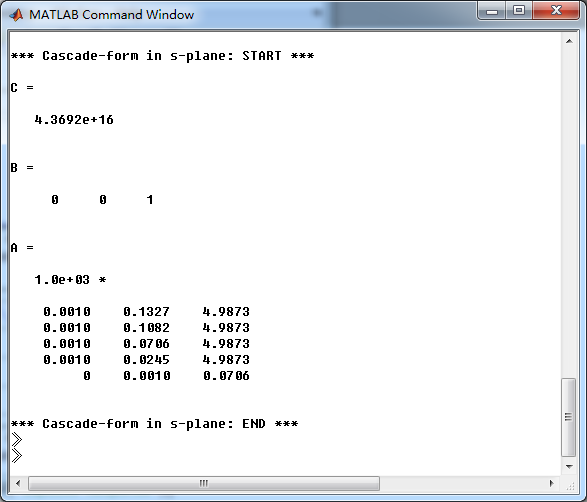
串联形式系数
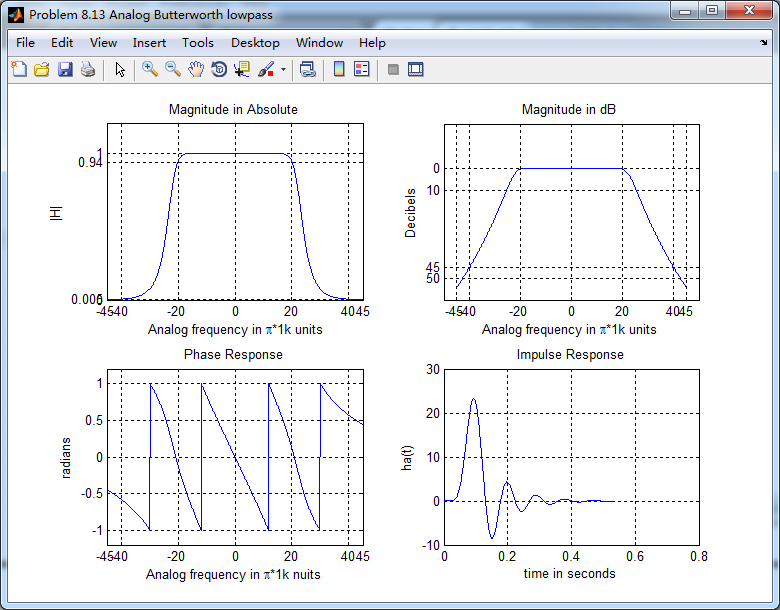
幅度谱、相位谱和脉冲响应。
《DSP using MATLAB》Problem 8.13的更多相关文章
- 《DSP using MATLAB》Problem 7.13
代码: %% ++++++++++++++++++++++++++++++++++++++++++++++++++++++++++++++++++++++++++++++++ %% Output In ...
- 《DSP using MATLAB》Problem 6.13
代码: %% ++++++++++++++++++++++++++++++++++++++++++++++++++++++++++++++++++++++++++++++++ %% Output In ...
- 《DSP using MATLAB》Problem 5.13
1. 代码: %% ++++++++++++++++++++++++++++++++++++++++++++++++++++++++++++++++++++++++++++++++ %% Output ...
- 《DSP using MATLAB》Problem 4.13
代码: %% ---------------------------------------------------------------------------- %% Output Info a ...
- 《DSP using MATLAB》Problem 6.12
代码: %% ++++++++++++++++++++++++++++++++++++++++++++++++++++++++++++++++++++++++++++++++ %% Output In ...
- 《DSP using MATLAB》Problem 6.10
代码: %% ++++++++++++++++++++++++++++++++++++++++++++++++++++++++++++++++++++++++++++++++ %% Output In ...
- 《DSP using MATLAB》Problem 4.11
代码: %% ---------------------------------------------------------------------------- %% Output Info a ...
- 《DSP using MATLAB》Problem 3.3
按照题目的意思需要利用DTFT的性质,得到序列的DTFT结果(公式表示),本人数学功底太差,就不写了,直接用 书中的方法计算并画图. 代码: %% -------------------------- ...
- 《DSP using MATLAB》Problem 3.1
先写DTFT子函数: function [X] = dtft(x, n, w) %% --------------------------------------------------------- ...
随机推荐
- sparkStreaming结合SparkSql实例
SparkSQL结合SparkStreaming的使用 Flume+Kafka+SparkStreaming已经发展为一个比较成熟的实时日志收集与计算架构,利用Kafka,即可以支持将用于离线分析的数 ...
- 2019-8-16-调试时限制程序使用-CPU-核心数模拟低端设备
title author date CreateTime categories 调试时限制程序使用 CPU 核心数模拟低端设备 lindexi 2019-08-16 16:11:32 +0800 20 ...
- 启动 AXD 配置开发板
1. 启动 AXD 先启动 DragonICE Server 程序. 按如下步聚启动 AXD: 开始>所有程序>ARM Developer Suite v1.2>AXD De ...
- linux 系统优化,调优
1.系统安装前的规则 a.分区:不同环境不同分法,按自己的需求来 以硬盘500G为例 /boot 100M-200M(只存放grub和启动相关文件,不存放其他) / 80G-100G (因为很多人默 ...
- windows下mysql8.0.x简单安装!
1.官网下载mysql安装包并解压到自己喜欢的目录 2.在解压的目录下,添加my.ini配置文件,内容如下:[mysqld]# 设置3306端口port=3306# 设置mysql的安装目录 下面是我 ...
- (转)Android中RelativeLayout各个属性的含义
转:http://blog.csdn.net/softkexin/article/details/5933589 android:layout_above="@id/xxx" - ...
- 命令学习_nslookup
nslookup 域名 这是最常用最简单的用法,可以直接获得目标域名的IP地址和CNAME. 如下是A记录的返回情况 nslookup命令会采用先反向解释获得使用的DNS服务器的名称,上图中ns.gu ...
- IntelliJ IDEA更换主题样式分享
原文地址:https://blog.csdn.net/liu865033503/article/details/79481785 .自定义主题样式网址:http://www.riaway.com/in ...
- 正则表达式r和re
# coding:utf-8 import re print 'a\ws' print r'a\nb' # r'': 一般用在正则表达式中,称为原始字符串,作用是将Python语法中的反斜杠转义给 取 ...
- AYITOJ-括号序列-栈的入门
题目描述 给定一个由括号组成的字符串 问其是否为一个合法的括号序列 合法的括号序列的定义如下 1. 空字符串是合法的括号序列 2. 若字符串A是合法的括号序列, 那么{A},[A],(A)也是合法的括 ...