
【CSS3】纯CSS3制作页面切换效果
此前写的那个太复杂了,来点简单的核心
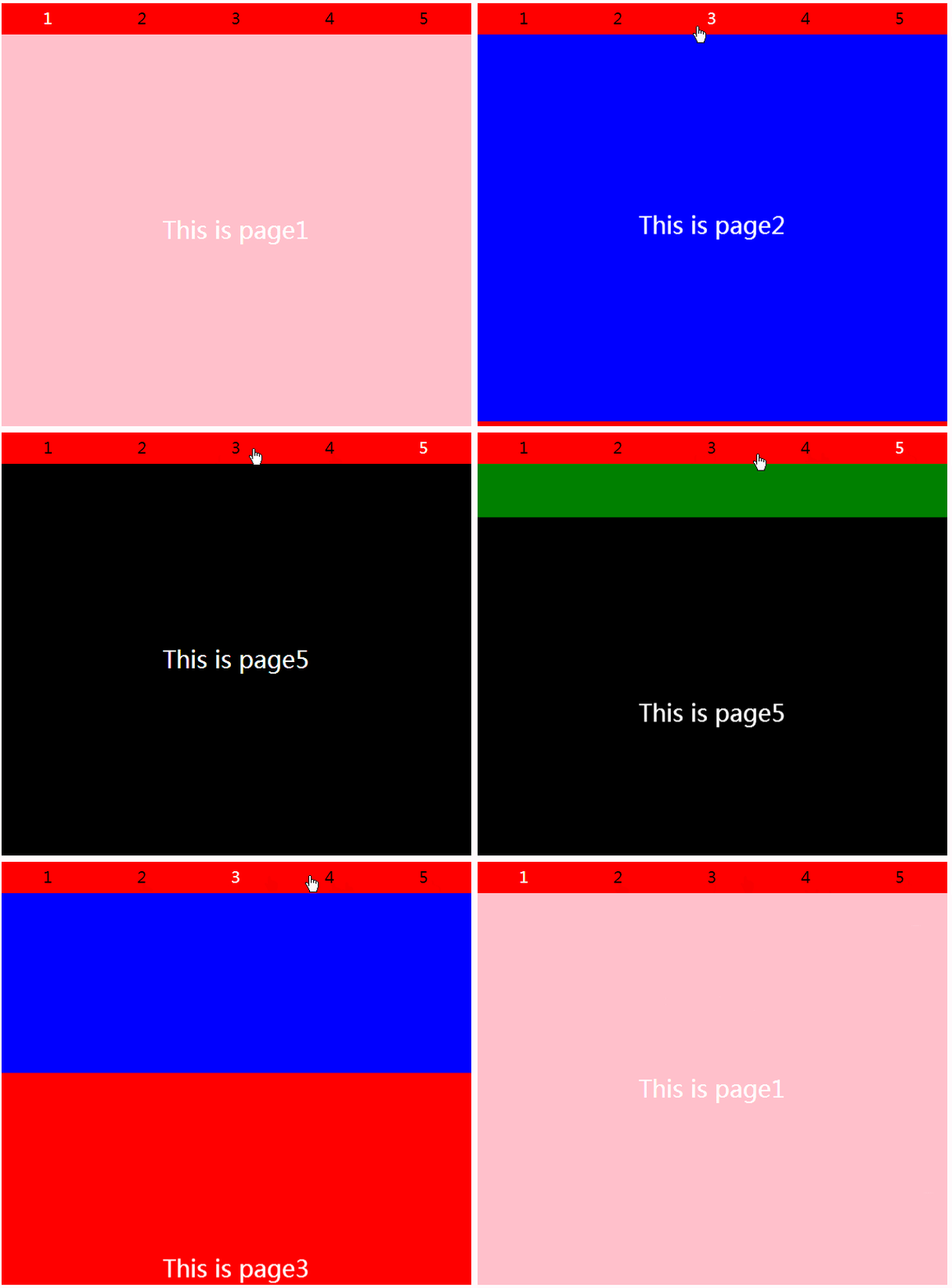
<html>

<head>

    <title></title>

    <style type="text/css">

        * { margin: 0; padding: 0; border: none; }

        .Bl {

            width: 600px;

            height: 540px;

            margin: 0 auto;

            position: relative;

            top: 50%;

            transform: translateY(-50%);

        }

        .Bl > input {

            width: 20%;

            height: 40px;

            position: absolute;

            cursor: pointer;

            opacity: 0;

        }

        .Bl input:nth-of-type(1){ left: 0%; }

        .Bl input:nth-of-type(2){ left: 20%; }

        .Bl input:nth-of-type(3){ left: 40%; }

        .Bl input:nth-of-type(4){ left: 60%; }

        .Bl input:nth-of-type(5){ left: 80%; }

        /*切换效果*/

        .Bl input:nth-of-type(1):checked ~ span:nth-of-type(1) { color: white; }  /* ~ 选择兄弟元素 */

        .Bl input:nth-of-type(2):checked ~ span:nth-of-type(2) { color: white; }

        .Bl input:nth-of-type(3):checked ~ span:nth-of-type(3) { color: white; }

        .Bl input:nth-of-type(4):checked ~ span:nth-of-type(4) { color: white; }

        .Bl input:nth-of-type(5):checked ~ span:nth-of-type(5) { color: white; }

        .Bl input:nth-of-type(1):checked ~ .pagebox > .pages {  }

        .Bl input:nth-of-type(2):checked ~ .pagebox > .pages { transform: translateY(-100%); }

        .Bl input:nth-of-type(3):checked ~ .pagebox > .pages { transform: translateY(-200%); }

        .Bl input:nth-of-type(4):checked ~ .pagebox > .pages { transform: translateY(-300%); }

        .Bl input:nth-of-type(5):checked ~ .pagebox > .pages { transform: translateY(-400%); }

        span {

            display: block;

            width: 20%;

            height: 40px;

            background-color: red;

            float: left;

            text-align: center;

            line-height: 40px;

            font-size: 20px;

        }

        .pagebox,.pages {

            width: 100%;

            height: 500px;

        }

        .pagebox {

            overflow: hidden;

        }

        .pages {

            transition: all 0.5s;

        }

        .page {

            width: 100%;

            height: 100%;

            text-align: center;

            font-family: "微软雅黑";

            font-size: 30px;

            line-height: 500px;

            color: white;

        }

        .page1 { background-color: pink; }

        .page2 { background-color: blue; }

        .page3 { background-color: red; }

        .page4 { background-color: green; }

        .page5 { background-color: black; }

    </style>

</head>

<body>

    <div class="Bl">

        <input type="radio" name="btn" checked ><span>1</span>

        <input type="radio" name="btn"  ><span>2</span>

        <input type="radio" name="btn"  ><span>3</span>

        <input type="radio" name="btn"  ><span>4</span>

        <input type="radio" name="btn"  ><span>5</span>

        <section class="pagebox">

            <div class="pages">

                <div class="page page1">This is page1</div>

                <div class="page page2">This is page2</div>

                <div class="page page3">This is page3</div>

                <div class="page page4">This is page4</div>

                <div class="page page5">This is page5</div>

            </div>

        </section>

    </div>

</body>

</html>
【CSS3】纯CSS3制作页面切换效果的更多相关文章
- Android - FragmentTabHost 与 Fragment 制作页面切换效果
使用 FragmentTabHost 与 Fragment 制作页面切换效果 API 19 TabHost已经不建议使用了.用 FragmentTabHost 来代替TabHost.实际上 Fragm ...
- Android - TabHost 与 Fragment 制作页面切换效果
Android - TabHost 与 Fragment 制作页面切换效果 Android API 19 , API 23 三个标签页置于顶端 效果图: 在文件BoardTabHost.java中定义 ...
- 基于html5和css3响应式全屏滚动页面切换效果
分享一款全屏响应式的HTML5和CSS3页面切换效果.这个页面布局效果对于那些页面要求固定100%高度和宽度的网站和APP来说是十分有用的.效果图如下: 在线预览 源码下载 HTML wrappe ...
- jquery mobile页面切换效果(Flip toggle switch)(注:jQuery移动使用的数据属性的列表。 )
1.页面切换(data-transition)
- html5各种页面切换效果和模态对话框
页面动画:data-transition 属性可以定义页面切换是的动画效果.例如:<a href="index.html" data-transition="pop ...
- WP8 NavigationInTransition实现页面切换效果
NavigationInTransition这个是实现页面切换效果,而且没控件来拖,要自己手动写, 将App.xaml.cs中InitializePhoneApplication()函数里的RootF ...
- 在uwp仿IOS的页面切换效果
有时候我们需要编写一些迎合IOS用户使用习惯的uwp应用,我在这里整理一下仿IOS页面切换效果的代码. 先分析IOS的页面切换.用户使用左右滑动方式进行前进和后退,播放类似于FlipView的切换动画 ...
- [Swift通天遁地]九、拔剑吧-(7)创建旋转和弹性的页面切换效果
★★★★★★★★★★★★★★★★★★★★★★★★★★★★★★★★★★★★★★★★➤微信公众号:山青咏芝(shanqingyongzhi)➤博客园地址:山青咏芝(https://www.cnblogs. ...
- [Swift通天遁地]九、拔剑吧-(8)创建气泡式页面切换效果
★★★★★★★★★★★★★★★★★★★★★★★★★★★★★★★★★★★★★★★★➤微信公众号:山青咏芝(shanqingyongzhi)➤博客园地址:山青咏芝(https://www.cnblogs. ...
随机推荐
- 洛谷P1970 [NOIP2013提高组Day2T2] 花匠
P1970 花匠 题目描述 花匠栋栋种了一排花,每株花都有自己的高度.花儿越长越大,也越来越挤.栋栋决定 把这排中的一部分花移走,将剩下的留在原地,使得剩下的花能有空间长大,同时,栋栋希 望剩下的花排 ...
- 错觉-Info:让你难以置信的视错觉
ylbtech-错觉-Info:让你难以置信的视错觉 1.返回顶部 1. 看下图:如果你看到舞者逆时针旋转说明你用左脑,如果看到顺时针旋转说明你用右脑思维. 据说这是耶鲁大学五年的研究成果. 下图 ...
- golang 命令行参数
package main import ( "fmt" "flag" ) func main() { //定义几个变量,用于接收命令行的参数值 var user ...
- intellij idea cpu占用率太大太满 运行速度太慢解决方案
1.关掉代码检查. setting -> Editor -> Inspections,把右面方框框里的对勾全去掉,或者根据需要去掉.原理是关闭不必要的代码检查,提高速度. 2.关掉多余的插 ...
- 【GDOI2017 day1】取石子游戏 线段树+区间合并
题面 如果给你一棵有根树,树根为 1,并且树的每个结点上有一个权值,现在我想知道每个点,除它所在子树以外的结点权值集合的 mex,怎么做呢? 在这里,mex 是定义在集合上的函数,mex(S) 表示 ...
- 构建PaaS的开源平台:CloudFoundry
CloudFoundry的架构: 点评:这是vmware用ruby开发的一个paas,由于对ruby不太熟悉,还是比较难理解. refer to :http://www.oschina.net/que ...
- iOS开发——你真的会用SDWebImage?
http://www.cocoachina.com/ios/20160503/16064.html 本文授权转载,作者:hosea_zhou(简书) SDWebImage作为目前最受欢迎的图片下载第三 ...
- Linux用户程序配置文件
在 Linux(和一般的 UNIX)中,有无数的“用户”程序.最常见的一种用户程序配置文件是 /etc/lynx.cfg.这是著名的文本浏览器 lynx 的配置文件.通过这个文件,您可以定义代理服务器 ...
- 微服务开源生态报告 No.4
「微服务开源生态报告」,汇集各个开源项目近期的社区动态,帮助开发者们更高效的了解到各开源项目的最新进展. 社区动态包括,但不限于:版本发布.人员动态.项目动态和规划.培训和活动. 非常欢迎国内其他微服 ...
- tyvj1017 冗余关系
描述 Mrs.Chen是一个很认真很称职的语文老师 ......所以,当她看到学生作文里的人物关系描述得非常的麻烦的时候,她非常生气,于是宣布:凡是作文里有冗余关系的,一率罚抄出师表10次...同学们 ...