
Bootstrap之Form表单验证神器: BootstrapValidator(转)
前言:做Web开发的我们,表单验证是再常见不过的需求了。友好的错误提示能增加用户体验。博主搜索bootstrap表单验证,搜到的结果大部分都是文中的主题:bootstrapvalidator。今天就来看看它如何使用吧。
一、源码及API地址
介绍它之前,还是给出它的源码以及API的地址吧。
bootstrapvalidator源码:https://github.com/nghuuphuoc/bootstrapvalidator
boostrapvalidator api:http://bv.doc.javake.cn/api/
二、代码以及效果展示
1、初级用法
来看bootstrapvalidator的描述:A jQuery form validator for Bootstrap 3。从描述中我们就可以知道它至少需要jQuery、bootstrap的支持。我们首先引入需要的js组件


<script src="~/Scripts/jquery-1.10.2.js"></script><script src="~/Content/bootstrap/js/bootstrap.min.js"></script>
<link href="~/Content/bootstrap/css/bootstrap.min.css" rel="stylesheet" /> <script src="~/Content/bootstrapValidator/js/bootstrapValidator.min.js"></script>
<link href="~/Content/bootstrapValidator/css/bootstrapValidator.min.css" rel="stylesheet" /></pre>
我们知道,既然是表单验证,那么我们在cshtml页面就必须要有一个Form,并且我们知道Form里面取元素都是通过name属性去取值的,所以,表单里面的元素都要有一个name的属性值。
     <form>

            <div class="form-group">

                <label>Username</label>

                <input type="text" class="form-control" name="username" />

            </div>

            <div class="form-group">

                <label>Email address</label>

                <input type="text" class="form-control" name="email" />

            </div>

            <div class="form-group">

                <button type="submit" name="submit" class="btn btn-primary">Submit</button>

            </div>

        </form>
有了表单元素之后,就是我们的js初始化了。
    $(function () {

        $('form').bootstrapValidator({
        message: 'This value is not valid',
             feedbackIcons: {
                        valid: 'glyphicon glyphicon-ok',
                        invalid: 'glyphicon glyphicon-remove',
                        validating: 'glyphicon glyphicon-refresh'
                       },
            fields: {

                username: {

                    message: '用户名验证失败',

                    validators: {

                        notEmpty: {

                            message: '用户名不能为空'

                        }

                    }

                },

                email: {

                    validators: {

                        notEmpty: {

                            message: '邮箱地址不能为空'

                        }

                    }

                }

            }

        });

    });
内容应该很容易看懂。来看效果:
验证通不过,提交按钮灰掉不能点击

验证通过,提交按钮恢复

看看效果先感受下,最大优点:使用简单,界面友好。下面我们来看看重叠验证。
2、中级用法
上面我们知道了非空验证的写法,除此之外肯定还有其他验证方式啊。别急,我们慢慢来看。上面的代码cshtml部分不动,js部分我们稍作修改:
  $(function () {

        $('form').bootstrapValidator({

            message: 'This value is not valid',

            feedbackIcons: {

                valid: 'glyphicon glyphicon-ok',

                invalid: 'glyphicon glyphicon-remove',

                validating: 'glyphicon glyphicon-refresh'

            },

            fields: {

                username: {

                    message: '用户名验证失败',

                    validators: {

                        notEmpty: {

                            message: '用户名不能为空'

                        },

                        stringLength: {

                            min: 6,

                            max: 18,

                            message: '用户名长度必须在6到18位之间'

                        },

                        regexp: {

                            regexp: /^[a-zA-Z0-9_]+$/,

                            message: '用户名只能包含大写、小写、数字和下划线'

                        }

                    }

                },

                email: {

                    validators: {

                        notEmpty: {

                            message: '邮箱不能为空'

                        },

                        emailAddress: {

                            message: '邮箱地址格式有误'

                        }

                    }

                }

            }

        });

    });
加上了重叠验证我们来看效果:
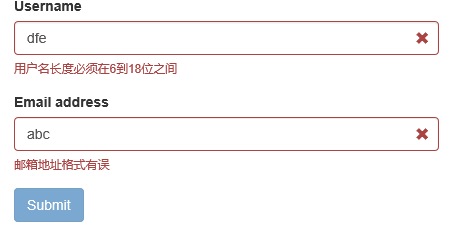


由上面的代码可以看出在validators属性对应一个Json对象,里面可以包含多个验证的类型:
notEmpty:非空验证;
stringLength:字符串长度验证;
regexp:正则表达式验证;
emailAddress:邮箱地址验证(都不用我们去写邮箱的正则了~~)
除此之外,在文档里面我们看到它总共有46个验证类型,我们抽几个常见的出来看看:
base64:64位编码验证;
between:验证输入值必须在某一个范围值以内,比如大于10小于100;
creditCard:身份证验证;
date:日期验证;
ip:IP地址验证;
numeric:数值验证;
phone:电话号码验证;
uri:url验证;
更多验证类型详见:http://bv.doc.javake.cn/validators/。当然涉及中文的验证可能会有些小问题,园友们如果有需要可以自行下去用代码测试下。
还有一个比较常用的就是submitHandler属性,它对应着提交按钮的事件方法。使用如下:
$(function () {

        $('form').bootstrapValidator({

            message: 'This value is not valid',

            feedbackIcons: {

                valid: 'glyphicon glyphicon-ok',

                invalid: 'glyphicon glyphicon-remove',

                validating: 'glyphicon glyphicon-refresh'

            },

            fields: {

                username: {

                    message: '用户名验证失败',

                    validators: {

                        notEmpty: {

                            message: '用户名不能为空'

                        },

                        stringLength: {

                            min: 6,

                            max: 18,

                            message: '用户名长度必须在6到18位之间'

                        },

                        regexp: {

                            regexp: /^[a-zA-Z0-9_]+$/,

                            message: '用户名只能包含大写、小写、数字和下划线'

                        }

                    }

                },

                email: {

                    validators: {

                        notEmpty: {

                            message: '邮箱不能为空'

                        },

                        emailAddress: {

                            message: '邮箱地址格式有误'

                        }

                    }

                }

            },

            submitHandler: function (validator, form, submitButton) {

                alert("submit");

            }

        });

    });
在它的Demo里面介绍了很多验证的实例。我们简单看看它的效果,至于实现代码,其实很简单,有兴趣的可以直接看api。
颜色验证

Tab页表单验证

按钮验证

转载:http://www.cnblogs.com/landeanfen/p/5035608.html
Bootstrap之Form表单验证神器: BootstrapValidator(转)的更多相关文章
- 黄聪: Bootstrap之Form表单验证神器: BootstrapValidator(转)
前言:做Web开发的我们,表单验证是再常见不过的需求了.友好的错误提示能增加用户体验.博主搜索bootstrap表单验证,搜到的结果大部分都是文中的主题:bootstrapvalidator.今天就来 ...
- JS组件系列——Form表单验证神器: BootstrapValidator
前言:做Web开发的我们,表单验证是再常见不过的需求了.友好的错误提示能增加用户体验.博主搜索bootstrap表单验证,搜到的结果大部分都是文中的主题:bootstrapvalidator.今天就来 ...
- Form表单验证神器: BootstrapValidator
前言:做Web开发的我们,表单验证是再常见不过的需求了.友好的错误提示能增加用户体验.博主搜索bootstrap表单验证,搜到的结果大部分都是文中的主题:bootstrapvalidator.今天就来 ...
- jQuery表单验证组件BootstrapValidator
github:https://github.com/nghuuphuoc/bootstrapvalidator 参考博客:JS组件系列——Form表单验证神器: BootstrapValidator ...
- Bootstrap学习总结笔记(24)-- 基于BootstrapValidator的Form表单验证
Form表单进行数据验证是十分必要的,我们可以自己写JS脚本或者使用JQuery Validate 插件来实现.对于Bootstrap而言,利用BootstrapValidator来做Form表单验证 ...
- 基于Bootstrap+jQuery.validate Form表单验证实践
基于Bootstrap jQuery.validate Form表单验证实践 项目结构 : github 上源码地址:https://github.com/starzou/front-end- ...
- web框架-(六)Django补充---form表单验证
一.form表单验证 1. 常规html页面的form表单验证 常规页面中,如果想实现对表单中用户输入信息的数据验证,需要配合Ajax来实现. 使用前我们先来熟悉下函数参数:request,其中包含的 ...
- form表单验证-Javascript
Form表单验证: js基础考试内容,form表单验证,正则表达式,blur事件,自动获取数组,以及css布局样式,动态清除等.完整代码如下: <!DOCTYPE html PUBLIC &qu ...
- django之form表单验证
django中的Form一般有两种功能: 输入html 验证用户输入 #!/usr/bin/env python # -*- coding:utf- -*- import re from django ...
随机推荐
- PYTHON网络爬虫与信息提取[信息的组织与提取](单元五)
1 三种信息类型的简介 xml : extensible markup language 与html非常相似 现有html后有xml xml是html发展来的 扩展 通用 json 类型 javas ...
- python实例 列表
#! /usr/bin/python # -*- coding: utf8 -*- #列表类似Javascript的数组,方便易用 #定义元组 word=['a','b','c','d','e','f ...
- Django用户登陆以及跳转后台管理页面1
"""S14Djngo URL Configuration The `urlpatterns` list routes URLs to views. For more i ...
- Linux平台的SVN服务器的配置及搭建
https://jingyan.baidu.com/article/54b6b9c08b35382d593b477c.html 一.安装SVN 1 在Linux平台上,SVN的软件包名称是subv ...
- JavaScript字符串、数组、对象方法总结
字符串方法 示例字符串: const str = "hello,kitty,hello,vue "; 一.基本方法 charAt(n) 返回指定索引的字符 charCodeAt(n ...
- ajax成功请求到后台,但是前端报404错误
记录下今天遇见的一个问题,一个删除的ajax请求,传递一个主键到后台,后台成功接受并执行删除,但是前端报POST404错误. 查找原因是由于Controller忘记写返回状态码 @Responsebo ...
- Docker的asp.net core应用部署系列——docker pull 加速
原文:Docker的asp.net core应用部署系列--docker pull 加速 版权声明:本文为博主原创文章,随意转载. https://blog.csdn.net/Michel4Liu/a ...
- 二.python数据结构的性能分析
目录: 1.引言 2.列表 3.字典 一.引言 - 现在大家对 大O 算法和不同函数之间的差异有了了解.本节的目标是告诉你 Python 列表和字典操作的 大O 性能.然后我们将做一些基于时间的实验来 ...
- nodeJs koa-generator脚手架
koa-generator 脚手架 全局安装:cnpm install -g koa-generator 查看版本:koa2 --version 创建项目:koa2 project 默认的是用jade ...
- 分布式Jmeter
遇到的问题 1.压力不够大 2.单台瓶颈 3.网络瓶颈 分布式系统是由一组通过网络进行通信.为了完成共同的任务而协调工作的计算机节点组成的系统.分布式系统的出现是为了用廉价的.普通的机器完成单个计算机 ...