
(二)使用CXF开发WebService服务器端接口
CXF作为java领域主流的WebService实现框架,Java程序员有必要掌握它。
CXF主页:http://cxf.apache.org/
简介:百度百科
今天的话,主要是用CXF来开发下WebService服务器端接口,明天写下开发客户端接口;
这里用Maven。
首先建一个Maven的j2se项目;

项目的jre用1.8,因为1.8有webservice的默认实现。不要用1.5 不然下面你用我的代码会有问题,用1.5的话,还需要另外加jar包,这里为了大家省事,要换成1.8;
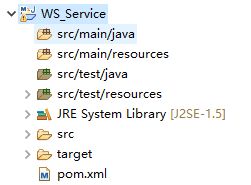


根据规范,我们先建一个接口类:HelloWorld
package com.wishwzp.webservice;

import javax.jws.WebService;

@WebService

public interface HelloWorld {

    public String say(String str);

}
再建一个具体的实现类:HelloWorldImpl
package com.wishwzp.webservice.impl;

import javax.jws.WebService;

import com.wishwzp.webservice.HelloWorld;

@WebService

public class HelloWorldImpl implements HelloWorld{

    public String say(String str) {

        return "hello" + str;

    }

}
最后建一个发布服务的主类:Server
package com.wishwzp.webservice;

import javax.xml.ws.Endpoint;

import com.wishwzp.webservice.impl.HelloWorldImpl;

public class Server {

    public static void main(String[] args) {

        System.out.println("web service start");

        HelloWorld implementor = new HelloWorldImpl();

        String address = "http://192.168.0.110/helloWorld";

        Endpoint.publish(address, implementor);  // JDK实现   暴露webservice接口

        System.out.println("web service started");

    }

}
这里的Endpoint是Jdk自身实现的WebService。所以到这里我们不需要用到CXF的任何东西。
这里的address,写上自己的本机IP
我们运行下Server类:
运行效果如下:
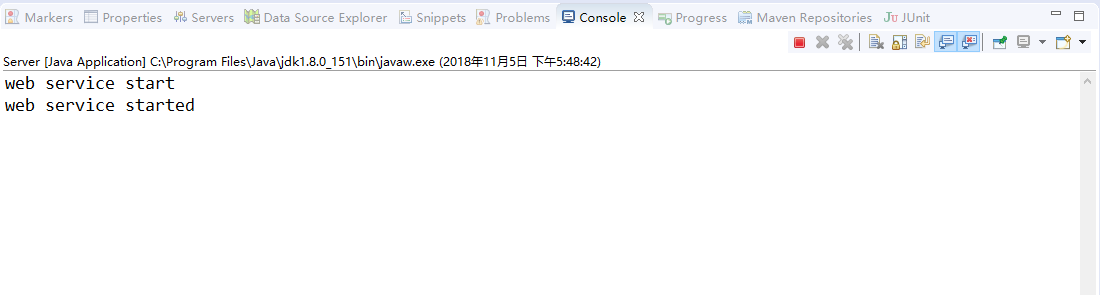
我们在浏览器里访问:http://192.168.0.110/helloWorld?wsdl
效果:

说明已经成功调用了webservice接口;
这里的wsdl 是 Web Services Description Language的缩写,是一个用来描述Web服务和说明如何与Web服务通信的XML语言。WSDL是Web Service的描述语言,用于描述Web Service的服务,接口绑定等,为用户提供详细的接口说明书。
请求后得到的是一个xml规范文档。是一套规范,后面会具体介绍,任何语言平台技术都可以解析。
下面我们介绍使用CXF来实现webservice接口:
我们先在pom.xml中加入:
<dependency>

        <groupId>org.apache.cxf</groupId>

        <artifactId>cxf-core</artifactId>

        <version>3.1.5</version>

    </dependency>

    <dependency>

        <groupId>org.apache.cxf</groupId>

        <artifactId>cxf-rt-frontend-jaxws</artifactId>

        <version>3.1.5</version>

    </dependency>

    <dependency>

        <groupId>org.apache.cxf</groupId>

        <artifactId>cxf-rt-transports-http-jetty</artifactId>

        <version>3.1.5</version>

    </dependency>
这里要额外加入jetty,作为webservice发布的服务器。jetty是一个内嵌的web服务器;
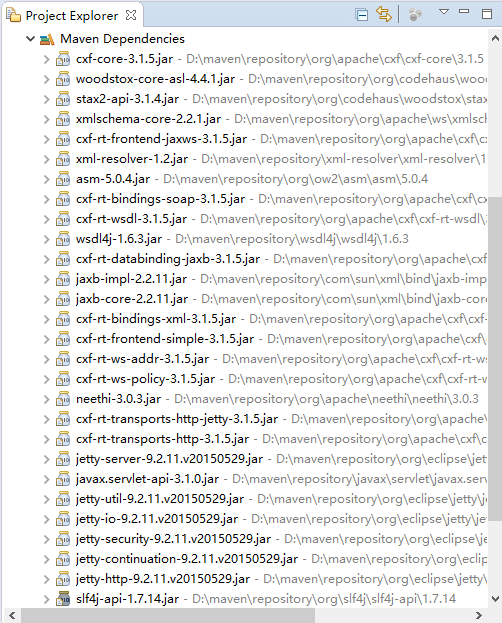
我们把Server改下。换成CXF实现:
package com.wishwzp.webservice;

import javax.xml.ws.Endpoint;

import org.apache.cxf.jaxws.JaxWsServerFactoryBean;

import com.wishwzp.webservice.impl.HelloWorldImpl;

public class Server {

    public static void main(String[] args) {

        System.out.println("web service start");

        HelloWorld implementor = new HelloWorldImpl();

        String address = "http://192.168.0.110/helloWorld";

        //Endpoint.publish(address, implementor);  // JDK实现   暴露webservice接口

        JaxWsServerFactoryBean factoryBean = new JaxWsServerFactoryBean();

        factoryBean.setAddress(address); // 设置暴露地址

        factoryBean.setServiceClass(HelloWorld.class); // 接口类

        factoryBean.setServiceBean(implementor); // 设置实现类

        factoryBean.create();

        System.out.println("web service started");

        System.out.println("web service started");

    }

}
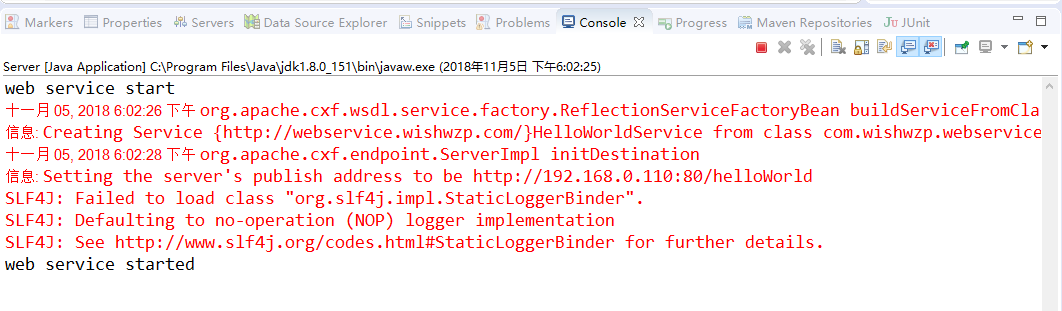
运行效果和刚才一样,这里就不再重复;
(二)使用CXF开发WebService服务器端接口的更多相关文章
- 使用cxf开发webservice接口
项目中经常用到开发webservice接口,及调用webService接口.这里讲解如何使用cxf开发webService接口. 一.webservice介绍及理解 webservice是一种跨平台, ...
- (三)使用CXF开发WebService客户端
前面一讲开发了webservice服务器端接口,今天的话,我们来开发webservice客户端,让大家来体验下过程: 首先建一个Maven项目,项目名字,WS_Client: 然后我们要用CXF给我们 ...
- struts1+spring+myeclipse +cxf 开发webservice以及普通java应用调用webservice的实例
Cxf + Spring+ myeclipse+ cxf 进行 Webservice服务端开发 使用Cxf开发webservice的服务端项目结构 Spring配置文件applicationCont ...
- 【WebService】使用CXF开发WebService(四)
CXF简介 Apache CXF = Celtix + XFire,开始叫 Apache CeltiXfire,后来更名为 Apache CXF 了,以下简称为 CXF.CXF 继承了 Celtix ...
- 使用cxf开发webservice应用时抛出异常
在使用cxf开发webservice应用时,报出了类似下面的错误 JAXB: [javax.xml.bind.UnmarshalException: unexpected element (uri:& ...
- WebService -- Java 实现之 CXF (WebService 服务器端接口)
1. 使用Maven创建一个quickstart项目 2. 引入依赖的Jar包 <dependency> <groupId>org.apache.cxf</groupId ...
- Spring boot+CXF开发WebService
最近工作中需要用到webservice,而且结合spring boot进行开发,参照了一些网上的资料,配置过程中出现的了一些问题,于是写了这篇博客,记录一下我这次spring boot+cxf开发的w ...
- Spring boot+CXF开发WebService Demo
最近工作中需要用到webservice,而且结合spring boot进行开发,参照了一些网上的资料,配置过程中出现的了一些问题,于是写了这篇博客,记录一下我这次spring boot+cxf开发的w ...
- 3.使用CXF开发webService
CXF 简介 关于 Apache CXF Apache CXF = Celtix + XFire,Apache CXF 的前身叫 Apache CeltiXfire,现在已经正式更名为 Apache ...
随机推荐
- ansible 循环与条件判断when
普通循环 with_itemes 变量组 { item } 循环变量 示例 - name: 覆盖配置文件 copy: src=/root/{{ item }} dest=/root/test/{{ i ...
- SQL 对大小写不敏感!
一定要记住,SQL 对大小写不敏感!
- Centos7更改yum镜像源
1. 备份本地yum源 mv /etc/yum.repos.d/CentOS-Base.repo /etc/yum.repos.d/CentOS-Base.repo_bak 2.获取阿里yum源配置文 ...
- PageRank简单实现中的一个错误
在我的一篇博客PageRank中,在5.1 算法实现中简单实现部分原本是有一个错误的.这个错误也体现出我当时对PageRank算法有理解上的偏差. 这是个什么样的错误呢?是这样的: 简单实现中计算每个 ...
- 收集服务器网卡和IP信息
收集服务器网卡和IP信息 Python2环境 #!/usr/bin/python2 # -*- coding:utf-8 -*- import os,sys import socket, fcntl, ...
- Bootstrap --对话框及提示框的处理和优化
源模态框使用:http://www.runoob.com/bootstrap/bootstrap-modal-plugin.html <!-- 按钮触发模态框 --> <button ...
- CF115B Lawnmower(贪心)
CF115B Lawnmower \(solution:\) 很明显的一道贪心题,奇数行只能向左走,偶数行只能向右走,每一行的起点应该在上一行就已确定,而这一行的终点只和(这一行最后一棵草(相对于你走 ...
- Android ROM资源文件存放位置
位于目录:framework/core/res/res /frameworks/base/core/res/res/values/public.xml 上面的文件中公开了上层(也就是第三方应用或者系统 ...
- Dom4j向XML中增加节点与属性——(四)
先获取到节点,然后在节点山添加Element 添加节点 添加属性 设置开始标签与结束标签的值book.addElement("描述").addAttribute("nam ...
- Java的IO流——(七)
目录结构: