
Unity3D学习笔记(二十九):AssetBundle
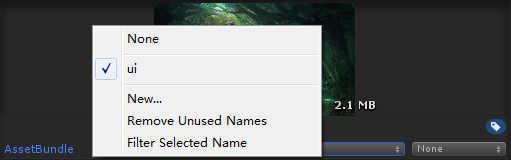
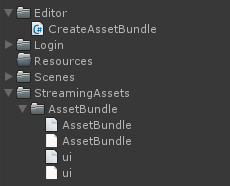
using System.Collections;

using System.Collections.Generic;

using UnityEngine;

using UnityEditor;

public class CreateAssetBundle : MonoBehaviour {

    [MenuItem("AssetBundle/CreateAB")]

    static void CreateAB()

    {

        //第一个参数:AB包的输出路径

        //第二个参数:打包的参数设置,我们设置的是强制性的重新打包

        //第三个参数:AB包的适用平台,不同的平台使用的AB包是不一样的

        BuildPipeline.BuildAssetBundles(

            Application.streamingAssetsPath + "/AssetBundle/",

            BuildAssetBundleOptions.ForceRebuildAssetBundle,

            BuildTarget.StandaloneWindows64

            );

    }

}
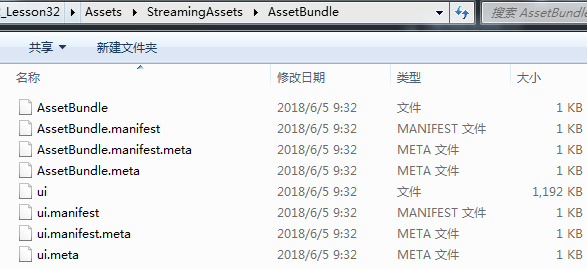
using System.Collections;

using System.Collections.Generic;

using UnityEngine;

using UnityEngine.UI;

public class LoadABTexture : MonoBehaviour {

    private Image image;

    private void Awake()

    {

        image = GetComponent<Image>();

    }

    // Use this for initialization

    void Start () {

        //要是AB包中的资源文件

        //第一种方式:先加载AB包

        //AssetBundle ab = AssetBundle.LoadFromFile(Application.streamingAssetsPath + "/AssetBundle/ui");

        //第二种方式:

        WWW www = new WWW("file://" + Application.streamingAssetsPath + "/AssetBundle/ui");

        AssetBundle ab = www.assetBundle;

        Sprite sp = ab.LoadAsset<Sprite>("beijing_02.jpg");

        image.sprite = sp;

        image.SetNativeSize();

    }

}
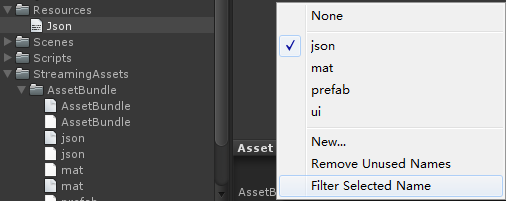
AssetBundle jsonAB = AssetBundle.LoadFromFile(Application.streamingAssetsPath + "/AssetBundle/json");

TextAsset json = jsonAB.LoadAsset<TextAsset>("Json");

Debug.Log(json);
//从AB包中加载预制体,把预制体实例到界面

//加载AB包

AssetBundle uiAB = AssetBundle.LoadFromFile(Application.streamingAssetsPath + "/AssetBundle/ui");

AssetBundle matAB = AssetBundle.LoadFromFile(Application.streamingAssetsPath + "/AssetBundle/mat");

AssetBundle prefabAB = AssetBundle.LoadFromFile(Application.streamingAssetsPath + "/AssetBundle/prefab");

//从AB包中加载预制体

GameObject prefab = prefabAB.LoadAsset<GameObject>("Cube");

//实例化预制体

Instantiate(prefab, transform);
每一个AB包都对应一个.manifest文件(资源清单),包含如下信息
ManifestFileVersion: //版本号

CRC: //CRC循环冗余码

Hashes://资源文件的哈希码,用于检查增量的构建AB包

  AssetFileHash:

    serializedVersion:

    Hash: 82edae0095f36a303261e62246d831ae

  TypeTreeHash:

    serializedVersion:

    Hash: 81fd706e1561f1cfc1872b1168421ee0

HashAppended:

ClassTypes://该AB包中所有资源使用到的类类型,一般情况下对应的都是地址

- Class:

  Script: {instanceID: }

- Class:

  Script: {fileID: , guid: d533bd1959b71b4459e871de8a9975af, type: }

- Class:

  Script: {instanceID: }

Assets://对应该AB包中的所有资源

- Assets/Prefabs/Cube.prefab

Dependencies://该AB包的直接依赖

- "D:/Unity3D\u6E38\u620F\u5F00\u53D1\u5DE5\u7A0B\u5E08\u73ED1803\u671F-\u706B\u661F\u65F6\u4EE3/Unity3D/Unity_Projects/m3w3d2_Lesson32/Assets/StreamingAssets/AssetBundle/ui"//路径里的中文用16进制显示
ManifestFileVersion:

CRC:

AssetBundleManifest:

  AssetBundleInfos:

    Info_0:

      Name: ui

      Dependencies: {}

    Info_1:

      Name: mat

      Dependencies: {}

    Info_2:

      Name: prefab

      Dependencies:

        Dependency_0: ui
//使用AB包的步骤

//1、加载总的构建的AB包

AssetBundle singleAB = AssetBundle.LoadFromFile(Application.streamingAssetsPath + "/AssetBundle/AssetBundle");

//2、从单一的AB包中去加载构建清单

AssetBundleManifest singleManifest = singleAB.LoadAsset<AssetBundleManifest>("AssetBundleManifest");

//3、从构建清单中获取指定的AB包的所有的依赖项,并加载所有的依赖项

//singleManifest.GetAllDependencies("prefab");获取所有的依赖,不管直接还是间接

//singleManifest.GetDirectDependencies("prefab");获取所有的直接依赖

string[] deps = singleManifest.GetAllDependencies("prefab");

for (int i = ; i < deps.Length; i++)

{

    //Debug.Log(deps[i]);

    AssetBundle depAB = AssetBundle.LoadFromFile(Application.streamingAssetsPath + "/AssetBundle/" + deps[i]);

}

//4、加载资源所在的AB包

AssetBundle prefabAB = AssetBundle.LoadFromFile(Application.streamingAssetsPath + "/AssetBundle/prefab");

//5、从AB包中加载资源

GameObject prefab = prefabAB.LoadAsset<GameObject>("Cube");

Instantiate<GameObject>(prefab, transform);
public string[] GetAllDependencies(string assetBundleName);//获取所有依赖(老版本没有)

public string[] GetDirectDependencies(string assetBundleName);//获取直接依赖
using System.Collections;

using System.Collections.Generic;

using UnityEngine;

public class UnloadAB : MonoBehaviour {

    public AssetBundle uiAB;

    public AssetBundle matAB;

    public AssetBundle prefabAB;

    public GameObject prefab;

    // Use this for initialization

    void Start () {

        uiAB = AssetBundle.LoadFromFile(Application.streamingAssetsPath + "/AssetBundle/ui");

        matAB = AssetBundle.LoadFromFile(Application.streamingAssetsPath + "/AssetBundle/mat");

        prefabAB = AssetBundle.LoadFromFile(Application.streamingAssetsPath + "/AssetBundle/prefab");

        prefab = prefabAB.LoadAsset<GameObject>("Cube");

        Instantiate<GameObject>(prefab, transform);

    }

       // Update is called once per frame

       void Update () {

        if (Input.GetKeyDown(KeyCode.Space))//按空格键卸载

        {

            uiAB.Unload(false);

            matAB.Unload(false);

            prefabAB.Unload(false);

        }

    }

}
using System.Collections;

using System.Collections.Generic;

using UnityEngine;

public class LessonDictionary : MonoBehaviour {

    //动态数组的申请方式

    List<string> list = new List<string>();

    //定义一个键是string类型,值是string类型的字典

    Dictionary<string, string> dic1 = new Dictionary<string, string>();

    //定义一个键是string类型,值是GameObject类型的字典

    Dictionary<string, GameObject> dic2 = new Dictionary<string, GameObject>();

    // Use this for initialization

    void Start () {

        //对list进行添加元素

        list.Add("nihao");

        //字典的添加元素,添加的是键值对,第一个参数键,第二个参数值

        dic1.Add("a", "A");

        //这种方式也能添加元素

        dic1["b"] = "C";

        //list改变值的方式

        list[] = "";

        //字典改变这个键对应的值的方式

        dic1["a"] = "B";

        //list通过索引访问元素

        Debug.Log(list[]);

        //字典通过键去访问这个键对应的值

        Debug.Log(dic1["a"]);

        Debug.Log(dic1["b"]);

        //list删除元素

        list.Remove("");

        //字典删除元素,通过键去删除这个键值对

        dic1.Remove("a");

        //list的遍历

        for (int i = ; i < list.Count; i++)

        {

            Debug.Log(list[i]);

        }

        foreach (var item in list)//不能改值,且效率低,产生内存碎片

        {

            Debug.Log(item);

        }

        //字典的遍历

        //遍历字典的键

        foreach (var item in dic1.Keys)

        {

            Debug.Log(item);//打印的键

            Debug.Log(dic1[item]);//打印的值

        }

        //遍历字典的值

        foreach (var item in dic1.Values)

        {

            Debug.Log(item);//打印字典的值

        }

        //遍历字典的键值对

        foreach (KeyValuePair<string,string> item in dic1)

        {

            Debug.Log(item.Key);//打印字典的键

            Debug.Log(item.Value);//打印字典的值

        }

        //list里是否有“1”这个元素

        if (list.Contains(""))

        {

        }

        //判断字典里是否有“a”这个键

        if (dic1.ContainsKey("a"))

        {

        }

        string value = "";

        //这个方法的返回值,这个字典里有没有第一个参数的这个键

        //如果有,那么把这个键所对应的值放在out参数的value里

        if (dic1.TryGetValue("a", out value))

        {

        }

        //删除list的所有元素

        list.Clear();

        //删除字典的所有元素

        dic1.Clear();

    }

}
专门负责加载AB包的管理器
using System.Collections;

using System.Collections.Generic;

using UnityEngine;

public class LoadManager

{

    #region 单例

    private static LoadManager instance;

    public static LoadManager Instance

    {

        get

        {

            if (instance == null)

            {

                instance = new LoadManager();

            }

            return instance;

        }

    }

    private LoadManager()

    {

        abDic = new Dictionary<string, AssetBundle>();

        abPath = Application.streamingAssetsPath + "/AssetBundle/";

        singleABName = "AssetBundle";

    }

    #endregion

    /// <summary>

    /// 用来存储已经加载的AB包,键是AB包的名字,值就是AB包。

    /// </summary>

    public Dictionary<string, AssetBundle> abDic;

    //用来存储单一的ab包

    public AssetBundle singleAB;

    //单一的构建清单,所有的ab包的依赖全部从这获取

    public AssetBundleManifest singleManifest;

    //存储ab包的路径

    public string abPath;

    //单一的ab包的名字

    public string singleABName;

    /// <summary>

    /// 加载单一的ab包,和单一的构建清单

    /// </summary>

    private void LoadSingleAssetBundle()

    {

        //每次加载单一的ab包需要判断是否加载果过。

        //singleAB为null没加载过,不为null就是加载过

        if (singleAB == null)

        {

            singleAB = AssetBundle.LoadFromFile(abPath + singleABName);

        }

        //从单一的ab包中加载单一的构建清单

        if (singleManifest == null)

        {

            singleManifest = singleAB.LoadAsset<AssetBundleManifest>("AssetBundleManifest");

        }

    }

    /// <summary>

    /// 加载指定ab包的所有的依赖项

    /// </summary>

    /// <param name="abName"></param>

    private void LoadAllDependencies(string abName)

    {

        LoadSingleAssetBundle();

        //首先先获取指定的这个ab包的所有的依赖项

        //从单一的构建清单中获取

        string[] deps = singleManifest.GetAllDependencies(abName);

        //遍历去加载依赖项

        for (int i = ; i < deps.Length; i++)

        {

            //加载该依赖项前,先判断之前加载没加载过该依赖项

            //就是判断存储ab包的字典里有没有这个ab包

            if (!abDic.ContainsKey(deps[i]) )

            {

                //如果未加载过,需要加载

                AssetBundle ab = AssetBundle.LoadFromFile(abPath + deps[i]);

                //ab包加载完之后,把加载来的ab包存储在字典里

                abDic[deps[i]] = ab;

            }

        }

    }

    /// <summary>

    /// 加载指定的ab包,并且返回该ab包

    /// </summary>

    /// <param name="abName"></param>

    /// <returns></returns>

    public AssetBundle LoadAssetBundle(string abName)

    {

        LoadAllDependencies(abName);

        //加载指定的ab包

        //加载前先判断是否已经加载过,如果加载过,把加载过的ab包给你

        //如果未加载过,就加载该ab包

        //方法一:

        //if (abDic.ContainsKey(abName))//证明该ab包已经加载过

        //{

        //    return abDic[abName];

        //}

        //AssetBundle ab = ab = AssetBundle.LoadFromFile(abPath + abName);

        //abDic[abName] = ab;

        //return ab;

        //方法二:优化重构

        AssetBundle ab = null;

        if (!abDic.TryGetValue(abName, out ab))

        {

            //如果进入到这,证明该键没有指定的值,那么证明该ab包未加载,需要加载

            ab = AssetBundle.LoadFromFile(abPath + abName);

            //把加载进来的ab包添加到字典中

            abDic[abName] = ab;

        }

        return ab;

    }

    /// <summary>

    /// 加载指定的ab包中的指定名字的指定类型的资源

    /// </summary>

    /// <typeparam name="T">指定资源的类型</typeparam>

    /// <param name="abName">ab包的名字</param>

    /// <param name="assetName">资源的名字</param>

    /// <returns></returns>

    public T LoadAssetByAB<T>(string abName, string assetName) where T : Object

    {

        //先获取指定的ab包

        AssetBundle ab = LoadAssetBundle(abName);

        if (ab != null)

        {

            return ab.LoadAsset<T>(assetName);

        }

        else

        {

            Debug.LogError("指定的ab包的名字有误!");

        }

        return null;

    }

    /// <summary>

    /// 卸载指定的ab包

    /// </summary>

    /// <param name="abName"></param>

    /// <param name="unloadAllloadedObjects"></param>

    public void UnloadAssetBundle(string abName, bool unloadAllloadedObjects)

    {

        //方法一:

        //if (abDic.ContainsKey(abName))

        //{

        //    abDic[abName].Unload(unloadAllloadedObjects);

        //    abDic.Remove(abName);

        //}

        //方法二:优化重构

        //先判断有没有这个ab包

        AssetBundle ab = null;

        if (abDic.TryGetValue(abName, out ab))

        {

            //卸载ab包

            ab.Unload(unloadAllloadedObjects);

            //从容器中删除该ab包

            abDic.Remove(abName);

        }

    }

    /// <summary>

    /// 卸载全部的ab包

    /// </summary>

    /// <param name="unloadAllloadedObjects"></param>

    public void UnloadAllAssetBundle(bool unloadAllloadedObjects)

    {

        //遍历每一个ab包,调用ab包的卸载的方法

        //遍历键,通过键去获取值进行卸载

        foreach (var item in abDic.Keys)

        {

            abDic[item].Unload(unloadAllloadedObjects);

        }

        //直接遍历值去卸载

        foreach (var item in abDic.Values)

        {

            item.Unload(unloadAllloadedObjects);

        }

        abDic.Clear();

    }

}
测试管理器
using System.Collections;

using System.Collections.Generic;

using UnityEngine;

public class TestManager : MonoBehaviour {

    public UnityEngine.UI.Image image;

       // Use this for initialization

       void Start () {

        //先加载指定ab包,再加载包中的指定名字的指定类型的资源

        //AssetBundle ab = LoadManager.Instance.LoadAssetBundle("prefab");

        //GameObject prefab = ab.LoadAsset<GameObject>("Cube");

        //直接加载指定的ab包中的指定名字的指定类型的资源

        GameObject prefab = LoadManager.Instance.LoadAssetByAB<GameObject>("prefab", "Cube");

        Instantiate(prefab, transform);

        //AssetBundle ab1 = LoadManager.Instance.LoadAssetBundle("prefab");//重复加载也不会报错

        //AssetBundle ui = LoadManager.Instance.LoadAssetBundle("ui");

        //Sprite sp = ui.LoadAsset<Sprite>("beijing_02");

        Sprite sp = LoadManager.Instance.LoadAssetByAB<Sprite>("ui", "beijing_02");

        image.sprite = sp;

    }

       // Update is called once per frame

       void Update () {

       }

}
Unity3D学习笔记(二十九):AssetBundle的更多相关文章
- Java学习笔记二十九:一个Java面向对象的小练习
一个Java面向对象的小练习 一:项目需求与解决思路: 学习了这么长时间的面向对象,我们只是对面向对象有了一个简单的认识,我们现在来做一个小练习,这个例子可以使大家更好的掌握面向对象的特性: 1.人类 ...
- angular学习笔记(二十九)-$q服务
angular中的$q是用来处理异步的(主要当然是http交互啦~). $q采用的是promise式的异步编程.什么是promise异步编程呢? 异步编程最重要的核心就是回调,因为有回调函数,所以才构 ...
- unity3d学习笔记(十九)--ngui制作3d人物头顶的头像和血条
原地址:http://blog.csdn.net/lzhq1982/article/details/18793479 本系列文章由Aimar_Johnny编写,欢迎转载,转载请标明出处,谢谢. htt ...
- PHP学习笔记二十九【接口】
<?php //定义接口 //接口可以定义属性,但必须是常量而且是public //接口的所有方法必须是public interface Iusb{ public function start( ...
- Unity3D学习笔记(十九):UGUI、Image、Text、Button
UGUI:Unity官方最新,与NGUI同源 UI:User Interface(用户的操作界面),图片+文字 UGUI的组件: 1.创建UGUI组件时,会默认创建Canvas(画布)和EventSy ...
- python3.4学习笔记(二十六) Python 输出json到文件,让json.dumps输出中文 实例代码
python3.4学习笔记(二十六) Python 输出json到文件,让json.dumps输出中文 实例代码 python的json.dumps方法默认会输出成这种格式"\u535a\u ...
- python3.4学习笔记(二十五) Python 调用mysql redis实例代码
python3.4学习笔记(二十五) Python 调用mysql redis实例代码 #coding: utf-8 __author__ = 'zdz8207' #python2.7 import ...
- python3.4学习笔记(二十四) Python pycharm window安装redis MySQL-python相关方法
python3.4学习笔记(二十四) Python pycharm window安装redis MySQL-python相关方法window安装redis,下载Redis的压缩包https://git ...
- python3.4学习笔记(二十二) python 在字符串里面插入指定分割符,将list中的字符转为数字
python3.4学习笔记(二十二) python 在字符串里面插入指定分割符,将list中的字符转为数字在字符串里面插入指定分割符的方法,先把字符串变成list然后用join方法变成字符串str=' ...
- python3.4学习笔记(二十) python strip()函数 去空格\n\r\t函数的用法
python3.4学习笔记(二十) python strip()函数 去空格\n\r\t函数的用法 在Python中字符串处理函数里有三个去空格(包括'\n', '\r', '\t', ' ')的函数 ...
随机推荐
- request.getServletPath(),request.getContextPath()
2018-11-24 16:34:33 1. getServletPath():获取能够与“url-pattern”中匹配的路径,注意是完全匹配的部分,*的部分不包括. 2. getPageInfo ...
- Java输入输出流(IO)-----文件类File详解
1.java.io.File类简介 凡是与输入.输出相关的类.接口等都定义在java.io包下 File是一个类,可以有构造器创建其对象.此对象对应着一个文件(.txt .avi .doc .p ...
- hashcat 中文文档
hashcat 描述 hashcat是世界上最快,最先进的密码恢复工具. 此版本结合了以前基于CPU的hashcat(现在称为hashcat-legacy)和基于GPU的oclHashcat. H ...
- golang学习笔记9 beego nginx 部署 nginx 反向代理 golang web
golang学习笔记9 beego nginx 部署 nginx 反向代理 golang web Nginx 部署 - beego: 简约 & 强大并存的 Go 应用框架https://bee ...
- How to use CAR FANS C800 Diagnostic Scan Tool to do diagnosis operation
How to use Heavy Duty Diagnostic CAR FANS C800 Diagnostic Scan Tool to do diagnosis operation Here i ...
- C#简单线程
一.实例1 static void Main(string [] args) { Console.WriteLine("开始线程"); startFunc(); Console.W ...
- git从安装到使用
一.Git简介 Git是一个开源的分布式版本控制系统,用于敏捷高效地处理任何或小或大的项目. Git 是 Linus Torvalds 为了帮助管理 Linux 内核开发而开发的一个开放源码的版本控制 ...
- solr 使用指定数据源
1,将solr 解压,我们观察发现它其实即可以是web服务也可以做数据分析 数据库 2,我们在example目录下新建一个hai的文件夹,用于存放数据 参考solr 目录,将solr.xml 复制一份 ...
- Java的类的详解
首先呢,我承认上一次我理解的有误. 1.构造方法的作用:是初始化一个对象,而不是成员变量,它和get和set方法都有给成员变量赋值的功能. 2.下来说一下JVM调用main方法的过程: a.静态变量赋 ...
- Java排序之升序与降序
以前在学校学排序的时候,总是自己写排序的代码,真正到工作中,直接使用java提供的排序方法,但最近发现行业默认的和学习时有些不一样. 以前总是在进行排序时如果前边的数字和后边数字的差为负则交换两个数字 ...